
Kirish
This manual provides essential instructions for the safe installation, operation, and maintenance of your APC AP7922 32A 230V Switched Rack PDU. The AP7922 is a rack-mountable power distribution unit designed to provide advanced power control and monitoring capabilities for IT equipment in data centers and server rooms. It features AC 230V input, Ethernet 10/100 connectivity, and 16 output connectors, all within a 2U, 19-inch form factor.
Xavfsizlik bo'yicha muhim ma'lumotlar
Please read and understand all safety instructions before installing or operating this equipment. Failure to follow these instructions could result in electric shock, fire, or serious injury.
- Ushbu qurilma faqat bino ichida foydalanish uchun mo'ljallangan.
- Connect the PDU to a properly grounded power source.
- Do not attempt to open or service the PDU. Refer all servicing to qualified personnel.
- Ensure the total current draw of connected equipment does not exceed the PDU's maximum current rating (32 Amps).
- Har qanday texnik xizmat ko'rsatish yoki o'rnatish ishlarini bajarishdan oldin elektrni uzing.
Paket tarkibi
Paketni ochishda barcha narsalar mavjudligini tekshiring:
- APC AP7922 Switched Rack PDU
- O'rnatish uchun qo'llanma
- Rakka o'rnatish uchun qavslar
- Serial configuration cable
- Hujjatlar CD
Mahsulot xususiyatlari
The APC AP7922 Switched Rack PDU offers the following key features:
- O'chirilgan rozetkalar: Remotely control power to individual outlets for power cycling, delayed sequencing, and load shedding.
- Tarmoq boshqaruvi: Full-featured network management interface via Ethernet 10/100 for remote monitoring and control.
- Joriy monitoring: Monitor the aggregate current draw per PDU to prevent circuit overloads.
- Rafga o'rnatiladigan dizayn: Occupies 2U of rack space, compatible with standard 19-inch racks.
- Chiqish konnektorlari: Equipped with 16 C13 output connectors.
- Kirish hajmitage: Supports AC 230V input.
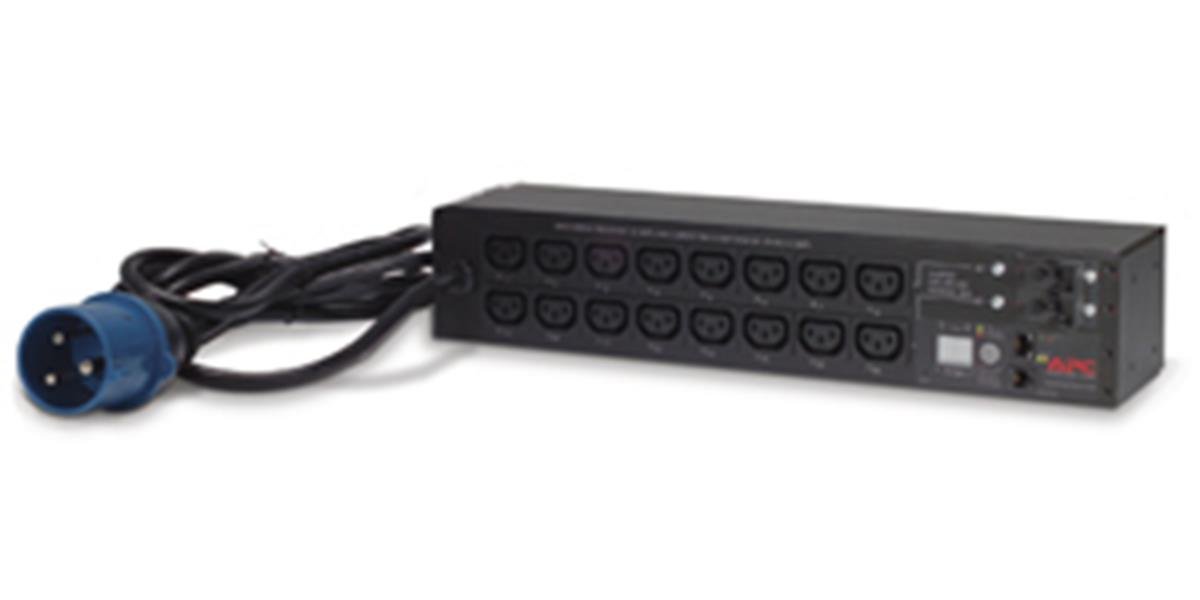
Rasm: old view of the APC AP7922 Switched Rack PDU, showing the 16 C13 outlets and network interface.
O'rnatish bo'yicha ko'rsatmalar
1. Rafga o'rnatish
- Identify two available 2U spaces in your standard 19-inch equipment rack.
- Attach the provided rack-mounting brackets to the PDU using the screws supplied.
- Secure the PDU into the rack using appropriate rack screws. Ensure it is firmly seated and level.
2. Quvvatga ulanish
- Connect the PDU's input power cord to a dedicated 230V, 32A power source. Ensure the power source is properly grounded.
- Do not overload the circuit. Verify that the total load of connected devices will not exceed 32 Amps.
3. Tarmoqqa ulanish
- Connect a standard Ethernet cable from the PDU's network port to your network switch or router.
- The PDU will obtain an IP address via DHCP by default. Refer to the full user manual for static IP configuration.
Foydalanish bo'yicha ko'rsatmalar
Powering On/Off Connected Devices
Once the PDU is powered and connected to the network, you can manage its outlets remotely.
- Access the PDU's web a ga IP manzilini kiritish orqali interfeys web brauzer.
- Log in using the default credentials (refer to the full manual for details).
- Navigate to the outlet control section. From here, you can individually switch on, switch off, or cycle power to each of the 16 C13 outlets.
Monitoring Current Draw
The web interface also provides real-time monitoring of the aggregate current draw. This allows you to ensure that the PDU and its connected circuit are not overloaded.
Xizmat
- Tozalash: Periodically clean the exterior of the PDU with a soft, dry cloth. Do not use liquid cleaners or solvents.
- Dasturiy ta'minotni yangilash: Check the APC website for available firmware updates to ensure optimal performance and security. Follow the instructions provided with the firmware package for safe updating.
- Kabelni boshqarish: Ensure all power and network cables are neatly routed and secured to prevent accidental disconnections or damage.
Muammolarni bartaraf qilish; nosozliklarni TUZATISH
| Muammo | Mumkin sabab | Yechim |
|---|---|---|
| PDU does not power on. | Kirish quvvati yo'q; o'chirilgan o'chirgich. | Verify the power cord is securely connected. Check the building's circuit breaker for the PDU's power source. |
| Kirish imkonsiz web interfeys. | Incorrect IP address; network connectivity issue; PDU not powered. | Ensure the PDU is powered on. Verify network cable connection. Confirm the correct IP address. Check network settings. |
| Outlets do not switch. | Software issue; PDU fault. | Try restarting the PDU. If the issue persists, contact technical support. |
| Haddan tashqari yuk signali. | Total current draw exceeds PDU rating. | Disconnect non-essential equipment to reduce the load. Redistribute equipment across multiple PDUs if necessary. |
Texnik spetsifikatsiyalar
| Xususiyat | Tafsilot |
|---|---|
| Model raqami | AP7922 |
| Brend | Schneider Electric kompaniyasining APC kompaniyasi |
| Form faktor | 2U Rack-mountable, 19-inch |
| Kirish hajmitage | 230 voltli o'zgaruvchan tok |
| Kirish oqimi | 32 Amps |
| Chiqish hajmitage | 230 voltli o'zgaruvchan tok |
| Chiqish oqimi | 32 Amps (Maks) |
| Chiqishlar soni | 16 |
| Ulagich turi | C13 |
| Tarmoq interfeysi | Ethernet 10/100 |
| Wattage | 7360 vatt |
| Olchamlari (Y x G x D) | 4.49 x 17.52 x 3.5 dyuym |
| Og'irligi | 0.7 kilogramm |
| Material | Metall |
| Rang | Qora |
Kafolat va qo'llab-quvvatlash
Kafolat haqida ma'lumot
APC products typically come with a standard manufacturer's warranty. Please refer to the warranty card included with your product or visit the official APC website for detailed warranty terms and conditions specific to the AP7922 model.
Texnik yordam
For technical assistance, troubleshooting, or to report issues, please contact APC customer support. You can find contact information and additional resources on the official Schneider Electric websayt: