
Mahsulot tugadiview
The Western Digital My Book Essential external hard drive provides 1 terabyte (1TB) of storage capacity. Designed for data backup and archiving, this device features a high-speed USB 2.0 interface for broad compatibility and efficient data transfer. Its design allows it to power on and off in conjunction with your computer, contributing to energy efficiency.
Asosiy xususiyatlar:
- Oddiy o'rnatish: Plug-and-play functionality for immediate use.
- Yilni dizayn: Occupies minimal desk space, similar to a paperback book.
- Energiya tejamkorligi: Automatically enters standby mode after 10 minutes of inactivity to conserve power.
- USB 2.0 interfeysi: Offers convenient and compatible connectivity with various computers.
- PC and Mac Compatible: Supports Windows 2000/XP/Vista and Mac OS X 10.4.8 or later.
Qutida nima bor
Quyidagi barcha narsalar mahsulotingiz paketiga kiritilganligini tekshiring:
- Western Digital My Book Essential WDBAAF0010HBK Hard Drive
- USB kabeli
- AC adapteri
- Tez o'rnatish qo'llanma
O'rnatish bo'yicha ko'rsatmalar
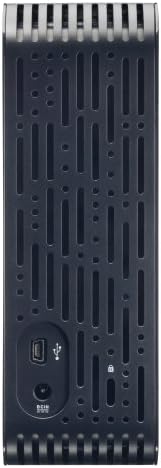
- AC adapterini ulang: Plug the AC adapter into the power port on the back of the My Book Essential drive. Connect the other end of the AC adapter to a power outlet.
- USB kabelini ulang: Connect one end of the supplied USB cable to the USB 2.0 port on the back of the My Book Essential drive. Connect the other end of the USB cable to an available USB port on your computer.
- Yoqilgan: The drive is designed to power on automatically with your computer. Ensure your computer is powered on. The drive's indicator light will illuminate.
- Dastlabki tan olish: Your operating system (Windows or Mac OS) should automatically detect and install the necessary drivers for the drive. This process may take a few moments.
- Drayvga kirish: Once installed, the drive will appear as a new storage device in 'My Computer' (Windows) or 'Finder' (Mac OS). You can now begin transferring files.
Note: For detailed operating system-specific instructions or if the drive is not recognized, refer to the included Quick Install Guide or the Western Digital support websayt.
Foydalanish bo'yicha ko'rsatmalar
The Western Digital My Book Essential drive functions as an external storage device for your computer. It is ideal for backing up important files, storing large media libraries, and freeing up space on your computer's internal hard drive.
Ma'lumot uzatish:
- O'tkazish uchun files, simply drag and drop them to and from the My Book Essential drive icon in your computer's file tadqiqotchi.
- For optimal performance, ensure the USB cable is securely connected to a USB 2.0 port on your computer.
Quvvatni boshqarish:
- The drive is designed to turn on and off with your computer. When your computer is shut down or put to sleep, the drive will also enter a low-power state.
- After 10 minutes of inactivity, the drive will automatically enter standby mode to save energy. It will resume normal operation when accessed.
Xavfsiz olib tashlash:
Always use the "Safely Remove Hardware" option (Windows) or drag the drive icon to the Trash/Eject (Mac OS) before disconnecting the USB cable to prevent data corruption.
Xizmat
Proper maintenance ensures the longevity and reliable performance of your external hard drive.
- Jismoniy parvarish: Drayvni barqaror, yaxshi shamollatiladigan joyda saqlang. Uni haddan tashqari harorat, to'g'ridan-to'g'ri quyosh nuri yoki namlik ta'siriga qo'ymang. Shamollatish teshiklarini to'sib qo'ymang.
- Tozalash: Drayvning tashqi qismini tozalash uchun yumshoq, quruq matodan foydalaning. Suyuq tozalagichlar yoki aerozollardan foydalanmang.
- Ma'lumotlarni zaxiralash: Regularly back up critical data stored on the external drive to another location (e.g., cloud storage, another hard drive) to prevent data loss in case of unforeseen issues.
- Dasturiy ta'minotni yangilash: Vaqti-vaqti bilan Western Digital qo'llab-quvvatlashini tekshirib turing webmodelingiz uchun mavjud bo'lgan har qanday dasturiy ta'minot yangilanishlari uchun sayt.
Muammolarni bartaraf qilish; nosozliklarni TUZATISH
If you encounter issues with your My Book Essential drive, try the following steps:
- Drayv aniqlanmadi:
- AC adapterining haydovchiga ham, ishlaydigan quvvat manbaiga ham mahkam ulanganligiga ishonch hosil qiling.
- Verify the USB cable is firmly connected to both the drive and your computer's USB port. Try a different USB port or cable if available.
- Kompyuteringizni qayta ishga tushiring.
- Check your computer's Disk Management (Windows) or Disk Utility (Mac OS) to see if the drive is recognized but unformatted or unallocated.
- Sekin ma'lumotlarni uzatish:
- Ensure you are using a USB 2.0 port. While compatible with USB 1.1, performance will be significantly slower.
- Katta vaqtlarda bir nechta talab qilinadigan ilovalarni ishga tushirishdan saqlaning file transferlar.
- Check for background processes that might be using system resources or disk I/O.
- Drive Light Not On:
- Confirm the AC adapter is connected and the power outlet is active.
- If connected to a computer, ensure the computer is powered on and not in sleep mode.
For further assistance, consult the Quick Install Guide or visit the Western Digital support websayt.
Texnik xususiyatlari
| Xususiyat | Tafsilot |
|---|---|
| Model nomi | My Book Essential Edition 2.0 |
| Model raqami | WDH1U10000N |
| Raqamli saqlash hajmi | 1024 GB (1 TB) |
| Qattiq disk interfeysi | USB 2.0 |
| Ulanish texnologiyasi | USB |
| Qattiq disk forma faktori | 3.5 dyuym |
| Qattiq disk tavsifi | Ish stoli |
| Mos qurilmalar | Ish stoli |
| O'rnatish turi | Ulanish |
| Rang | Qora |
| Qattiq diskning aylanish tezligi | 7200 aylanish tezligi |
| O'qish tezligi | soniyasiga 60 megabayt |
| Media tezligi | 30 MB/s |
| Qoplama materiali | Hard Plastic or Metal |
| Element og'irligi | 3.3 funt |
| Tizim talablari | Available USB port, Windows 2000/XP/Vista, Mac OS X 10.4.8 or later |
Kafolat va qo'llab-quvvatlash
The Western Digital My Book Essential drive comes with a 1 yillik cheklangan kafolat. For warranty claims, technical support, or to access additional resources such as drivers and software, please visit the official Western Digital support websayt.
Onlayn qo'llab-quvvatlash: support.wdc.com
Mahsulot rasmlari




Mahsulot videolari
WD Hard Drives: Essential vs. Home Edition Comparison
This video provides a comparison between the Western Digital My Book Essential and Home Edition hard drives, highlighting their physical differences and connectivity options. It helps users understand the specific features of the Essential model in context.