
1. Kirish
This user manual provides comprehensive instructions for the setup, operation, and maintenance of your new Microsoft Wired Keyboard, Model ANB-00021. Please read this manual thoroughly before using the product to ensure optimal performance and longevity.

Figure 1: Microsoft Wired Keyboard (Model ANB-00021)
This image displays the Microsoft Wired Keyboard from an angled perspective, showcasing its full layout, including the numeric keypad and special function keys. The keyboard is black with a standard QWERTY layout and a wired USB connection.
2. Mahsulot xususiyatlari
The Microsoft Wired Keyboard is designed for efficiency and durability, offering a comfortable typing experience. Key features include:
- Black, English/International Layout: Standard QWERTY layout suitable for various regions.
- USB ulanishi: Simple and reliable wired connection.
- Ultra-Flat Design: Yupqa profile for a modern aesthetic and comfortable wrist position.
- Short Key Travel: Responsive keys with a short actuation distance for efficient typing.
- Chaqmoqqa chidamli: Designed to withstand minor spills, protecting internal components.
- Maxsus tezkor tugmalar: Includes 5 special keys for quick access to common functions.
- Calculator Key: Instant access to the calculator application.
- Gently Inclined Key Block: Ergonomic design for reduced strain during extended use.
- Classic Keyboard Layout: Familiar and intuitive key arrangement.
- Plug and Play: No software installation required; simply connect and use.
3. Sozlash
Setting up your Microsoft Wired Keyboard is a straightforward process due to its Plug and Play functionality.
- Klaviaturani o'ramdan chiqarib oling: Klaviaturani ehtiyotkorlik bilan o'ramidan chiqarib oling.
- USB portiga ulang: Locate an available USB port on your computer (desktop PC, laptop, or compatible device). Insert the USB connector of the keyboard firmly into the USB port.
- Tizimni aniqlash: Your operating system (Windows, macOS, Linux, etc.) will automatically detect and install the necessary drivers. This process usually takes a few seconds.
- Foydalanishga tayyor: Once the drivers are installed, the keyboard is ready for immediate use. No additional software or configuration is typically required.
For optimal performance, ensure the USB cable is not kinked or strained.
4. Foydalanish bo'yicha ko'rsatmalar
The Microsoft Wired Keyboard operates like any standard QWERTY keyboard, with additional convenience features.
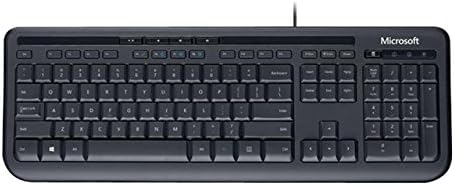
2-rasm: Yuqoridan pastga view of the keyboard layout
Ushbu rasm yuqoridan pastga aniq tasvirni beradi view of the Microsoft Wired Keyboard, highlighting the full QWERTY key layout, function keys, numeric keypad, and the row of special hotkeys located above the function keys.
Standard Key Functions
- Alphanumeric Keys: Used for typing letters, numbers, and symbols.
- Funktsional tugmalar (F1-F12): Perform various tasks depending on the active application or operating system.
- Raqamli klaviatura: Located on the right, for efficient data entry.
- Navigatsiya tugmalari: Arrow keys, Home, End, Page Up, Page Down for cursor movement and scrolling.
- Modifikator tugmalari: Shift, Ctrl, Alt, Windows key for combination shortcuts.
Special Keys (Hotkeys)
The keyboard features a row of dedicated hotkeys above the function keys for quick access to multimedia and system functions:
- Media boshqaruv tugmalari: Play/Pause, Stop, Previous Track, Next Track.
- Ovoz balandligini boshqarish tugmalari: Mute, Volume Down, Volume Up.
- Calculator Key: Instantly launches the system's calculator application.
- Other Programmable Keys: Some models may include additional keys that can be customized through operating system settings or Microsoft keyboard software (if available).
Familiarize yourself with these keys to enhance your productivity.
5. Xizmat ko'rsatish
Proper care and maintenance will extend the life of your Microsoft Wired Keyboard.
- Tozalash:
- Tozalashdan oldin klaviaturani kompyuteringizdan uzing.
- Yumshoq, tuklarsiz matodan engil foydalaning dampsuv yoki yumshoq, abraziv bo'lmagan tozalash eritmasi bilan qoplangan.
- Wipe the surface of the keys and the keyboard casing.
- Tugmalar orasidagi chang va qoldiqlar uchun siqilgan havodan foydalaning.
- Bunday qilma immerse the keyboard in water or use harsh chemicals.
- Chayqalishga qarshilik: While the keyboard is splash-resistant, it is not waterproof. Avoid exposing it to excessive liquids. In case of a spill, disconnect immediately, wipe dry, and allow to air dry completely before reconnecting.
- Saqlash: Klaviaturani uzoq vaqt ishlatilmaganda, uni toza, quruq va yuqori haroratlardan uzoqroq joyda saqlang.
- Kabelni parvarish qilish: Shikastlanishning oldini olish uchun USB kabelida keskin burilishlar yoki egilishlardan saqlaning.
6. Muammolarni bartaraf qilish; nosozliklarni TUZATISH
Agar klaviaturangiz bilan bog'liq muammolarga duch kelsangiz, quyidagi keng tarqalgan muammolar va yechimlarga murojaat qiling:
| Muammo | Mumkin sabab | Yechim |
|---|---|---|
| Klaviatura javob bermayapti | Loose USB connection, incorrect USB port, driver issue. | Ensure the USB cable is securely plugged into a working USB port. Try a different USB port. Restart your computer. |
| Maxsus kalitlar ishlamayapti | Debris under the key, key mechanism damage. | Use compressed air to clear debris. If the key is physically damaged, contact support. |
| Hotkeys not functioning | Software conflict, operating system settings. | Ensure your operating system is up to date. Check keyboard settings in your OS control panel. |
| Unexpected behavior after liquid exposure | Internal components affected by liquid. | Immediately disconnect the keyboard. Allow it to dry completely for at least 24-48 hours in a well-ventilated area before attempting to reconnect. If issues persist, the keyboard may be damaged. |
If the problem persists after trying these solutions, please refer to the Support section.
7. Texnik shartlar
Detailed technical specifications for the Microsoft Wired Keyboard (Model ANB-00021):
| Atribut | Tafsilot |
|---|---|
| Model raqami | ANB-00021 |
| Brend | Microsoft |
| Ulanish texnologiyasi | USB (simli) |
| Klaviatura tavsifi | Standard QWERTY, USB |
| Maxsus xususiyat | Chayqalishga chidamli |
| Rang | Qora |
| Tugmalar soni | 600 (Note: This number is as per product specifications and may refer to total keypresses lifespan or a specific internal metric, not physical keys.) |
| Klaviatura orqa yorug'ligi | None (Single Color support listed, but typically implies no backlighting for this model) |
| Uslub | Zamonaviy |
| Material | Plastik |
| Mahsulot o'lchamlari (U x G x Y) | 8.66 x 3.15 x 1.18 inches (22 x 8 x 3 cm approx.) |
| Element og'irligi | 1.31 pounds (0.59 kg approx.) |
| Mos qurilmalar | Laptop, PC, Tablet, Smartphone (via appropriate adapters if needed) |
| Ishlab chiqaruvchi | Microsoft |
| Birinchi mavjud sana | 9 yil 2011 mart |
8. Kafolat va qo'llab-quvvatlash
For warranty information and technical support regarding your Microsoft Wired Keyboard, please refer to the official Microsoft support channels.
- Onlayn qo'llab-quvvatlash: Rasmiy Microsoft qo'llab-quvvatlash xizmatiga tashrif buyuring website for FAQs, troubleshooting guides, and driver downloads.
- Qo‘llab-quvvatlash xizmatiga murojaat qiling: For direct assistance, contact Microsoft customer service through their provided contact methods (phone, chat, email).
- Xaridni tasdiqlovchi hujjat: Kafolat da'volari uchun har doim sotib olinganligingizni tasdiqlovchi hujjatingizni saqlab qo'ying.
Specific warranty terms and conditions may vary by region and purchase date. Please consult the documentation included with your product or the Microsoft webeng aniq va eng so'nggi kafolat tafsilotlari uchun sayt.