
Quantum J-32U Portable CD/MP3 Player, USB, Radio, and Cassette Recorder User Manual
Model: J-32U
1. Kirish
Sotib olganingiz uchun tashakkurasing the Quantum J-32U Portable CD/MP3 Player, USB, Radio, and Cassette Recorder. This device is designed to provide versatile audio playback and recording capabilities in a compact, portable unit. Please read this manual thoroughly before operating the unit to ensure proper use and to maximize its performance.
Kelajakda foydalanish uchun ushbu qo'llanmani saqlang.
2. Xavfsizlik bo'yicha muhim ko'rsatmalar
- Quvvat manbai: Operate the unit only from the power source indicated on the marking label.
- Ventilyatsiya: Hech qanday shamollatish teshiklarini to'sib qo'ymang. Ishlab chiqaruvchining ko'rsatmalariga muvofiq o'rnating.
- Suv va namlik: Ushbu qurilmani suv yoki namlik yaqinida ishlatmang.
- Tozalash: Faqat quruq mato bilan tozalang.
- Issiqlik: Radiatorlar, issiqlik moslamalari, pechkalar yoki boshqa qurilmalar (shu jumladan,) kabi issiqlik manbalari yaqiniga o'rnatmang. ampissiqlik hosil qiluvchi ko'targichlar).
- Xizmat ko'rsatish: Barcha xizmatlarni malakali xizmat ko'rsatuvchi xodimlarga topshiring. Har qanday uskuna shikastlanganda xizmat ko'rsatish talab qilinadi.
- Batareyalar: Dispose of used batteries according to local regulations. Do not expose batteries to excessive heat.
3. Paket tarkibi
Iltimos, paketingizga quyidagi narsalar kiritilganligini tekshiring:
- Quantum J-32U Portable Audio System
- AC quvvat simi
- Foydalanuvchi uchun qo'llanma (ushbu hujjat)
4. Mahsulot tugadiview
4.1 Old panel
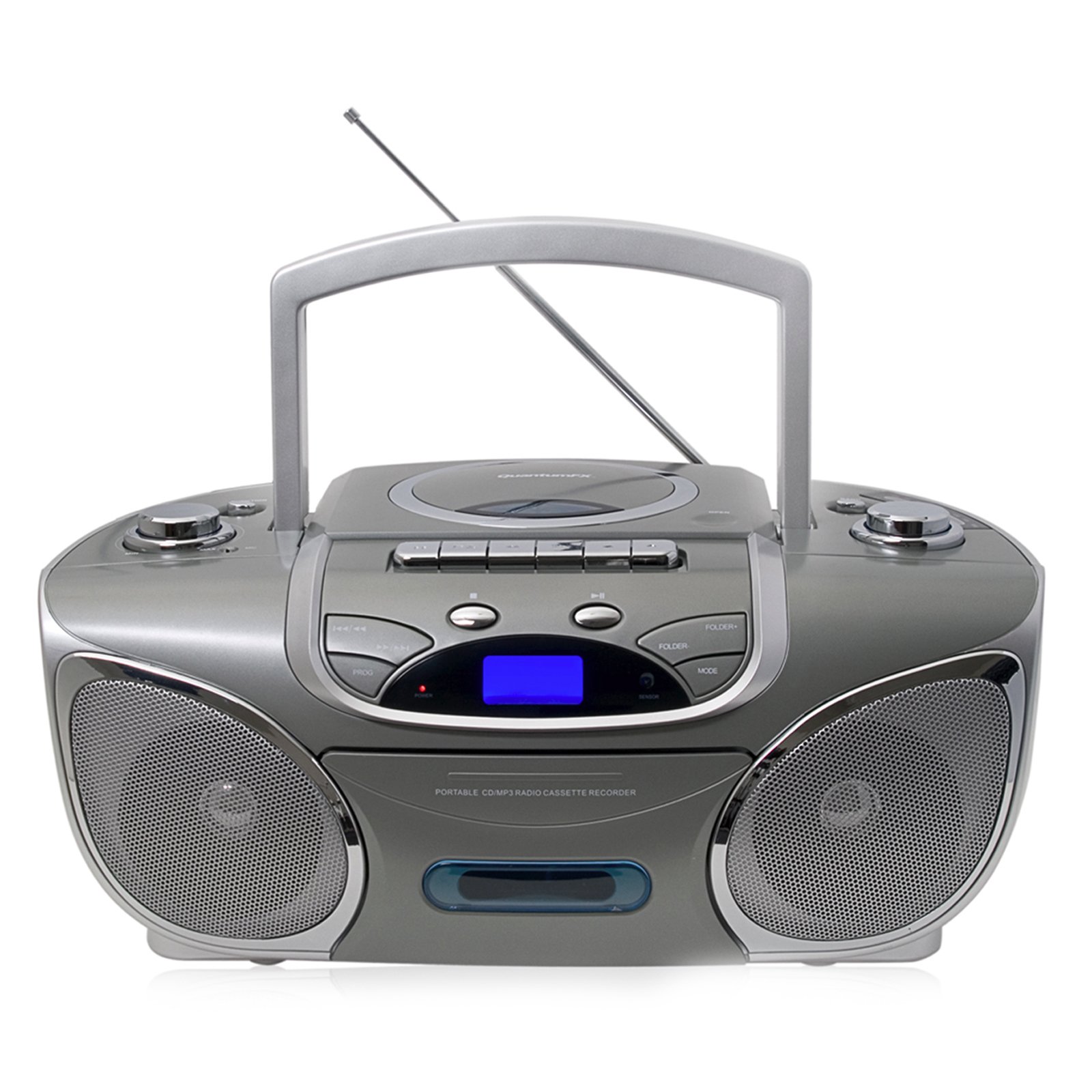
Rasm: old view of the Quantum J-32U, showing the speaker grilles, display, and control buttons.
- Spikerlar: Stereo speakers for audio output.
- LCD displey: Shows current mode, track number, and radio frequency.
- Funktsiya tugmalari: Play/Pause, Stop, Skip/Search (Forward/Backward).
- Ovozni boshqarish: Rotary knob to adjust audio output level.
- Rejim tugmasi: Selects between CD, USB/SD, Radio, and Cassette modes.
4.2 Yuqori panel
Rasm: yuqori view of the Quantum J-32U, highlighting the CD compartment, cassette deck, USB port, and SD/MMC slot.
- CD bo'limi: Top-loading CD/MP3 disc tray.
- Kasseta paneli: For playing and recording cassette tapes.
- USB port: USB flesh-disklarni ulash uchun.
- SD/MMC karta uyasi: For inserting SD or MMC memory cards.
- Sozlash tugmasi: For manual radio frequency selection.
- Kassetani boshqarish tugmalari: Play, Record, Fast Forward, Rewind, Stop/Eject.
4.3 Orqa panel
Rasm: orqa view of the Quantum J-32U, showing the AC power input and battery compartment.
- AC quvvat manbai: Connect the supplied AC power cord here.
- Batareya bo'limi: For inserting batteries for portable operation.
- FM antennasi: FM radio qabul qilish uchun teleskopik antenna.
5. Sozlash
5.1 Jihozni quvvatlantirish
The J-32U can be powered by AC mains or batteries.
AC quvvati
- Jihoz o'chirilganligiga ishonch hosil qiling.
- Connect the supplied AC power cord to the AC power input on the rear panel of the unit.
- AC quvvat simining ikkinchi uchini standart rozetkaga ulang.
Batareya quvvati
- Open the battery compartment cover on the rear panel.
- Insert the required number of "C" size batteries (not included), ensuring correct polarity (+/-).
- Batareya bo'limi qopqog'ini mahkam yoping.
- Eslatma: Disconnect the AC power cord when operating on batteries.
6. Foydalanish bo'yicha ko'rsatmalar
6.1 Umumiy foydalanish
- Quvvatni yoqish/oʻchirish: ni bosing KUCH qurilmani yoqish yoki o'chirish uchun tugma.
- Rejim tanlash: ni bosing REJIM button repeatedly to cycle through CD, USB/SD, Radio (AM/FM), and Cassette modes.
- Ovoz balandligini sozlash: ni aylantiring Ovoz Ovoz balandligini oshirish yoki pasaytirish uchun tugmani bosing.
6.2 CD/MP3 ijro etish
- ni bosing REJIM CD rejimini tanlash uchun tugmani bosing.
- CD bo'limi qopqog'ini oching.
- Place a CD or MP3 CD with the label side facing up.
- Close the CD compartment cover. The unit will read the disc.
- ni bosing O‘YNAT/TO‘XTATISH ijro etishni boshlash uchun tugma.
- bosing OLGA OTIRISH or ORQAGA O'TKAZISH to navigate tracks.
- bosing va ushlab turing OLGA OTIRISH or ORQAGA O'TKAZISH to fast forward or rewind within a track.
- ni bosing STOP ijro etishni to'xtatish uchun tugmani bosing.
6.3 USB/SD/MMC ijro etish
- Insert a USB flash drive into the USB port or an SD/MMC card into the card slot.
- ni bosing REJIM button to select USB/SD mode. The unit will automatically detect and begin playing MP3 files.
- Foydalanish O‘YNAT/TO‘XTATISH, STOP, OLGA OTIRISH, va ORQAGA O'TKAZISH buttons as with CD playback.
6.4 Radio Operation (AM/FM Stereo)
- ni bosing REJIM button to select Radio mode.
- Extend the FM telescopic antenna for better FM reception. For AM, rotate the unit for optimal reception.
- ni aylantiring TUNING kerakli radiostansiyani tanlash uchun tugmasini bosing.
- The frequency will be displayed on the LCD screen.
6.5 Kassetalarni ijro etish va yozib olish
Ijro
- ni bosing REJIM Kasset rejimini tanlash uchun tugmasini bosing.
- ni bosing TO'XTIRISH/CHIQARISH button to open the cassette deck.
- Insert a cassette tape and close the deck.
- ni bosing O‘YNA ijro etishni boshlash uchun tugma.
- Foydalanish TEZ OLDINA or ORTAGA ORGAN buttons to navigate the tape.
- bosing TO'XTIRISH/CHIQARISH ijroni toʻxtatish uchun.
Recording (from CD/USB/SD/Radio)
- Insert a blank cassette tape into the cassette deck.
- Select the desired source (CD, USB/SD, or Radio) using the REJIM tugmasi.
- Start playback on the source (e.g., play a CD track, tune to a radio station).
- While the source is playing, press the YOZISH button on the cassette deck. The O‘YNA button will also engage.
- Yozishni to'xtatish uchun tugmasini bosing TO'XTIRISH/CHIQARISH tugmasi.
- Eslatma: Ensure the cassette tape has its record protection tabs intact for recording.
7. Xizmat ko'rsatish
- Jihozni tozalash: Jihozning tashqi qismini tozalash uchun yumshoq, quruq matodan foydalaning. Abraziv tozalash vositalarini yoki erituvchilarni ishlatmang.
- CD Lens Cleaning: If CD playback becomes erratic, use a commercially available CD lens cleaner disc to clean the laser lens.
- Kassetali boshni tozalash: Periodically clean the cassette deck's heads, pinch rollers, and capstan with a cotton swab lightly dampizopropil spirti bilan to'ldirilgan.
- Saqlash: When not in use for extended periods, disconnect the AC power cord and remove batteries. Store the unit in a cool, dry place.
8. Muammolarni bartaraf qilish; nosozliklarni TUZATISH
| Muammo | Mumkin sabab | Yechim |
|---|---|---|
| Quvvat yo'q | AC shnuri ulanmagan; Batareyalar tugagan yoki noto'g'ri o'rnatilgan. | AC shnuri ulanishini tekshiring; Batareyalarni almashtiring yoki to'g'ri kutupluluğuna ishonch hosil qiling. |
| Ovoz yo'q | Volume too low; Incorrect mode selected. | Increase volume; Press REJIM to select correct source. |
| CD o'tkazib yuboradi yoki ijro etilmaydi | Disc dirty or scratched; CD compartment not closed; Disc inserted incorrectly. | Clean or replace disc; Close CD compartment firmly; Insert disc label side up. |
| Yomon radio qabul qilish | Antenna kengaytirilmagan; Birlik pozitsiyasi. | FM antennasini to'liq kengaytiring; AMni yaxshiroq qabul qilish uchun qurilmani aylantiring. |
| Kasseta lentasi ijro etilmayapti/yozib olinmayapti | Tape incorrectly inserted; Record protection tab removed (for recording). | Ensure tape is correctly inserted; Cover record protection tab with tape for recording. |
9. Texnik shartlar
- Model: J-32U
- Quvvat manbai: AC 120V ~ 60Hz or DC 9V (6 x "C" size batteries)
- CD Pleyer: Top-loading CD/MP3 compatible
- USB/SD/MMC: Supports MP3 audio playback
- Radiochastotalar: AM/FM Stereo
- Kasseta paneli: Playback and Recording function
- Spikerlar: Stereo
- Mos qurilmalar: MP3 Player, Smartphone (via USB/SD for file playback, not direct audio input)
- GTIN: 606540009864
10. Kafolat va qo'llab-quvvatlash
Quantum products are designed for reliability and performance. For warranty information, please refer to the warranty card included with your purchase or visit the official Quantum website. For technical support or service inquiries, please contact Quantum customer service.
Onlayn qo'llab-quvvatlash: www.quantumfx.com/support (Eslatma: Bu to'ldiruvchi URL as no specific support link was provided.)
Mijozlarga xizmat ko'rsatish: Refer to your product packaging or warranty card for contact details.