Foydalanuvchilar uchun qo'llanmalar soddalashtirilgan.
BlackBerry BB 9900
BlackBerry BB 9900 Bold Touch Smartphone User Manual
Model: BB 9900
1. Kirish
This manual provides essential instructions for setting up, operating, and maintaining your BlackBerry BB 9900 Bold Touch smartphone. Please read this guide thoroughly to ensure proper use and to maximize the device's capabilities. The BlackBerry BB 9900 Bold Touch combines a capacitive touchscreen with a full QWERTY keyboard, running on BlackBerry OS 7.
2. Paket tarkibi
Paketingizda quyidagi elementlar mavjudligiga ishonch hosil qiling:
BlackBerry BB 9900 Bold Touch Smartphone
Zaryadlanuvchi batareya
Devor zaryadlovchi
USB kabeli
Foydalanuvchi uchun qo'llanma (ushbu hujjat)
3. Qurilma tugadiview
Familiarize yourself with the physical features of your BlackBerry BB 9900 Bold Touch.
3.1 Old qismi View
Rasm: old view of the BlackBerry BB 9900 Bold Touch, highlighting the 2.8-inch touchscreen and the physical QWERTY keyboard below it. The device also features a trackpad and call/end buttons.
Sensorli ekran: 2.8-inch capacitive display for interactive navigation.
QWERTY klaviaturasi: Full physical keyboard for efficient typing.
Optical Trackpad: For precise navigation and selection.
Call/End Buttons: Standard telephony controls.
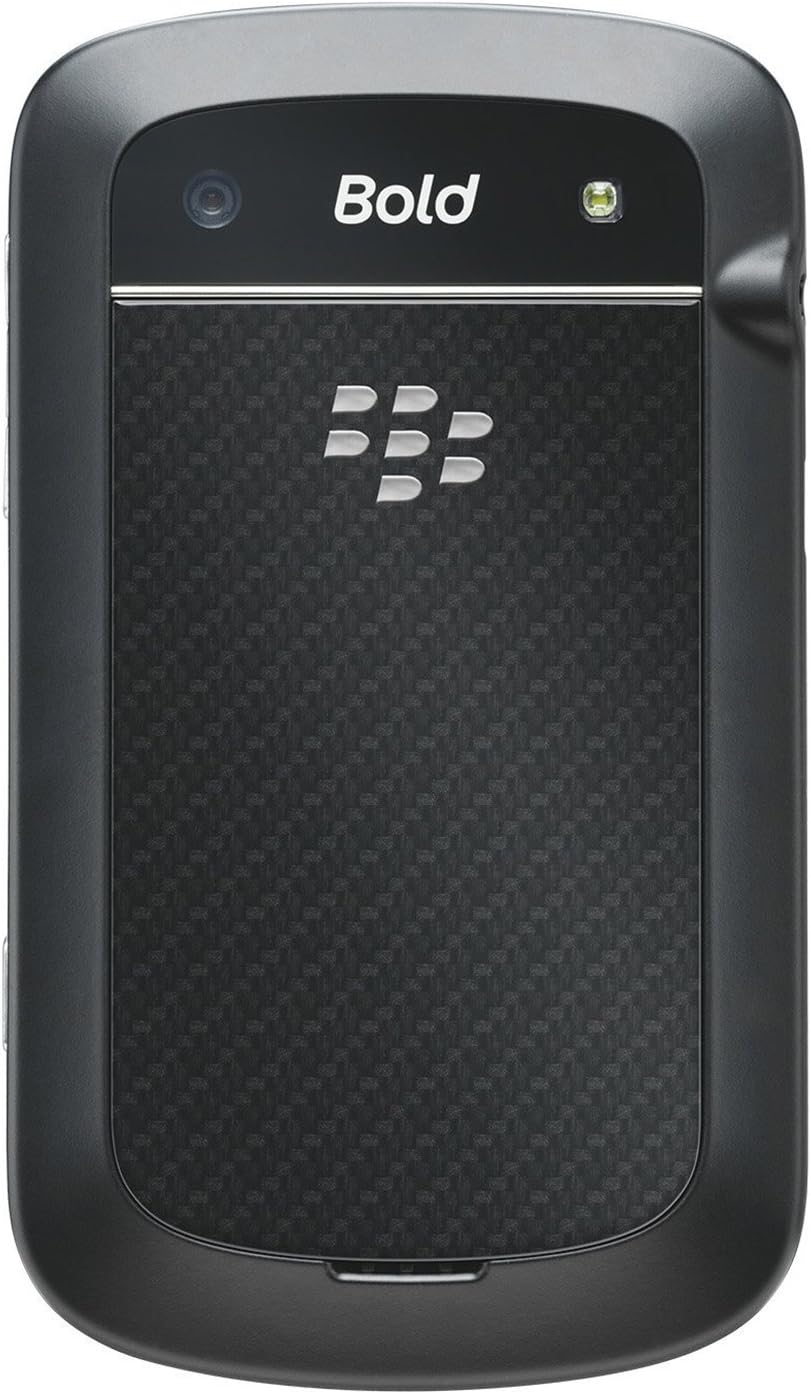
3.2 Orqa View
Rasm: orqa view of the BlackBerry BB 9900 Bold Touch, featuring the 5-megapixel camera lens, LED flash, and the BlackBerry logo.
5MP kamera: Primary camera with autofocus and LED flash.
Batareya qopqog'i: Removable cover for battery and SIM card access.
3.3 Yon View
Rasm: yon view of the BlackBerry BB 9900 Bold Touch, illustrating the placement of the volume control buttons and a customizable convenience key.
Ovoz balandligi tugmalari: Ovoz darajasini sozlang.
Convenience Key: Customizable shortcut button.
4. Sozlash
4.1 SIM kartani joylashtirish
Remove the battery cover from the back of the device.
SIM karta uyasini toping.
SIM-kartani tilla rangli kontaktlarini pastga qaratib va kesilgan burchagini uya bilan bir tekis qilib joylashtiring.
Ensure the SIM card is securely in place.
4.2 Batareyani joylashtirish
After inserting the SIM card, align the battery's gold contacts with the contacts in the battery compartment.
Batareyani sekin bosib joyiga qo'ying.
Batareya qopqog'ini almashtiring.
4.3 Qurilmani zaryadlash
Connect the USB cable to the charging port on your device.
Plug the other end of the USB cable into the wall charger, then into a power outlet.
Qurilmani birinchi marta ishlatishdan oldin to'liq zaryadlang. Ekrandagi batareya indikatori zaryadlash holatini ko'rsatadi.
4.4 Quvvatni yoqish/o‘chirish
Yoqish uchun: Press and hold the Power/Lock button (usually located on the top edge) until the BlackBerry logo appears.
O'chirish uchun: Press and hold the Power/Lock button until the 'Power Off' option appears on the screen. Tap 'Power Off' to confirm.
5. Foydalanish bo'yicha ko'rsatmalar
5.1 Sensorli ekran navigatsiyasi
Bosing: Ilovalarni ochish, elementlarni tanlash yoki tugmalarni faollashtirish uchun ekranga qisqa bosing.
Surish: Drag your finger across the screen to scroll through lists or switch between home screen panels.
Kattalashtirish uchun chimchilash: Use two fingers to zoom in or out on photos, web sahifalar yoki xaritalar.
5.2 Using the QWERTY Keyboard
The physical QWERTY keyboard allows for fast and accurate text entry. Each key corresponds to a letter, number, or symbol. Use the 'Alt' key for alternate characters and the 'Shift' key for capitalization.
5.3 Qo'ng'iroqlarni amalga oshirish
From the home screen, tap the Phone icon or press the green Call button.
Enter the phone number using the keyboard.
Qo'ng'iroqni boshlash uchun yashil qo'ng'iroq tugmasini bosing.
Qo'ng'iroqni tugatish uchun qizil Qo'ng'iroqni tugatish tugmasini bosing.
5.4 Xabarlarni yuborish
Tap the Messages icon from the home screen.
Select 'Compose New' or similar option.
Qabul qiluvchining raqamini kiriting yoki kontaktlardan tanlang.
Type your message using the QWERTY keyboard.
Tap 'Send'.
5.5 Kameradan foydalanish
Kamera ilovasini ochish uchun Kamera belgisini bosing.
Ekran sifatida foydalanib, suratingizni ramkaga soling viewqidiruvchi.
Tap the screen or press the convenience key (if configured) to take a photo.
The 5MP camera features autofocus and an LED flash for improved image quality.
5.6 Wi-Fi tarmog'iga ulanish
Go to 'Options' > 'Networks and Connections' > 'Wi-Fi'.
Turn Wi-Fi on. The device will scan for available networks.
Kerakli tarmoqni tanlang va so'ralganda parolni kiriting.
Once connected, the Wi-Fi indicator will appear in the status bar.
5.7 Using NFC (Near Field Communication)
The BlackBerry BB 9900 Bold Touch supports NFC for short-range wireless communication. This allows for quick pairing with compatible accessories or sharing data with other NFC-enabled devices by tapping them together.
Qurilmangiz sozlamalarida NFC yoqilganligiga ishonch hosil qiling.
Hold your device close to another NFC-enabled device or tag.
Follow on-screen prompts to complete the desired action (e.g., pairing, data transfer).
6. Xizmat ko'rsatish
6.1 Qurilmangizni tozalash
Use a soft, lint-free cloth to wipe the screen and body of the device.
Qattiq kimyoviy moddalar, abraziv tozalash vositalari yoki aerozol spreylarini ishlatmang.
Qurilmani ortiqcha namlikka ta'sir qilmang.
6.2 Batareyani parvarish qilish
Batareyaning ishlashini pasaytiradigan haddan tashqari haroratlardan saqlaning.
Use only the original or approved charger.
Batareyani teshmang yoki shikastlamang.
6.3 Dasturiy ta'minotni yangilash
Periodically check for software updates to ensure your device has the latest features and security enhancements. Updates can typically be found in the device's 'Options' or 'Settings' menu under 'Software Updates'.
7. Muammolarni bartaraf qilish; nosozliklarni TUZATISH
7.1 Qurilma yoqilmaydi
Batareyaning to'g'ri o'rnatilganligiga va zaryadlanganligiga ishonch hosil qiling.
Connect the device to the charger and wait a few minutes before attempting to power on again.
If the issue persists, try removing and reinserting the battery.
7.2 Tarmoqqa ulanish muammolari
Check if your SIM card is correctly inserted and activated with your carrier.
Verify that cellular data or Wi-Fi is enabled in your device settings.
Qurilmani qayta ishga tushiring.
If using Wi-Fi, ensure your router is working and you have entered the correct password.
7.3 Sensorli ekran javob bermayapti
Qurilmani qayta ishga tushiring.
Ekran toza va axlat yoki namlikdan xoli ekanligiga ishonch hosil qiling.
If the issue is intermittent, check for any recent software installations that might be causing conflicts.
8. Texnik shartlar
Xususiyat
Tafsilot
Model nomi
BB 9900
Operatsion tizim
BlackBerry OS 7
Displey
2.8-inch Capacitive Touchscreen, 640 x 480 Resolution
Protsessor
Not specified (typically 1.2 GHz for this model)
Ram
768 MB
Ichki xotira
8 GB
Orqa kamera
5 MP, Autofocus, LED Flash
Ulanish
Wi-Fi 802.11 b/g/n, NFC, Bluetooth, GPS
Tarmoqni qo'llab-quvvatlash
Quad-band GSM/GPRS/EDGE, Tri-band HSPA+
O'lchamlari
4.53 x 2.6 x 0.41 dyuym (115 x 66 x 10.5 mm)
Og'irligi
4.6 untsiya (130 gramm)
Audio Jek
3.5 mm
9. Qo'llab -quvvatlash va kafolat
9.1 Mijozlarni qo‘llab-quvvatlash
For technical assistance, troubleshooting beyond this manual, or service inquiries, please visit the official BlackBerry support website or contact your local service provider. Refer to the packaging or official webmaxsus aloqa ma'lumotlari uchun sayt.
9.2 Kafolat haqida ma'lumot
Your BlackBerry BB 9900 Bold Touch is covered by a limited warranty. Please refer to the warranty card included in your product packaging or visit the official BlackBerry webKafolat muddati va qamrov tafsilotlari kabi batafsil shartlar va qoidalar uchun saytga tashrif buyuring. Kafolat da'volari uchun sotib olish hujjatingizni saqlang.
Ask a question about this manual
Ask about setup, troubleshooting, compatibility, parts, safety, or missing instructions. Manuals+ will review the question and use this page’s manual context to help answer it.