
1. Kirish
The D-Link GO-SW-5G is a 5-Port Unmanaged Gigabit Desktop Switch designed for home and small office environments. This device provides a simple and cost-effective solution to expand your network connectivity, offering high-speed Gigabit Ethernet ports for reliable data transfer. It incorporates D-Link's Green Technology for energy efficiency, reduced heat generation, and extended product lifespan.
This switch is a plug-and-play device, requiring no complex configuration or software installation, making it easy to integrate into an existing network.
2. Paket tarkibi
Iltimos, quyida keltirilgan barcha narsalar paketingizga kiritilganligini tekshiring:
- D-Link GO-SW-5G 5-Port Gigabit Desktop Switch
- Quvvat adapteri
- Tez o'rnatish qo'llanma
If any items are missing or damaged, please contact your retailer for assistance.
3. O'rnatish bo'yicha ko'rsatmalar
The D-Link GO-SW-5G switch is designed for easy plug-and-play installation. Follow these steps to set up your device:
3.1. Quvvat adapterini ulang
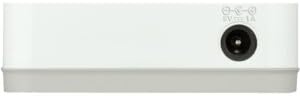
- Locate the power input port on the side of the D-Link GO-SW-5G switch.
- Connect the provided power adapter to this port.
- Quvvat adapterining ikkinchi uchini standart elektr rozetkaga ulang.
- The power LED on the front of the switch will illuminate, indicating that the device is receiving power.

1-rasm: Yon view of the D-Link GO-SW-5G switch with the power input port.
3.2. Tarmoqingizga ulaning
- Using a standard Ethernet cable (RJ45), connect one end to an available LAN port on your router (not your modem).
- Connect the other end of this Ethernet cable to any of the five available ports on the back of the D-Link GO-SW-5G switch.
- The corresponding LED on the front of the switch will light up, indicating an active connection.
2-rasm: Orqa view of the D-Link GO-SW-5G switch with five Ethernet ports.
3.3. Connect Network Devices
- Connect your network devices (e.g., computers, gaming consoles, network printers, smart TVs) to the remaining available Ethernet ports on the D-Link GO-SW-5G switch using Ethernet cables.
- Each connected device will have its corresponding LED on the front of the switch illuminate, confirming a successful connection.

3-rasm: Old view of the D-Link GO-SW-5G switch showing active port LEDs.
4. Foydalanish bo'yicha ko'rsatmalar
The D-Link GO-SW-5G is an unmanaged switch, meaning it operates automatically without requiring user configuration. Once connected as described in the Setup section, it will begin forwarding network traffic between connected devices.
- Automatic Negotiation: The switch automatically detects the network speed (10/100/1000 Mbps) and duplex mode (half/full) of connected devices and adjusts accordingly.
- Avtomatik MDI/MDIX: All ports support automatic MDI/MDIX crossover, eliminating the need for crossover cables when connecting to other switches or hubs.
- LED ko'rsatkichlari: Each port has an LED indicator on the front panel. A lit LED indicates an active link, and blinking indicates network activity.
5. Xizmat ko'rsatish
To ensure optimal performance and longevity of your D-Link GO-SW-5G switch, consider the following maintenance guidelines:
- Joylashtirish: Place the switch in a cool, dry location away from direct sunlight, heat sources, and excessive moisture. Ensure adequate ventilation around the device.
- Tozalash: Use a soft, dry cloth to clean the exterior of the switch. Avoid using liquid or aerosol cleaners, as they may damage the device.
- Kabelni boshqarish: Keep Ethernet cables neatly organized to prevent tangles and accidental disconnections.
- Quvvat aylanishi: If you experience network issues, a simple power cycle (unplugging the power adapter for 10 seconds and then plugging it back in) can often resolve minor problems.
6. Muammolarni bartaraf qilish; nosozliklarni TUZATISH
If you encounter issues with your D-Link GO-SW-5G switch, refer to the following common troubleshooting steps:
- LED quvvat yo'q:
- Quvvat adapterining ham kalitga, ham ishlaydigan elektr rozetkasiga mahkam ulanganligiga ishonch hosil qiling.
- Elektr rozetkasini boshqa qurilmaga ulash orqali ishlayotganligini tekshiring.
- No Link/Activity LED for a Connected Device:
- Ethernet kabeli kommutator portiga ham, tarmoq qurilmasiga ham mahkam ulanganligini tekshiring.
- Noto'g'ri kabelni istisno qilish uchun boshqa Ethernet kabelini sinab ko'ring.
- Ulangan qurilma yoqilganligiga va uning tarmoq adapteri to'g'ri ishlayotganiga ishonch hosil qiling.
- Qurilmani kalitdagi boshqa portga ulashga harakat qiling.
- Sekin tarmoq tezligi:
- Verify that all connected devices and cables support Gigabit Ethernet (1000 Mbps) for optimal performance. The switch will operate at the lowest common speed.
- Ensure your router and internet service provider (ISP) plan support the desired speeds.
- Perform a power cycle on the switch and your router.
- Vaqti-vaqti bilan ulanish:
- Bo'shashgan kabel ulanishlarini tekshiring.
- Ensure the switch is not overheating; provide adequate ventilation.
- Test with different Ethernet cables.
7. Texnik shartlar
| Brend | D-Link |
| Model raqami | GO-SW-5G/B |
| Portlar soni | 5 |
| Kommutator turi | Boshqarilmagan |
| Ma'lumot uzatish tezligi | 1 Gigabits Per Second (10/100/1000 Mbps) |
| Interfeys | RJ45 |
| Rang | Oq |
| Element og'irligi | 0.22 funt |
| jildtage | 100-240 volt |
| Mos qurilmalar | PC, Mac, and other Ethernet-enabled devices |
| Matoni almashtirish | 10 Gbit/s |
| UPC | 790069365669 |
8. Kafolat va qo'llab-quvvatlash
Cheklangan Kafolat: The D-Link GO-SW-5G switch comes with a 3-year limited warranty. For detailed terms and conditions, please refer to the warranty information included in your package or visit the official D-Link websayt.
Texnik yordam: For technical assistance, product registration, or to download the latest firmware and documentation, please visit the D-Link qo'llab-quvvatlash Websayt or contact D-Link customer service.