
MXL 2008PF001
MXL2008 PF001 Bundle User Manual
Professional Condenser Microphone System
Kirish
Thank you for choosing the MXL2008 PF001 Bundle. This professional condenser microphone system is designed to deliver high-quality audio capture for a variety of applications, including studio recording, broadcasting, and live sound. This manual provides essential information for the proper setup, operation, and maintenance of your microphone to ensure optimal performance and longevity.
Iltimos, mahsulotni ishlatishdan oldin ushbu qo'llanmani diqqat bilan o'qib chiqing va uni kelajakda foydalanish uchun saqlab qo'ying.
Xavfsizlik bo'yicha muhim ma'lumotlar
To prevent electric shock, fire, or damage to the unit, please observe the following precautions:
- Do not expose the microphone to rain or moisture.
- Avoid extreme temperatures or high humidity.
- Do not attempt to disassemble or modify the microphone. Refer all servicing to qualified personnel.
- Ensure proper phantom power (48V) is supplied by your audio interface or mixer, if required.
- Jismoniy shikastlanmaslik uchun mikrofonni ehtiyotkorlik bilan ishlating.
Qutida nima bor
The MXL2008 PF001 Bundle typically includes:
- MXL 2008 kondensatorli mikrofon
- Shock Mount (PF001 component)
- Hard Mount Adapter
- Tozalash matosi
- Foydalanuvchi uchun qo'llanma (ushbu hujjat)
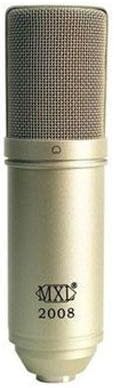
Image: The MXL 2008 condenser microphone, a cylindrical microphone with a metallic mesh grille at the top and the MXL 2008 logo on its body. This is the primary component of the bundle.
O'rnatish uchun qo'llanma
Follow these steps to set up your MXL2008 PF001 Bundle:
- Mikrofonni o'rnatish:
- Attach the shock mount (PF001) to a standard microphone stand.
- Carefully insert the MXL 2008 microphone into the shock mount. Ensure it is securely held by the elastic bands. The shock mount helps to isolate the microphone from vibrations and handling noise.
- Connecting to Audio Interface/Mixer:
- Connect one end of an XLR cable (not included) to the XLR output at the base of the MXL 2008 microphone.
- Connect the other end of the XLR cable to an available XLR input on your audio interface, mixer, or preamphayotiyroq.
- Applying Phantom Power:
- The MXL 2008 is a condenser microphone and requires 48V phantom power to operate.
- Activate the +48V phantom power switch on your audio interface or mixer for the input channel connected to the microphone.
- Ogohlantirish: Ensure the microphone is connected before activating phantom power to avoid potential pops or damage.
- Kirish daromadini sozlash:
- With phantom power active, gradually increase the input gain (preamp level) on your audio interface or mixer.
- Speak or sing into the microphone at your typical performance level and adjust the gain until you achieve a strong signal without clipping (distortion). Most interfaces have a peak indicator light to help with this.
Foydalanish bo'yicha ko'rsatmalar
The MXL 2008 is a versatile microphone suitable for various recording scenarios. Here are general guidelines for operation:
- Mikrofonni joylashtirish:
- Position the microphone approximately 6-12 inches (15-30 cm) from the sound source for vocals or acoustic instruments. Adjust distance based on desired proximity effect and room acoustics.
- The MXL 2008 has a cardioid polar pattern, meaning it picks up sound primarily from the front and rejects sound from the sides and rear. Point the front of the microphone (where the MXL logo is) directly at the sound source.
- Pop filtrdan foydalanish:
- For vocal recordings, it is highly recommended to use an external pop filter (not included) placed between the vocalist and the microphone. This helps to reduce plosive sounds (P's and B's) and protect the microphone capsule from moisture.
- Monitoring:
- Monitor your audio through headphones or studio monitors connected to your audio interface/mixer. This allows you to hear the microphone's output and make necessary adjustments to gain and placement.
- Yozib olish dasturi:
- Ensure your Digital Audio Workstation (DAW) software is configured to recognize your audio interface and the correct input channel.
- Arm the track for recording and begin capturing your audio.
Xizmat va parvarish
Proper care will extend the life and maintain the performance of your MXL 2008 microphone:
- Tozalash: Use a soft, dry, lint-free cloth to wipe the microphone body. Do not use liquid cleaners or solvents, as they may damage the finish or internal components.
- Saqlash: When not in use, store the microphone in its original packaging or a protective case to shield it from dust, moisture, and physical impact.
- Atrof-muhit sharoitlari: Mikrofonni uzoq vaqt davomida haddan tashqari harorat, yuqori namlik yoki to'g'ridan-to'g'ri quyosh nuri ta'sirida qoldirmang.
- Ishlov berish: Always handle the microphone by its body, not by the cable or grille.
Muammolarni bartaraf qilish; nosozliklarni TUZATISH
If you encounter issues with your MXL 2008 microphone, refer to the following common problems and solutions:
| Muammo | Mumkin sabab | Yechim |
|---|---|---|
| Ovoz chiqishi yo'q |
|
|
| Buzilgan ovoz |
|
|
| Hum yoki Buzz shovqini |
|
|
If the problem persists after trying these solutions, please contact MXL customer support.
Texnik xususiyatlari
| Xususiyat | Tafsilot |
|---|---|
| Ishlab chiqaruvchi | MXL |
| Model raqami | 2008PF001 |
| Element og'irligi | 5.05 funt (taxminan 2.29 kg) |
| ASIN | B009TT7AO2 |
| Birinchi mavjud sana | 14 yil 2012 aprel |
| Kiritilgan komponentlar | Microphone (MXL 2008), PF001 (Shock Mount) |
Eslatma: Texnik xususiyatlar mahsulotni yaxshilash uchun ogohlantirilmasdan o'zgartirilishi mumkin.
Kafolat va qo'llab-quvvatlash
MXL products are manufactured to the highest quality standards. For information regarding warranty coverage, please refer to the warranty card included with your product or visit the official MXL websayt.
For technical support, troubleshooting assistance beyond this manual, or service inquiries, please contact MXL customer support through their official channels. Always provide your product model number (MXL2008 PF001) and ASIN (B009TT7AO2) when seeking support.
Qo'shimcha ma'lumot va qo'llab-quvvatlash manbalariga tashrif buyurib topishingiz mumkin MXL Store on Amazon.
Ask a question about this manual
Ask about setup, troubleshooting, compatibility, parts, safety, or missing instructions. Manuals+ will review the question and use this page’s manual context to help answer it.