
1. Kirish
This manual provides essential instructions for the safe and efficient operation of your ICOM BC-152 charger. Please read this manual thoroughly before using the charger to ensure proper setup, operation, and maintenance. Keep this manual for future reference.
2. Xavfsizlik ma'lumotlari
Always observe the following safety precautions to prevent injury, damage to the charger, or damage to the device being charged.
- Use only with compatible ICOM battery packs. Using incompatible batteries may cause fire, explosion, or injury.
- Zaryadlovchi qurilmani yomg'ir, namlik yoki haddan tashqari harorat ta'siriga qo'ymang.
- Zaryadlovchini qismlarga ajratmang yoki o'zgartirmang. Barcha xizmatlarni malakali xodimlarga topshiring.
- Elektr rozetkasining ovoz balandligiga ishonch hosil qilingtage matches the charger's specifications.
- Zaryadlovchini issiqlik manbalaridan va to'g'ridan-to'g'ri quyosh nurlaridan uzoqroq tuting.
- Foydalanilmayotganda yoki tozalashdan oldin zaryadlovchini rozetkadan uzing.
3. Sozlash
3.1 Paketni ochish
Carefully remove the ICOM BC-152 charger from its packaging. Verify that all components are present:
- ICOM BC-152 Charger Unit
- AC adapteri (agar mavjud bo'lsa)
- Qo'llanma (bu hujjat)
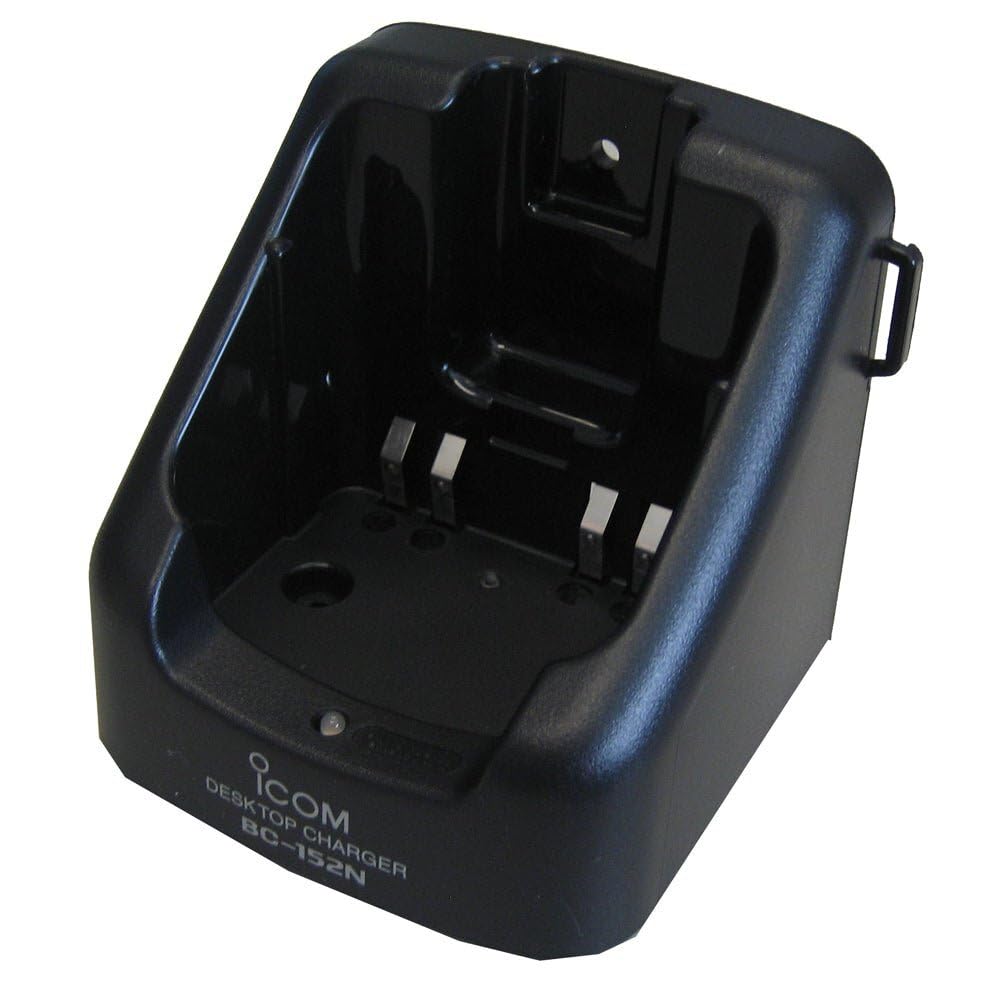
Figure 1: The ICOM BC-152 charger unit. This image shows the compact black charger with a single slot for a battery pack.
3.2 Quvvatni ulash
- Connect the AC adapter cable to the DC input jack on the rear of the BC-152 charger unit.
- AC adapterini standart rozetkaga ulang.
- Zaryadlash qurilmasi endi foydalanishga tayyor.
4. Foydalanish bo'yicha ko'rsatmalar
4.1 Charging a Battery Pack
Follow these steps to charge a compatible ICOM battery pack:
- Ensure the charger is connected to a power source as described in Section 3.2.
- Carefully insert the battery pack into the charging slot of the BC-152 charger. Ensure it is seated firmly.
- Observe the charging indicator light.
4.2 Ko'rsatkich chiroqlari
The BC-152 charger features an LED indicator to show the charging status:
- Qizil (qattiq): Batareya hozirda quvvatlanmoqda.
- Yashil (qattiq): Charging is complete. The battery pack is fully charged.
- Miltillovchi qizil: Charging error or battery fault. Remove the battery and re-insert. If the error persists, consult the troubleshooting section.
- Nur yo'q: Charger is not connected to power, or no battery is inserted.
Charging time may vary depending on the battery's capacity and its current charge level. Typically, a fully depleted battery will take approximately 2-4 hours to charge.
5. Xizmat ko'rsatish
5.1 Tozalash
Optimal ishlash va ko'rinishni saqlab qolish uchun:
- Tozalashdan oldin har doim zaryadlovchini elektr rozetkasidan uzing.
- Zaryadlovchi qurilmaning tashqi qismini artish uchun yumshoq, quruq matodan foydalaning.
- Abraziv tozalash vositalari, erituvchilar yoki kuchli kimyoviy moddalardan foydalanmang.
- Ensure no moisture enters the charging slot or power input.
5.2 Saqlash
When not in use for extended periods, store the charger in a cool, dry place, away from direct sunlight and extreme temperatures. Disconnect it from the power supply.
6. Muammolarni bartaraf qilish; nosozliklarni TUZATISH
If you encounter issues with your BC-152 charger, refer to the table below for common problems and solutions.
| Muammo | Mumkin sabab | Yechim |
|---|---|---|
| Charger indicator light is off. | No power supply or battery not inserted. | Check AC adapter connection. Ensure battery is correctly inserted. |
| Indicator light flashes red. | Battery fault or charging error. | Remove and re-insert the battery. Try a different compatible battery if available. |
| Batareya zaryadlanmaydi. | Faulty battery, charger, or power supply. | Verify power connection. Test with a known good battery. If problem persists, contact support. |
7. Texnik shartlar
| Brend | ICOM |
| Model | BC-152 |
| Kirish hajmitage | 12-16V DC (via AC adapter) |
| Chiqish hajmitage | 8.4V DC |
| Zaryadlash oqimi | Taxminan. 450mA |
| Olchamlari (W×Y×D) | Approx. 80 × 50 × 90 mm (3.1 × 2.0 × 3.5 inches) |
| Og'irligi | 0.18 funt (taxminan 82 g) |
| Rang | Qora |
Note: Specifications are subject to change without notice for improvement.
8. Kafolat haqida ma'lumot
ICOM products are manufactured with high-quality components and are subject to rigorous quality control. This product is covered by a limited warranty against defects in materials and workmanship. The specific terms and duration of the warranty may vary by region. Please refer to the warranty card included with your purchase or visit the official ICOM webbatafsil kafolat ma'lumotlari uchun sayt.
This warranty does not cover damage caused by misuse, accident, unauthorized modification, or improper installation.
9. Mijozlarni qo'llab-quvvatlash
If you have any questions, require technical assistance, or need to report a problem that cannot be resolved using the troubleshooting guide, please contact ICOM customer support.
ICOM America Inc.
Visit ICOM America's Contact Page
Please have your product model (BC-152) and serial number ready when contacting support.