
1. Kirish
The PAC SWI-RC-1 Steering Wheel Control Interface is designed to seamlessly integrate your vehicle's factory steering wheel controls with an aftermarket radio. This universal interface supports a wide range of vehicles and major radio brands, allowing you to retain the convenience and safety of your steering wheel controls after upgrading your car's audio system.
2. Xavfsizlik ma'lumotlari
- Har qanday o'rnatishni boshlashdan oldin har doim avtomobilning salbiy batareya terminalini ajratib oling.
- Optimal ishlash va xavfsizlik uchun professional o'rnatish tavsiya etiladi.
- Qisqa tutashuvlarni oldini olish uchun barcha simli ulanishlar xavfsiz va to'g'ri izolyatsiya qilinganligiga ishonch hosil qiling.
- Do not operate the vehicle or attempt to program the device while driving.
- Qurilmani namlik va haddan tashqari haroratdan uzoqroq tuting.
3. Mahsulot tugadiview
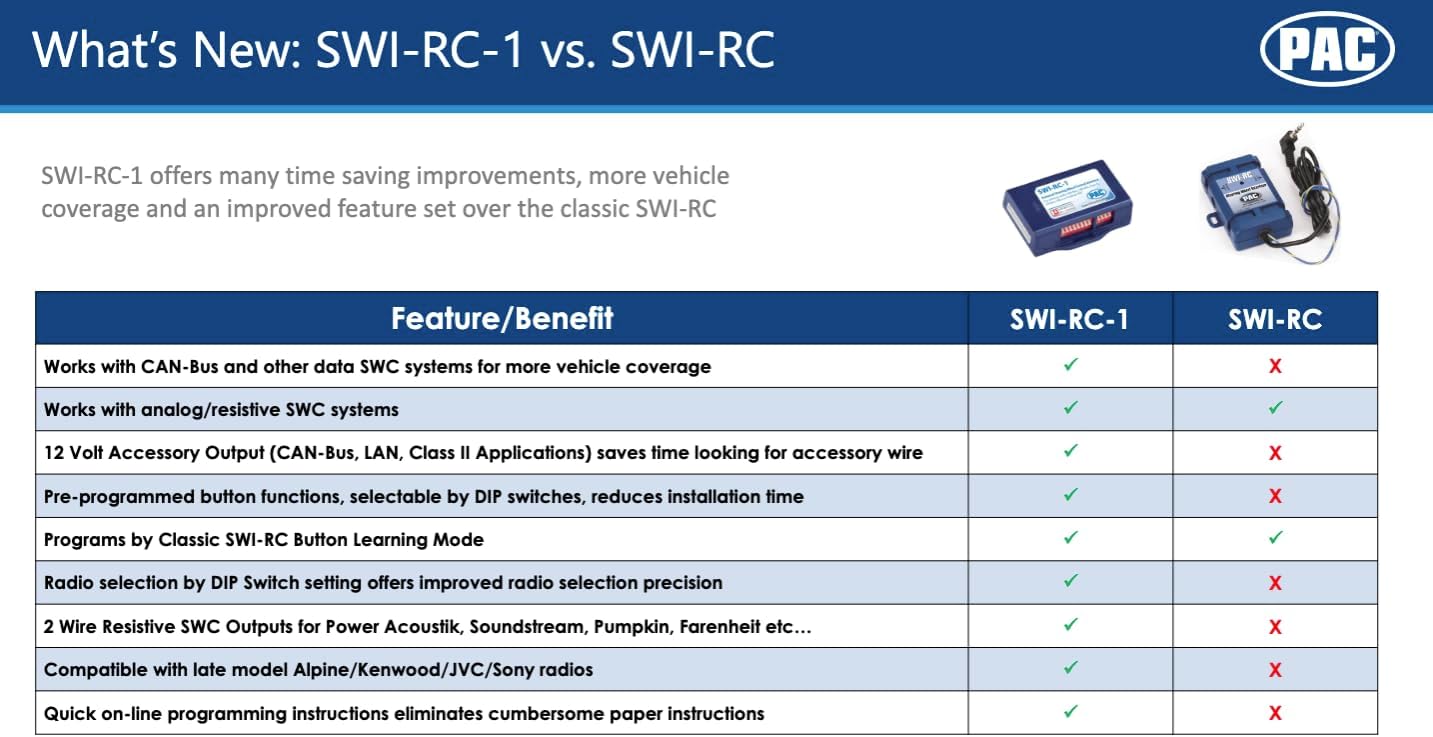
The PAC SWI-RC-1 offers advanced features for integrating steering wheel controls:
- 3000 dan ortiq transport vositalari uchun rul boshqaruvini tez va oson ushlab turish.
- DIP tugmachasini tanlash orqali tez va oson oldindan dasturlashtirilgan tugma funksiyasi.
- Analog (rezistiv) va ma'lumotlar SWC tizimlarida ishlaydi.
- CAN-Bus, GMLAN, CLASS II, LIN-Bus, I-BUS yoki analog SWC ga ega transport vositalari bilan mos keladi.
- Klassik, SWI-RC uslubidagi tugma dasturlashni qo'llab-quvvatlaydi.
- Customizable button functions including short press, long press, and button reassignment.
- 2 beradi amp, 12-volt accessory output for CAN-Bus, LAN, and Class II applications.
- 3.5 mm yoki ikki simli ulanishlarga ega barcha so'nggi rusumdagi radiolar bilan mos keladi.

4. Paket tarkibi
Your PAC SWI-RC-1 package should include the following items:
- PAC SWI-RC-1 Interface Module
- Asosiy simi simi
- 3.5mm Jack to Two-Wire Connection Cable
- Qo'llanma (bu hujjat)
5. Oʻrnatish va oʻrnatish
Installation of the PAC SWI-RC-1 involves three main steps:
5.1. O'rnatishdan oldingi nazorat ro'yxati
- Ensure your aftermarket radio is equipped with a wired remote input (e.g., 3.5mm headphone style jack or a Blue/Yellow wire labeled W/R, REM, Wired Remote, Remote, Rem Cont).
- Gather necessary tools: wire strippers, crimpers, electrical tape, multimeter, and vehicle-specific panel removal tools.
5.2. Step 1: Select Your Device, Vehicle, and Radio via Web Ilova
ga boring pac-audio.com/swi-rc-1 on your PC or mobile device. Follow the on-screen prompts to select your specific vehicle (make, model, year) and aftermarket radio brand and model. This step is crucial for generating the correct DIP switch settings and wiring diagram for your application.

5.3. Step 2: Set the DIP Switches
Based on the information provided by the PAC web app, set the DIP switches on the SWI-RC-1 module. The web app will display a clear image or diagram indicating the correct positions for your specific vehicle and radio combination.
5.4. Step 3: Wire the Module
Follow the detailed wiring diagram provided by the PAC web app. This diagram will show you how to connect the SWI-RC-1's wiring harness to your vehicle's factory wiring and your aftermarket radio. Ensure all connections are made accurately and securely.
Muhim muvofiqlik eslatmalari:
- Kenwood modellari: KDC-X598, KDC-BT318U, KDCBT-758-HD, KDCBT-558U & KDC-X798 are not compatible. These models require the SWI-CP5.
- Clarion CZ500: Bluetooth masofaviy boshqaruvini qo'llab-quvvatlamaydi.
- JVC KW-NT1 and KW-NT3HDT: Rul boshqaruvidan oldindan o'rnatilgan sozlamalarni yuqoriga va pastga qo'llab-quvvatlamang.
- Pioneer AVIC-Fxxx radiolari: Do not interpret radio preset seeking commands. This is a radio limitation.
- Bluetooth bilan ishlaydigan Pioneer radiolari: Steering wheel controls will not adjust phone call volume. Volume must be adjusted on the radio face. This is a radio limitation.
- Pioneer AVIC-Z110BT, Z120BT, Z130BT, Z140BH and AVIC-X920BT, X930BT, X940BT: Only these models support Voice Recognition via wired remote input.
6. Foydalanish bo'yicha ko'rsatmalar
Once installed and configured, the PAC SWI-RC-1 allows you to operate your aftermarket radio using your vehicle's factory steering wheel controls. The functionality of each button can be customized via the PAC web app during the setup process.
- Standart funktsiyalar: Typically, buttons like Volume Up/Down, Seek/Track Up/Down, and Mode/Source will function as expected.
- Moslashtiriladigan funksiyalar: The interface supports assigning different functions to a short press versus a long press of a button, allowing for expanded control options. Refer to your specific configuration from the PAC web app for assigned functions.
7. Xizmat ko'rsatish
The PAC SWI-RC-1 is a low-maintenance device. To ensure its longevity and proper function:
- Keep the module and its connections free from dust and debris.
- Avoid exposing the module to excessive moisture or direct sunlight.
- Modulni ochishga urinmangasing, as this may void the warranty.
8. Muammolarni bartaraf qilish; nosozliklarni TUZATISH
If you encounter issues with your PAC SWI-RC-1, consider the following:
- Funktsiya yo'q: Double-check all wiring connections for proper contact and insulation. Verify that the DIP switches are set correctly according to the PAC web ilova.
- Incorrect Button Response: Revisit the PAC web app to confirm your button programming. Ensure that the correct functions are assigned to each button press (short vs. long).
- Specific Radio Limitations: Refer to the compatibility notes in Section 5.4. Some radio models have inherent limitations that the SWI-RC-1 cannot overcome.
- Quvvat bilan bog'liq muammolar: Ensure the vehicle's battery is properly connected and providing adequate power.
For further assistance, consult the detailed installation guides available on the PAC websayt yoki texnik yordamga murojaat qiling.
9. Texnik shartlar
| Xususiyat | Spetsifikatsiya |
|---|---|
| Model | SWI-RC |
| Model raqami | SWI-RC-1 |
| Element og'irligi | 3.52 untsiya |
| Mahsulot o'lchamlari | 1 x 3 x 1 dyuym |
| jildtage | 12 volt |
| Maxsus xususiyatlar | Simsiz |
10. Kafolat
The PAC SWI-RC-1 Steering Wheel Control Interface comes with a 3 yillik kafolat sotib olingan kundan boshlab. Iltimos, kafolat da'volari uchun sotib olinganligingizni tasdiqlovchi hujjatingizni saqlab qo'ying.
11. Qo'llab-quvvatlash
For technical support or further inquiries, please contact PAC customer service:
- Telefon: 1-866-427-2999
- Ish vaqti: Monday to Friday: 8:30 AM to 5:00 PM EST, Saturday: 10:00 AM to 4:00 PM EST
- Websayt: www.pac-audio.com