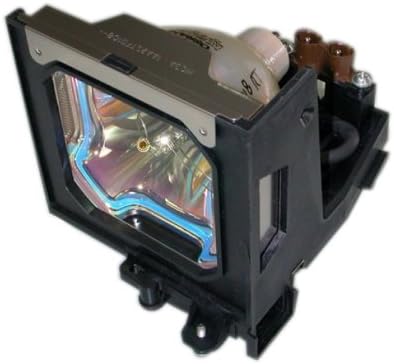
Ushbu qo'llanma sizning Boxlight almashtirish chiroqingizni xavfsiz va samarali o'rnatish, ishlatish va texnik xizmat ko'rsatish bo'yicha muhim ma'lumotlarni taqdim etadi.amp modul. Ushbu modul Boxlight LC-XG110, LC-XG210 va LX32 proyektor modellari bilan foydalanish uchun mo'ljallangan. O'rnatishni davom ettirishdan oldin ushbu ko'rsatmalarni diqqat bilan o'qing.
Rasm: Yoritgichni almashtirish lamp modul, elektr ulagichlari bilan korpusiga o'ralgan lampochkani ko'rsatadi.
Boxlight o'rnini bosuvchi lamp Modul (Qism raqami: ACTG042) asl lampochka va korpusni o'z ichiga oladi, bu sizning projektoringiz bilan moslik va optimal ishlashni ta'minlaydi. Unda o'rtacha quvvatga ega 250 vattli lampochka mavjud.amp normal ish sharoitida 2000 soatlik ishlash muddati.
Xavfsizlik bo'yicha muhim ma'lumotlar
Lampochka bu lamp Tarkibida simob (Hg) mavjud. Iltimos, mahalliy, shtat yoki federal qonunlarga muvofiq yo'q qiling. Oddiy maishiy chiqindilar bilan birga tashlamang.
O'rnatish yoki texnik xizmat ko'rsatishdan oldin har doim projektorni elektr rozetkasidan uzing.
Proyektorni almashtirishdan oldin uning to'liq sovishini kuting (kamida 30 daqiqa)ampIssiq lamps jiddiy kuyishga olib kelishi mumkin.
Yangi l ning shisha yuzasiga tegmangamp to'g'ridan-to'g'ri yalang'och qo'llar bilan. Teringizdagi yog'lar l ni kamaytirishi mumkinamp hayot. Agar kerak bo'lsa, qo'lqop yoki toza matodan foydalaning.
l ni majburlamangamp Modulni joyiga qo'ying. Agar u osongina mos kelmasa, yo'nalishni qayta tekshiring va uning to'g'ri ekanligiga ishonch hosil qilingamp proyektor modelingiz uchun.
Hech qachon proyektorni l bilan ishlatmangamp qopqoq olib tashlandi.
l ni saqlangamp Modulni bolalar qo'li yetmaydigan joyda saqlang.
O'rnatish bo'yicha ko'rsatmalar
Quvvatni o'chirish va o'chirish: Boxlight proyektoringiz o'chirilgan va quvvat manbaidan to'liq uzilganligiga ishonch hosil qiling.
O'zingizni bosing: Proyektorni kamida 30 daqiqa sovushini kuting.amp yuqori haroratlarda ishlaydi va issiq holda ishlatilsa, kuyishga olib kelishi mumkin.
L ni topingamp Muqova: L ni topish uchun proyektoringizning foydalanuvchi qo'llanmasiga qarang.amp bo'linma qopqog'i. Bu odatda bir yoki bir nechta vintlar bilan mahkamlanadi.
L.ni olib tashlangamp Muqova: Tegishli tornavida yordamida l ni mahkamlaydigan vint(lar)ni ehtiyotkorlik bilan chiqarib olingamp qopqoqni yoping va keyin qopqoqni olib tashlang.
Eski L ni ochingamp: Eski lamp Modul bir yoki bir nechta vintlar bilan mahkamlanadi. Ushbu mahkamlagichlarni burab qo'ying.
Eski L.ni olib tashlangamp: Eski l ustidagi tutqichni sekin tortingamp modulni proyektordan chiqarib olish uchun. Uni tushirib yubormaslikka ehtiyot bo'ling.
Yangi L kiritingamp: Yangi Boxlight almashtirish l ni ehtiyotkorlik bilan joylashtiringamp Modulni proyektorga joylashtiring, shunda u joyiga silliq siljiydi. Uni majburlamang.
Xavfsiz yangi Lamp: Yangi l ni mahkamlangamp modulni avvalroq olib tashlagan vint(lar) bilan mahkamlang. Uning mahkam o'rnatilganligiga ishonch hosil qiling.
L -ni almashtiringamp Muqova: L -ni qayta ulangamp bo'linma qopqog'ini yoping va uni vint(lar) bilan mahkamlang.
Quvvatni qayta ulash: Proyektorni elektr rozetkasiga qayta ulang.
Qayta tiklash Lamp Taymer: L ni qanday tiklash bo'yicha ko'rsatmalar uchun projektoringizning foydalanuvchi qo'llanmasiga qarang.amp taymer. Bu aniq o'lchash uchun juda muhimdiramp hayotni kuzatish.
Foydalanish bo'yicha ko'rsatmalar
To'g'ri o'chirish: Proyektorni ishlatishdan keyin uni elektrdan uzishdan oldin har doim sovutish siklini tugating. To'satdan elektr uzilishlari vaqtni qisqartirishi mumkin.amp hayot.
Ventilyatsiya: Proyektorning yetarli shamollatilishiga ishonch hosil qiling. Tiqilib qolgan shamollatish teshiklari qizib ketishiga va yorug'likning pasayishiga olib kelishi mumkin.amp hayot.
Tez-tez yoqish/o‘chirish davrlaridan saqlaning: Proyektorni tez-tez yoqish va o'chirish uning ishlashiga salbiy ta'sir ko'rsatishi mumkin.amp va uning ishlash muddatini qisqartiradi.
Eko rejimi (agar mavjud bo'lsa): Agar projektoringizda "Eko rejimi" yoki shunga o'xshash energiya tejash sozlamasi mavjud bo'lsa, undan foydalanish vaqtni uzaytirishi mumkin.amp hayot.
Xizmat
Havo filtrini tozalash: Proyektoringizning havo filtrini proyektor qo'llanmasiga muvofiq muntazam ravishda tozalang yoki almashtiring. Tiqilib qolgan filtr proyektorning haddan tashqari qizib ketishiga olib kelishi mumkin, bu esa uning ishlashiga salbiy ta'sir ko'rsatadi.amp hayot.
Changni tozalash: Proyektorni changdan toza tuting. Tashqi qismini artish uchun yumshoq, quruq matodan foydalaning. Abraziv tozalagichlar yoki erituvchilardan foydalanmang.
Lamp Ishlov berish: l bilan ishlagandaamp modulni har doim lampochkaning o'zidan emas, balki korpusidan ushlang.
Muammolarni bartaraf qilish; nosozliklarni TUZATISH
Agar yangi l ni o'rnatgandan keyin muammolarga duch kelsangizamp, quyidagilarni hisobga oling:
Lamp Yoritilmaydi:
l ga ishonch hosil qilingamp Modul to'liq o'rnatilgan va vintlar bilan mahkamlangan.
l ni tasdiqlangamp qopqoq to'g'ri o'rnatilgan va mahkamlangan. Ko'pgina projektorlarda qopqoq ochiq bo'lsa, ishlashga xalaqit beradigan xavfsizlik tugmasi mavjud.
Proyektor ishlaydigan elektr rozetkasiga to'g'ri ulanganligini tekshiring.
Xira tasvir yoki yomon rang:
l ni tasdiqlangamp taymer qayta o'rnatildi. Agar bunday bo'lmasa, projektor hali ham eski, eskirgan deb taxmin qilingan holda ishlayotgan bo'lishi mumkin.amp.
Yorqinlik yoki tasvir rejimlari uchun proyektor sozlamalarini tekshiring.
Proyektor linzalari toza ekanligiga ishonch hosil qiling.
"Lamp Xato" xabari:
Bu ko'pincha l ni ko'rsatadiamp to'g'ri o'rnatilmagan yoki lamp qopqoq mahkamlanmagan. O'rnatish bosqichlarini qayta tekshiring.
Agar xato davom etsa, lamp o'zi nosoz bo'lishi mumkin. Mijozlarni qo'llab-quvvatlash xizmatiga murojaat qiling.
Qo'shimcha yordam olish uchun proyektoringizning asl foydalanuvchi qo'llanmasiga qarang yoki Boxlight mijozlarni qo'llab-quvvatlash xizmatiga murojaat qiling.
Mahsulot spetsifikatsiyalari
Brend
Chiroq
Model raqami
ACTG042
Mos keladigan projektor modellari
LC-XG110, LC-XG210, LX32
Lamp Qism raqamlari
03-000712-01P; 610 305 5602; MP56T-930; POA-LMP59
Wattage
250 vatt
Lamp Hayot (Oddiy)
2000 soat
Nur turi
Ksenon
Lamp Texnologiya
LCD
Element og'irligi
13.3 untsiya (0.83 funt)
Mahsulot o'lchamlari
5.32 x 4.53 x 4.13 dyuym
UPC
840398106805
Kafolat haqida ma'lumot
Ushbu Boxlight o'rnini bosuvchi lamp modul a bilan qoplangan 180 kunlik kafolat sotib olingan kundan boshlab. Ushbu kafolat odatdagi foydalanish sharoitida materiallar va mahoratdagi nuqsonlarni qoplaydi. Iltimos, kafolat da'volari uchun sotib olinganligingizni tasdiqlovchi hujjatingizni saqlab qo'ying.
Kafolat xizmati yoki savollar uchun, iltimos, sotuvchi yoki ishlab chiqaruvchiga bevosita murojaat qiling.
Mijozlarni qo‘llab-quvvatlash
Agar sizga qo'shimcha yordam kerak bo'lsa, o'rnatish bo'yicha savollaringiz bo'lsa yoki muammo haqida xabar berishingiz kerak bo'lsa, iltimos, ushbu mahsulotni sotib olgan sotuvchiga yoki ishlab chiqaruvchi Arclyte Tech (Boxlight ishlab chiqaruvchisi) bilan bog'laning.
Qo'llab-quvvatlash xizmatiga murojaat qilganingizda, iltimos, mahsulot modelingiz raqamini (ACTG042) va sotib olinganligini tasdiqlovchi hujjatni tayyor holda taqdim eting.
Ask a question about this manual
Ask about setup, troubleshooting, compatibility, parts, safety, or missing instructions. Manuals+ will review the question and use this page’s manual context to help answer it.