
Kirish
This manual provides comprehensive instructions for the setup, operation, and maintenance of your Lowell JM Oval Alarm Clock, model JA7020. Please read this manual carefully before using the product to ensure proper function and longevity.
Mahsulot tugadiview
The Lowell JM Oval Alarm Clock is a compact and functional device designed to display time and provide an alarm function. Its simple design makes it suitable for various settings.
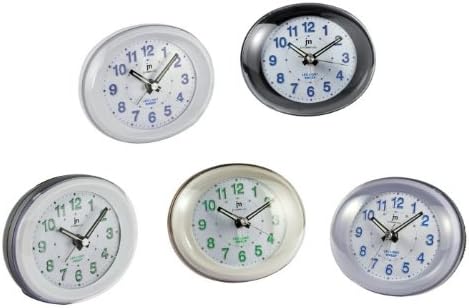
1-rasm: Old view of the Lowell JM Oval Alarm Clock, showcasing its oval shape and analog display. The image displays multiple color variations of the clock, including white, black, silver, and cream, each with a clear face, hour, minute, and second hands, and numerical hour markers.
Paket tarkibi
- Lowell JM Oval Alarm Clock (Model JA7020)
- Qo'llanma (bu hujjat)
Eslatma: Batareyalar kiritilmagan va ularni alohida sotib olish kerak.
Sozlash; o'rnatish
- Paketdan chiqarish: Carefully remove the alarm clock from its packaging. Retain packaging for future storage or transport if needed.
- Batareyani o'rnatish:
Locate the battery compartment on the back of the clock. Open the compartment cover. Insert the required batteries (typically 1x AA battery, not included) according to the polarity indicators (+/-). Close the battery compartment cover securely.
- Joylashtirish: Place the alarm clock on a stable, flat surface away from direct sunlight, extreme temperatures, and high humidity.
Foydalanish bo'yicha ko'rsatmalar
Vaqtni belgilash
- Soatning orqa tomonidagi vaqtni sozlash tugmachasini toping.
- Rotate the knob clockwise or counter-clockwise until the hour and minute hands display the correct current time.
Signalni sozlash
- Soatning orqa tarafidagi signalni sozlash tugmachasini toping.
- Budilnik qo'ng'irog'ini kerakli budilnik vaqtiga o'tkazish uchun budilnikni sozlash tugmachasini aylantiring.
- Locate the alarm ON/OFF switch (usually a small slider or button) on the back or side of the clock. Slide or press it to the "ON" position to activate the alarm.
Signalni to'xtatish
- When the alarm sounds, slide or press the alarm ON/OFF switch to the "OFF" position to silence it.
- To reactivate the alarm for the next day, ensure the alarm ON/OFF switch is set to the "ON" position after silencing it.
Xizmat
- Tozalash: Wipe the clock with a soft, dry cloth. Do not use abrasive cleaners, solvents, or chemical sprays, as these can damage the finish and internal components.
- Batareyani almashtirish: Replace batteries when the clock starts losing time or the alarm function weakens. Always use fresh batteries of the specified type. Remove old batteries promptly to prevent leakage.
- Saqlash: If storing the clock for an extended period, remove the batteries to prevent leakage and potential damage.
Muammolarni bartaraf qilish; nosozliklarni TUZATISH
| Muammo | Mumkin sabab | Yechim |
|---|---|---|
| Soat ishlamayapti / Qo'llar harakat qilmaydi | O'lik yoki noto'g'ri o'rnatilgan batareyalar. | Batareyaning kutupluluğunu tekshiring. Yangi batareyalar bilan almashtiring. |
| Signal jiringlamayapti | Alarm switch is OFF; alarm time not set correctly; weak batteries. | Ensure alarm switch is ON. Verify alarm hand is set to desired time. Replace batteries. |
| Soat vaqtni yo'qotmoqda | Zaif batareyalar. | Yangi batareyalar bilan almashtiring. |
Texnik xususiyatlari
- Brend: LoWell
- Model: JA7020
- Turi: Analog budilnik
- Olchamlari (U x G x Y): Taxminan 22 x 3.81 x 21 sm (8.66 x 1.5 x 8.27 dyuym)
- Og'irligi: Taxminan 160 g (0.35 funt)
- Quvvat manbai: Batareya (qo'shilmagan)
- Xususiyatlari: Time display, Alarm function
Kafolat va qo'llab-quvvatlash
For warranty information or technical support, please refer to the retailer where the product was purchased or visit the official LoWell website. Please have your model number (JA7020) and purchase details ready when contacting support.