
Kirish
The Nyko Media Remote for Xbox One provides convenient control over your Xbox One console and various media applications. This remote simplifies navigation and playback of streaming content and physical media, offering dedicated buttons for common functions. It also features the ability to power your Xbox One on and off, and control basic functions of your television.

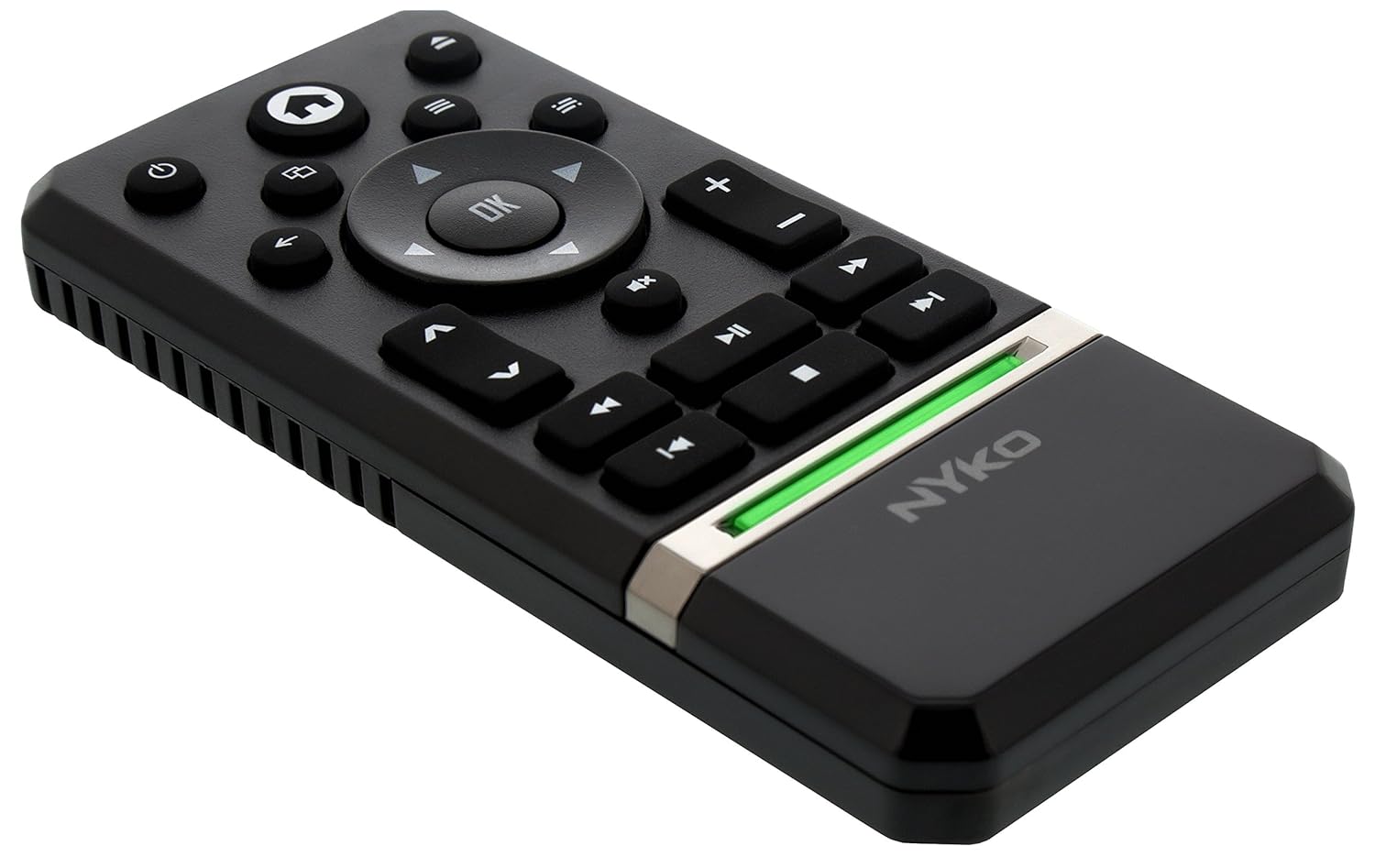
Image: Nyko Media Remote for Xbox One, front view.
Paket tarkibi
- Nyko Media Remote for Xbox One (Model: 86116)
- Eslatma: AAA batareyalari qo'shilmaydi va ularni alohida sotib olish kerak.

Image: Nyko Media Remote for Xbox One in its retail packaging.
Sozlash; o'rnatish
1. Batareyani o'rnatish
- Masofadan boshqarish pultining orqa tomonidagi batareya bo'linmasini toping.
- Batareya qopqog'ini ochish uchun pastga suring.
- Bo'lim ichida ko'rsatilganidek, to'g'ri qutblanishni (+/-) ta'minlab, ikkita (2) AAA batareyani joylashtiring.
- Batareya qopqog'ini joyiga o'rnatguncha yuqoriga suring.
Rasm: orqa view of the remote with the battery cover removed, illustrating the AAA battery placement.
2. Dastlabki ulanish
The Nyko Media Remote uses infrared (IR) technology. No manual pairing is required for the Xbox One. Simply ensure a clear line of sight between the remote's IR emitter and the Xbox One's IR receiver.
For TV control functions (volume, channels, power), your TV must be configured to respond to the Xbox One's IR signals, typically through the Xbox One's OneGuide settings. The remote sends commands to the Xbox One, which then relays them to your TV via its IR blaster (if configured) or Kinect sensor.
Foydalanish bo'yicha ko'rsatmalar
The Nyko Media Remote provides comprehensive control for your Xbox One and various media applications. Refer to the diagram below for button identification and their primary functions.

Rasm: old view of the Nyko Media Remote, displaying all control buttons.
Tugma funktsiyalari:
| Tugma | Funktsiya |
|---|---|
| Quvvat tugmasi (⏻) | Powers the Xbox One console on or off. |
| Uy tugmasi (⌂) | Returns to the Xbox One Home screen. |
| View Tugma (🗀) | Accesses additional information or options within an app or game. |
| Menyu tugmasi (☰) | Opens context-sensitive menus or options. |
| Yo'nalish paneli (D-Pad) | Menyular va kontent bo'ylab harakatlanadi. |
| OK tugmasi | Confirms selections. Can also function as Play/Pause in some apps. |
| Orqaga tugmasi (←) | Oldingi ekran yoki menyuga qaytadi. |
| OneGuide Button (📱) | Launches the Xbox OneGuide for live TV and media. |
| Ovozni oshirish/pasaytirish (⏸ / ⏷) | Adjusts the television volume (requires TV setup via Xbox One). |
| Ovozni o'chirish tugmasi (🔇) | Mutes or unmutes television audio. |
| Kanal yuqoriga/pastga (▲ / ▼) | Changes television channels (requires TV setup via Xbox One). |
| Tez orqaga qaytarish (⏪) | Media ijrosini orqaga qaytaradi. |
| Oʻynatish/toʻxtatib turish (⏯) | Media faylni ijro etadi yoki to'xtatib turadi. |
| Tez oldinga (⏩) | Media ijrosini tez oldinga yo'naltirish. |
| Oldingi trek (⏮) | Joriy trekning boshiga yoki oldingi trekka o'tadi. |
| STOP (⏹) | Media ijrosini to'xtatadi. |
| Keyingi trek (⏭) | Skips to the next track or chapter. |
Media and App Control:
The remote is designed for seamless control of various Xbox One applications, including:
- OneGuide
- Netflix
- Hulu Plus
- Amazon Instant Video
- Other streaming services and Blu-ray/DVD playback
Dedicated playback buttons (Play, Pause, Fast Forward, Rewind, Stop, Skip) provide intuitive control for movies, music, and other media.
Xizmat
Batareyani almashtirish:
When the remote's performance diminishes or it stops responding, it is likely time to replace the batteries. Follow the "Battery Installation" steps in the Setup section to replace the two AAA batteries.
Tozalash:
To clean the remote, gently wipe it with a soft, dry cloth. Avoid using harsh chemicals, abrasive cleaners, or excessive moisture, as these can damage the remote's finish or internal components.
Muammolarni bartaraf qilish; nosozliklarni TUZATISH
- Masofadan boshqarish pulti javob bermayapti:
- Yangi AAA batareyalari to'g'ri o'rnatilganligiga ishonch hosil qiling.
- Verify there is a clear line of sight between the remote and the Xbox One console. Obstructions can block the infrared signal.
- Move closer to the Xbox One console. The remote has a maximum effective range of approximately 9 meters (25 feet).
- TV Control (Volume, Channel, Power) Not Working:
- Confirm that your Xbox One's OneGuide settings are properly configured for your television. The remote sends commands to the Xbox One, which then controls the TV.
- Ensure any necessary IR blasters or Kinect sensors are correctly set up and positioned.
- Vaqti-vaqti bilan javob:
- This can sometimes occur due to weak batteries or environmental interference. Replace batteries and ensure a clear line of sight.
Texnik xususiyatlari
| Xususiyat | Tafsilot |
|---|---|
| Brend | Nyko |
| Model nomi | Media masofaviy |
| Model raqami | 86116 |
| Ulanish texnologiyasi | Infraqizil (IR) |
| Mos qurilmalar | Xbox One, Television (via Xbox One IR blaster/Kinect) |
| Batareya turi | 2 x AAA batareyalar (qo'shilmagan) |
| Maksimal diapazon | 9 metrgacha (25 fut) |
| Element og'irligi | 0.1 funt (taxminan 45 gramm) |
| Rang | Toʻq kulrang |
| Qo'shimcha xususiyatlar | Ergonomic design, dedicated media playback controls. |
Kafolat va qo'llab-quvvatlash
Nyko products are designed for quality and reliability. For specific warranty details, please refer to the documentation included with your purchase or visit the official Nyko website. The product includes warranty information in multiple languages.
Mijozlarni qo‘llab-quvvatlash:
- Email: customer.support@nyko.com
- Telefon: +1-888-400-6956
- Onlayn ro'yxatdan o'tish: www.nyko.com
- Qo'shimcha ma'lumot: http://uqr.me/nykotechnologies/qr/83215

Rasm: orqa view of the product packaging, detailing features and customer support contact information.