
Kirish
This manual provides instructions for the setup, operation, and maintenance of your DIRECTV Universal Remote Control, model RC65. This remote is designed to operate your DIRECTV receiver and can be programmed to control other audio/video devices such as televisions and sound systems.
Please read this manual thoroughly before using your remote control to ensure proper functionality and to maximize your viewtajribasi.
Mahsulot tugadiview
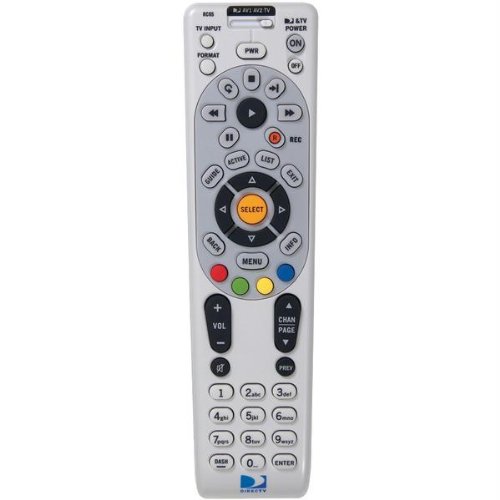
Rasm: old view of the DIRECTV Universal Remote Control RC65. This image displays the remote's ergonomic design and the layout of its primary control buttons, including the directional pad, channel and volume controls, and various function keys. The remote is black with white button labels.
The DIRECTV RC65 remote control is a universal remote capable of controlling multiple devices. Its design focuses on ease of use and compatibility with a wide range of audio/video equipment.
Sozlash; o'rnatish
1. Batareyani o'rnatish
- Masofadan boshqarish pultining orqa tomonidagi batareya bo'linmasini toping.
- Press down on the tab and slide the battery cover off.
- Ikkita (2) AA batareyani joylashtiring, musbat (+) va manfiy (-) terminallar bo'linma ichidagi belgilarga mos kelishiga ishonch hosil qiling.
- Batareya qopqog'ini mahkam chertilguncha joyiga suring.
Note: Batteries are not included with the remote control.
2. Programming for DIRECTV Receiver
The remote is typically pre-programmed to operate your DIRECTV receiver. If it does not work, or if you are setting up a new remote, follow these steps:
- Masofadan boshqarish pultini DIRECTV qabul qilgichingizga yo'naltiring.
- ni bosing va ushlab turing Ovozsiz va TANLASH tugmalarni bir vaqtning o'zida masofadan boshqarish pultining yuqori qismidagi yashil chiroq ikki marta yonib-o'chguncha bosing.
- Kodni kiriting 961Yashil chiroq ikki marta yonib-o'chib turadi.
- ni bosing KANAL YUQARISh tugmasi. Yashil chiroq ikki marta yonib-o'chib turadi.
- ni bosing TANLASH tugmasi. Yashil chiroq ikki marta yonib-o'chib turadi.
- Test the remote by changing channels or adjusting volume.
3. Programming for Other Devices (TV, Audio)
To program the remote to control your television or other audio/video devices, you will need the device's brand code. Refer to the code list provided with your DIRECTV system or search online for "DIRECTV remote codes [your device brand]".
- Turn on the device you wish to program (e.g., your TV).
- ni bosing va ushlab turing Ovozsiz va TANLASH tugmalarni bir vaqtning o'zida masofadan boshqarish pultining yuqori qismidagi yashil chiroq ikki marta yonib-o'chguncha bosing.
- Press the mode button for the device you are programming (e.g., TV for television, AV1 or AV2 for audio/video devices). The green light will flash once.
- Enter the 5-digit code for your device's brand. The green light will flash twice if the code is accepted.
- Masofadan boshqarish pultini qurilmaga yo'naltiring va tugmasini bosing KUCH tugmasi. Agar qurilma o'chsa, dasturlash muvaffaqiyatli bo'ldi.
- If the device does not turn off, repeat steps 1-5 with another code for your device's brand.
Tip: If you cannot find a code, try the "Code Search" method: After step 3, instead of entering a code, press KANAL YUQARISh repeatedly until the device turns off, then press TANLASH.
Foydalanish bo'yicha ko'rsatmalar
The DIRECTV RC65 remote control features a standard layout for easy navigation and control of your entertainment system.
- MODE Buttons (DIRECTV, TV, AV1, AV2): Select the device you want to control. Press the corresponding button before issuing commands for that device.
- KUCH: Tanlangan qurilmani yoqadi yoki o'chiradi.
- Ovozni yuqoriga/pastga: Adjusts the volume of the selected audio device (usually TV or AV receiver).
- CHANNEL UP/DOWN: Changes channels on the DIRECTV receiver.
- Ovozsiz: Ovozni o'chiradi yoki yoqadi.
- Qo‘llanma: Displays the DIRECTV program guide.
- MENYU: Accesses the DIRECTV system menu.
- SELECT/OK: Tanlovlarni tasdiqlaydi yoki menyularga kiradi.
- ARROW Buttons (UP, DOWN, LEFT, RIGHT): Navigate through menus and guides.
- Yozib olish: Records the current program on your DIRECTV DVR.
- PLAY, PAUSE, STOP, REW, FF, SKIP: Control playback of recorded content or live TV (with DVR).
- MA'LUMOT: Joriy dastur haqidagi ma'lumotlarni ko'rsatadi.
- CHIQISH: Menyular yoki qo'llanmalardan chiqadi.
Note: Specific button functions may vary slightly depending on your DIRECTV receiver model and programmed devices.
Xizmat
Masofadan boshqarish pultini tozalash
- Use a soft, dry cloth to wipe the surface of the remote control.
- O'jar axloqsizlik uchun, bir oz dampmatoni suv yoki yumshoq, abraziv bo'lmagan tozalash vositasi bilan yuving. Tozalash vositasini to'g'ridan-to'g'ri masofadan boshqarish pultiga sepmang.
- Kuchli kimyoviy moddalar, erituvchilar yoki abraziv tozalash vositalaridan foydalanishdan saqlaning, chunki ular masofadan boshqarish pultining qoplamasiga yoki ichki qismlariga zarar etkazishi mumkin.
Batareyani almashtirish
Replace batteries when the remote's response becomes sluggish or if the green light at the top does not flash when a button is pressed. Refer to the "Battery Installation" section under Setup for detailed instructions.
- Har doim ikkala batareyani bir vaqtning o'zida almashtiring.
- Use new AA alkaline batteries for optimal performance.
- Eski batareyalarni mahalliy qoidalarga muvofiq utilizatsiya qiling.
Muammolarni bartaraf qilish; nosozliklarni TUZATISH
Masofadan boshqarish pulti javob bermayapti
- Batareyalarni tekshiring: Batareyalarning to'g'ri joylashtirilganligiga va tugab qolmaganligiga ishonch hosil qiling. Agar kerak bo'lsa, almashtiring.
- Ko'rish chizig'i: Make sure there are no obstructions between the remote and the device you are trying to control. The remote uses infrared (IR) signals, which require a clear line of sight.
- To'g'ri rejim: Verify that the correct mode button (DIRECTV, TV, AV1, AV2) is pressed for the device you intend to control.
- Masofadan boshqarish pultini tiklash: Remove batteries, press all buttons a few times to discharge any residual power, then reinsert batteries.
Device Not Responding After Programming
- Kodni tasdiqlash: Double-check that you entered the correct 5-digit code for your device's brand. Try other codes listed for your brand.
- Kod qidirish: Attempt the "Code Search" method described in the "Programming for Other Devices" section.
- Qurilmaning mosligi: While the remote has an extensive code library, some older or very new devices may not be fully compatible.
Volume/Channel Control Issues
- Ovozni qulflash: Ensure the volume is not locked to the DIRECTV receiver if you want to control the TV volume. To unlock, press and hold Ovozsiz va TANLASH until the green light flashes twice, then enter 993. bosing TANLASH.
- Kanalni boshqarish: Ensure the remote is in DIRECTV mode to change channels on the receiver.
Texnik xususiyatlari
| Xususiyat | Tafsilot |
|---|---|
| Brend | DIRECTV |
| Model nomi / raqami | RC65 |
| Maxsus xususiyat | Universal |
| Rang | Qora |
| Mos qurilmalar | Television, DIRECTV Receiver, Audio/Video Devices |
| Ulanish texnologiyasi | Infraqizil (IR) |
| Nazoratchi turi | Tugmachani boshqarish |
| Batareya turi | 2 x AA batareyalari (qo'shilmagan) |
| Element og'irligi | Taxminan 0.52 funt |
Kafolat haqida ma'lumot
This DIRECTV Universal Remote Control (Model RC65) comes with a limited warranty against defects in materials and workmanship under normal use. The warranty period typically covers 90 days from the date of purchase. Please retain your proof of purchase for warranty claims.
This warranty does not cover damage caused by misuse, accident, unauthorized modification, or use with non-DIRECTV approved accessories. For specific warranty terms and conditions, please refer to the documentation included with your DIRECTV system or visit the official DIRECTV support websayt.
Mijozlarni qo‘llab-quvvatlash
If you require further assistance with your DIRECTV Universal Remote Control, please contact DIRECTV customer support:
- Onlayn qo'llab-quvvatlash: Visit the official DIRECTV support website for FAQs, troubleshooting guides, and programming code lists.
- Telefon qo'llab-quvvatlash: Refer to your DIRECTV service agreement or bill for the most current customer service phone number.
When contacting support, please have your DIRECTV account information and the remote control model number (RC65) ready.