
Linksys EA6900
Linksys EA6900 Smart WiFi AC1900 Router Instruction Manual
Model: EA6900 | Brand: Linksys
Kirish
The Linksys EA6900 Smart WiFi AC1900 Router is designed to provide high-speed wireless connectivity for your home network. Featuring advanced Wireless-AC technology and simultaneous dual-band operation, it is optimized for demanding tasks such as HD video streaming and online gaming. This manual provides essential information for setting up, operating, and maintaining your router, ensuring optimal performance and a secure network environment.
Paket tarkibi
- Linksys Smart Wi-Fi Router AC1900, EA6900
- Tez boshlash uchun qo'llanma
- 3 Antennalar
- Hujjatlar bilan CD-ROM
- Ethernet kabeli
- Quvvat adapteri
Sozlash; o'rnatish
Follow these steps to set up your Linksys EA6900 router:
- Routerni qadoqdan chiqaring: Routerni va barcha aksessuarlarni qadoqdan ehtiyotkorlik bilan olib tashlang.
- Antennalarni ulang: Attach the three external antennas to the designated ports on the back of the router. Ensure they are securely fastened.
- Routerni joylashtiring: Routerni uyingizning markaziy joyiga, to'siqlar va shovqinlarga olib kelishi mumkin bo'lgan boshqa elektron qurilmalardan uzoqroqqa joylashtiring.
- Quvvatga ulanish: Plug the power adapter into the router's power port and then into an electrical outlet. The power LED on the router should illuminate.
- Modemga ulanish: Connect one end of the provided Ethernet cable to the yellow "Internet" (WAN) port on the router and the other end to your modem's Ethernet port.
- Qurilmalarni ulash (ixtiyoriy): For wired connections, connect Ethernet cables from your devices (e.g., computer, gaming console) to any of the four blue "Ethernet" (LAN) ports on the router.
- Dastlabki konfiguratsiya:
- Connect your computer or mobile device to the router's default Wi-Fi network (SSID and password can be found on the router's label or Quick Start Guide).
- Ochish a web browser and navigate to the Linksys Smart WiFi setup page (usually
linksyssmartwifi.comor192.168.1.1). - Follow the on-screen instructions to complete the setup, including creating a new Wi-Fi network name (SSID) and password, and setting up an administrator password for the router.
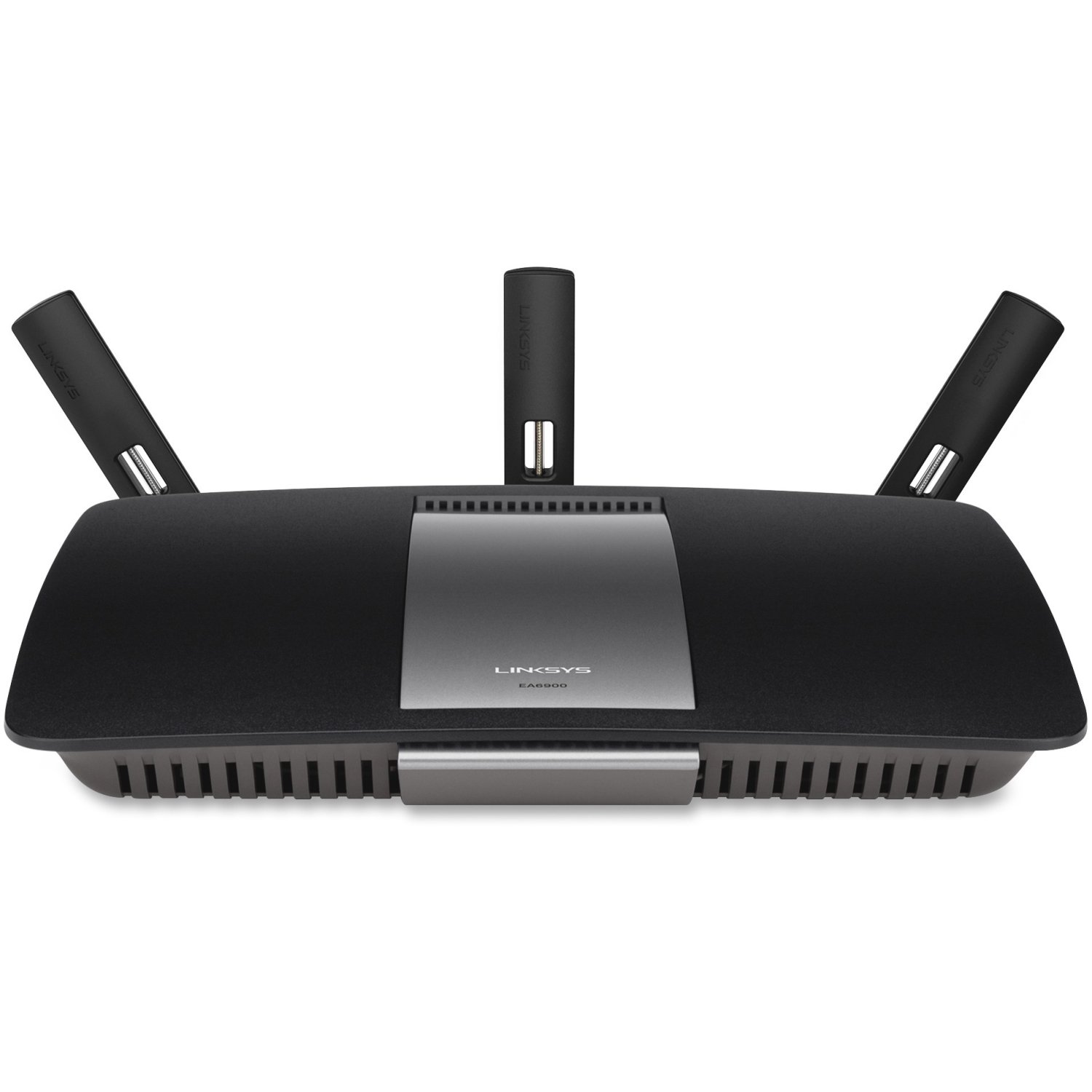
1-rasm: Old view of the Linksys EA6900 Router, showcasinuning dizayni va tashqi antennalari.

Figure 2: Rear panel of the Linksys EA6900 Router, showing the power port, WAN port, four LAN ports, and USB ports.
Router bilan ishlash
The Linksys EA6900 router offers various features to manage your network:
- Ikki tarmoqli Wi-Fi: The router operates on both 2.4 GHz and 5 GHz frequencies simultaneously. The 2.4 GHz band provides wider coverage, while the 5 GHz band offers faster speeds for compatible devices.
- Linksys Smart WiFi Software: Access your router settings and manage your network from anywhere using the Linksys Smart WiFi app or web interface. Features include guest access, parental controls, and device prioritization.
- Wi-Fi himoyalangan sozlash (WPS): Easily connect WPS-compatible devices to your Wi-Fi network by pressing the WPS button on the router and the device.
- USB portlari: The router includes one USB 2.0 port and one USB 3.0 port. These can be used to connect external storage devices for network-attached storage (NAS) functionality, allowing you to share files tarmog'ingiz bo'ylab.
- Gigabit Ethernet portlari: Four Gigabit LAN ports provide high-speed wired connections for devices like desktop computers, smart TVs, and gaming consoles.
Xizmat
To ensure the longevity and optimal performance of your Linksys EA6900 router, consider the following maintenance tips:
- Dasturiy ta'minotni yangilash: Regularly check for and install firmware updates through the Linksys Smart WiFi software. Updates often include performance improvements, security patches, and new features.
- Jismoniy joylashtirish: Ensure the router is placed in a well-ventilated area to prevent overheating. Avoid placing it in enclosed spaces or near heat sources.
- Kabelni boshqarish: Keep all cables connected to the router tidy and free from kinks or excessive bending to prevent signal degradation.
- Vaqti-vaqti bilan qayta ishga tushirish: Occasionally restarting your router (power cycling) can help clear its memory and resolve minor performance issues.
Muammolarni bartaraf qilish; nosozliklarni TUZATISH
If you encounter issues with your Linksys EA6900 router, try these troubleshooting steps:
- Internetga ulanish yo'q:
- Modem to'g'ri ishlayotganini tekshiring.
- Ensure the Ethernet cable from the modem is securely connected to the router's yellow "Internet" (WAN) port.
- Restart both your modem and router by unplugging them from power for 30 seconds and then plugging them back in.
- Slow Wi-Fi Speeds or Frequent Disconnects:
- Move the router to a more central location, away from walls, large metal objects, and other electronics.
- Qurilmalaringiz tegishli Wi-Fi diapazoniga ulanganligiga ishonch hosil qiling (yuqori tezlik uchun 5 gigagerts, kengroq diapazon uchun 2.4 gigagerts).
- Check for firmware updates for your router.
- Reduce the number of active devices or bandwidth-intensive applications if possible.
- Router sozlamalariga kirish imkoni yo'q:
- Qurilmangiz routerning Wi-Fi tarmog'iga yoki Ethernet kabeli orqali ulanganligiga ishonch hosil qiling.
- Verify the router's IP address (usually
192.168.1.1) yoki foydalaninglinksyssmartwifi.com. - If you forgot your administrator password, you may need to perform a factory reset (see Quick Start Guide for instructions).
- Wi-Fi Protected Setup (WPS) Issues:
- Ensure your device supports WPS.
- Try initiating WPS from both the router and the device within two minutes.
- If WPS fails, connect the device manually using the Wi-Fi network name (SSID) and password.
Texnik xususiyatlari
| Xususiyat | Tafsilot |
|---|---|
| Brend | Linksys |
| Model nomi | EA6900 |
| Simsiz texnologiya | Advanced Wireless-AC (up to 4.3x faster than Wireless-N) |
| Chastota diapazoni klassi | Ikki tarmoqli (2.4 gigagertsli va 5 gigagertsli) |
| Max. Link Rate | 1300 Mbps (AC1300) + N600 Mbps |
| Ethernet portlari | 1x Gigabit WAN (10/100/1000), 4x Gigabit LAN (10/100/1000) |
| USB portlari | 1x USB 2.0, 1x USB 3.0 |
| Antennalar | 3 Fixed Antennas |
| Maxsus xususiyatlar | Linksys Smart WiFi software, Wi-Fi Protected Setup (WPS) |
| Ishlash harorati | 32-104 °F (0-40 °C) |
| Ishlash namligi | 10 dan 80% gacha kondensatsiz |
| Tarmoq standartlari | IEEE 802.11a/b/g/n/ac, IEEE 802.3/3u |
| Mos keladigan OS | Mac OS X (10.5.8 to 10.9), Windows (XP to 8 32/64) |
Kafolat va qo'llab-quvvatlash
The Linksys EA6900 Smart WiFi AC1900 Router comes with a 1-year hardware limited warranty. For technical support, product registration, or to access the full documentation, please visit the official Linksys support website. You can also find additional resources and FAQs through the Linksys Smart WiFi software.
Ask a question about this manual
Ask about setup, troubleshooting, compatibility, parts, safety, or missing instructions. Manuals+ will review the question and use this page’s manual context to help answer it.