
1. Kirish
The Intel NUC DE3815TYKHE is a compact, fanless mini PC designed for various applications, including thin clients, digital signage, and embedded solutions. This kit provides a flexible platform with support for a 2.5-inch storage drive, offering a customizable computing experience in a small form factor.
2. Paket tarkibi
Paketingizda barcha narsalar mavjudligini tekshiring:
- Intel NUC DE3815TYKHE Unit
- AC quvvat adapteri
- VESA Mounting Bracket (with screws)
- Tez boshlash qo'llanmasi (agar mavjud bo'lsa)
3. Jismoniy tugashview
3.1 Old panel
The front panel provides essential connectivity and controls.

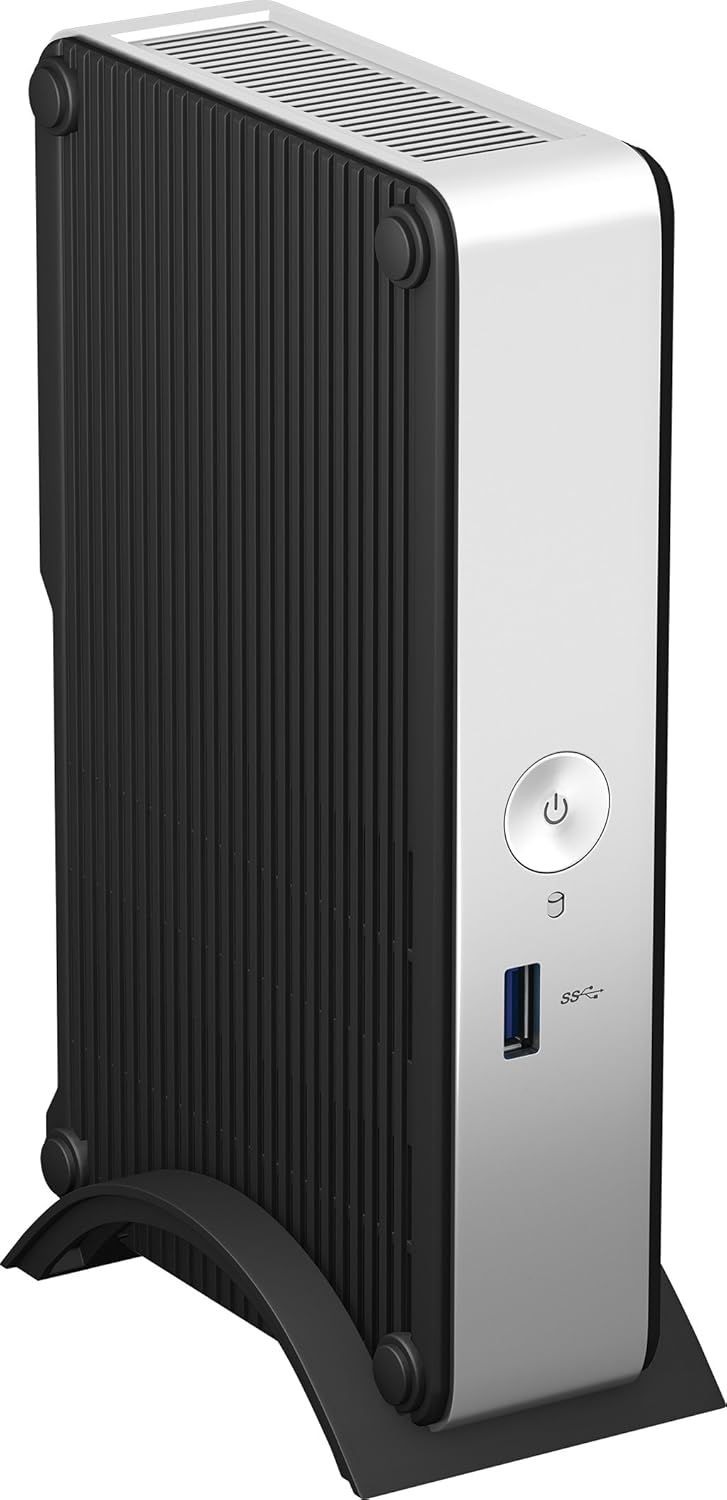
1-rasm: Old view of the Intel NUC DE3815TYKHE. This image displays the compact, fanless design of the unit, highlighting the power button and a single blue USB 3.0 port on the front for easy access.
- Quvvat tugmasi: Jihozni yoqish yoki o'chirish uchun ishlatiladi.
- USB 3.0 porti: Yuqori tezlikdagi USB qurilmalarini ulash uchun.
3.2 Orqa panel
The rear panel houses various ports for display, network, and peripherals.

2-rasm: Orqa view of the Intel NUC DE3815TYKHE. This image details the available rear ports, including VGA, HDMI, two USB ports, an Ethernet port, and a headphone/microphone jack, along with the power input.
- VGA porti: For connecting to older monitors or projectors.
- HDMI porti: For connecting to modern displays with audio support.
- USB 2.0 portlari (x2): Standart USB qurilmalarini ulash uchun.
- Ethernet porti (RJ-45): Simli tarmoq ulanishi uchun.
- Eshitish vositasi/Mikrofon uyasi: Ovozni kiritish va chiqarish uchun.
- DC quvvat kiritish: AC quvvat adapterini ulash uchun.
3.3 Ichki komponentlar
Accessing the internal components is necessary for memory and storage installation.
3-rasm: Intel NUC DE3815TYKHE unit displayed alongside its internal motherboard. This view illustrates the compact size of the main unit and the layout of the internal components, including the processor, memory slot, and connectors for storage.
- DDR3L SODIMM Slot: For installing system memory.
- 2.5-inch Drive Bay: For installing a SATA HDD or SSD.
- Simsiz antennalar: Built-in for wireless connectivity.
- eMMC Storage: 4GB embedded storage for operating system or data.
4. Sozlash
Follow these steps to prepare your Intel NUC for operation.
4.1 Installing Memory (RAM)
- Unscrew and remove the bottom cover of the NUC unit.
- Locate the DDR3L SODIMM slot on the motherboard.
- Align the notch on the SODIMM module with the notch in the slot.
- Insert the module at a 45-degree angle and press down until the retaining clips snap into place.
4.2 Installing a 2.5-inch Storage Drive
- With the bottom cover removed, locate the 2.5-inch drive bay.
- Connect the SATA data and power cables from the NUC to your 2.5-inch HDD or SSD.
- Secure the drive within the bay using the provided screws (if applicable).
- Replace the bottom cover and secure it with screws.
4.3 Periferik qurilmalarni ulash
- Displey: Connect your monitor to the HDMI or VGA port.
- Klaviatura va sichqoncha: Connect USB keyboard and mouse to any available USB ports.
- Tarmoq: For wired internet, connect an Ethernet cable to the RJ-45 port. For wireless, ensure antennas are clear.
- Audio: Connect headphones or speakers to the audio jack if needed.
4.4 Quvvatni yoqish
- Connect the AC power adapter to the DC power input on the rear panel.
- Quvvat adapterini rozetkaga ulang.
- Press the power button on the front panel to turn on the NUC.
5. Operatsion tizimni o'rnatish
The Intel NUC DE3815TYKHE supports multiple operating systems. You will need to install your preferred OS onto the internal eMMC storage or the 2.5-inch drive you installed.
- Prepare a bootable USB drive with your chosen operating system (e.g., Windows, Linux).
- Connect the USB drive to a USB port on the NUC.
- Power on the NUC and enter the BIOS/UEFI setup (usually by pressing F2 during boot) to configure the boot order.
- Operatsion tizimni o'rnatish uchun ekrandagi ko'rsatmalarga amal qiling.
6. Xizmat ko'rsatish
The fanless design of the Intel NUC DE3815TYKHE minimizes maintenance requirements.
- Tozalash: Periodically wipe the exterior with a soft, dry cloth. Avoid using liquid cleaners directly on the unit.
- Ventilyatsiya: Ensure the ventilation slots are not obstructed to allow for proper passive cooling.
- Dasturiy ta'minot yangilanishlari: Optimal ishlash va xavfsizlik uchun operatsion tizim va drayverlarni yangilab turing.
7. Muammolarni bartaraf qilish; nosozliklarni TUZATISH
Muammolarga duch kelsangiz, quyidagi umumiy muammolarni bartaraf etish bosqichlariga qarang.
- Quvvat yo'q: Quvvat adapterining ham NUCga, ham ishlaydigan elektr rozetkasiga mahkam ulanganligiga ishonch hosil qiling. Rozetkani boshqa qurilma bilan sinab ko'ring.
- Displey yo'q: Verify that the monitor is powered on and correctly connected to the NUC's HDMI or VGA port. Try a different cable or monitor if possible.
- Operatsion tizim yuklanmayapti: Check the boot order in the BIOS/UEFI settings. Ensure the installed storage drive is detected and contains a valid operating system.
- Periferik qurilma aniqlanmadi: Ensure USB devices are properly seated in the ports. Try a different USB port or device.
- Tarmoqqa ulanish yo'q: For wired connections, check the Ethernet cable and router. For wireless, ensure Wi-Fi is enabled in the OS and the NUC is within range of a network.
8. Texnik shartlar
| Xususiyat | Tafsilot |
|---|---|
| Model nomi | DE3815TYKHE |
| Protsessor | Intel Atom Processor (e.g., E3815) |
| Ram | 4 GB DDR3L 1333 (SODIMM slot for expansion) |
| Ichki xotira | 4GB eMMC (embedded MultiMediaCard) |
| Saqlashni kengaytirish | Internal 2.5-inch SATA HDD/SSD bay |
| Grafika | Integratsiyalashgan Intel Graphics |
| Video chiqishi | HDMI, VGA |
| USB portlari | 1x USB 3.0 (old), 2x USB 2.0 (orqa) |
| Audio | Eshitish vositasi/Mikrofon kombinatsiyasi |
| Tarmoq | Ethernet (RJ-45), Built-in Wireless Antennas |
| Dizayn | Fansiz |
| Operatsion tizimni qo'llab-quvvatlash | Multiple OS options (e.g., Windows, Linux) |
| Rang | Metallic gray plastic ring with black sides |
9. Kafolat va qo'llab-quvvatlash
For warranty information and technical support, please refer to the official Intel websaytiga tashrif buyuring yoki sotib olish nuqtangizga murojaat qiling. Kafolat talablari uchun sotib olish hujjatingizni saqlang.
- Onlayn qo'llab-quvvatlash: Tashrif buyuring Intel Support for DE3815TYKHE for drivers, downloads, and troubleshooting resources.
- Aloqa: Refer to the Intel support page for contact options.