
1. Kirish
The PATLITE NBM-D88N is an advanced interface converter designed for flexible control and monitoring of network status. It features 8 digital inputs and 8 digital outputs, allowing independent control of various devices with contact inputs. This unit also includes a 24V power output and supports a wide range of communication protocols for seamless integration into industrial and research environments. This manual provides essential information for the proper setup, operation, and maintenance of your NBM-D88N device.
2. Sozlash
2.1 Paketni ochish va tekshirish
Carefully unpack the NBM-D88N unit and verify that all included components are present and undamaged. The package should contain:
- NBM-D88N Interface Converter Unit
- Simple Instruction Manual
- AC adapteri
- Rubber Feet (4 pieces)
2.2 Jismoniy aloqalar
Refer to the diagram below for the location of connection terminals and ports on the rear of the NBM-D88N unit. Ensure all connections are secure before powering on the device.

Image: Rear Panel Overview
This image displays the rear panel of the NBM-D88N unit, highlighting key connection points. Numbered labels indicate: (13) Serial Interface, (14) Functional Earth Terminal, (15) Input Terminal Block, (16) Output Terminal Block, (17) Power Output Terminal Block, and (18) DC Jack. This visual guide is crucial for correct wiring and setup.
- DC quvvat kiritish: Connect the provided AC adapter to the DC Jack (18). The unit operates on DC24V.
- Raqamli kirish: Connect external devices requiring contact input to the Input Terminal Block (15). The unit supports 8 digital inputs.
- Raqamli chiqishlar: Connect alarm devices, indicators, or other controlled equipment to the Output Terminal Block (16). The unit provides 8 digital outputs.
- 24V quvvat chiqishi: Utilize the Power Output Terminal Block (17) to supply 24V power to connected devices such as rotating lights or buzzers.
- Serial interfeysi: Use the Serial Interface (13) for specific communication needs.
- Functional Earth: Connect to the Functional Earth Terminal (14) for proper grounding.
3. Foydalanish bo'yicha ko'rsatmalar
3.1 Digital Input/Output Control
The NBM-D88N allows for independent control of devices connected to its 8 digital inputs and 8 digital outputs. Digital input detection conditions can be configured to trigger specific actions. These conditions include:
- Continuous Time Setting: Define a duration for which an input must be active to be detected.
- AND Condition Setting: Require multiple inputs to be active simultaneously for detection.
- Count Condition Setting: Detect an input after a specified number of activations.

Image: Contact Input/Output Overview
This diagram illustrates the 8 digital inputs and 8 digital outputs of the NBM-D88N. It shows examples of contact input from sensors and contact output to alarm devices, demonstrating how the unit facilitates control using these outputs.
3.2 Network Monitoring Functions
The device offers comprehensive network monitoring capabilities:
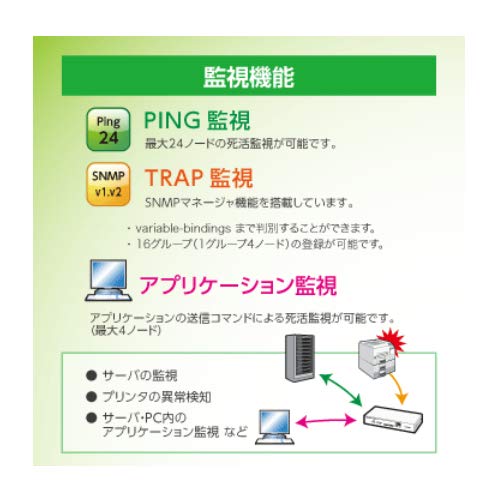
Image: Monitoring Functions
This image details the monitoring capabilities of the NBM-D88N. It includes PING monitoring for up to 24 nodes, SNMP TRAP monitoring (v1, v2) with support for 16 groups (4 nodes per group), and Application monitoring for up to 4 nodes, showing examples like server monitoring and printer anomaly detection.
- PING Monitoring: Capable of monitoring the live/dead status of up to 24 network nodes.
- SNMP TRAP Monitoring: Equipped with an SNMP manager function, allowing detailed variable bindings. Supports up to 16 groups (4 nodes per group).
- Application Monitoring: Monitors the live/dead status of applications via transmission commands, supporting up to 4 nodes. Examples include server monitoring, printer anomaly detection, and application monitoring within servers/PCs.
3.3 Command Transmission
The NBM-D88N supports various command transmission methods for external device linkage:

Image: Command Transmission Options
This image illustrates the various command transmission methods supported by the NBM-D88N. It shows the ability to send up to 8 RSH commands, 8 SNMP TRAP commands, SOCKET transmissions (up to 30 bytes), and up to 8 email notifications. These functions enable control of network-compatible devices and event notifications.
- RSH Command Transmission: Send up to 8 RSH commands based on events.
- SNMP TRAP Transmission: Send up to 8 SNMP TRAP (V1, V2C) messages in response to events.
- SOCKET Transmission: Transmit SOCKET commands up to 30 bytes.
- Email Transmission: Send up to 8 email notifications with customizable subject and body, supporting POP/SMTP authentication.
3.4 Command Control
The unit can receive and execute commands from external systems:
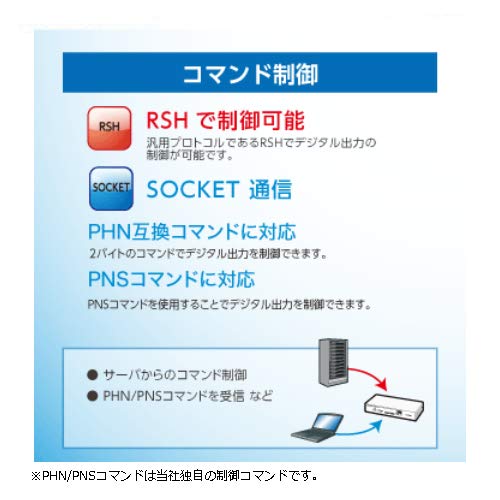
Image: Command Control Capabilities
This diagram illustrates the command control features of the NBM-D88N. It highlights control via RSH (a general-purpose protocol for digital output control), SOCKET communication, and support for proprietary PHN/PNS commands for digital output control. This enables command control from servers and reception of PHN/PNS commands.
- RSH Control: Digital output can be controlled using the RSH protocol.
- SOCKET Communication: Supports PHN compatible commands (2-byte commands) and PNS commands for digital output control. Note: PHN/PNS commands are proprietary control commands.
3.5 USB funksiyasi
The USB port allows for convenient management tasks:
- Dasturiy ta'minotni yangilash: Update the device firmware using a USB flash memory.
- Log Saving: Save operational logs to a USB flash memory.
- Configuration Management: Upload and download configuration data to/from a USB flash memory.
4. Xizmat ko'rsatish
To ensure optimal performance and longevity of your NBM-D88N, follow these maintenance guidelines:
- Tozalash: Keep the unit clean and free from dust. Use a soft, dry cloth for cleaning. Avoid abrasive cleaners or solvents.
- Ulanish tekshiruvlari: Periodically inspect all cable connections to ensure they are secure and free from damage.
- Dasturiy ta'minotni yangilash: Regularly check the PATLITE website for available firmware updates to benefit from new features and improvements. Use a USB flash memory for the update process as described in Section 3.5.
- Atrof-muhit sharoitlari: Ensure the device is operated within its specified environmental conditions (temperature, humidity) to prevent malfunction.
5. Muammolarni bartaraf qilish; nosozliklarni TUZATISH
If you encounter issues with your NBM-D88N, consider the following basic troubleshooting steps:
- Quvvat yo'q: Verify that the AC adapter is correctly connected to the DC Jack and plugged into a working power outlet. Check the power indicator light on the unit.
- Tarmoqqa ulanish yo'q: Ensure the Ethernet cable is securely connected to a functional network port. Check network settings and IP configuration.
- Digital Input/Output Malfunction: Check the wiring to the input and output terminal blocks. Verify that the external devices connected are functioning correctly. Review the digital input detection conditions configured in the device settings.
- Aloqa muammolari: Confirm that the communication commands (HTTP, RSH, SNMP, SOCKET) are correctly configured and that the external systems are sending/receiving commands as expected.
- USB Functionality Issues: Ensure the USB flash memory is properly inserted and formatted. Try a different USB flash memory if problems persist.
For more complex issues, refer to the detailed technical documentation available from PATLITE or contact customer support.
6. Texnik shartlar
Detailed specifications for the PATLITE NBM-D88N Interface Converter:
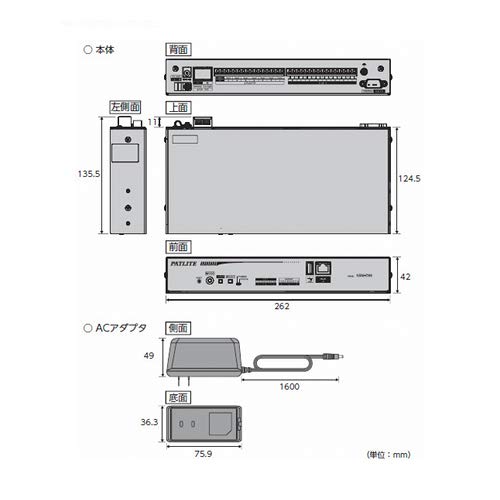
Rasm: Mahsulot o'lchamlari
This technical drawing provides precise dimensions (in mm) for the main NBM-D88N unit (top and front views) and its accompanying AC adapter (side and bottom views). It shows the unit's length as 262mm, width as 124.5mm, and height as 42mm, with the AC adapter measuring 49mm x 75.9mm x 36.3mm.
| Xususiyat | Tafsilot |
|---|---|
| Ishlab chiqaruvchi | PATLITE |
| Qism raqami | NBM-D88N |
| Element og'irligi | 1.1 kilogramm |
| Mahsulot o'lchamlari (U x G x Y) | 13.55 x 26.2 x 4.2 sm |
| Material | Metall |
| Plug turi | Rak |
| Sertifikatlar | Idoralar, FCC, RoHS |
| Kiritilgan komponentlar | Simple Instruction Manual, AC Adapter, 4 Rubber Feet |
| ASIN | B014CJP7KC |
| Birinchi mavjud sana | 24 yil 2015 avgust |
7. Kafolat va qo'llab-quvvatlash
For information regarding the product warranty, please refer to the warranty card included with your purchase or visit the official PATLITE website. For technical support, service, or inquiries, please contact your local PATLITE distributor or customer service center. Ensure you have your product model number (NBM-D88N) and purchase details available when seeking support.