
1. Kirish
Sotib olganingiz uchun tashakkurasing the ipega PG-9057 Wireless Game Controller. This manual provides detailed instructions for setting up, operating, and maintaining your device. Please read this manual carefully before use to ensure optimal performance and longevity of your controller.
2. Mahsulot xususiyatlari
- Simsiz ulanish: Enjoy gaming freedom with wireless connection technology.
- Ko'p platformali muvofiqlik: Supports Android devices (smartphones, tablets, TV boxes) and Windows PCs.
- High Durability Buttons: Equipped with high-quality, durable buttons for extended gaming sessions.
- Aniqlik boshqaruvlari: Features a D-pad with pressure sensitivity and a 360-degree joystick with no dead zone for accurate input.
- Ergonomik dizayn: Designed for comfortable grip and prolonged use.
- O'rnatilgan telefon ushlagichi: Conveniently mount your smartphone for mobile gaming.
3. Paket tarkibi
Iltimos, qutidan chiqarilayotganda paket tarkibini tekshiring:
- ipega PG-9057 simsiz o'yin boshqaruvchisi
- USB zaryadlovchi kabeli
- User Manual (Japanese version included)
4. Sozlash
4.1. Tekshirish moslamasini zaryadlash
Before first use, fully charge the controller using the provided USB cable. Connect the small end of the USB cable to the controller's charging port and the other end to a USB power source (e.g., PC, USB wall adapter).
4.2. Device Compatibility Overview
The ipega PG-9057 controller supports various devices and connection methods as shown below:

This image displays the ipega PG-9057 Wireless Game Controller, highlighting its compatibility with various devices including smartphones, tablets, personal computers, and VR headsets.
4.3. Connection Methods and System Environment
The controller offers multiple connection options depending on your device and operating system. Refer to the table below for detailed compatibility.

This table outlines the system requirements and connection methods for the ipega PG-9057 controller, detailing compatibility with Android smartphones, tablets, and TV boxes via Bluetooth 4.0 or USB, and PCs via USB.
4.3.1. Bluetooth Connection (Android Devices)
- Tekshirish moslamasi zaryadlanganligiga ishonch hosil qiling.
- ni bosing va ushlab turing UY tugmasi va A button simultaneously until the indicator light flashes rapidly. This puts the controller into pairing mode.
- On your Android device, go to Bluetooth settings and turn Bluetooth on.
- Ni qidirish available devices and select "ipega PG-9057" (or similar name) from the list.
- Once paired, the indicator light on the controller will become solid.
4.3.2. USB Wired Connection (Windows PC / Android Devices)
- Connect the controller to your Windows PC or Android device using the USB cable.
- The device should automatically recognize the controller. No special drivers are usually required for basic functionality.
5. Foydalanish bo'yicha ko'rsatmalar
5.1. Asosiy boshqaruv elementlari
The ipega PG-9057 features standard gamepad controls for intuitive gaming.

Batafsil view of the ipega PG-9057 controller's D-pad, joystick, and A/B/X/Y buttons, illustrating their high sensitivity and precise input capabilities.
- D-Pad: For directional input, offering pressure sensitivity.
- Chap/O'ng joystiklar: 360-degree movement with no dead zone for precise control.
- A/B/X/Y tugmalari: Standard action buttons with zero delay response.
- L1/R1, L2/R2 Triggers: Shoulder buttons and triggers for various in-game actions.
- TANLASH/BOSHLASH tugmalari: O'yin ichidagi menyu navigatsiyasi va harakatlar uchun.
- HOME tugmasi: To power on/off the controller or return to the main menu.
5.2. Smartfon bilan foydalanish
The controller includes an integrated holder for smartphones, allowing for a portable gaming experience.
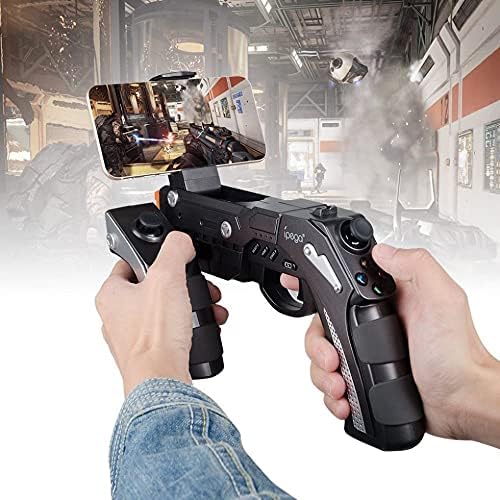
A user is shown holding the ipega PG-9057 Wireless Game Controller with a smartphone securely attached, actively engaged in mobile gaming.
- Extend the phone holder located on the top of the controller.
- Carefully place your smartphone into the holder, ensuring it is securely gripped.
- Connect the controller to your smartphone via Bluetooth as described in Section 4.3.1.
- Launch your desired game and configure controller settings if necessary.
6. Xizmat ko'rsatish
To ensure the longevity and optimal performance of your ipega PG-9057 controller, follow these maintenance guidelines:
- Tozalash: Use a soft, dry cloth to wipe the surface of the controller. Do not use harsh chemicals or abrasive cleaners.
- Saqlash: Tekshirgichni to'g'ridan-to'g'ri quyosh nuri va haddan tashqari haroratdan uzoqda, salqin va quruq joyda saqlang.
- Damlamalardan saqlaning: Protect the controller from drops and impacts, as this can damage internal components.
- Zaryadlash: Batareyani haddan tashqari zaryadlamang. Kontroller to'liq zaryadlangandan so'ng, zaryadlash simini ajratib oling.

The ipega PG-9057 Wireless Game Controller is shown, emphasizing its construction from high-quality, durable ABS material.
7. Muammolarni bartaraf qilish; nosozliklarni TUZATISH
If you encounter issues with your controller, please refer to the following common solutions:
- Tekshirish moslamasi ulanmayapti:
- Tekshirish moslamasi to'liq zaryadlanganligiga ishonch hosil qiling.
- Verify that Bluetooth is enabled on your device and the controller is in pairing mode.
- Tekshirish moslamasini ham, qurilmangizni ham qayta ishga tushirib ko'ring.
- If using USB, ensure the cable is securely connected and try a different USB port.
- Tugmalar yoki joystiklar javob bermayapti:
- Kontroller qurilmangizga to'g'ri ulanganligini tekshiring.
- Restart the controller and reconnect.
- O'ynayotgan o'yiningiz tashqi kontrollerlarni qo'llab-quvvatlashiga ishonch hosil qiling.
- Kechikish yoki kiritish kechikishi:
- Ensure there are no obstructions or excessive distance between the controller and your device.
- Boshqa simsiz qurilmalardan shovqinlarni minimallashtiring.
- For critical gaming, consider using a wired USB connection if supported by your device.
8. Texnik shartlar
| Spetsifikatsiya | Qiymat |
|---|---|
| Brend | ipega |
| Model | PG-9057 |
| Mos qurilmalar | Android, Windows |
| Nazoratchi turi | O'yin paneli |
| Ulanish texnologiyasi | Simsiz |
| Xususiyatlari | Simsiz |
| Mos keladigan elementlar | Android, Windows |
| Ulanish usuli | Simsiz |
| Maxsus xususiyatlar | Simsiz |
| Uskuna platformasi | Pristavka |
| Quvvat manbai | Batareyadan quvvatlanadi |
| Number of Package Items | 1 |
| UPC | 602747571722 |
| ASIN | B018TSBFE4 |
| GTIN | 602747571722 |
9. Kafolat va qo'llab-quvvatlash
For warranty information and customer support, please refer to the documentation provided with your purchase or visit the official ipega websayt. Har qanday kafolat da'volari uchun xaridingizni tasdiqlovchi hujjatni saqlang.