
Kirish
This manual provides detailed instructions for the setup, operation, and maintenance of your A4tech Bloody Light Strike B314 Gaming Keyboard. Please read this manual thoroughly before using the product to ensure optimal performance and longevity.
Asosiy xususiyatlar
- Bloody 4 Light Strike Mechanical Switches: Experience ultra-fast response times of 0.2ms with infrared optic switches, providing a competitive edge in gaming.
- Kengaytirilgan chidamlilik: Designed for intensive use, featuring A,S,D,W silicon keys with a convex shape for improved control and longevity.
- Neon Glare System LED Backlighting: Customize your gaming environment with vibrant LED backlighting, making keys easy to locate in low-light conditions.
- 9 Dasturlashtiriladigan tugmalar: Personalize your gaming experience by assigning custom functions to 9 individually programmable keys.
- Double Secure Water-Resistance: The keyboard is electronically sealed with a water drain hole, protecting it from accidental spills and extending its lifespan.
Paket tarkibi
Paketda barcha elementlar mavjudligiga ishonch hosil qiling:
- Bloody Light Strike B314 Gaming Keyboard
- Foydalanuvchi uchun qo'llanma (ushbu hujjat)

Image: The retail packaging for the Bloody Light Strike B314 Gaming Keyboard, showing the keyboard with LED backlighting and key features highlighted.
O'rnatish uchun qo'llanma
- Klaviaturani ulang: Klaviaturaning USB ulagichini kompyuteringizdagi mavjud USB portiga ulang.
- Haydovchi o'rnatish: The keyboard is typically plug-and-play. Your operating system should automatically detect and install the necessary drivers. If prompted, follow the on-screen instructions.
- Dasturiy ta'minotni o'rnatish (ixtiyoriy): For advanced customization, including programming keys and managing backlighting, download and install the official Bloody software from the A4tech websayt.
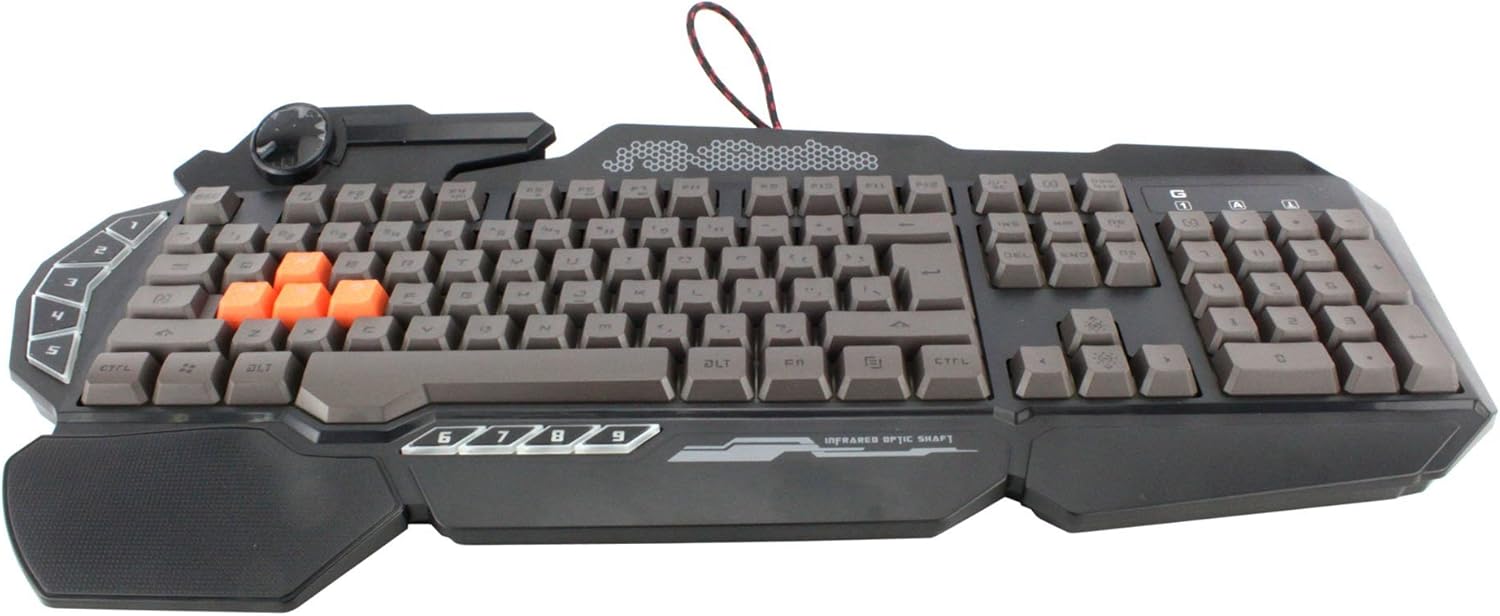
Rasm: yuqoridan pastga view of the Bloody Light Strike B314 Gaming Keyboard, showcasing the full QWERTY layout with orange WASD keys and dedicated macro keys on the left.
Foydalanish bo'yicha ko'rsatmalar
Asosiy foydalanish
The Bloody B314 functions as a standard QWERTY keyboard for everyday typing and gaming. Its infrared mechanical switches provide a fast and responsive typing experience.
Dasturlashtiriladigan kalitlar
The keyboard features 9 programmable keys, typically located on the left side. To customize these keys:
- Install the official Bloody software from the A4tech websayt.
- Launch the software and navigate to the key customization section.
- Select the desired programmable key (e.g., G1-G9 or similar).
- Assign macros, key functions, or multimedia controls as needed.
- Professionalingizni saqlangfile o'zgarishlarni qo'llash uchun.
LED orqa yoritishni boshqarish
The Neon Glare System LED backlighting can be adjusted using function key combinations:
- Fn+F12: Cycle through different backlighting modes (e.g., static, breathing, off).
- Fn + Up/Down Arrow: Orqa yorug'likning yorqinligini sozlang.
- Fn + Left/Right Arrow: Adjust backlight speed or direction (if applicable to the mode).
O'yin rejimi
Activate Game Mode to disable the Windows key and prevent accidental interruptions during gameplay.
- Fn+F8: O'yin rejimini yoqish/o'chirish.

Rasm: burchakli view of the Bloody Light Strike B314 Gaming Keyboard, highlighting the ergonomic wrist rest and the distinct orange WASD keys.
Xizmat
Tozalash
- Tozalashdan oldin klaviaturani kompyuteringizdan uzing.
- Yumshoqdan foydalaning, damp Klaviatura yuzasini artish uchun mato. Qattiq kimyoviy moddalar yoki abraziv materiallardan saqlaning.
- Tugmalar orasidagi chang va qoldiqlar uchun siqilgan havodan foydalaning.
- The water-resistant design helps protect against spills, but it is still recommended to clean up liquids promptly.
Saqlash
Klaviaturani uzoq vaqt ishlatilmaganda to'g'ridan-to'g'ri quyosh nuri va haddan tashqari haroratdan uzoqda, salqin va quruq joyda saqlang.
Muammolarni bartaraf qilish; nosozliklarni TUZATISH
Klaviatura javob bermayapti
- USB kabelining klaviaturaga ham, kompyuterga ham mahkam ulanganligiga ishonch hosil qiling.
- Klaviaturani boshqa USB portiga ulab ko'ring.
- Kompyuteringizni qayta ishga tushiring.
- Check if the keyboard is recognized in your computer's Device Manager (Windows) or System Information (macOS).
Orqa yoritish ishlamayapti
- Ensure the backlighting is not turned off using the Fn + F12 combination.
- Adjust brightness using Fn + Up Arrow.
- Agar maxsus prodan foydalansangizfiles, ensure the backlighting settings are correctly configured in the Bloody software.
Dasturlashtiriladigan tugmalar ishlamayapti
- Verify that the Bloody software is installed and running.
- Ensure your custom profiles are loaded and active within the software.
- Check for any software updates for the Bloody keyboard utility.
Texnik xususiyatlari
| Xususiyat | Tafsilot |
|---|---|
| Brend | A4tech |
| Model raqami | A4TKLA45173 |
| Ulanish texnologiyasi | Infraqizil |
| Klaviatura tavsifi | Mexanik |
| Kommutator turi | Mechanical (Light Strike Optic) |
| Maxsus xususiyat | Backlit, Programmable Keys, Water Resistant |
| Rang | Qora |
| Klaviatura orqa yorug'ligi rangini qo'llab-quvvatlash | RGB (Neon Glare System) |
| Tugmalar soni | 104 |
| Dasturlashtiriladigan tugmalar | 9 |
| Suvga chidamlilik darajasi | Suvga chidamli |
| Element og'irligi | 2.9 funt |
Kafolat va qo'llab-quvvatlash
For warranty information and technical support, please refer to the official A4tech websayti yoki bevosita mijozlarga xizmat ko'rsatish bilan bog'laning. Kafolat da'volari uchun xarid kvitansiyasini xaridni tasdiqlovchi hujjat sifatida saqlang.
Official A4tech Websayt: www.a4tech.com