
Nissin NFG015S
Nissin i60A Flashgun for Sony Camera User Manual
Model: NFG015S | Brand: Nissin
Kirish
The Nissin i60A Flashgun is a compact and powerful external flash unit designed for Sony cameras, offering advanced lighting capabilities for photographers. Weighing approximately 300g and standing less than 4.5 inches high, it is one of the smallest and lightest high-power portable flashes available. It features a guide number of 60 (at 200mm zoom head position, ISO 100) and supports TTL exposure control, making it versatile for various shooting conditions.
This manual provides detailed instructions on the setup, operation, maintenance, and specifications of your Nissin i60A Flashgun to ensure optimal performance and longevity.
Qutida nima bor
Paketni ochgandan so'ng, quyidagi elementlarning barchasi kiritilganligini tekshiring:
- Nissin i60A Flashgun
- Saqlash sumkasi
- Mini stend
- Soft Box (for softening light output)

Image: The Nissin i60A Flashgun, showcasing its compact design and the included soft box and stand.
Sozlash; o'rnatish
1. Batareyani o'rnatish
The i60A Flashgun operates on 4 AA batteries (not included). For optimal performance, use high-quality alkaline or Ni-MH rechargeable batteries.
- Locate the battery compartment on the side of the flashgun.
- Batareya bo'limi qopqog'ini suring.
- Bo'lim ichida ko'rsatilganidek, to'g'ri qutblanishni (+/-) ta'minlab, 4 ta AA batareyasini joylashtiring.
- Batareya bo'limi qopqog'ini mahkam yoping.

Rasm: yaqindan view of the battery compartment, showing where to insert the 4 AA batteries.
2. Kameraga ulash
The i60A Flashgun features a hot shoe mount for secure attachment to your camera.
- Ensure both the flashgun and camera are powered off.
- Slide the flashgun's hot shoe foot into the camera's hot shoe slot until it clicks into place.
- Secure the flashgun by rotating the locking mechanism (if present on your camera or flash) to prevent accidental detachment.
3. External Power Source Connection (Optional)
For reduced flash cycle time during constant high power output, an external power source (not included) can be connected.
- Locate the external power pack socket on the side of the flashgun.
- Connect a compatible Nissin power pack or original factory power pack to this socket.

Image: The external power port on the side of the flashgun, used for connecting an optional power pack.
Foydalanish bo'yicha ko'rsatmalar
1. Quvvatni yoqish/o‘chirish
Press and hold the power button on the control panel to turn the flashgun on or off.

Image: The control panel of the Nissin i60A, showing the power button, mode dial, and other controls.
2. Tartibni tanlash
The i60A features a color LCD with dial control for easy mode selection. Available modes include:
- Avtomatik rejim: Automatically adjusts flash output for optimal exposure.
- Manuel rejim: Allows manual control of flash power from 1/256 to 1/1 in 1/3 step increments.
- TTL rejimi: Through-The-Lens metering for automatic flash exposure.
- Wireless Mode (2.4GHz Nissin Air System & Optical): Supports wireless operation with A, B, C channel selection. Includes optical wireless TTL slave (SD) and non-TTL slave (SF) modes.
Use the dial control to navigate through the menu and select your desired mode.
3. Masshtabni sozlash
The flash zoom range can be adjusted automatically or manually from 24-200mm. When using the built-in diffuser, the coverage extends to 16mm.
4. LED Video Light Function
The i60A includes a 9-level LED video light function, providing continuous light for video recording. It can operate for up to 3.5 hours on a full charge of batteries.

Rasm: old view of the flashgun, highlighting the integrated LED video light.
5. Bounce and Swivel Head
The flash head can be bounced and swiveled to direct light indirectly, creating softer and more natural illumination.
- Bounce Position: Up 0-90 degrees.
- Burilish holati: Left & right 0-180 degrees.
An inbuilt bounce card can be extended or retracted, even when the soft box is in place, to further refine light direction.

Rasm: yuqoridan pastga view illustrating the flash head's ability to swivel 180 degrees in either direction.
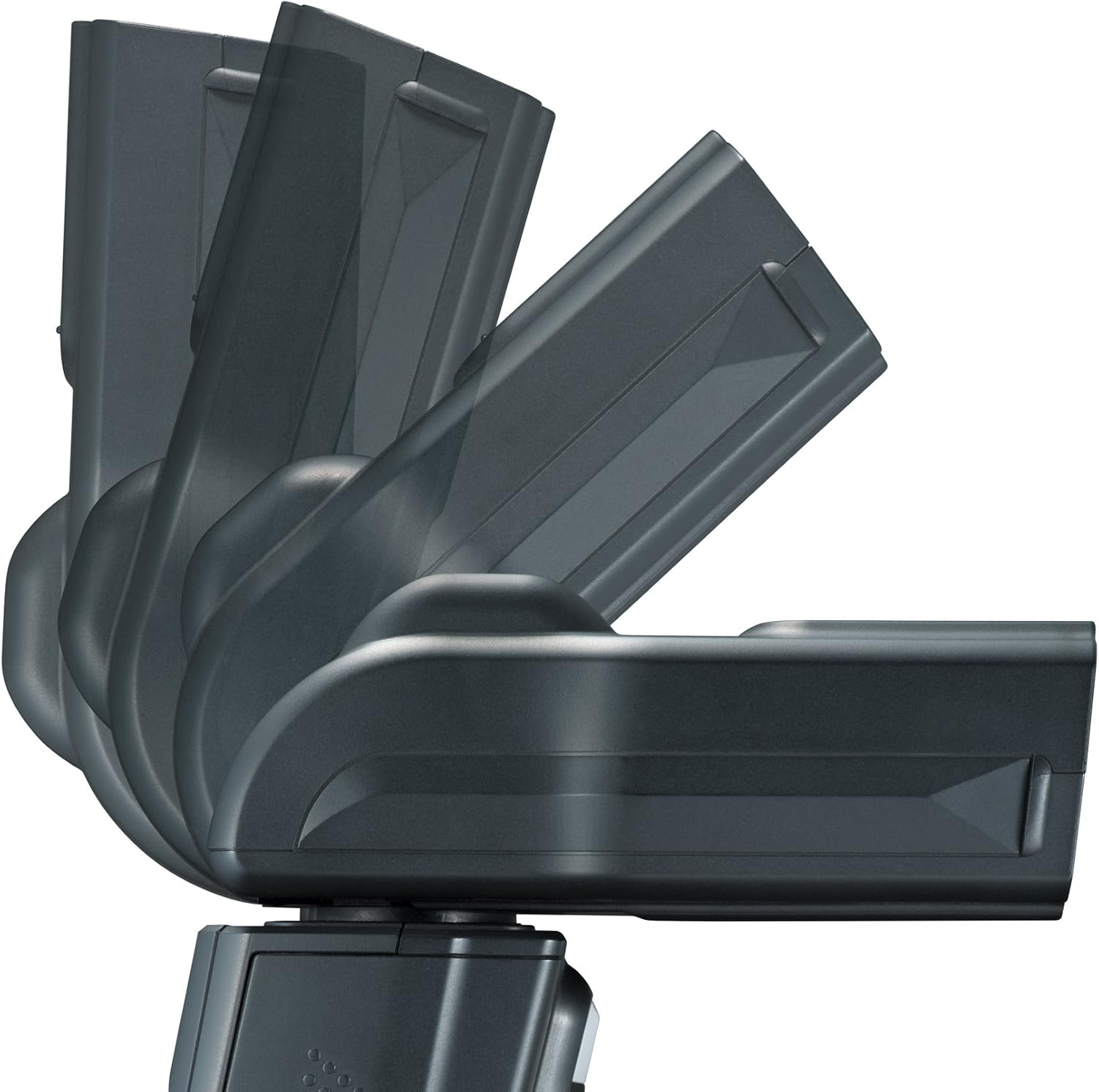
Rasm: yon view demonstrating the flash head's ability to tilt upwards for bounce flash.

Image: The flashgun with its built-in bounce card extended, used for directing light.
Xizmat
Proper maintenance ensures the longevity and optimal performance of your Nissin i60A Flashgun.
- Tozalash: Use a soft, dry cloth to clean the exterior of the flashgun. For the flash tube and LCD screen, use a microfiber cloth specifically designed for optics. Avoid using abrasive cleaners or solvents.
- Batareya parvarishi: Remove batteries if the flashgun will not be used for an extended period to prevent leakage. Store batteries in a cool, dry place.
- Saqlash: Store the flashgun in its included bag in a dry, dust-free environment, away from extreme temperatures and direct sunlight.
- Ishlov berish: Avoid dropping the flashgun or subjecting it to strong impacts, as this can damage internal components.
Muammolarni bartaraf qilish; nosozliklarni TUZATISH
If you encounter issues with your Nissin i60A Flashgun, please refer to the following common troubleshooting steps:
- Chiroq yonmaydi:
- Check battery levels and ensure they are correctly inserted.
- Ensure the flashgun is securely mounted on the camera's hot shoe.
- Verify that the flashgun is powered on and not in sleep mode.
- Check camera settings to ensure external flash is enabled and compatible sync modes are selected.
- Inconsistent Flash Output:
- Ensure batteries have sufficient power. Low battery can lead to slow recycling and inconsistent output.
- Check for obstructions between the flash and subject, especially in wireless modes.
- Verify that the flash mode (TTL, Manual) is appropriate for your shooting conditions.
- LED Video Light Not Working:
- Batareya darajasini tekshiring.
- Ensure the LED light function is activated via the control panel.
- Wireless Communication Issues:
- Ensure the flashgun and trigger (if applicable) are set to the same channel and group.
- Check the distance between the flash and trigger; ensure it's within the effective range (up to 30 meters for 2.4GHz Nissin Air System).
- Minimize physical obstructions between units.
If problems persist, consult the Nissin support websayt yoki qo'shimcha yordam uchun mijozlarga xizmat ko'rsatish bilan bog'laning.
Texnik xususiyatlari
| Xususiyat | Tafsilot |
|---|---|
| Qo'llanma raqami (ISO 100) | GN60 (at 200mm zoom head position) |
| Focal Length Coverage | 24 - 200mm (16mm with built-in diffuser) |
| Quvvat manbai | 4 x AA batteries or external power source |
| Qayta ishlash vaqti | 0.1 - 5.5 soniya |
| Number of Flashes (approx.) | 220 - 1,500 flashes |
| LED Video Light Operation Time | 3.5 soat |
| Fleshli davomiyligi | 1/800 - 1/20,000 soniya |
| Rang harorati | 5,600K |
| EHM nazorati | TTL |
| Simsiz rejim | 2.4GHz Nissin Air System radio wireless, Optical wireless TTL slave (SD), Non-TTL slave (SF) |
| EV Compensation on Flash | +/- 2EV in 1/3 EV increments |
| Bounce Position | Up 0-90 degrees |
| Swivel Position | Left & right 0-180 degrees |
| Fleshli ta'sir qilish nazorati | 1st & 2nd curtain synchronisation, high speed sync, red eye reduction, slow sync (dependent on camera), FE/FV lock (set on camera) |
| AF-Assist Beam Effective Range | 0.7 - 5 metr |
| Operatsion paneli | Colour LCD with dial control |
| Manual Mode Power Ratio | 1/256 - 1/1 with 1/3 step control |
| O'lchamlari | 2.87 x 3.86 x 4.41 dyuym (7.29 x 9.80 x 11.20 sm) |
| Element og'irligi | 10.6 untsiya (300 g) |
| Model raqami | NFG015S |
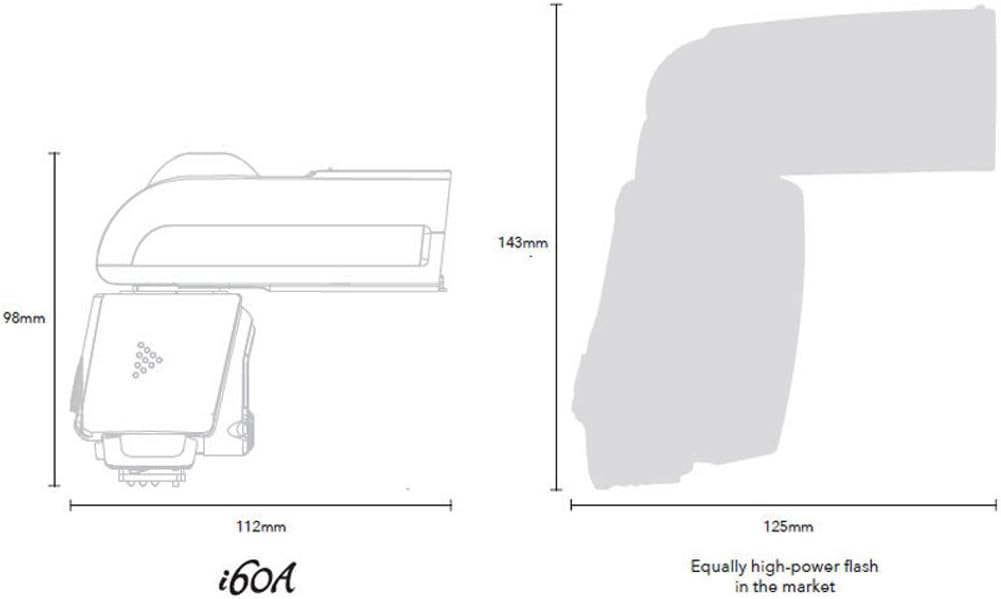
Image: Diagram illustrating the compact dimensions of the Nissin i60A Flashgun compared to other high-power flashes.
Kafolat va qo'llab-quvvatlash
Specific warranty details for the Nissin i60A Flashgun are not provided within this manual. For information regarding warranty coverage, technical support, and service, please visit the official Nissin websaytiga tashrif buyuring yoki mahalliy vakolatli dileringizga murojaat qiling.
It is recommended to register your product on the manufacturer's webyangilanishlar va yordam olish uchun sayt.
Qo'shimcha yordam uchun, shuningdek, murojaat qilishingiz mumkin Nissin Store on Amazon.
Ask a question about this manual
Ask about setup, troubleshooting, compatibility, parts, safety, or missing instructions. Manuals+ will review the question and use this page’s manual context to help answer it.