
Kirish
The Nissin i60A is a powerful and compact shoe-mount flash designed for FUJIFILM mirrorless cameras. It features a guide number of 197' at ISO 100 and 200mm, a versatile zoom range of 24-200mm (16mm with panel), and a quick recycling time. Equipped with the Nissin Air 2.4 GHz Radio TTL System, it offers reliable wireless communication. This manual provides essential information for setting up, operating, and maintaining your i60A flash unit.

Figure 1: The Nissin i60A flash unit, showcasing its compact design and flash head.
Sozlash; o'rnatish
Paket tarkibi
Paketni ochgandan so'ng, barcha komponentlar mavjudligiga ishonch hosil qiling:
- Nissin i60A Flash Unit
- Diffuziya paneli
- Built-in LED Video Light (integrated)
Batareyani o'rnatish
The Nissin i60A operates on 4 AA batteries. Ensure batteries are inserted with correct polarity as indicated inside the battery compartment.
Kameraga o'rnatish
Align the flash unit's hot shoe with your camera's hot shoe. Slide the flash forward until it clicks into place. The sturdy metal hotshoe features a quick release mechanism for easy attachment and detachment.
Dasturiy ta'minotni yangilash
To ensure optimal compatibility and performance with the latest camera models, firmware updates may be required. Nissin provides free firmware updates at their service location. For details on how to send your unit for an update, please refer to the "Warranty and Support" section.
Foydalanish bo'yicha ko'rsatmalar
Quvvatni yoqish/o‘chirish
Press and hold the power button located on the control panel to turn the unit on or off. The color LCD screen will illuminate upon power-on.

Figure 2: The i60A control panel with key features highlighted, including the focal length range, NAS compatibility, and compact size.
Flash rejimlari
The i60A supports various flash modes, including TTL (Through-The-Lens) and Manual modes. Use the mode dial on the control panel to select your desired mode. The TTL mode automatically adjusts flash output for correct exposure, while Manual mode allows precise control over flash power.
Zoom Range and Head Articulation
The flash head features an automatic zoom range of 24-200mm, which can extend to 16mm with the built-in wide-angle panel. The flash head can be tilted upward 90° and rotated 180° left and right, providing flexibility for bounced flash photography.

Figure 3: The Nissin i60A flash unit with its head tilted upwards, demonstrating its articulation capability for bounce flash.
Nissin Air System (NAS)
The i60A integrates Nissin's 2.4 GHz radio transmission wireless flash system. This system offers enhanced reliability compared to traditional optical wireless transmitters, being less susceptible to angle and obstacle limitations. You can set Group A, B, and C, and channels 1 to 8 directly on the i60A flash unit to prevent misfiring in environments with signal interference.
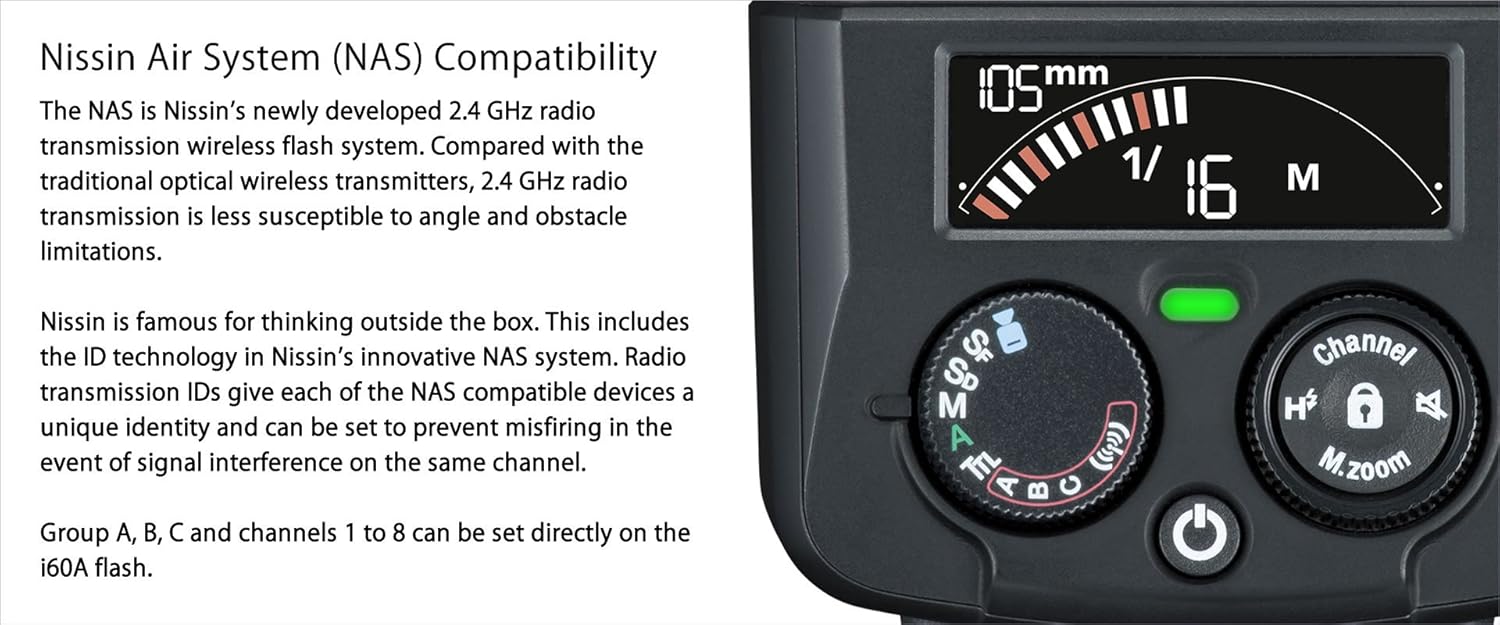
4-rasm: Batafsil view of the i60A control panel, illustrating the settings for the Nissin Air System (NAS) including channel and group selection.
LED video nuri
The i60A includes a built-in LED video light, useful for continuous illumination during video recording or for focusing in low-light conditions.
Yuqori tezlikdagi sinxronizatsiya (HSS)
The flash supports High-Speed Sync (HSS) up to 1/8000 second. Please note that HSS activation may depend on your camera's flash shutter curtain settings (FP mode) rather than directly from the flash dial, as indicated in some user experiences.
Xizmat
Tozalash
To clean the flash unit, use a soft, dry cloth. For stubborn marks, a slightly damp cloth can be used, followed by immediate drying. Avoid using strong solvents or abrasive cleaners, as these can damage the unit's finish or internal components.
Batareya parvarishi
Remove batteries from the unit if it will not be used for an extended period to prevent leakage and potential damage. Use high-quality AA batteries for optimal performance and longevity.
Muammolarni bartaraf qilish; nosozliklarni TUZATISH
Flash Not Firing or Inconsistent Output
- Check battery levels and ensure they are correctly inserted.
- Verify the flash is securely mounted on the camera's hot shoe.
- Ensure the camera's flash settings are correctly configured for external flash.
- If using wireless mode, confirm that the flash and trigger (if applicable) are on the same group and channel.
Compatibility Issues with Newer Cameras
Some compatibility issues with newer camera models may arise due to outdated firmware. Refer to the "Firmware Updates" section under Setup for information on updating your unit's firmware.
LCD Display or Zoom Lag
In rare instances, there might be a slight lag between the actual flash head position and the indicated zoom value on the LCD. This is typically a minor display anomaly and does not affect flash performance. Ensure firmware is up to date.
Texnik xususiyatlari
| Xususiyat | Tafsilot |
|---|---|
| Mahsulot o'lchamlari | 4.5 x 3.75 x 5.25 dyuym |
| Element og'irligi | 9.6 untsiya |
| Model raqami | ND60A-FJ |
| Brend | Nissin |
| Mos keladigan o'rnatish moslamalari | Fujifilm |
| Kamera chirog'i turi | Qul |
| Flash sinxronlash tezligi | 1/250 (up to 1/8000 with HSS) |
| Kiritilgan komponentlar | Flash unit, diffusion panel, built-in LED video light |
| Qo'llanma raqami | 197' at ISO 100 and 200mm |
| Kattalashtirish diapazoni | 24-200mm (16mm with panel) |
| Qayta ishlash vaqti | 0.1-5.5 soniya |
| Quvvat manbai | 4 AA Batteries or External Pack |
| Head Articulation | Tilts Upward 90°, Rotates Left & Right 180° |
Kafolat va qo'llab-quvvatlash
For warranty information and technical support, please contact Nissin customer service. Firmware updates are provided free of charge at their service location.
Nissin Service Contact:
- Telefon: 1-866-469-3080
- Address for Repairs/Firmware Updates:
- Nissin: Attn Repairs
- 741 Main St.
- Claremont, NH 03743
When sending your unit for service, please include a note with your contact information and a clear description of the service requested (e.g., firmware update).
Qo'shimcha ma'lumot olish uchun siz rasmiy tashrif buyurishingiz mumkin Nissin Store on Amazon.