
Kirish
The Jam Audio HMDX HX-P280 is a portable Bluetooth speaker designed for wireless audio streaming. It features two active drivers and two passive radiators for enhanced bass, providing a rich audio experience. This speaker also includes a speakerphone function for hands-free calls and offers multi-language voice prompts for ease of use. Its compact design makes it highly portable, fitting conveniently into a pocket.
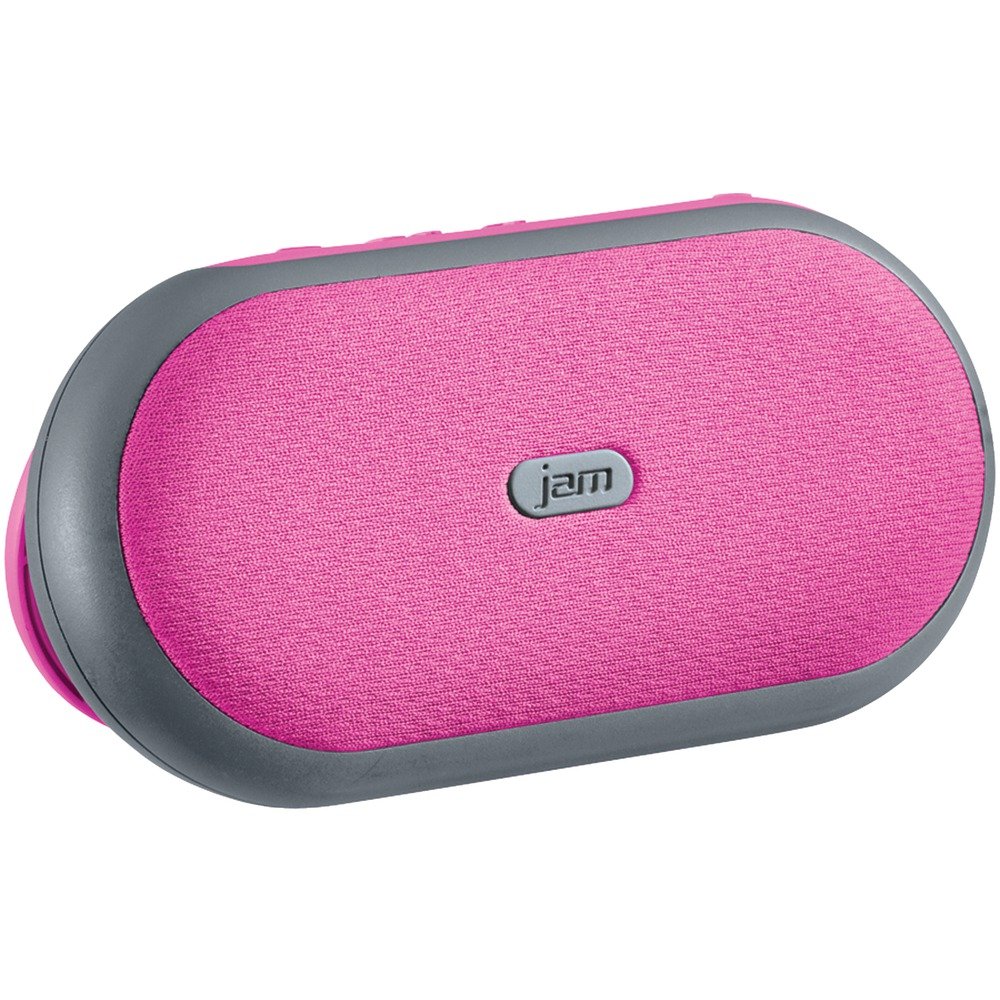
1-rasm: Old view of the Jam Audio HMDX HX-P280 Bluetooth Speaker. This image displays the compact, rectangular design of the speaker, highlighting its portable nature.
Qutida nima bor
- Jam Audio HMDX HX-P280 Bluetooth Speaker
- USB zaryadlovchi kabeli
- Foydalanuvchi uchun qo'llanma (ushbu hujjat)
Sozlash; o'rnatish
Karnayni zaryadlash
- Locate the charging port on your HX-P280 speaker.
- Connect the small end of the provided USB charging cable to the speaker's charging port.
- USB zaryadlovchi kabelining katta uchini USB quvvat adapteriga (qo'shilmagan) yoki kompyuterning USB portiga ulang.
- The charging indicator light will illuminate, typically red, to show that the speaker is charging.
- Once fully charged, the indicator light will change color or turn off. A full charge provides up to 6 hours of playtime.
Bluetooth ulanishi
- Karnay to'liq zaryadlanganligiga ishonch hosil qiling.
- Press and hold the Power button on the speaker until you hear an audible prompt indicating it is in pairing mode. The Bluetooth indicator light will typically flash rapidly.
- On your smartphone, tablet, or other Bluetooth-enabled device, go to the Bluetooth settings menu.
- Enable Bluetooth if it is not already on.
- Scan for available devices. You should see "HMDX HX-P280" or a similar name appear in the list.
- Select "HMDX HX-P280" to initiate the pairing process.
- Once paired, you will hear an audible confirmation from the speaker, and the Bluetooth indicator light will typically turn solid blue or flash slowly.
- The speaker can maintain a Bluetooth connection up to 30 feet (9 meters) from your device.
Foydalanish bo'yicha ko'rsatmalar
Quvvatni yoqish/o‘chirish
- To turn on: Press and hold the Power button until the speaker powers on.
- To turn off: Press and hold the Power button again until the speaker powers off.
Audio tinglash
Once paired, audio from your connected device will stream wirelessly to the HX-P280 speaker. Use the controls on your connected device to manage playback (play, pause, skip tracks) and adjust volume. The speaker itself may have basic touch controls for volume adjustment.
Karnay funktsiyasi
Telefoningiz karnayga ulangan holda qo'ng'iroq kirganda:
- Qo'ng'iroqqa javob berish uchun: Press the Play/Pause button (or a dedicated call button if present) once.
- Qo'ng'iroqni tugatish uchun: Press the Play/Pause button (or dedicated call button) once during a call.
- Qo'ng'iroqni rad qilish uchun: Press and hold the Play/Pause button (or dedicated call button) for a few seconds.
The speaker's built-in microphone allows for hands-free conversation.
Xizmat
Tozalash
- Use a soft, dry, lint-free cloth to clean the surface of the speaker.
- Abraziv tozalash vositalari, mumlar yoki erituvchilardan foydalanmang.
- Har qanday teshikka namlik tushishidan saqlaning.
Batareya parvarishi
- The HX-P280 uses a rechargeable Li-Ion battery.
- Batareyaning ishlash muddatini uzaytirish uchun batareyani tez-tez to'liq zaryadsizlantirishdan saqlaning.
- Charge the speaker regularly, even if not in use for extended periods, to maintain battery health.
- Foydalanilmayotganda karnayni salqin va quruq joyda saqlang.
Muammolarni bartaraf qilish; nosozliklarni TUZATISH
| Muammo | Yechim |
|---|---|
| Karnay yoqilmaydi. | Ensure the speaker is fully charged. Connect it to a power source using the USB cable and allow it to charge for at least 30 minutes before attempting to power on again. |
| Qurilma bilan ulanib bo‘lmadi. |
|
| Ovoz yo'q yoki ovoz sifati yomon. |
|
| Speakerphone not working. |
|
Texnik xususiyatlari
| Xususiyat | Tafsilot |
|---|---|
| Model nomi | HX-P280 Pink |
| Brend | Jam audio |
| Ulanish texnologiyasi | Bluetooth |
| Simsiz aloqa texnologiyasi | Bluetooth |
| Bluetooth diapazoni | 30 futgacha (9 metr) |
| Quvvat manbai | Batareya bilan ishlaydi (qayta zaryadlanuvchi Li-Ion) |
| O'yin vaqti | 6 soatgacha |
| Audio chiqish rejimi | Stereo |
| Audio haydovchi turi | Dynamic Driver (2 active drivers & 2 passive radiators) |
| Karnay turi | Portativ Bluetooth dinamik |
| Maxsus xususiyat | Portable, Speakerphone Function |
| Nazorat usuli | teging |
| Tavsiya etilgan foydalanish | For Smartphones or Tablets, For Computers, Travel |
| Mos qurilmalar | Smartphone, Tablet, Bluetooth-enabled devices |
| Rang | Pushti |
| Mahsulot o'lchamlari | 6 x 5 x 2 dyuym (15.24 x 12.7 x 5.08 sm) |
| Element og'irligi | 12.8 untsiya (363 gramm) |
| Suv o'tkazmaydigan | Yo'q |
| Ishlab chiqaruvchi | JAM |
| UPC | 031262070609 |
| ASIN | B01GIH0OOK |
| Birinchi mavjud sana | 2 yil 2016 iyun |
Kafolat va qo'llab-quvvatlash
The Jam Audio HMDX HX-P280 Bluetooth Speaker comes with a Cheklangan Kafolat. For specific details regarding warranty coverage, duration, and terms, please refer to the warranty card included with your product or visit the official Jam Audio websayt.
For technical support, frequently asked questions, or to contact customer service, please visit the Jam Audio official support page. Keep your purchase receipt and product model number (HX-P280) handy when seeking support.