
1. Mahsulot tugadiview
The ADATA HM900 (model AHM900-6TU3-CEUBK) is a 6TB external hard disk drive designed for high-capacity data storage and transfer. This mechanical hard disk drive offers ample space for extensive data needs and supports simultaneous operations without compromising performance. It connects via USB, making it compatible with various devices, including personal computers and televisions.

1-rasm: old tomoni view of the ADATA HM900 External Hard Drive.
2. O'rnatish bo'yicha ko'rsatmalar
2.1 Paket tarkibi
Davom etishdan oldin paketda barcha elementlar mavjudligiga ishonch hosil qiling:
- ADATA HM900 External Hard Disk Drive
- USB ma'lumot kabeli
- Quvvat adapteri
- Tez boshlash qo'llanmasi (agar mavjud bo'lsa)
2.2 Connecting the Hard Drive
- Quvvat adapterini ulang: Plug the power adapter into the DC IN port on the back of the ADATA HM900. Connect the other end of the power adapter to a wall outlet. The device requires 12 Watts of power.
- USB kabelini ulang: Insert one end of the provided USB data cable into the USB port (marked 'SS' for SuperSpeed USB) on the back of the hard drive.
- Qurilmangizga ulaning: Plug the other end of the USB cable into an available USB port on your computer, television, or other compatible device.
- Yoqilgan: The drive should power on automatically. A status indicator light will typically illuminate to show it is active.
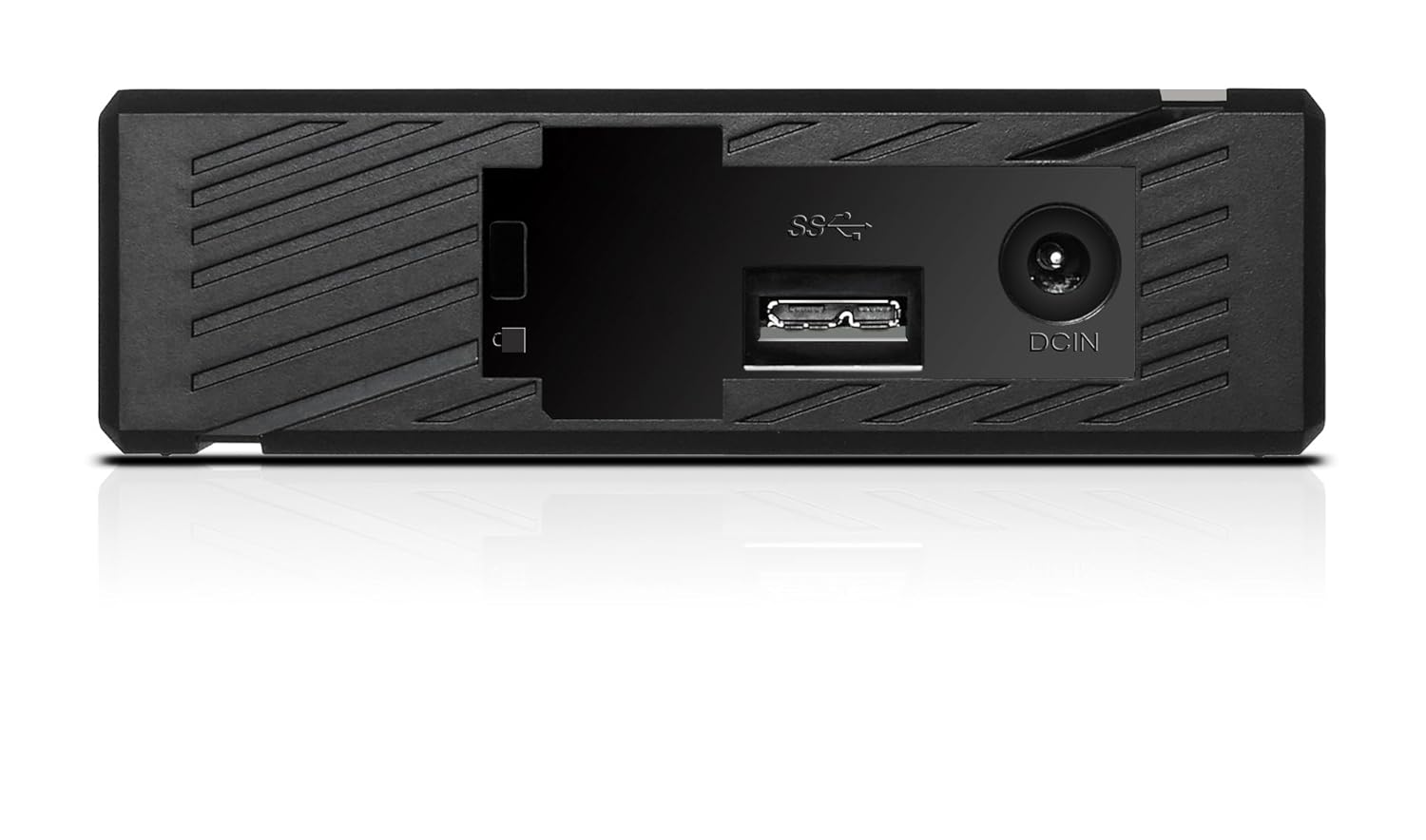
2-rasm: orqa view of the ADATA HM900, highlighting the USB and DC IN ports for connection.
3. Qattiq diskni ishlatish
3.1 Dastlabki tanib olish
Upon first connection, your operating system (Windows, macOS, Linux) or compatible device (e.g., smart TV) should automatically detect the ADATA HM900. For computers, it may appear as a new drive letter or volume in 'My Computer'/'This PC' or 'Finder'.
3.2 Ma'lumotlarni uzatish
O'tkazish uchun files, simply drag and drop them to and from the HM900 drive icon. For larger transfers, it is recommended to use your operating system's copy/paste functions or dedicated backup software.
3.3 Using with a Television
The ADATA HM900 is compatible with televisions that support external storage devices. Connect the drive as described in Section 2.2. Refer to your television's user manual for specific instructions on how to access and play media files from an external USB drive.
4. Xizmat va parvarish
Proper care ensures the longevity and reliability of your ADATA HM900 external hard drive:
- Xavfsiz uzilish: Always safely eject or unmount the hard drive from your operating system before physically disconnecting the USB cable or power. This prevents data corruption.
- Jismoniy himoya: Avoid dropping or subjecting the drive to strong impacts, as it contains a mechanical hard disk that can be damaged.
- Atrof-muhit sharoitlari: Store and operate the drive in a cool, dry environment, away from direct sunlight, extreme temperatures, and high humidity.
- Tozalash: Drayvning tashqi qismini tozalash uchun yumshoq, quruq matodan foydalaning. Suyuq tozalagichlar yoki erituvchilardan foydalanmang.
5. Muammolarni bartaraf qilish; nosozliklarni TUZATISH
5.1 Drayv aniqlanmadi
- Ulanishlarni tekshiring: Ensure both the power adapter and USB cable are securely connected to the drive and your device.
- Boshqa USB portini sinab ko'ring: Connect the drive to a different USB port on your computer or device.
- Quvvatni tekshiring: Confirm the power adapter is plugged into a working electrical outlet and the drive's indicator light is on.
- Qurilmani qayta ishga tushirish: Restart your computer or television and try connecting the drive again.
- Disk boshqaruvini tekshiring (Windows) / Disk Utility (macOS): For computers, check if the drive appears in disk management tools, even if it doesn't have a drive letter assigned.
5.2 Ma'lumotlar uzatish tezligining sekinlashishi
- USB 3.0 portidan foydalaning: Ensure the drive is connected to a USB 3.0 (or higher) port on your device for optimal speeds. USB 2.0 ports will result in slower transfers.
- Boshqa USB qurilmalardan saqlaning: Disconnect other high-bandwidth USB devices during large transfers.
- Diskning sog'lig'ini tekshiring: Run a disk check utility on your computer to ensure the drive is healthy.
6. Texnik shartlar
| Xususiyat | Spetsifikatsiya |
|---|---|
| Brend | ADATA |
| Model raqami | AHM900-6TU3-CEUBK |
| Raqamli saqlash hajmi | 6 TB |
| Qattiq disk tavsifi | Mexanik qattiq disk |
| Qattiq disk forma faktori | 2.5 dyuym |
| Ulanish texnologiyasi | USB |
| Ob'ekt o'lchamlari (UxWxH) | 19 x 12.1 x 3.65 santimetr |
| Element og'irligi | 998 gr |
| Wattage | 12 vatt |
| Mos qurilmalar | Television, Personal Computers |
| Birinchi mavjud sana | 11 yil 2016 noyabr |
7. Kafolat va qo'llab-quvvatlash
For detailed warranty information, please refer to the warranty card included with your product or visit the official ADATA website. Support resources, including drivers and firmware updates, may also be available on the ADATA support portal.


