
Instapark PWT-07
Instapark PWT-07 Digital Programmable Water Timer User Manual
Model: PWT-07
Kirish
This manual provides detailed instructions for the setup, operation, maintenance, and troubleshooting of your Instapark PWT-07 Digital Programmable Water Timer. Please read this manual thoroughly before using the device to ensure proper function and longevity.
Xavfsizlik ma'lumotlari
- Use only 1.5V AA alkaline batteries. Do not mix old and new batteries, or different battery types.
- Ensure the battery compartment is securely closed to maintain the IP66 waterproof rating.
- Do not expose the timer to extreme temperatures or direct sunlight for prolonged periods, which may affect battery life and device performance.
- Disconnect the timer from the faucet and drain it before freezing temperatures to prevent damage.
- This device is designed for outdoor use with standard ¾” (GHS) threaded faucets.
Paket tarkibi
Paketda barcha elementlar mavjudligiga ishonch hosil qiling:
- Instapark PWT-07 Water Timer
- Foydalanuvchi uchun qo'llanma (ushbu hujjat)
- Kafolat kartasi
Note: 2 AA alkaline batteries are required and not included.
Mahsulot xususiyatlari
- Single-station digital programmable faucet water timer.
- Impulse solenoid valve for reliable operation.
- Compatible with standard ¾” (GHS) threaded outdoor hose faucets.
- User-friendly interface with a single oversized rotary dial and 4 pushbuttons.
- Large, easy-to-read LCD display (2.1” x 1”).
- Suvga chidamlilik darajasi: IP66.
- Built-in rain delay function (24, 48, or 72 hours).
- Manual watering option without interrupting programmed schedules.
- Detachable battery compartment for easy battery replacement.
- Low power consumption, up to 4,000 on/off cycles per battery set.
Sozlash; o'rnatish
1. Batareyani o'rnatish
The Instapark PWT-07 requires two (2) 1.5V AA alkaline batteries (not included).
- Taymerning orqa tomonidagi batareya bo'linmasini toping.
- Slide the battery compartment cover downwards to open.
- Insert two new AA alkaline batteries, ensuring correct polarity (+/-).
- Batareya bo'limi qopqog'ini mahkam chertilguncha joyiga suring.
- The LCD display should illuminate, indicating successful battery installation. If the display shows a low battery indicator, remove the batteries, wait for the screen to go completely dark, then reinsert them.
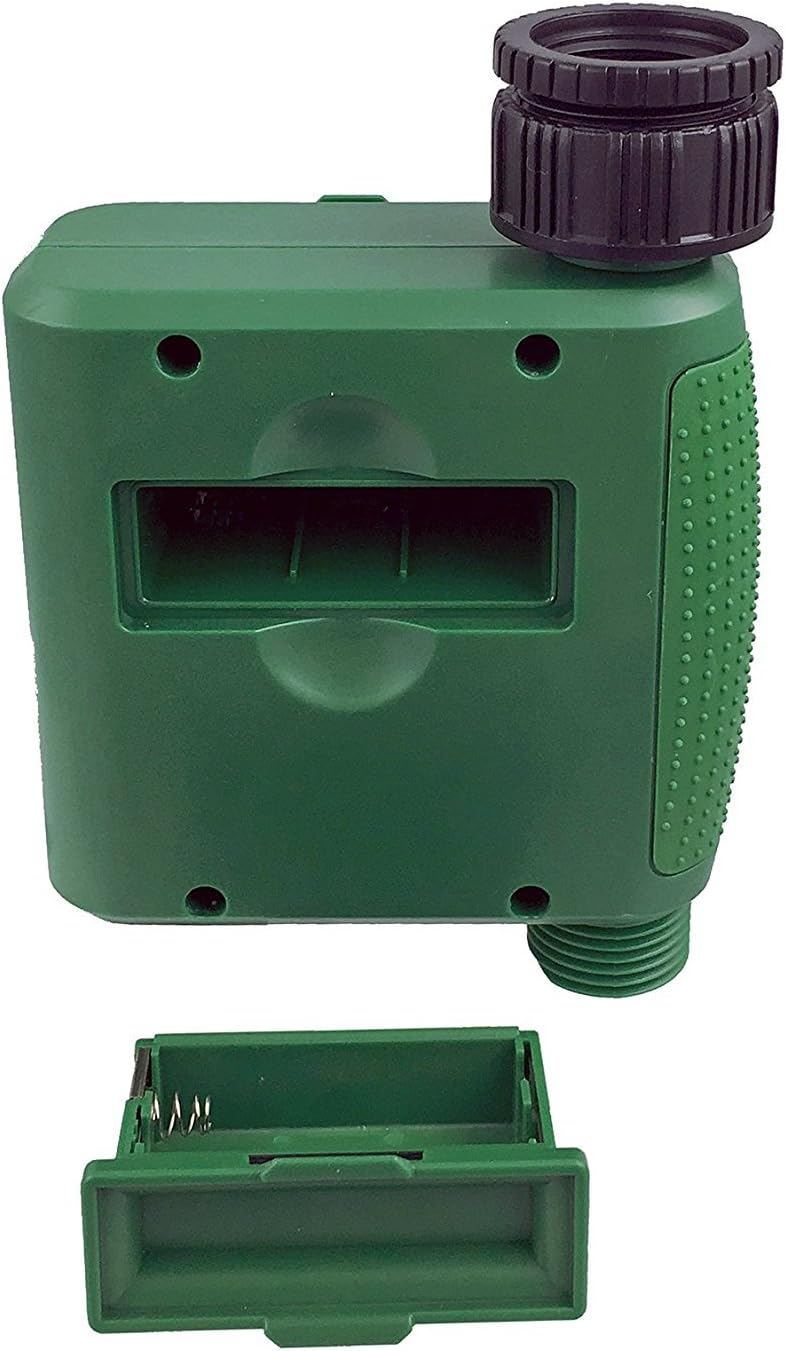
1-rasm: qopqog'i olib tashlangan batareya bo'limi.
2. Taymerni o'rnatish
Attach the timer to your outdoor faucet:
- Kranning toza va axlatsiz ekanligiga ishonch hosil qiling.
- Screw the timer's inlet (top connector) onto a standard ¾” (GHS) outdoor hose faucet. Hand-tighten only to prevent damage. Do not overtighten.
- Connect your garden hose or irrigation system to the timer's outlet (bottom connector). Hand-tighten securely.
- Turn on the faucet fully. The timer is designed to operate under pressure.

Figure 2: Instapark PWT-07 mounted on a faucet.
Foydalanish bo'yicha ko'rsatmalar
The timer features a large rotary dial and four buttons: SET, +, -, va QO'LLANMA.

Figure 3: Control panel and LCD display.
1. Joriy vaqtni o'rnatish
- Aylanadigan kadranni ga burang SOATNI SOZLASH.
- dan foydalaning + va - buttons to adjust the current hour. Press SET tasdiqlash uchun.
- dan foydalaning + va - buttons to adjust the current minute. Press SET tasdiqlash uchun.
2. Programming Watering Schedule
The timer allows you to set a start time, duration, and frequency for watering.
Boshlanish vaqtini belgilang:
- Aylanadigan kadranni ga burang BAŞLASH VAQTI.
- dan foydalaning + va - buttons to set the desired watering start hour. Press SET tasdiqlash uchun.
- dan foydalaning + va - buttons to set the desired watering start minute. Press SET tasdiqlash uchun.
Set How Long (Duration):
- Aylanadigan kadranni ga burang QANCHA MUDDATGA; QANCHA VAQT.
- dan foydalaning + va - buttons to set the watering duration (from 5 seconds to 360 minutes). Press SET tasdiqlash uchun.
Set How Often (Frequency):
- Aylanadigan kadranni ga burang QANCHA VAQTDA.
- dan foydalaning + va - buttons to select the watering frequency (e.g., every 10 seconds, 30 seconds, 1 minute, 3 minutes, 5 minutes, 1 hour, 2 hours, 4 hours, 12 hours, 1 day, 2 days, 3 days, 4 days, 5 days, 6 days, 7 days). Press SET tasdiqlash uchun.
After setting all parameters, turn the rotary dial to RUN to activate the programmed schedule.
3. Qo'lda sug'orish
Dasturlashtirilgan jadvalingizga ta'sir qilmasdan qo'lda sug'orish uchun:
- Ensure the dial is set to RUN or O'CHIRIB.
- ni bosing QO'LLANMA button. The display will show a default manual watering duration.
- dan foydalaning + va - buttons to adjust the desired manual watering duration.
- bosing SET to start manual watering. The timer will run for the selected duration and then automatically shut off.
- Qo'lda sug'orishni muddatidan oldin to'xtatish uchun tugmasini bosing QO'LLANMA tugmasini yana bosing.
4. Yomg'irni kechiktirish funksiyasi
The rain delay function allows you to pause your watering schedule for a set period without losing your program settings.
- Ensure the dial is set to RUN.
- ni bosing va ushlab turing - button for 3 seconds. The display will show "DELAY" and a default delay duration.
- dan foydalaning + va - buttons to select a delay duration of 24, 48, or 72 hours.
- bosing SET to activate the rain delay. The timer will resume its programmed schedule after the delay period ends.
- To cancel the rain delay, press and hold the - tugmasini yana 3 soniya bosib turing.
Xizmat
- Batareyani almashtirish: Replace batteries when the low battery indicator appears on the LCD. Always use new AA alkaline batteries.
- Tozalash: Taymerni reklama bilan o'chiringamp mato. Abraziv tozalash vositalarini yoki erituvchilarni ishlatmang.
- Qishlash: Before the first frost, disconnect the timer from the faucet. Remove the batteries and store the timer indoors in a dry, frost-free location. Failure to do so may result in damage from freezing water.
- Filtr ekrani: Periodically check the filter screen inside the inlet connector for debris. Clean if necessary to ensure proper water flow.
Muammolarni bartaraf qilish; nosozliklarni TUZATISH
| Muammo | Mumkin sabab | Yechim |
|---|---|---|
| Timer does not turn on / LCD is blank. | O'lik yoki noto'g'ri o'rnatilgan batareyalar. | Replace with new AA alkaline batteries, ensuring correct polarity. If still blank, remove batteries, wait for screen to fully clear, then reinsert. |
| Water does not turn on at scheduled time. |
|
|
| Water does not turn off. |
|
|
| Ulanishlardan suv oqishi. |
|
|
| Low battery indicator flashes even with new batteries. | Firmware not booting correctly after battery change. | Remove batteries, wait for the LCD screen to go completely dark (may take a few minutes), then reinsert new batteries. |
Texnik xususiyatlari
| Model | PWT-07 |
| Quvvat manbai | 2 x 1.5V AA gidroksidi batareyalar (qo'shilmagan) |
| Valf turi | Impuls solenoid klapan |
| Ishlaydigan suv bosimi | 14.5 dan 116 psi gacha |
| Kutish holati | <100 mkA |
| Watering Frequency Settings | 10s, 30s, 1m, 3m, 5m, 1h, 2h, 4h, 12h, 1d, 2d, 3d, 4d, 5d, 6d, 7d (16 settings) |
| Watering Duration Settings | 5s, 10s, 15s, 20s, 25s, 30s, 35s, 40s, 45s, 50s, 55s, 1-360m |
| Vaqtni ko'rsatish formati | 24 soat |
| Suv o'tkazmaydigan reyting | IP66 |
| Material | ABS plastik |
| Mahsulot o'lchamlari | 4.25"D x 6"W x 2.6"Y |
| Element og'irligi | 14.2 untsiya |
Kafolat va qo'llab-quvvatlash
The Instapark PWT-07 Digital Programmable Water Timer is backed by a standard 1-year manufacturer's warranty from the date of purchase. This warranty covers defects in materials and workmanship under normal use.
For warranty claims, technical support, or any questions regarding your product, please contact Instapark customer service. Please have your purchase receipt and product model number (PWT-07) available when contacting support.
Contact information for Instapark customer service can typically be found on the manufacturer's websayt yoki sotib olish hujjatlari.
Ask a question about this manual
Ask about setup, troubleshooting, compatibility, parts, safety, or missing instructions. Manuals+ will review the question and use this page’s manual context to help answer it.