
1. Kirish
The Amkette Trubeats S50 is a versatile smart wireless Bluetooth speaker designed to enhance your audio experience. It features multiple connectivity options including Bluetooth, USB, Micro SD card, and AUX input, along with an integrated FM radio. The speaker also includes a digital clock with alarm functions and can be controlled via a dedicated smartphone application. Additionally, it can function as a power bank to charge your mobile devices.
2. Paket tarkibi
Iltimos, quyidagi elementlar uchun katakchani belgilang:
- Amkette Trubeats S50 Smart Wireless Bluetooth Speaker
- USB zaryadlovchi kabeli
- AUX kabeli
- Foydalanuvchi uchun qo'llanma (ushbu hujjat)
3. Mahsulot tugadiview
Familiarize yourself with the various parts and controls of your Amkette Trubeats S50 speaker.
3.1 Old qismi View

1-rasm: Old view of the Amkette Trubeats S50 speaker, showing the speaker grille and LED display.
3.2 Yuqori boshqaruv paneli

Figure 2: Labeled diagram of the Amkette Trubeats S50 speaker's top control buttons: Mode, Volume Down/Previous, Play/Pause/Answer Call, Volume Up/Next, Clock, and Microphone.
- MODE tugmasi: Press to switch between Bluetooth, FM, AUX, USB, and Micro SD modes.
- K-/ Button: Press to decrease volume; long press for previous track/station.
- Play/Pause/Answer Call Button: Press to play/pause audio; press to answer/end calls.
- +/N Button: Press to increase volume; long press for next track/station.
- CLOCK tugmasi: Press to set time and alarms.
- Mikrofon: Qo'ng'iroqlarsiz qo'ng'iroq qilish uchun.
3.3 Rear Ports and Switch

Figure 3: Labeled diagram of the Amkette Trubeats S50 speaker's rear ports: AUX, Micro SD, USB Host, USB DC, and On/Off switch.
- AUX kirish: Connect external audio devices using the 3.5mm AUX cable.
- Micro SD karta uyasi: Ovozni ijro etish uchun Micro SD kartani joylashtiring.
- USB xost porti: Insert a USB drive for audio playback or use as a power bank.
- USB DC Input: Connect the USB charging cable to power the speaker.
- ON/OFF tugmasi: Karnayni yoqing yoki o'chiring.
4. Sozlash
4.1 Karnayni zaryadlash
- Connect the small end of the USB charging cable to the USB DC Input port on the rear of the speaker.
- USB zaryadlovchi kabelining katta uchini USB quvvat adapteriga (qo'shilmagan) yoki kompyuterning USB portiga ulang.
- LED indikatori zaryadlash holatini ko'rsatadi. To'liq zaryadlash odatda taxminan 4 soat davom etadi.
Eslatma: The speaker does not have a visible battery level indicator. It is recommended to charge fully before first use and when the battery is low.
4.2 Quvvatni yoqish/o‘chirish
- Yoqish uchun tugmani suring ON/OFF tugmasi on the rear of the speaker to the 'ON' position.
- Quvvatni o'chirish uchun ni suring ON/OFF tugmasi to the 'OFF' position.
5. Foydalanish bo'yicha ko'rsatmalar
5.1 Bluetooth ulanishi

Figure 4: Speaker in Bluetooth pairing mode, indicated by 'BT' on the display.
- Power on the speaker. It will automatically enter Bluetooth pairing mode, indicated by 'BT' flashing on the LED display.
- Smartfoningizda yoki boshqa qurilmangizda Bluetooth-ni yoqing.
- Ni qidirish available devices and select "Amkette S50" from the list.
- Once paired, the speaker will emit a confirmation tone, and 'BT' will stop flashing.
- Endi siz qurilmangizdagi audioni karnay orqali ijro etishingiz mumkin.
5.2 AUX kirishidan foydalanish

Figure 5: Speaker connected to a smartphone via AUX cable for wired audio playback.
- Connect one end of the 3.5mm AUX cable to the AUX kiritish port on the rear of the speaker.
- Connect the other end of the AUX cable to the audio output jack of your external device (e.g., smartphone, MP3 player, laptop).
- ni bosing MODE tugmasi repeatedly until the speaker enters AUX mode.
- Ulangan qurilmangizdan audio tinglang.
5.3 Using USB/Micro SD Card
- Insert a USB drive into the USB xost porti or a Micro SD card into the Micro SD karta uyasi karnayning orqa tomonida.
- Ovozingizni ta'minlang files (MP3 format recommended) are stored on the drive/card.
- ni bosing MODE tugmasi repeatedly until the speaker enters USB or Micro SD mode. Playback will begin automatically.
- dan foydalaning K-/ va +/N trek navigatsiyasi va ovoz balandligini boshqarish tugmalari.
5.4 FM radiosi bilan ishlash

Figure 6: Speaker displaying FM frequency, with app control for station selection.
- ni bosing MODE tugmasi repeatedly until the speaker enters FM radio mode.
- Avtomatik skanerlash: In FM mode, long press the Oʻynatish/toʻxtatib turish button to initiate an automatic scan for available FM stations. The speaker will save detected stations.
- Qo'lda sozlash: dan foydalaning K-/ va +/N tugmalar saqlangan stantsiyalar bo'ylab harakatlanish uchun.
- For precise tuning and station management, use the Amkette Trubeats Smart Speaker App (see section 5.7).
5.5 Digital Clock and Alarm Setup

Figure 7: Speaker displaying the current time on its LED screen.
- Sozlash vaqti: ni bosing va ushlab turing SOAT tugmasi. The hour display will flash. Use the K-/ va +/N Soatni sozlash uchun tugmalarni bosing. SOAT tugmasi again to set minutes, and adjust with K-/ va +/N. bosing SOAT tugmasi once more to confirm.
- Signallarni sozlash: ni qisqa bosing SOAT tugmasi to cycle through Alarm 1 and Alarm 2 settings. When an alarm time is displayed, long press the SOAT tugmasi to enter alarm setting mode. Adjust hour and minute using K-/ va +/N, confirming each with a short press of the SOAT tugmasi. You can also set the alarm source (FM/SD Card/USB) via the app.
5.6 Power Bank sifatida foydalanish
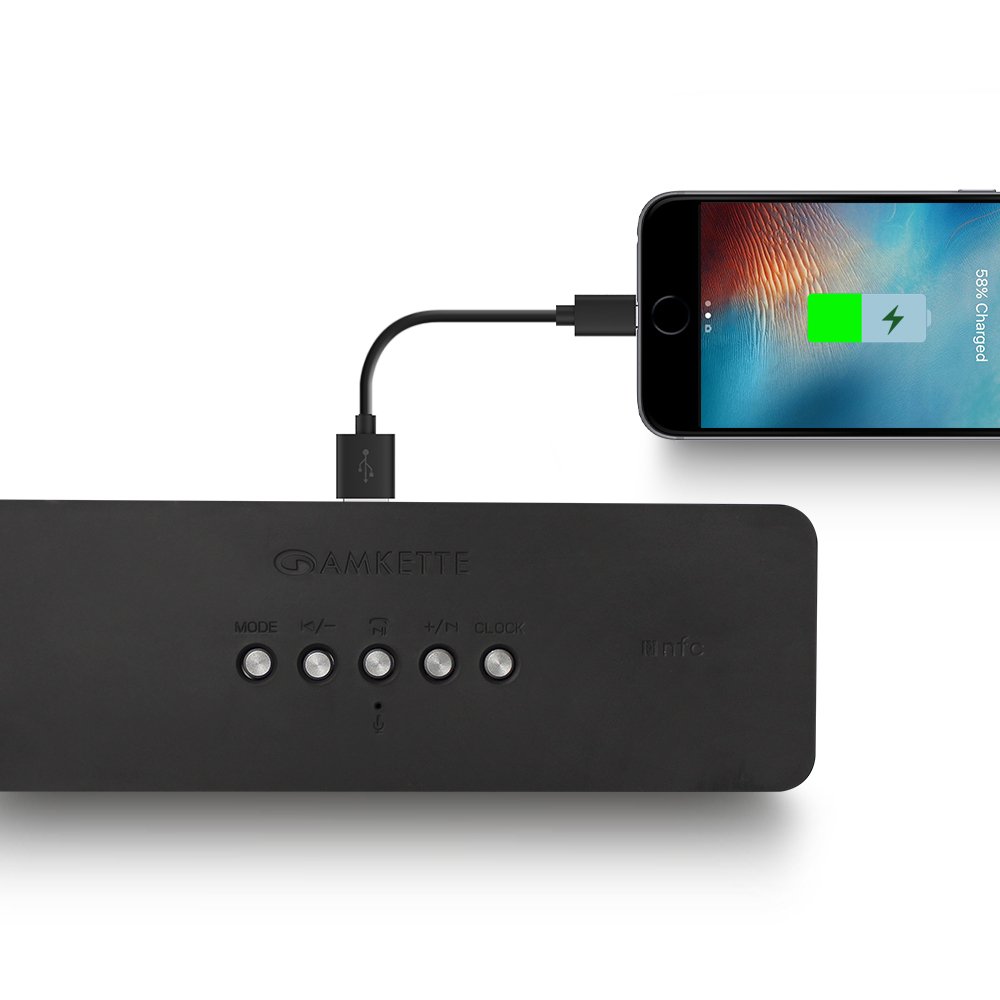
Figure 8: Speaker providing power to a smartphone through its USB Host port.
The Amkette Trubeats S50 can charge your smartphone or other USB-powered devices. Connect your device's charging cable to the USB xost porti on the rear of the speaker. The speaker's internal battery will then supply power to your device.
5.7 App Control (Android Only)

Figure 9: Smartphone displaying the Amkette Trubeats Smart Speaker App interface.
For enhanced control, download the Amkette Trubeats Smart Speaker App from the Google Play Store (for Android phones). The app allows you to:
- Switch between different audio modes.
- Control volume and track playback.
- Manage FM radio stations and perform precise tuning.
- Set and customize alarms, including alarm source.
Ensure your speaker is connected via Bluetooth to your smartphone for app functionality.
5.8 Qo'ng'iroqlarni qayta ishlash
When connected via Bluetooth to a smartphone, the speaker can be used for hands-free calling:
- Qo'ng'iroqqa javob berish: ni bosing Play/Pause/Answer Call Button bir marta.
- Qo‘ng‘iroqni tugatish: ni bosing Play/Pause/Answer Call Button qo'ng'iroq paytida bir marta.
- Qo'ng'iroqni rad etish: ni uzoq bosib turing Play/Pause/Answer Call Button.
6. Xizmat ko'rsatish
- Karnayni haddan tashqari harorat, to'g'ridan-to'g'ri quyosh nuri va namlikdan uzoqroq tuting.
- Karnayni yumshoq, quruq mato bilan tozalang. Abraziv tozalash vositalarini yoki erituvchilarni ishlatmang.
- Karnayni tashlab qo'ymang yoki unga kuchli ta'sir o'tkazmang.
- Uzoq vaqt davomida foydalanilmaganda dinamikni salqin va quruq joyda saqlang va batareya quvvatini saqlash uchun vaqti-vaqti bilan zaryadlang.
7. Muammolarni bartaraf qilish; nosozliklarni TUZATISH
| Muammo | Mumkin sabab | Yechim |
|---|---|---|
| Karnay yoqilmaydi. | Batareya quvvati tugadi. | Karnayni to'liq quvvatlang. |
| Karnaydan ovoz yo'q. | Ovoz balandligi juda past; noto'g'ri rejim tanlangan; qurilma to'g'ri ulanmagan. | Increase speaker and source device volume. Ensure correct mode (Bluetooth, AUX, etc.) is selected. Reconnect the device. |
| Bluetooth ulanishi amalga oshmadi. | Karnay juftlashtirish rejimida emas; qurilma juda uzoqda; shovqin. | Ensure speaker is in pairing mode ('BT' flashing). Move device closer to speaker. Turn off other Bluetooth devices. |
| FM radiosining yomon qabul qilinishi. | Zaif signal; atrof-muhit aralashuvi. | Karnayni yaxshiroq qabul qilinadigan joyga o'tkazing. Avtomatik skanerlashni yana bajaring. |
| App not connecting to speaker. | Bluetooth not connected; app issue. | Ensure speaker is paired via Bluetooth to your phone. Restart the app and try again. |
8. Texnik shartlar
- Model: S50
- Brend: Amket
- Karnay turi: Portable Bluetooth Speaker (Outdoor)
- Ulanish: Bluetooth, USB, Micro SD, AUX, FM radio
- Simsiz aloqa texnologiyasi: Bluetooth
- Tekshirish usuli: Buttons, App (Android)
- Ovoz chiqarish rejimi: Stereo
- Audio Wattage: 10 vatt
- Quvvat manbai: Batareyadan quvvatlanadi
- Batareya muddati: 12 soatgacha (o'rtacha)
- Zaryadlash vaqti: Taxminan 4 soat
- Mos qurilmalar: Laptop, Mobile, Tablet
- O'lchamlari (LxWxH): 26.7 x 10.9 x 7.9 sm
- Mahsulot og'irligi: 703 gramm
- Suv o'tkazmaydigan; suvga chidamli: Ha
- O'rnatish turi: Stol usti o'rnatish
9. Kafolat va qo'llab-quvvatlash
The Amkette Trubeats S50 Smart Wireless Bluetooth Speaker comes with a 1 yillik kafolat sotib olingan kundan boshlab. Ushbu kafolat odatdagi foydalanish sharoitida ishlab chiqarish nuqsonlarini qoplaydi.
For warranty claims, technical assistance, or any other support inquiries, please contact Amkette customer support through their official websayt yoki xaridingiz hujjatlari bilan ko'rsatilgan aloqa ma'lumotlari.
Iltimos, xarid kvitansiyasini kafolat maqsadida xaridni tasdiqlovchi hujjat sifatida saqlang.