
Delok 83687
Delock USB 2.0 AB kabeli foydalanuvchi qo'llanmasi
Model: 83687
Mahsulot tugadiview
This manual provides instructions for the Delock USB 2.0 A-B Cable, model 83687. This cable is designed for connecting devices with a USB Type-A port to devices with a USB Type-B port, facilitating data transfer.
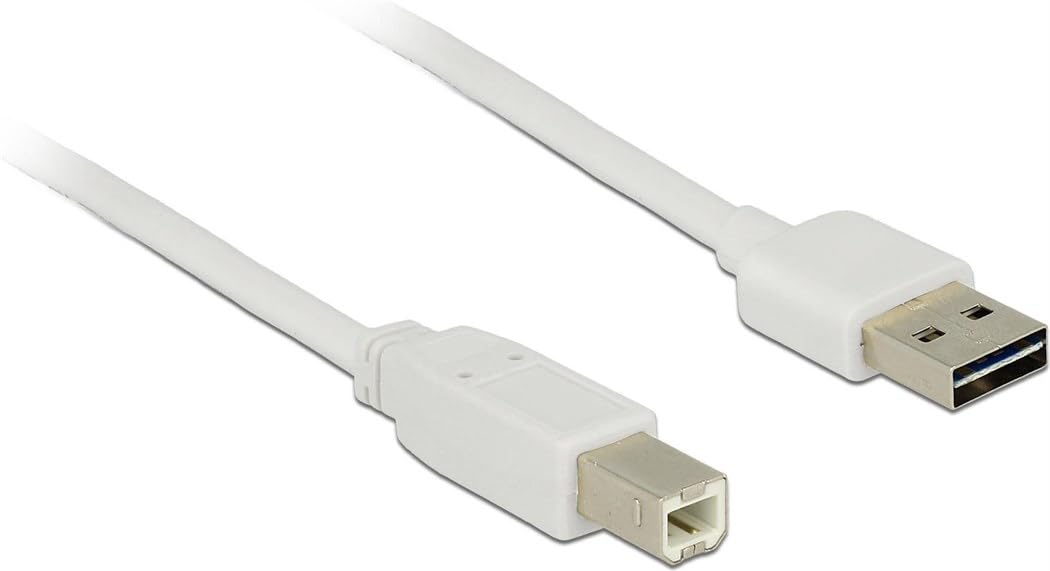
Image: The Delock USB 2.0 A-B Cable, featuring a white cable and gold-plated connectors. The USB Type-A connector is visible on the right, and the USB Type-B connector is on the left.
Sozlash; o'rnatish
The Delock USB 2.0 A-B Cable is designed for simple plug-and-play operation. Follow these steps to connect your devices:
- Portlarni aniqlang: Locate the USB Type-A port on your host device (e.g., computer, laptop) and the USB Type-B port on your peripheral device (e.g., printer, scanner, external hard drive).
- USB Type-A ni ulang: Insert the USB Type-A connector of the cable into the corresponding USB Type-A port on your host device. Ensure it is fully seated.
- USB Type-B ni ulang: Insert the USB Type-B connector of the cable into the corresponding USB Type-B port on your peripheral device. Ensure it is fully seated.
- Ulanishni tekshirish: Once both ends are connected, your operating system should automatically detect the peripheral device. If necessary, install any required drivers for your peripheral device as per its manufacturer's instructions.
This cable is compatible with devices such as laptops and personal computers.
Foydalanish bo'yicha ko'rsatmalar
Once the cable is properly connected, it facilitates data transfer between the connected devices. The cable supports USB 2.0 specifications, allowing for data transfer rates of up to 480 Mbit/s.
- Ensure both connected devices are powered on for proper communication.
- Initiate data transfer operations (e.g., printing, scanning, file transfer) through the software or operating system interface of your host device.
- For optimal performance, avoid disconnecting the cable during active data transfer.
Xizmat
To ensure the longevity and optimal performance of your Delock USB 2.0 A-B Cable, follow these maintenance guidelines:
- Saqlash: Store the cable in a cool, dry place away from direct sunlight and extreme temperatures. Avoid tightly coiling or bending the cable, especially near the connectors, to prevent internal damage.
- Tozalash: If the cable or connectors become dirty, gently wipe them with a soft, dry, lint-free cloth. Do not use liquid cleaners or abrasive materials.
- Ishlov berish: Always grasp the connector housing when plugging or unplugging the cable, rather than pulling on the cable itself. This prevents strain on the cable's internal wires and connections.
- Himoya: Keep the cable away from sharp objects, heavy furniture, or areas where it might be stepped on or pinched, as this can damage the insulation and internal conductors.
Muammolarni bartaraf qilish; nosozliklarni TUZATISH
If you encounter issues with your Delock USB 2.0 A-B Cable, consider the following troubleshooting steps:
| Muammo | Mumkin sabab / yechim |
|---|---|
| Qurilma tan olinmadi |
|
| Sekin ma'lumotlarni uzatish |
|
| Uzluksiz ulanish |
|
Texnik xususiyatlari
| Xususiyat | Tafsilot |
|---|---|
| Brend | Qulflash |
| Model raqami | 83687 |
| Kabel turi | USB 2.0 AB kabeli |
| Kabel uzunligi | 2 metr (6.56 fut) |
| 1-ulagich | USB turi-A erkak |
| 2-ulagich | USB Type-B Male |
| USB versiyasi | 2.0 |
| Ma'lumot uzatish tezligi (maksimal) | 480 Mbit/s |
| Kontaktlar | Oltin bilan qoplangan |
| Rang | Oq |
| Mos qurilmalar | Laptop, Personal Computer, and other devices with USB A and B ports |
| Maxsus xususiyat | Ma'lumotlarni uzatish |
Kafolat va qo'llab-quvvatlash
For information regarding warranty coverage and technical support for your Delock USB 2.0 A-B Cable, please refer to the official Delock websaytiga tashrif buyuring yoki ularning mijozlarga xizmat ko'rsatish markaziga bevosita murojaat qiling. Maxsus kafolat shartlari mintaqa va sotuvchiga qarab farq qilishi mumkin.
Manufacturer: DeLOCK
Birinchi marta sotuvga chiqarilgan sana: 2017-yil 29-avgust
Ask a question about this manual
Ask about setup, troubleshooting, compatibility, parts, safety, or missing instructions. Manuals+ will review the question and use this page’s manual context to help answer it.