
Kirish
Thank you for choosing the KROM Kernel TKL Mechanical Gaming Keyboard. This compact, tenkeyless (TKL) keyboard is designed for gaming enthusiasts, offering a responsive mechanical experience with customizable RGB backlighting and a Spanish layout. This manual provides detailed instructions for setup, operation, maintenance, and troubleshooting to ensure optimal performance and longevity of your device.
Mahsulot tugadiview
Asosiy xususiyatlar
- Mexanik kalitlar: Durable and responsive mechanical key switches for precise input.
- Tenkeyless (TKL) Design: Compact form factor without a numeric keypad, ideal for saving desk space and improving mouse movement.
- RGB yoritgichi: Customizable LED backlighting with various effects and colors.
- Makro funksionalligi: Assign macro functions to any key for personalized commands.
- Multimedia kalitlari: Dedicated or function-layer multimedia controls for convenience.
- Ghostingga qarshi: Ensures all key presses are registered accurately, even during intense gaming sessions.
- Bardoshli qurilish: Built with quality materials for long-lasting performance.
- Spanish Layout: Designed with a QWERTY Spanish key layout.
Paket tarkibi
- KROM Kernel TKL Mechanical Gaming Keyboard
- USB kabeli (biriktirilgan)
- Foydalanuvchi uchun qo'llanma (ushbu hujjat)
- (Note: Additional accessories may vary by region or specific product bundle.)
1.1-rasm: KROM Kernel TKL Mechanical Gaming Keyboard packaging, showing the front and back of the box with product features and design.

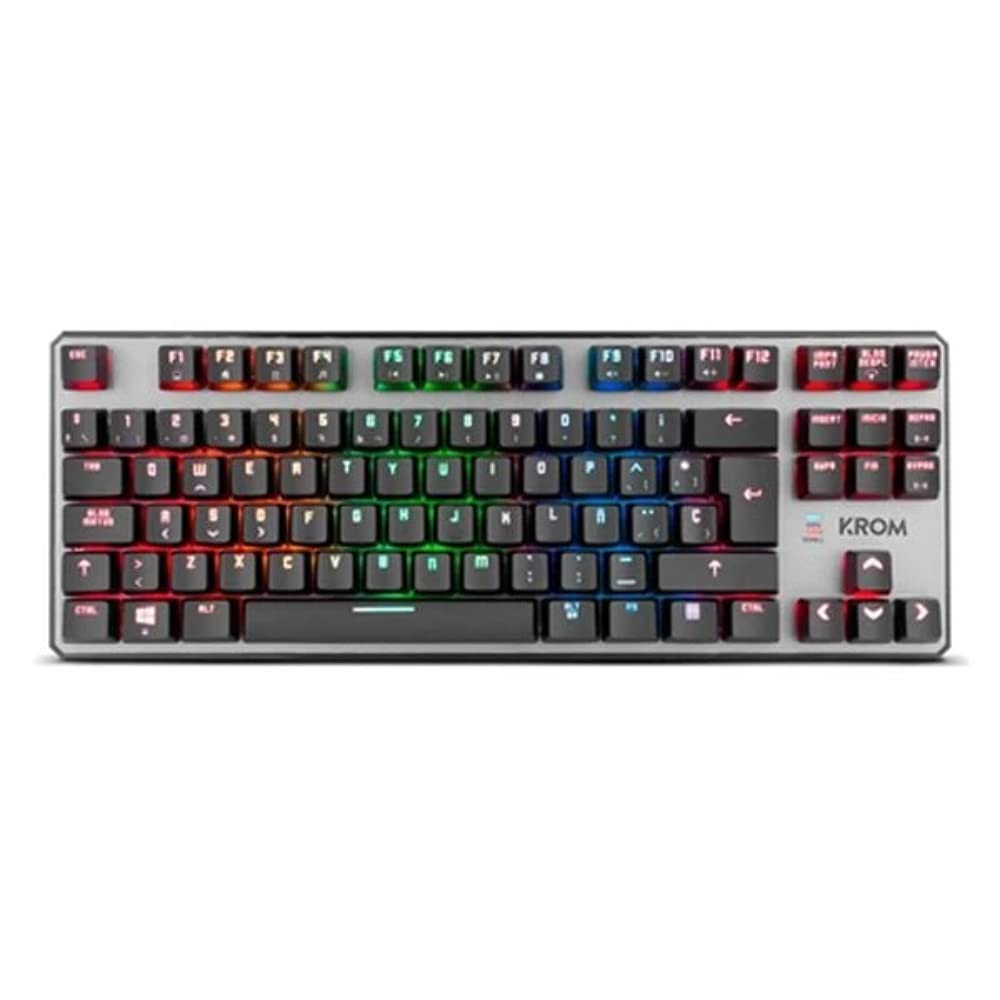
1.2-rasm: Tepadan pastga view of the KROM Kernel TKL keyboard, showcasing its compact design and vibrant RGB backlighting across all keys.
Sozlash; o'rnatish
- Klaviaturani o'ramdan chiqarib oling: Carefully remove the KROM Kernel TKL keyboard from its packaging.
- Kompyuterga ulanish: Locate the USB cable attached to the keyboard. Plug the USB connector into an available USB port on your computer (PC or laptop).
- Haydovchi o'rnatish: The keyboard is plug-and-play. Your operating system (Windows 7/8/8.1/10) should automatically detect and install the necessary drivers. This process may take a few moments.
- Funktsionalligini tekshirish: Once drivers are installed, test the keyboard by typing in a text editor or browser to ensure all keys are responsive.
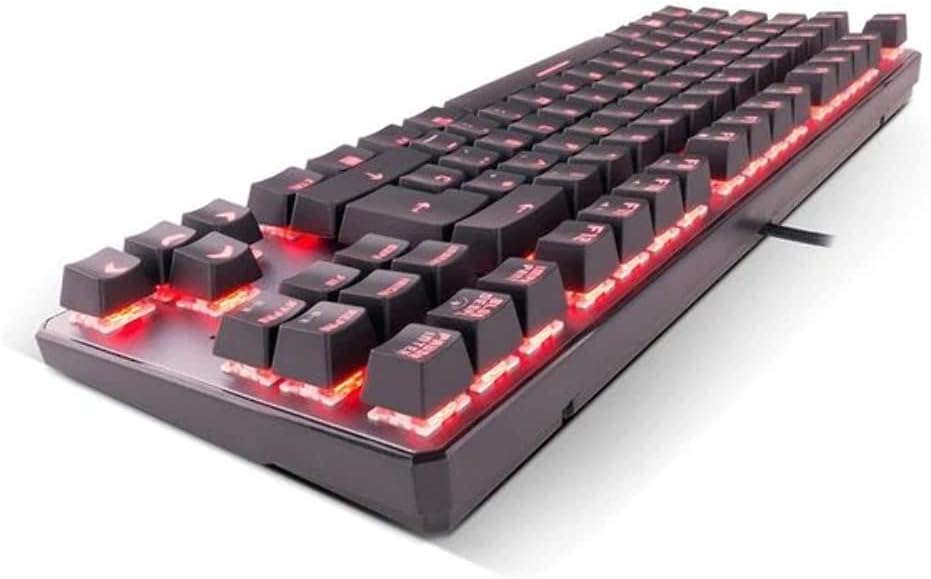
2.1-rasm: Yon view of the KROM Kernel TKL keyboard, highlighting the red backlighting visible beneath the keycaps and the compact profile.
Foydalanish bo'yicha ko'rsatmalar
RGB orqa yoritishni boshqarish
The KROM Kernel TKL keyboard features dynamic RGB backlighting. Use the following key combinations to adjust lighting effects:
- Fn + [Klaviatura]: Specific function keys (often F1-F12 or dedicated keys) are used in combination with the Function (Fn) key to cycle through lighting modes, adjust brightness, change speed, or select colors. Refer to the keyboard's keycap legends for specific symbols indicating lighting controls.
- Yorqinlikni sozlash: Typically Fn + Up/Down arrow keys or dedicated brightness keys.
- Effect Speed: Often Fn + Left/Right arrow keys to increase or decrease the speed of dynamic lighting effects.
- Rejimni almashtirish: Cycle through various pre-set RGB lighting modes (e.g., wave, ripple, breathing, static color) using a dedicated Fn combination.

3.1-rasm: The KROM Kernel TKL keyboard displaying its full RGB spectrum backlighting, enhancing the visual appeal during use.
Macro Function Assignment
The keyboard supports on-the-fly macro recording or software-based macro assignment. For on-the-fly recording:
- Yozib olishni boshlash: Press a specific Macro Record key (often labeled "MR" or a Fn combination).
- Select Target Key: Press the key you wish to assign the macro to.
- Record Sequence: Type the sequence of keys you want to record as the macro.
- Yozishni yakunlash: Press the Macro Record key again to save the macro.
Note: Detailed macro programming instructions may require specific software or refer to the full digital manual available on the KROM websayt.
Multimedia va qisqa klavishlar
Access multimedia functions and system shortcuts using the Fn key in combination with the F-keys (F1-F12) or other designated keys. Common functions include:
- Ovozni boshqarish: Fn + Fx (e.g., F1-F3 for Mute, Volume Down, Volume Up).
- Media ijro etish: Fn + Fx (e.g., F5-F8 for Play/Pause, Stop, Previous Track, Next Track).
- Ilova yorliqlari: Fn + Fx (e.g., F9-F12 for Email, Web Browser, My Computer, Calculator).

3.2-rasm: Yaqindan suratga olish view of the KROM Kernel TKL keyboard's keycaps, clearly showing the Spanish QWERTY layout and secondary functions.
Xizmat
To'g'ri parvarish qilish klaviaturangizning uzoq umr ko'rishini va ishlashini ta'minlaydi.
- Tozalash:
- Tozalashdan oldin klaviaturani kompyuteringizdan uzing.
- Klaviatura qopqoqlari orasidagi chang va qoldiqlarni olib tashlash uchun siqilgan havo idishidan foydalaning.
- Klaviatura qopqog'i va klaviatura yuzasini yumshoq, ozgina d bilan artib olingamp, tuklarsiz mato. Haddan tashqari namlikdan saqlaning.
- Qattiq kimyoviy moddalar, abraziv tozalagichlar yoki erituvchilardan foydalanmang.
- Saqlash: Klaviaturani quruq, salqin joyda, to'g'ridan-to'g'ri quyosh nuri va haddan tashqari haroratdan uzoqroq joyda saqlang.
- Ishlov berish: Avoid dropping the keyboard or exposing it to liquids. Do not attempt to disassemble the keyboard as this may void the warranty.

4.1-rasm: Yon mutaxassisfile view of the KROM Kernel TKL keyboard, illustrating its ergonomic tilt and compact design.

4.2-rasm: A close-up image showing a mechanical switch on the KROM Kernel TKL keyboard, highlighting its design and potential for easy replacement (CIY Technology).

4.3-rasm: The CIY Technology logo, indicating that the keyboard features hot-swappable mechanical switches for easy customization or replacement.
Muammolarni bartaraf qilish; nosozliklarni TUZATISH
If you encounter issues with your KROM Kernel TKL keyboard, refer to the following common solutions:
- Klaviatura javob bermayapti:
- USB kabelining klaviaturaga ham, kompyuterga ham mahkam ulanganligiga ishonch hosil qiling.
- Klaviaturani kompyuteringizning boshqa USB portiga ulab ko'ring.
- Kompyuteringizni qayta ishga tushiring.
- Muammo klaviaturada yoki tizimingizda ekanligini aniqlash uchun klaviaturani boshqa kompyuterda sinab ko'ring.
- Backlighting Not Working or Incorrect:
- Check if the backlighting is turned off. Use the Fn key combinations to cycle through lighting modes and adjust brightness.
- Ensure no software conflicts are interfering with the lighting controls.
- Ro'yxatdan o'tmagan kalitlar yoki ikki marta terish:
- Ta'sirlangan kalitlarni siqilgan havo bilan tozalab, har qanday chiqindilarni olib tashlang.
- If the keyboard uses hot-swappable switches (like the "CIY Technology" mentioned in an image), try gently removing and re-inserting the switch for the problematic key.
- Operatsion tizimingiz drayverlari yangilanganligiga ishonch hosil qiling.
- Macro Functions Not Working:
- Review the macro programming steps to ensure correct recording.
- Check if any software is overriding the keyboard's native macro functions.
Texnik xususiyatlari
| Xususiyat | Tafsilot |
|---|---|
| Model raqami | NXKROMKRNLTKL |
| Klaviatura turi | Mexanik |
| Tartib | Spanish QWERTY (TKL) |
| Orqa yoritish | RGB LED |
| Ulanish | Wired USB (Gold-plated) |
| Kabel uzunligi | 180 cm (Braided) |
| Ishga tushirish kuchi | 60 +/- 10 g |
| Saylov darajasi | 1000 Gts |
| Ichki xotira | 64 KB (for macros/profiles) |
| Joriy iste'mol | 100-260mA |
| jildtage | 5.0 +/- 0.25 V |
| Olchamlari (U x G x Y) | 361 x 133.5 x 22.5 mm |
| Og'irligi | 950 +/- 30 g |
| Moslik | Windows 7/8/8.1/10 |
| Maxsus xususiyatlar | Macro function assignment, Multimedia keys, Shortcut keys |
Kafolat va qo'llab-quvvatlash
KROM products are designed for reliability and performance. This product comes with a standard manufacturer's warranty. For specific warranty terms and conditions, please refer to the warranty card included with your product or visit the official KROM websayt.
For technical support, driver downloads, or further assistance, please visit the KROM official support page or contact their customer service. Contact information can typically be found on the KROM websayt yoki mahsulot qadoqlash.
KROM Official Websayt: www.kromgaming.com (Eslatma: Bu to'ldiruvchi URL, please verify the actual KROM support websayt.)