
1. Kirish
This manual provides comprehensive instructions for the installation, operation, and maintenance of your BlueBird A1390 Automatic Irrigation Tap Programmer. This device is designed to automate your garden watering schedule, ensuring efficient and consistent irrigation. Please read this manual thoroughly before using the product to ensure correct operation and to prevent damage.
2. Xavfsizlik ma'lumotlari
- Do not immerse the unit in water. The unit is designed to be weather-resistant, but not submersible.
- Use only 1.5V AA alkaline batteries. Do not mix old and new batteries, or different types of batteries.
- Agar qurilma uzoq vaqt davomida ishlatilmasa, oqishning oldini olish uchun batareyalarni chiqarib oling.
- Bolalar qo'li etmaydigan joyda saqlang.
- Jihozni o'zingiz qismlarga ajratishga yoki ta'mirlashga urinmang. Xizmat ko'rsatish uchun malakali mutaxassislarga murojaat qiling.
- Oqishning oldini olish uchun barcha ulanishlar xavfsiz ekanligiga ishonch hosil qiling.
3. Paket tarkibi
Paketda quyidagi elementlar mavjudligini tekshiring:
- 1x BlueBird A1390 Automatic Irrigation Tap Programmer
- 1x Foydalanuvchi qo'llanmasi (ushbu hujjat)
Note: 2 AA 1.5V batteries are required for operation and are not included in the package.
4. Mahsulot tugadiview
The BlueBird A1390 features two main rotary dials for setting irrigation frequency and duration, along with a battery indicator and an ON/OFF switch.
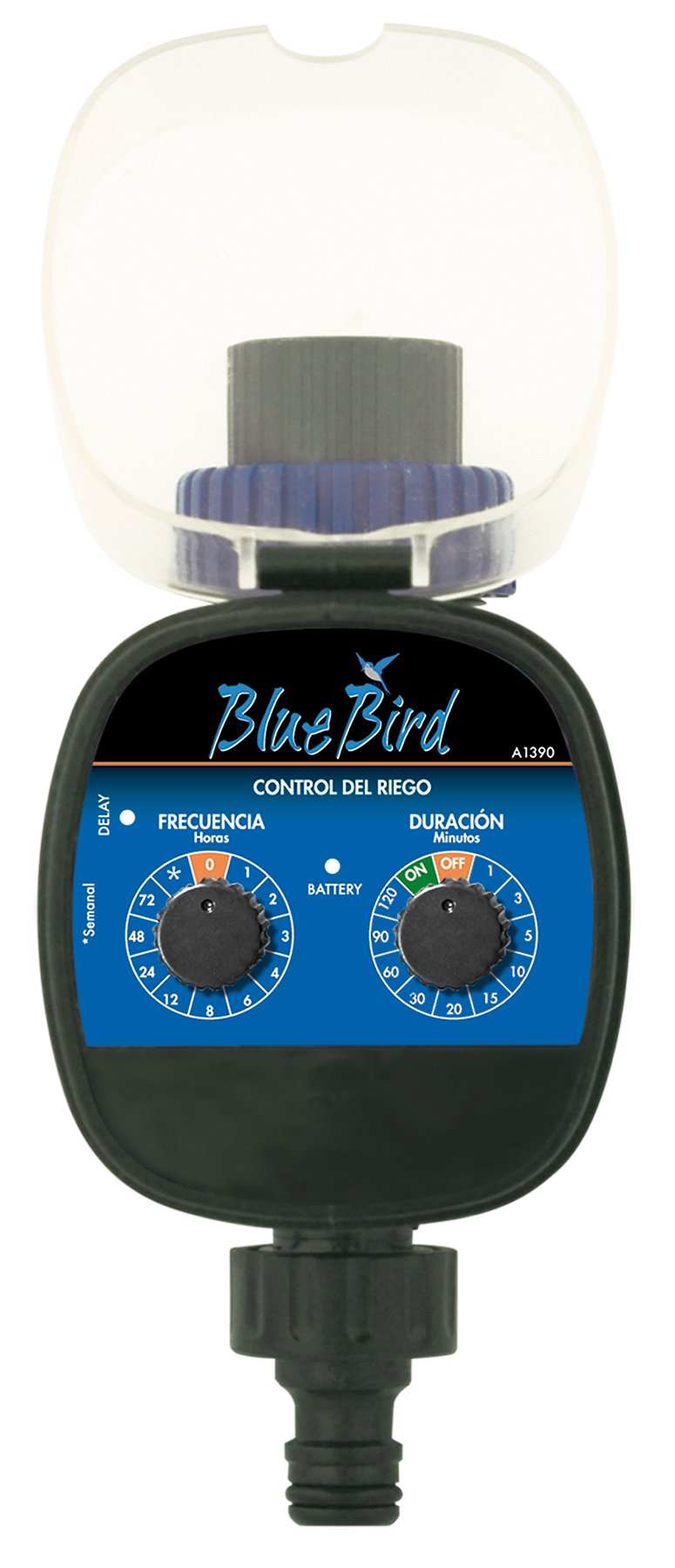
1-rasm: Old view of the BlueBird A1390 Irrigation Programmer. The left dial controls irrigation frequency, and the right dial controls irrigation duration. A battery indicator light is located between the dials.
Komponentlar:
- Frequency Dial (Frecuencia): Sets how often the irrigation occurs. Options include 0 (off), 1, 2, 3, 4, 6, 8, 12, 24, 48, 72 hours, and a '*' setting for manual or weekly operation.
- Duration Dial (Duración): Sets how long each irrigation cycle lasts. Options include 0 (off), 1, 3, 5, 10, 15, 20, 30, 60, 90, 120 minutes.
- ON/OFF tugmasi: Located on the Duration Dial, allows for manual override or turning the unit off.
- Batareya ko'rsatkichi: A light that indicates battery status.
- Batareya bo'limi: Located at the rear of the unit (not visible in Figure 1).
- Suv kirish/chiqish: Standard tap and hose connections.
5. Sozlash
5.1 Batareyani o'rnatish
- Qurilmaning orqa tomonidagi batareya bo'limi qopqog'ini toping.
- Remove the cover by twisting or sliding it open.
- Insert two (2) new 1.5V AA alkaline batteries, ensuring correct polarity (+/-).
- Replace the battery compartment cover securely to maintain water resistance.
5.2 Connecting to the Tap
- Ensure your outdoor tap is turned off.
- Screw the BlueBird A1390 programmer onto your tap. Hand-tighten only to prevent damage.
- Connect your garden hose or irrigation system to the outlet of the programmer. Ensure a tight connection to prevent leaks.
- Slowly turn on your outdoor tap. Check for any leaks at the connections.
6. Foydalanish bo'yicha ko'rsatmalar
The BlueBird A1390 is designed for simple, intuitive programming using its two rotary dials.
6.1 Setting Irrigation Frequency
- ni aylantiring Chastotani terish (left dial) to your desired irrigation interval.
- Mavjud sozlamalar:
- 0: No irrigation (off).
- 1, 2, 3, 4, 6, 8, 12, 24, 48, 72: Irrigation every X hours.
- *: This setting typically indicates a manual mode or a weekly cycle, depending on the specific model's internal logic. Refer to the example below for common usage.
6.2 Setting Irrigation Duration
- ni aylantiring Duration Dial (right dial) to your desired watering time per cycle.
- Mavjud sozlamalar:
- O'chirish: No irrigation.
- ON: Continuous irrigation (use with caution).
- 1, 3, 5, 10, 15, 20, 30, 60, 90, 120: Irrigation for X minutes.
6.3 MasalanampDasturlash
To water every 6 hours for 10 minutes:
- ni o'rnating Chastotani terish uchun 6 (soat).
- ni o'rnating Duration Dial uchun 10 (minutes).
The programmer will automatically begin the cycle based on these settings. The first cycle will typically start shortly after programming, or after a short delay.
6.4 Manual ON/OFF
To manually turn on the water, rotate the Duration Dial to the ON position. To stop manual watering, rotate the dial back to O'CHIRIB or a timed setting.
7. Xizmat ko'rsatish
7.1 Batareyani almashtirish
When the battery indicator light dims or the unit stops functioning, it's time to replace the batteries. Follow the steps in Section 5.1 for battery installation.
7.2 Tozalash
Clean the exterior of the programmer with a damp cloth. Do not use abrasive cleaners or solvents. Ensure no water enters the battery compartment or internal electronics.
7.3 Qishki saqlash
Before the first frost, disconnect the programmer from the tap and hose. Remove the batteries. Store the unit indoors in a dry, frost-free location to prevent damage from freezing water.
8. Muammolarni bartaraf qilish; nosozliklarni TUZATISH
| Muammo | Mumkin sabab | Yechim |
|---|---|---|
| Unit does not turn on/display. | O'lik yoki noto'g'ri o'rnatilgan batareyalar. | To'g'ri kutupluluğun ta'minlangan holda batareyalarni almashtiring. |
| Suv oqmaydi. | Tap is off; programmer set to '0' or 'OFF'; low water pressure; clogged filter. | Ensure tap is fully open. Check frequency/duration settings. Verify water pressure. Clean any filters. |
| Unit leaks at connections. | Loose connections; missing or damaged washer. | Tighten connections. Check and replace washers if necessary. |
| Irrigation schedule is incorrect. | Incorrect frequency or duration settings. | Re-check and adjust the Frequency and Duration Dials according to your desired schedule. |
9. Texnik shartlar
- Model: A1390
- Brend: BlueBird
- Ishlab chiqaruvchi: Altadex
- Quvvat manbai: 2 ta AA 1.5V ishqoriy batareyalar (qo'shilmagan)
- Sug'orish chastotasi: 0, 1, 2, 3, 4, 6, 8, 12, 24, 48, 72 hours, or '*' (manual/weekly)
- Sug'orish muddati: OFF, ON, 1, 3, 5, 10, 15, 20, 30, 60, 90, 120 minutes
- Mahsulot o'lchamlari: Taxminan 19.4 x 10.6 x 10 sm
- Mahsulot og'irligi: Taxminan 280 g
- GTIN (UPC): 8426375113909
10. Kafolat va qo'llab-quvvatlash
This product is covered by a standard manufacturer's warranty. For specific warranty details, please refer to the documentation provided at the time of purchase or contact your retailer. For technical support or inquiries, please contact the seller or manufacturer directly.