
Kirish
This manual provides instructions for the installation, operation, and maintenance of your Audiovox ELEAUDAX80EXT Wireless Extension. This device is designed to expand the functionality of compatible Audiovox phone models, specifically the AX8001, AX8001E, and AX8101AM, by providing an additional wireless handset.
Paket tarkibi
Please verify that all items are present in the package before proceeding with the setup.
- Audiovox ELEAUDAX80EXT Wireless Extension Unit
- Quvvat adapteri (agar mavjud bo'lsa)
- Rechargeable Battery (pre-installed or separate)
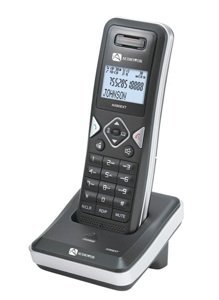
Image: The Audiovox ELEAUDAX80EXT Wireless Extension Unit. This image displays the compact design of the extension handset.
Sozlash; o'rnatish
- Batareyani zaryadlang: If the battery is not pre-installed, insert it into the extension unit according to the markings. Place the extension unit on its charging cradle (if included) or connect the power adapter directly to the unit and a power outlet. Allow the unit to charge for at least 12-16 hours before initial use.
- Register the Extension:
- Ensure your main Audiovox phone base (AX8001, AX8001E, or AX8101AM) is powered on.
- On the main phone base, locate and press the "Register" or "Page" button. Hold it until the indicator light on the base begins to flash (refer to your main phone's manual for exact instructions).
- While the base is in registration mode, on the ELEAUDAX80EXT extension unit, navigate to the "Menu" and select "Register Handset" or a similar option. Follow the on-screen prompts.
- Once registration is successful, the extension unit will display a confirmation message, and the indicator light on the base will stop flashing.
- Sinov ulanishi: Make a test call from the extension unit to ensure proper functionality.
Foydalanish bo'yicha ko'rsatmalar
Qo'ng'iroq qilish
- Telefonni oling yoki tugmachasini bosing GAPIRISH tugmasi.
- Kerakli telefon raqamini tering.
- ni bosing GAPIRISH Qo'ng'iroqni tugatish uchun tugmani yana bosing yoki go'shakni uyaga qaytarib qo'ying.
Qo'ng'iroqqa javob berish
- Telefon jiringlaganda, go'shakni ko'taring yoki tugmasini bosing GAPIRISH tugmasi.
- Qo'ng'iroqni tugatish uchun tugmasini bosing OXIRI tugmasini bosing yoki go'shakni yana rozetkaga qo'ying.
Intercom Function (if supported by base unit)
- ni bosing INTERCOM tugmasi.
- Dial the number of the extension you wish to call (e.g., "2" for the second handset).
- bosing GAPIRISH to initiate the intercom call.
Xizmat
- Tozalash: Jihozni yumshoq, damp mato. Qattiq kimyoviy moddalar yoki abraziv tozalash vositalaridan foydalanmang.
- Batareya parvarishi: For optimal battery life, avoid fully discharging the battery frequently. Keep the unit on its charger when not in use.
- Saqlash: If storing the unit for an extended period, remove the battery and store it in a cool, dry place.
Muammolarni bartaraf qilish; nosozliklarni TUZATISH
| Muammo | Yechim |
|---|---|
| No dial tone / Cannot make calls |
|
| Telefon quvvatlanmayapti |
|
| Qo'ng'iroq sifati yomon / Statik |
|
Texnik xususiyatlari
- Model raqami: ELEAUDAX80EXT
- Compatible Base Units: Audiovox AX8001, AX8001E, AX8101AM
- Olchamlari (U x G x Y): 20 x 40 x 30 millimetr
- Og'irligi: 20 gramm
- UPC: 044476082719
Kafolat va qo'llab-quvvatlash
For specific warranty information and technical support, please refer to the documentation included with your original Audiovox phone system or visit the official Audiovox websayt. Kafolat da'volari uchun xarid kvitansiyasini xaridni tasdiqlovchi hujjat sifatida saqlang.
For further assistance, please contact Audiovox customer service.