
1. Kirish
Thank you for choosing the iggual QR Barcode Scanner. This device is designed for efficient and reliable scanning of both 1D and 2D barcodes, offering both manual and automatic scanning modes. It features an ergonomic design for comfortable use and broad compatibility with various operating systems. This manual provides essential information for setting up, operating, and maintaining your scanner.
Asosiy xususiyatlar:
- Ergonomic design with a comfortable trigger button.
- Detects all common 1D and 2D barcodes, including QR codes.
- Supports manual and automatic scanning modes.
- Wired USB connectivity for reliable data transmission.
- Compatible with Windows XP/7/8/10, macOS, Linux, and Android.
2. Paket tarkibi
Iltimos, barcha narsalar mavjudligiga ishonch hosil qilish uchun paket tarkibini tekshiring:
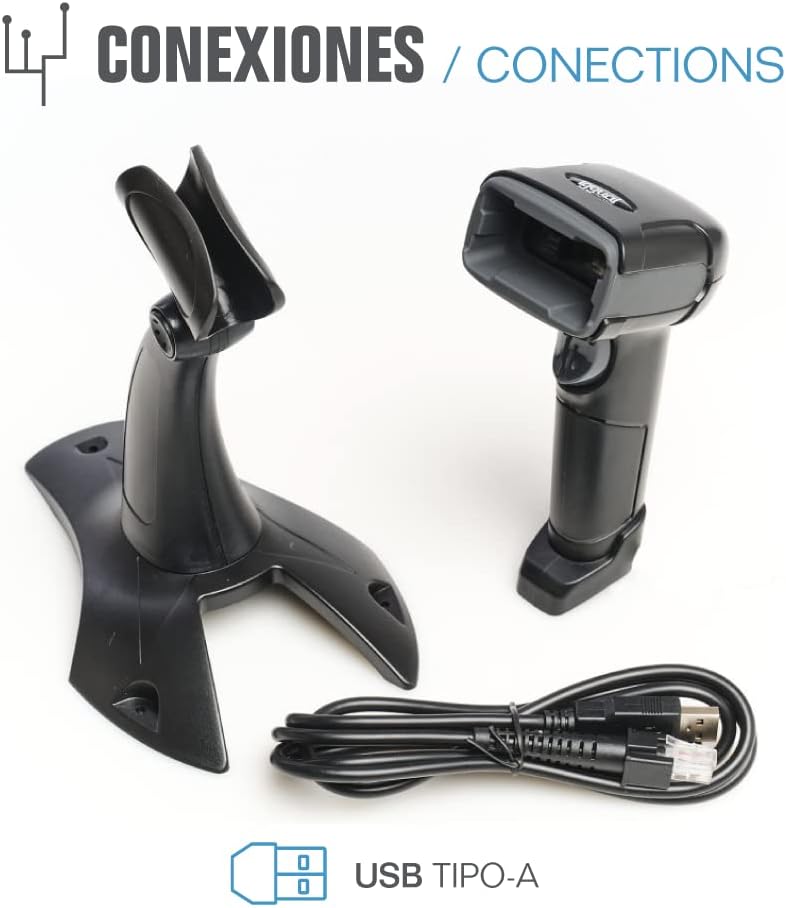
- iggual QR Barcode Scanner (Model IGG315651)
- USB Cable (Type-A)
- Scanner Stand (Optional, depending on package)

2.1-rasm: Package contents including the scanner, stand, and USB Type-A cable.
3. Mahsulot tugadiview
Familiarize yourself with the main components of your iggual barcode scanner:
- Skanerlash oynasi: Shtrix-kodlar o'qiladigan maydon.
- Trigger tugmasi: Activates scanning in manual mode.
- USB port: For connecting the scanner to your computer.
- LED ko'rsatkichi: Provides visual feedback on scanning status.
- Ovozli signal: Provides audible feedback on scanning status.

3.1-rasm: The iggual barcode scanner with its optional stand, highlighting the LED indicator and beeper functionality.
4. Sozlash
4.1 Skanerni ulash
- Connect the USB cable to the USB port on the scanner.
- USB kabelining ikkinchi uchini kompyuteringiz yoki xost qurilmangizdagi mavjud USB portiga ulang.
- The scanner will typically be recognized automatically by your operating system as a standard HID keyboard device. No special drivers are usually required.
4.2 Tizimning mosligi
The iggual QR Barcode Scanner is compatible with a wide range of operating systems:
- Windows XP / 7/8/10
- macOS
- Linux
- Android

4.1-rasm: Operating system compatibility for the iggual barcode scanner.
5. Foydalanish bo'yicha ko'rsatmalar
5.1 Skanerlash rejimlari
Skaner ikkita asosiy skanerlash rejimini qo'llab-quvvatlaydi:
- Manuel rejim: Press the trigger button to activate the scanner and read a barcode. Release the button after a successful scan.
- Avtomatik rejim: The scanner continuously emits a scanning beam, reading barcodes as they are presented within its field of view without needing to press the trigger. Refer to the full product manual (if available from iggual.com) for instructions on switching between modes, usually done by scanning specific configuration barcodes.
5.2 Qo'llab-quvvatlanadigan shtrix-kod turlari
This scanner is capable of reading a wide range of 1D and 2D barcode symbologies, including:
- 2D kodlari: QR Code, Maxi Code, MicroPDF, PDF417
- 1D kodlari: Code 128, EAN-13, EAN-8, Code 39, UPC-A, UPC-E, Code 93, Interleaved 2 of 5, Codabar, MSI, RSS, etc.

5.1-rasm: Scanner capabilities including 200 scans/second, 2D scanning, and supported code types.
5.3 Scanning Procedure
- Ensure the scanner is properly connected to your host device.
- Skanerlangan ma'lumotlarning ko'rinishini istagan dasturni oching (masalan, matn muharriri, elektron jadval yoki POS dasturi).
- Point the scanning window at the barcode you wish to read.
- If in manual mode, press and hold the trigger button. If in automatic mode, simply present the barcode.
- A successful scan will be indicated by a short beep and/or a flash of the LED indicator. The scanned data will appear in your active application.
- If the barcode is not read, adjust the distance and angle of the scanner relative to the barcode.
6. Xizmat ko'rsatish
6.1 Tozalash
- Skanerning tashqi qismini tozalash uchun yumshoq, d dan foydalaningamp mato.
- For the scanning window, use a lint-free cloth and a mild glass cleaner. Avoid abrasive materials or harsh chemicals that could scratch the surface.
- Skaner korpusiga suyuqlik tushmasligiga ishonch hosil qiling.
6.2 Saqlash
When not in use, store the scanner in a cool, dry place, away from direct sunlight and extreme temperatures.
7. Muammolarni bartaraf qilish; nosozliklarni TUZATISH
| Muammo | Mumkin sabab | Yechim |
|---|---|---|
| Skaner kompyuter tomonidan tan olinmadi. | USB ulanishi zaif, USB porti noto'g'ri yoki kabel bilan bog'liq muammo. | Ensure USB cable is securely connected. Try a different USB port or cable. Restart the computer. |
| Skaner shtrix-kodlarni o'qimaydi. | Barcode damaged, incorrect scanning angle/distance, scanner in wrong mode, or dirty scanning window. | Check barcode integrity. Adjust scanning angle and distance. Ensure scanner is in the correct mode (manual/automatic). Clean the scanning window. |
| Skanerlangan ma'lumotlar noto'g'ri ko'rsatilmoqda. | Keyboard layout mismatch or corrupted data. | Ensure your computer's keyboard layout matches the scanner's default output (usually US English). If issues persist, consult the full product manual for advanced configuration. |
8. Texnik shartlar
| Xususiyat | Tafsilot |
|---|---|
| Model | IGG315651 |
| Olchamlari (U x G x Y) | 160 x 80 x 100 mm (6.3 x 3.15 x 3.94 dyuym) |
| Og'irligi | 120 g (0.26 funt) |
| Skanerlash tezligi | 200 skanerlash/sekundiga |
| Tasvir sensori | 640(H) x 480(V), 256 Grayscale |
| Ulanish | Wired USB (Type-A) |
| Quvvat manbai | Simli elektr (USB quvvatlanadi) |
| Operatsion tizimlar | Windows XP/7/8/10, macOS, Linux, Android |
| Qo'llab-quvvatlanadigan shtrix kodlari | 1D & 2D (QR, Maxi Code, MicroPDF, Code, PDF417, RSS, etc.) |
8.1-rasm: Physical dimensions of the iggual barcode scanner.
9. Kafolat va qo'llab-quvvatlash
For warranty information, technical support, or to download the complete product manual with advanced configuration options, please visit the official iggual websaytga kiring yoki mahalliy distribyutoringizga murojaat qiling.
Rasmiy Websayt: www.iggual.com