
1. Kirish
The Cangaroo 3-in-1 device is a versatile instrument designed to monitor indoor temperature and humidity, while also functioning as a digital clock with an alarm feature. This manual provides detailed instructions for its setup, operation, and maintenance, ensuring you get the most accurate readings and functionality from your device.
2. Mahsulot xususiyatlari
- Temperature and Humidity Measurement: Accurately measures ambient temperature and relative humidity.
- Digital Clock with Alarm Function: Displays time and includes a programmable alarm.
- Katta displey: Clear and easy-to-read digital screen.
- Keng o'lchov diapazoni: Temperature from -50°C to 70°C; Humidity from 10% to 99%.
- Yuqori aniqlik: Temperature accuracy of +/- 1°C; Humidity accuracy of +/- 5%.
- Batareya bilan ishlaydi: Requires one AA 1.5V battery (not included) for portable use.
- Zamonaviy dizayn: Yilni va estetik jihatdan yoqimliasing for various environments.
3. Paket tarkibi
Paketda quyidagi elementlar mavjudligini tekshiring:
- 1 x Cangaroo 3-in-1 Thermometer, Hygrometer, Digital Clock with Alarm (Model 103548)
Note: AA 1.5V battery is not included and must be purchased separately.
4. Sozlash
4.1 Batareyani o'rnatish
- Qurilmaning orqa tomonidagi batareya bo'linmasini toping.
- Batareya bo'limi qopqog'ini oching.
- Insert one AA 1.5V battery, ensuring the correct polarity (+ and -).
- Batareya bo'limi qopqog'ini mahkam yoping.
Upon successful battery installation, the display will power on and show current temperature, humidity, and time.

Rasm: orqa view of the device, highlighting the battery compartment and control buttons (ADJ, MODE, °C/°F).
4.2 Dastlabki joylashtirish
Place the device on a flat, stable surface or mount it on a wall using the integrated hanging hole. For accurate readings, avoid placing the device near heat sources, direct sunlight, or areas with extreme drafts.
5. Foydalanish bo'yicha ko'rsatmalar
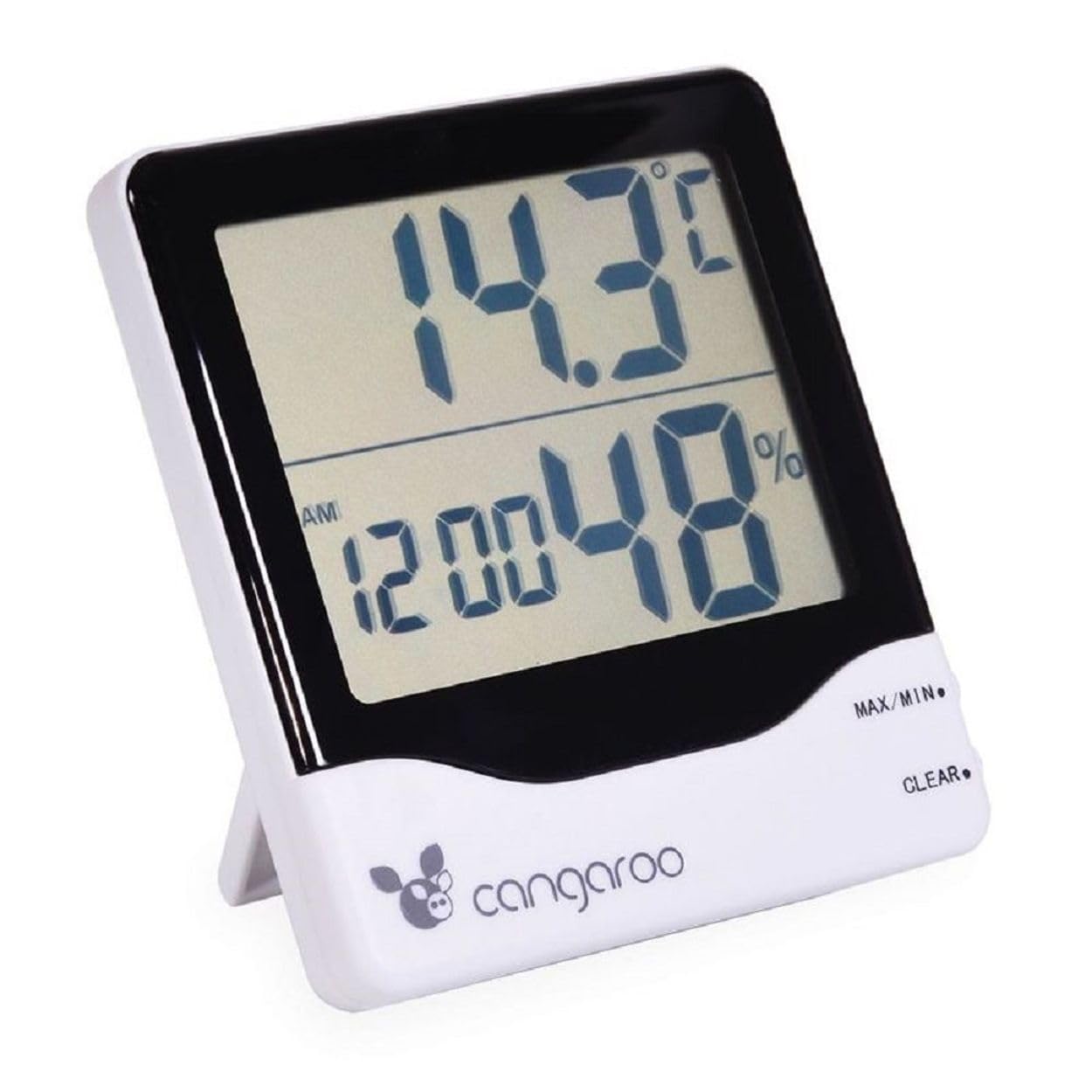
Rasm: old view of the Cangaroo 3-in-1 device, showing the main display with temperature, time, and humidity readings.
5.1 Ko'rsatishview
The large LCD screen displays the following information:
- Yuqori displey: Current temperature in °C or °F.
- Pastki displey: Current time (AM/PM indicator) and relative humidity in %.
5.2 Vaqt va sanani sozlash
- ni bosing REJIM button on the back of the device to cycle through display modes until the time setting is active (usually indicated by flashing digits).
- While in time setting mode, press the ADJ (Adjust) button to change the flashing digit (hours, minutes).
- Bosishda davom eting REJIM to move to the next setting (e.g., minutes, 12/24 hour format, date if available).
- dan foydalaning ADJ button to set the desired value for each.
- Barcha sozlamalar tugallangandan so'ng, tugmasini bosing REJIM sozlash rejimidan chiqish uchun yana.
5.3 Signalni o'rnatish
- ni bosing REJIM button until the alarm time is displayed (often indicated by an alarm icon or 'AL').
- ni bosing va ushlab turing REJIM button for a few seconds until the alarm hours start flashing.
- dan foydalaning ADJ Kerakli budilnik soatini o'rnatish uchun tugmasini bosing.
- bosing REJIM to move to alarm minutes, then use ADJ sozlamoq.
- bosing REJIM tasdiqlash va signal sozlamalaridan chiqish uchun yana bosing.
- Budilnikni yoqish/o'chirish uchun tugmasini bosing ADJ button while in alarm display mode (not setting mode). An alarm icon will appear/disappear on the display.
5.4 Kommutatsiya harorati birliklari (°C/°F)
ni bosing ° C/° F button on the back of the device to toggle between Celsius and Fahrenheit temperature display.
5.5 MAX/MIN Temperature and Humidity Readings
The device records the maximum and minimum temperature and humidity values since the last reset.
- ni bosing MAX/MIN button (located on the front right side) once to display the maximum recorded temperature and humidity.
- bosing MAX/MIN again to display the minimum recorded temperature and humidity.
- bosing MAX/MIN a third time to return to current readings.
- To clear the MAX/MIN records, press the TOZLASH button (located on the front right side, below MAX/MIN) while MAX or MIN values are displayed.
6. Xizmat ko'rsatish
6.1 Tozalash
Wipe the device with a soft, dry cloth. Do not use abrasive cleaners or immerse the device in water. Avoid spraying liquids directly onto the display or buttons.
6.2 Batareyani almashtirish
When the display becomes dim or the device stops functioning, it is time to replace the battery. Follow the steps in Section 4.1 Battery Installation to replace the AA 1.5V battery.
6.3 Saqlash
If the device will not be used for an extended period, remove the battery to prevent leakage and damage. Store the device in a cool, dry place away from direct sunlight.
7. Muammolarni bartaraf qilish; nosozliklarni TUZATISH
- Displey yo'q: Check if the battery is inserted correctly with the right polarity. Replace the battery if it is depleted.
- Noto'g'ri o'qishlar: Ensure the device is not placed near heat sources, direct sunlight, or in areas with extreme drafts. Allow the device to stabilize for 15-30 minutes after initial setup or relocation.
- Signal jiringlamayapti: Verify that the alarm function is activated (check for the alarm icon on the display). Ensure the alarm time is set correctly.
8. Texnik shartlar
| Model raqami | 103548 |
| Rang | Oq va qora |
| Harorat diapazoni | -50°C dan 70°C gacha (-58°F dan 158°F gacha) |
| Haroratning aniqligi | +/- 1°C |
| Namlik darajasi | 10% dan 99% gacha RH |
| Namlik aniqligi | +/- 5% RH |
| Quvvat manbai | 1 x AA 1.5V Battery (not included) |
| Olchamlari (U x G x Y) | 11 x 10 x 2.5 sm (taxminan) |
| Og'irligi | 120 Grams (approximately) |
9. Kafolat va qo'llab-quvvatlash
This product is covered by a standard manufacturer's warranty. For specific warranty details, please refer to the documentation provided with your purchase or contact Cangaroo customer support. If you encounter any issues or require assistance, please reach out to the retailer or manufacturer's support channels.
10. Utilizatsiya haqida ma'lumot
Please dispose of the device and its batteries responsibly according to local environmental regulations. Do not dispose of electronic devices or batteries with household waste. Contact your local authorities for information on recycling programs.