
1. Kirish
This manual provides instructions for the installation, operation, and maintenance of the Cisco CP-68KEM-3PCC Expansion Module. This module is designed to enhance the functionality of your Cisco IP Phone 6851 by providing additional programmable keys.
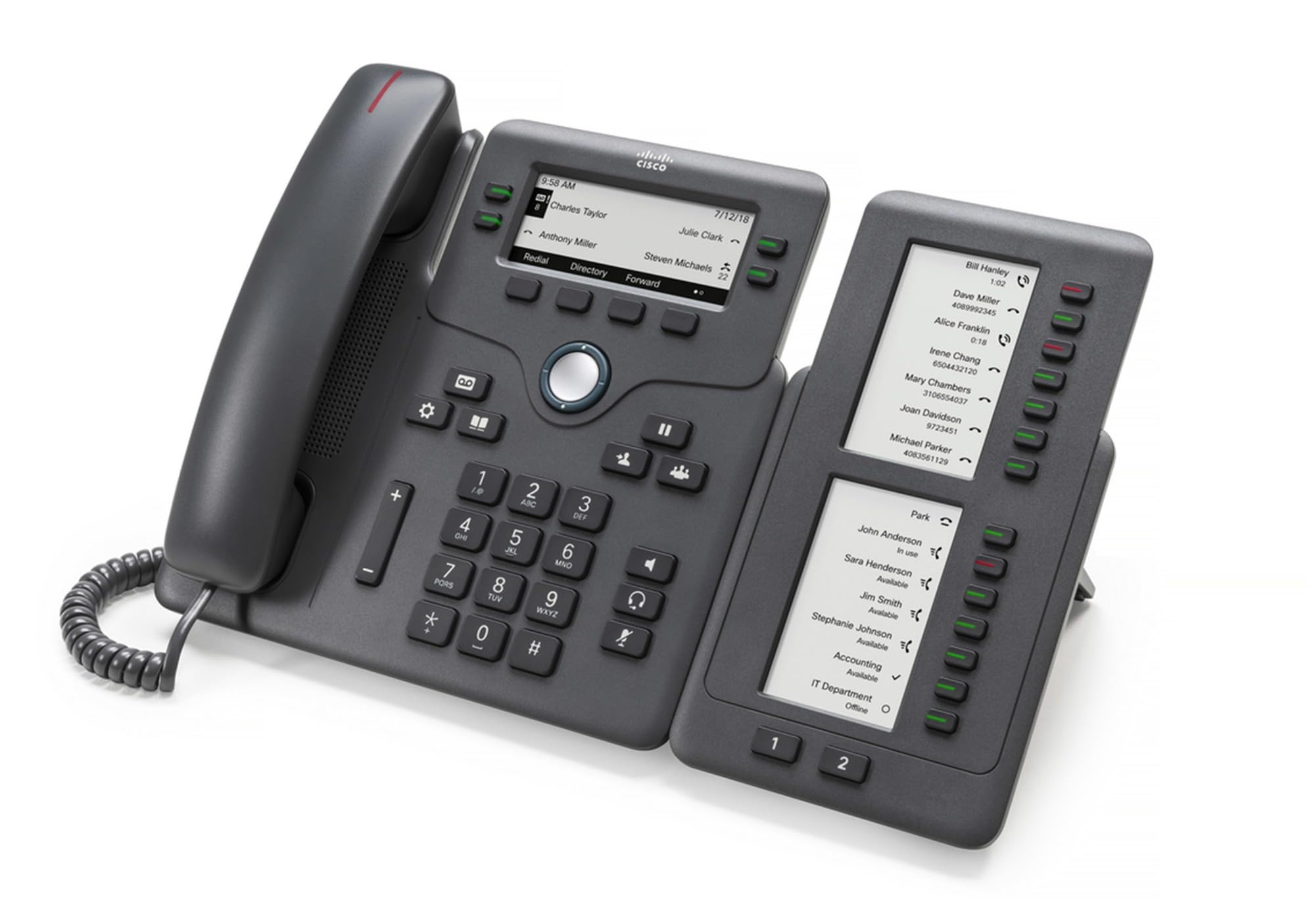
Figure 1: Cisco CP-68KEM-3PCC Expansion Module. This image shows the front view of the expansion module with its grayscale LCD screen and programmable keys.
The Cisco CP-68KEM-3PCC Expansion Module adds 14-line keys and 2-page keys, totaling 28 additional keys, with an easy-to-read grayscale LCD screen. It is ideal for monitoring and managing call status, directory numbers, and speed dial functions.
2. Qutida nima bor
Qutini ehtiyotkorlik bilan oching va barcha narsalar mavjudligiga ishonch hosil qiling:
- Cisco CP-68KEM-3PCC Phone Expansion Module
- Connecting Cable (typically included for linking to the phone)
- Documentation (this user manual, safety information)
If any items are missing or damaged, please contact your vendor or Cisco support immediately.
3. O'rnatish bo'yicha ko'rsatmalar
Follow these steps to connect your Cisco CP-68KEM-3PCC Expansion Module to your Cisco IP Phone 6851.
- Prepare the IP Phone: Ensure your Cisco IP Phone 6851 is powered off and disconnected from the network.
- Connect the Expansion Module: Locate the expansion port on the back or side of your Cisco IP Phone 6851. Connect the provided connecting cable from the expansion module to this port.
- Ulanishni xavfsiz qiling: Ensure the cable is securely fastened to prevent accidental disconnection.
- Yoqilgan: Reconnect your Cisco IP Phone 6851 to the network and power it on. The expansion module should be detected automatically.
- Funktsionalligini tekshirish: Once the phone has booted, check the expansion module's display and keys to ensure they are responsive.
For detailed visual instructions, refer to the official Cisco documentation or support websayt.
4. Operating the Expansion Module
The expansion module provides additional keys for various functions, enhancing your call management capabilities.
4.1 dasturlashtiriladigan kalitlar
The 28 programmable keys (14 keys across 2 pages) can be configured for:
- Directory Numbers (DNs): Assign specific phone lines or extensions.
- Tez terish: Program frequently called numbers for quick access.
- Feature Keys: Assign functions like call transfer, conference, or call park.
- Call Status Monitoring: Monitor the status of other lines (e.g., busy, ringing).
4.2 Page Navigation
Use the dedicated page keys (usually located near the display) to switch between the two pages of programmable keys. The grayscale LCD screen will update to show the labels for the currently active page.
4.3 Konfiguratsiya
Configuration of the programmable keys is typically managed through your organization's phone system administrator or via the web interface of the Cisco IP Phone 6851. Consult your IT department for specific configuration instructions.
5. Xizmat ko'rsatish
To ensure the longevity and optimal performance of your Cisco CP-68KEM-3PCC Expansion Module, follow these maintenance guidelines:
- Tozalash: Use a soft, dry, lint-free cloth to clean the exterior surfaces. For stubborn marks, slightly dampMatoni suv bilan artib oling. Qattiq kimyoviy moddalar, abraziv tozalagichlar yoki erituvchilardan foydalanishdan saqlaning, chunki ular qoplama va elektron qismlarga zarar etkazishi mumkin.
- Atrof-muhit: Keep the module in a clean, dry environment, away from direct sunlight, excessive heat, and moisture.
- Ishlov berish: Handle the module with care. Avoid dropping it or subjecting it to strong impacts.
- Kabelni boshqarish: Ensure connecting cables are not kinked, pinched, or under strain.
There are no user-serviceable parts inside the expansion module. Do not attempt to open or repair the device yourself.
6. Muammolarni bartaraf qilish; nosozliklarni TUZATISH
If you encounter issues with your expansion module, try the following troubleshooting steps:
| Muammo | Mumkin sabab | Yechim |
|---|---|---|
| Module not recognized by phone | Loose cable connection, phone not restarted, incompatible phone model. |
|
| Kalitlar javob bermayapti | Software glitch, configuration issue. |
|
| Displey bo'sh yoki miltillaydi | Elektr ta'minoti bilan bog'liq muammo, ichki nosozlik. |
|
If these steps do not resolve the issue, please contact Cisco technical support or your authorized reseller.
7. Texnik shartlar
| Xususiyat | Tafsilot |
|---|---|
| Model raqami | CP-68KEM-3PCC |
| Brend | Cisco |
| Mos qurilmalar | Cisco IP -telefoni 6851 |
| Rang | Qora |
| Material | Metall |
| Ob'ekt o'lchamlari (UxWxH) | 5.1 x 10.2 x 20.3 sm |
| Quvvat manbai | Corded (powered via host IP Phone) |
| Tugmalar soni | 28 (14 keys across 2 pages) |
| Displey | Grayscale LCD |
| GTIN/UPC | 889728068383 |
8. Kafolat haqida ma'lumot
The Cisco CP-68KEM-3PCC Expansion Module comes with a 2 yillik mahsulot kafolati sotib olingan kundan boshlab. Ushbu kafolat normal foydalanish paytida materiallar va ishlov berishdagi nuqsonlarni qoplaydi. Noto'g'ri foydalanish, baxtsiz hodisalar, ruxsatsiz o'zgartirishlar yoki tashqi sabablar natijasida kelib chiqqan zararni qoplamaydi.
For warranty claims or detailed terms and conditions, please refer to the official Cisco warranty policy available on their websaytiga kiring yoki xarid qilish nuqtangizga murojaat qiling.
9. Qo'llab-quvvatlash
For technical assistance, product information, or to report issues, please contact Cisco support:
- Cisco qo'llab -quvvatlash Websayt: Rasmiyga tashrif buyuring Cisco qo'llab -quvvatlash websayt for documentation, downloads, and contact options.
- Authorized Reseller: Contact the reseller from whom you purchased the product.
When contacting support, please have your product model (CP-68KEM-3PCC) and serial number ready.