
1. Kirish
This manual provides comprehensive instructions for the installation, setup, and operation of your Lesim Smart Switch WiFi Wall Light Switch. This device allows you to control your lighting remotely via a smartphone app or voice commands through compatible smart home assistants like Amazon Alexa and Google Home.
To'g'ri ishlashi va xavfsizligini ta'minlash uchun o'rnatish va ishlatishdan oldin ushbu qo'llanmani diqqat bilan o'qib chiqing.
2. Xavfsizlik ma'lumotlari
- OGOHLANTIRISH: ELEKTR TORK UKISH XAVFI. Installation should be performed by a qualified electrician or a person with electrical knowledge.
- O'rnatishdan oldin elektron to'xtatuvchidan quvvatni o'chiring.
- This smart switch is designed for single-pole applications only. It is not compatible with 3-way (multi-switch) yoritish tizimlari.
- A neutral wire is required for operation. If your electrical box does not have a neutral wire, this switch is not compatible.
- This is a standard on/off switch, not a dimmer.
- Qo'llab-quvvatlash Faqat 2.4 gigagertsli Wi-Fi (5G Wi-Fi networks are not supported).
- Barcha simlarning ulanishlari xavfsiz va izolyatsiyalanganligiga ishonch hosil qiling.
3. Paket tarkibi
Paketingizda barcha narsalar mavjudligini tekshiring:
- Lesim Smart Switch WiFi Wall Light Switch (1 Pack)
- Devor plitasi
- Simli yong'oqlar (4)
- O'rnatish vintlari (2)
- Foydalanuvchi uchun qo'llanma

Image: Contents of the Lesim Smart Switch package, showing the switch, wire nuts, and mounting screws.
4. Mahsulot tugadiview va Xususiyatlar
The Lesim Smart Switch offers convenient control over your home lighting with advanced features:
- Simsiz masofadan boshqarish: Turn electronics on or off from anywhere using the Smart Life app on your smartphone.
- Ovozli boshqaruv: Qo'llarni ishlatmasdan ishlash uchun Amazon Alexa va Google Assistant bilan mos keladi.
- Rejalashtirish va taymerlar: Set custom schedules to automatically turn lights on and off, enhancing convenience and energy efficiency.
- Smart Sharing: Share control of your smart switch with family members through the Smart Life app.
- Oson o'rnatish: Designed to replace existing single-pole light switches.
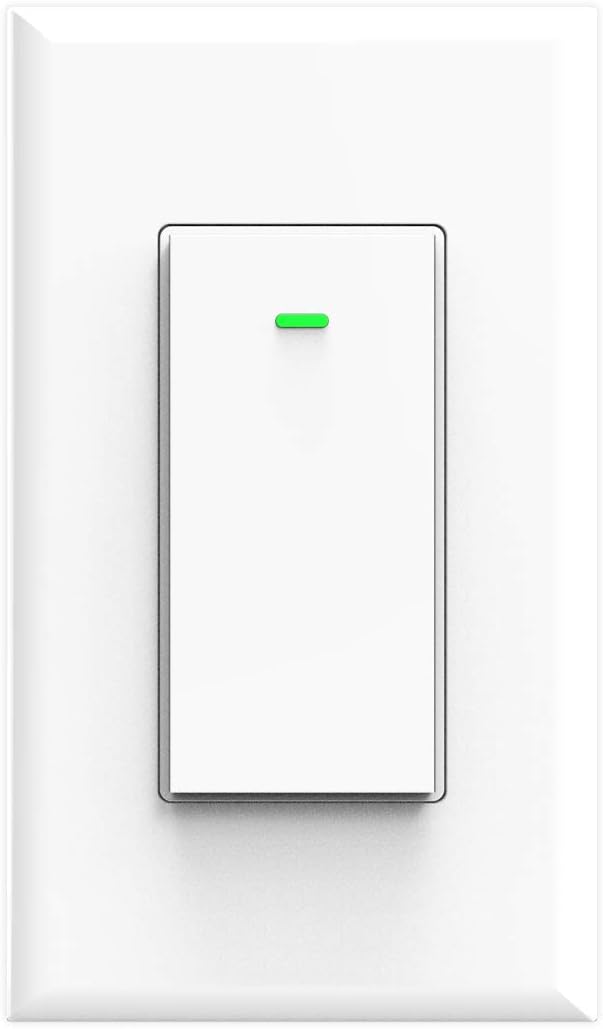
Rasm: old view of the Lesim Smart Switch, showing its clean white design.
5. Texnik shartlar
| Xususiyat | Spetsifikatsiya |
|---|---|
| Model | KS-602S |
| Quvvat manbai rejimi | Neytral + Jonli sim |
| Nominal oqim | 15A (Maks) |
| Operatsion jildtage | AC110-125V 50 / 60Hz |
| Nominal quvvat | 1650 Vt |
| Ulanish protokoli | Wi-Fi (faqat 2.4 gigagertsli) |
| Simsiz standart | IEEE802.11 b/g/n |
| Nazorat usuli | Ilova, Ovoz |
| Mos qurilmalar | Amazon Alexa, Google Assistant, IFTTT |
| O'lchamlari | 4.1 x 1.8 x 1.4 dyuym (taxminan) |
| Element og'irligi | 5.6 untsiya |

Image: Diagram showing the physical dimensions of the smart switch and a basic wiring illustration.
6. O'rnatish
Before beginning, ensure you have basic electrical knowledge and the necessary tools (screwdriver, wire strippers, voltage tester).
6.1 O'rnatishdan oldin nazorat ro'yxati
- Confirm your existing switch is a single-pole almashtirish.
- Verify the presence of a neytral sim (usually white) in your electrical box.
- Ensure your Wi-Fi network is 2.4 gigagertsli.
6.2 Simlarni ulash bo'yicha ko'rsatmalar
- Quvvatni o'chirish: Locate your circuit breaker and turn off the power to the light switch you are replacing. Use a voltagelektr o'chirilganligini tasdiqlash uchun e tester.
- Eski kalitni olib tashlang: Unscrew and carefully pull out the old switch from the wall box. Disconnect the wires, noting which wire was connected to which terminal.
- Simlarni aniqlang:
- Live Wire (Line): Carries power from the circuit breaker (often black).
- Yuklash simi: Carries power to the light fixture (often black).
- Neytral sim: Completes the circuit (always white).
- Tuproq simi: Safety wire (bare copper or green).
- Connect Smart Switch: Connect the wires from your wall box to the corresponding terminals on the Lesim Smart Switch using the provided wire nuts:
- ni ulang Live Wire (Line) from the wall box to the 'L-IN' terminal on the switch.
- ni ulang Simni yuklash from the wall box to the 'OUT' terminal on the switch.
- ni ulang Neytral sim from the wall box to the 'N-IN' terminal on the switch.
- ni ulang Yer simlari from the wall box to the 'GROUND' terminal on the switch.
- O'rnatish tugmasi: Carefully push the wired switch back into the wall box. Secure it with the mounting screws.
- Devor plitasini o'rnatish: Attach the new wall plate over the switch.
- Quvvatni tiklash: O'chirish to'xtatuvchisida quvvatni qayta yoqing.

Image: A detailed wiring diagram illustrating how to connect the Load, Live, Ground, and Neutral wires to the smart switch.
7. Setup (App Pairing & Wi-Fi Connection)
After successful physical installation, proceed with connecting your smart switch to your Wi-Fi network and the Smart Life app.
- Ilovani yuklab oling: ni yuklab oling Aqlli hayot Apple App Store yoki Google Play do'konidan ilova.
- Roʻyxatdan oʻtish/Kirish: Ilovani oching va yangi hisob qaydnomasi uchun ro'yxatdan o'ting yoki agar sizda allaqachon mavjud bo'lsa, tizimga kiring.
- Qurilma qo'shish: Tap the '+' icon in the top right corner of the app to add a new device. Select 'Electrician' then 'Switch (Wi-Fi)'.
- Wi-Fi tarmog'iga ulanish: Enter your 2.4GHz Wi-Fi network name and password. Ensure your phone is connected to the 2.4GHz network.
- Qurilmani asl holatiga qaytarish: Follow the in-app instructions to put the switch into pairing mode. This usually involves pressing and holding the switch button until the indicator light blinks rapidly. Confirm the indicator light is blinking quickly in the app.
- Ulanish: The app will begin connecting to the device. Once connected, you can rename your switch for easier identification.

Image: A visual guide showing the steps to set up the smart switch with the Smart Life mobile application.
8. Foydalanish bo'yicha ko'rsatmalar
8.1 Qo'lda boshqarish
Press the physical button on the smart switch to manually turn the connected light on or off.
8.2 Ilovalarni boshqarish
Once connected to the Smart Life app, you can:
- Masofadan yoqish/oʻchirish: Tap the switch icon in the app to turn lights on or off from anywhere.
- Rejalashtirish: Set specific times for your lights to turn on or off automatically.
- Taymerlar: Create countdown timers for lights to switch off after a set duration.
- Sahna yaratish: Group multiple smart devices to control them with a single command or schedule.
- Qurilma almashish: Share control of the switch with other Smart Life app users (e.g., family members).

Image: A user demonstrating remote control of the smart switch using the Smart Life app on a smartphone.

Image: Illustration of setting schedules and creating scenes for automated lighting control.

Image: Demonstrates controlling home lights remotely via the app, ensuring you never return to a dark home.
8.3 Ovozli boshqaruv
Integrate your Lesim Smart Switch with Amazon Alexa or Google Assistant for voice control:
- Hisobni bog'lash: In the Alexa or Google Home app, navigate to the 'Skills' or 'Works with Google' section and search for 'Smart Life'. Link your Smart Life account.
- Qurilmalarni kashf qilish: Once linked, ask Alexa or Google Assistant to 'Discover devices'.
- Ovozli buyruqlar: Quyidagi kabi buyruqlardan foydalaning:
- "Alexa, [Nomni almashtirish] funksiyasini yoqing"
- "Hey Google, [Switch Name] funksiyasini o'chirib qo'ying"

Image: Demonstrates hands-free voice control using Amazon Alexa and Google Home devices.
9. Xizmat ko'rsatish
The Lesim Smart Switch requires minimal maintenance.
- Tozalash: Wipe the switch and wall plate with a soft, dry cloth. Avoid using harsh chemicals or abrasive cleaners.
- Wi-Fi Stability: Ensure your Wi-Fi router is functioning correctly and provides a stable 2.4GHz signal to the switch for optimal performance.
- Dasturiy ta'minotni yangilash: Periodically check the Smart Life app for any available firmware updates for your switch to ensure you have the latest features and security enhancements.
10. Muammolarni bartaraf qilish; nosozliklarni TUZATISH
If you encounter issues with your Lesim Smart Switch, refer to the following common problems and solutions:
| Muammo | Mumkin sabab / yechim |
|---|---|
| Switch is unresponsive (no power) |
|
| Cannot connect to Wi-Fi / App pairing fails |
|
| Voice control (Alexa/Google Home) not working |
|
| Switch works manually but not via app/voice |
|
| Switch is a dimmer or 3-way switch |
|
11. Kafolat va qo'llab-quvvatlash
For warranty information or technical support, please refer to the product packaging or contact Lesim customer service directly. Contact details can typically be found on the manufacturer's websayt yoki xarid platformangiz orqali.