
Kirish
The KECHAODA A26 is a compact dual SIM mobile phone designed for essential communication. It features a small form factor, Bluetooth connectivity for use as a dialer with other smartphones, and an 800 mAh battery providing up to 4 hours of talk time. This manual will guide you through the setup, operation, and maintenance of your device.
Quti tarkibi
Paketni ochgandan so'ng, barcha quyidagi narsalar mavjudligiga ishonch hosil qiling:
- KECHAODA A26 Mobile Phone
- Qayta zaryadlanuvchi batareya (800 mA/soat)
- Micro USB zaryadlovchi kabeli
- Foydalanuvchi uchun qo'llanma
- Kafolat kartasi
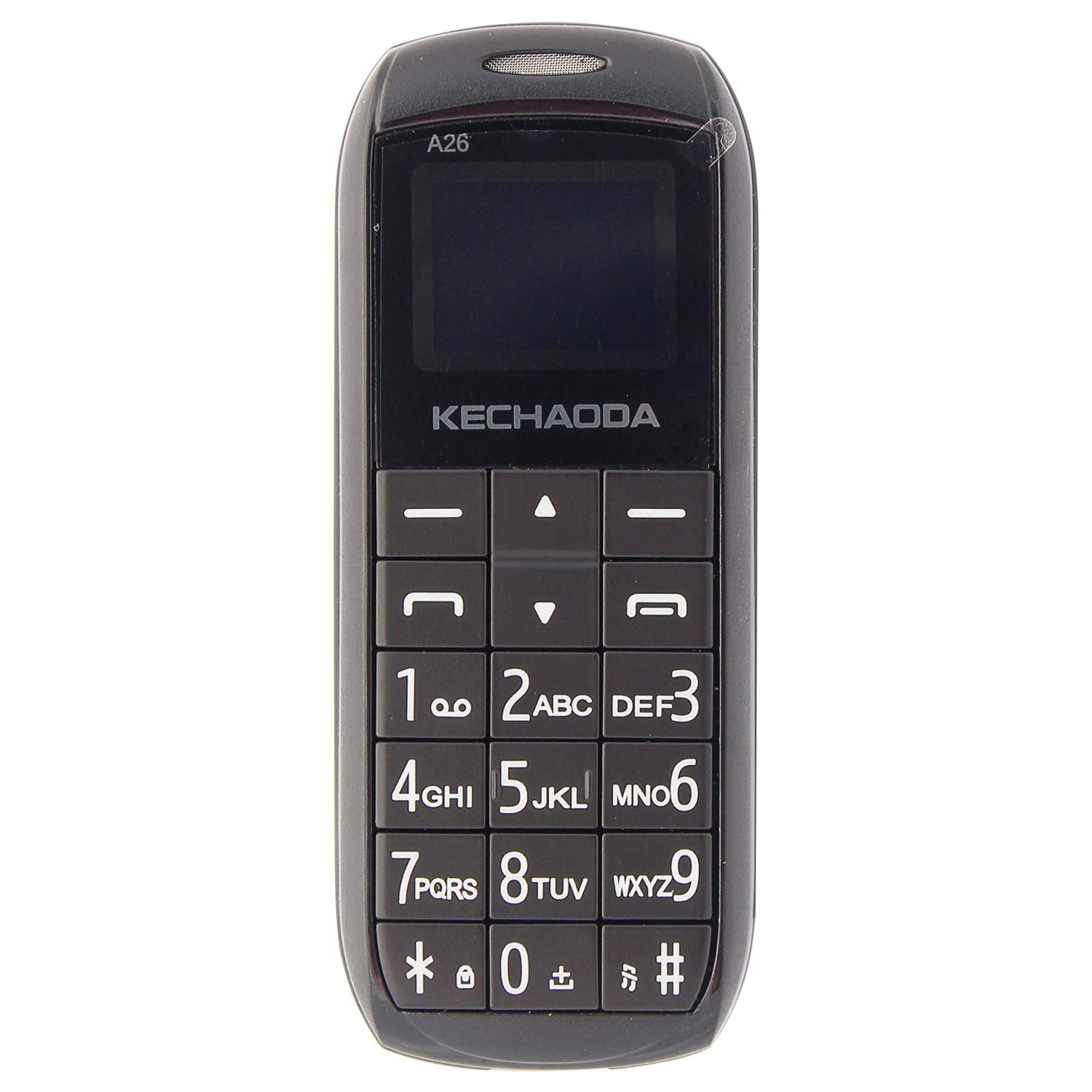
Rasm: old view of the KECHAODA A26 Mobile Phone, showcasing its compact design and keypad.
Mahsulot tugadiview
The KECHAODA A26 is designed for portability and ease of use. Familiarize yourself with its physical features:
- O'lchamlari: Approximately 40 x 15 x 4 Millimeters
- Og'irligi: Taxminan 95 gramm
- Displey: 1.6-inch black and white LCD screen
- SIM-kartani qo'llab-quvvatlash: Dual Micro SIM card slots
- Ulanish: Bluetooth, 2G GSM Network
- Portlar: Micro USB for charging, 3.5mm headphone jack
- Material: Bardoshli plastik konstruktsiya

Rasm: yon view of the KECHAODA A26 Mobile Phone, highlighting its slim profile.

Rasm: yuqori view of the KECHAODA A26 Mobile Phone, showing the Micro USB charging port and headphone jack.
Sozlash; o'rnatish
1. Inserting the Battery and SIM Cards
- Telefonning orqa qopqog'ini ehtiyotkorlik bilan olib tashlang.
- Insert the 800 mAh battery into its compartment, ensuring the contacts align correctly.
- Locate the dual Micro SIM card slots. Insert your SIM cards into the designated slots.
- Orqa qopqoqni joyiga mahkam o'rnashguncha o'zgartiring.
2. Qurilmani zaryadlash
- Connect the Micro USB charging cable to the phone's charging port.
- Plug the other end of the cable into a compatible USB power adapter or computer USB port.
- Allow the phone to charge fully before initial use. The battery indicator on the screen will show charging status.
Foydalanish bo'yicha ko'rsatmalar
1. Quvvatni yoqish/o‘chirish
- Yoqish uchun ekran yonib ketguncha Quvvat/Qo'ng'iroqni tugatish tugmasini bosib turing.
- To power off, press and hold the Power/End Call button until the power-off prompt appears, then confirm.
2. Qo'ng'iroq qilish
- From the home screen, use the numeric keypad to dial the desired phone number.
- Press the Call button (usually a green phone icon) to initiate the call.
- To end a call, press the Power/End Call button (usually a red phone icon).
3. SMS xabarlarni yuborish
- Asosiy ekrandan "Xabarlar" menyusiga o'ting.
- Select 'Write Message' or 'New Message'.
- Enter your message using the keypad. Multiple presses on a key cycle through letters and numbers.
- Qabul qiluvchining telefon raqamini kiriting yoki kontaktlaringizdan tanlang.
- Xabarni yuboring.
4. Bluetooth Dialer Functionality
The KECHAODA A26 can connect to another smartphone via Bluetooth and act as a dialer, allowing you to make and receive calls through your primary phone's SIM while using the compact A26.
- Enable Bluetooth on both your KECHAODA A26 and your primary smartphone.
- On the A26, navigate to the Bluetooth settings and search for available devices.
- Select your primary smartphone from the list and pair the devices. Follow any on-screen prompts for pairing codes.
- Once paired, you can use the A26 to dial numbers and manage calls that are routed through your connected smartphone.
5. FM radio
The phone includes an FM radio feature. To use it, ensure headphones are connected to the 3.5mm jack, as they often act as the antenna.
- Connect a pair of wired headphones to the phone.
- Navigate to the 'FM Radio' application in the menu.
- Stansiyalarni qidirish yoki chastotani qo'lda sozlash uchun navigatsiya tugmalaridan foydalaning.
Texnik xususiyatlari
| Brend | KECHAODA |
| Model | A26 |
| Operatsion tizim | Symbian 9.3 |
| CPU modeli | ARMv7 |
| Xotirani saqlash hajmi | 16 MB |
| Ekran o'lchami | 1.6 dyuym (LCD) |
| Rezolyutsiya | 720p |
| Rang | Qora |
| SIM-karta uyasi soni | Ikki SIM |
| Ulagich turi | Mikro USB |
| Form faktor | Smartphone (Feature Phone) |
| Human Interface Types | Dial (Keypad) |
| Materiallar xususiyatlari | Plastik |
| Naushniklar Jek | Ha |
| Mahsulot xususiyatlari | Bluetooth, Dual SIM |
| Batareya quvvati | 800 mlnamp Hours (Lithium-Ion) |
| Telefonda gaplashish vaqti | 4 soat |
| Element og'irligi | 95 gramm |
| Element o'lchamlari | 40 x 15 x 4 millimetr |
| Simsiz provayder | Barcha tashuvchilar uchun ochilgan |
| Uyali aloqa texnologiyasi | 2G |
| Tarmoqqa ulanish texnologiyasi | GSM |
| Model yili | 2019 |
Muammolarni bartaraf qilish; nosozliklarni TUZATISH
If you encounter issues with your KECHAODA A26, refer to the following common solutions:
- Telefon yoqilmaydi: Ensure the battery is correctly inserted and fully charged. Connect the charger and try again.
- Tarmoq signali yo'q: Check if your SIM cards are properly inserted. Ensure you are in an area with 2G GSM network coverage.
- Batareya zaryadlanmayapti: Verify that the Micro USB cable and charger are working correctly. Try a different charging cable or power source. Ensure the charging port is clean and free of debris.
- Bluetooth ulanishi bilan bog'liq muammolar: Ensure Bluetooth is enabled on both devices. Make sure both devices are within range and try re-pairing them.
- Klaviatura javob bermayapti: Power off the phone, remove the battery, wait a few seconds, then reinsert the battery and power on.
Kafolat va qo'llab-quvvatlash
The KECHAODA A26 comes with a 1 yillik ishlab chiqaruvchi kafolati. For warranty claims or technical support, please contact the manufacturer or your retailer with your proof of purchase.
Ishlab chiqaruvchi: Dharam & Company, SS Care
Ishlab chiqaruvchining aloqa ma'lumotlari: Dharam & Company