
1. Kirish
Thank you for choosing the Gembird MUS-6B-01 Optical USB Mouse. This manual provides essential information for setting up, operating, maintaining, and troubleshooting your new mouse. Please read these instructions carefully to ensure optimal performance and longevity of your device.

Image: The official Gembird brand logo, featuring the company name in a stylized font with a geometric design.
2. Mahsulot tugadiview
The Gembird MUS-6B-01 is a reliable 6-button optical USB mouse designed for comfortable and precise navigation. Its ambidextrous design makes it suitable for both left and right-handed users.
Asosiy xususiyatlar:
- Optik kuzatuv: Provides smooth and accurate cursor control.
- 6 tugma: Includes standard left/right click, scroll wheel, DPI adjustment, and two side buttons for enhanced functionality.
- USB ulanishi: Simple plug-and-play connection to your computer.
- Ikki tomonlama dizayn: Chap va o'ng qo'lli foydalanuvchilar uchun qulay.
Komponentlar:
- Chap tugmasini bosing
- O'ng tugmasini bosing
- Scroll Wheel (also functions as a middle click button)
- DPI sozlash tugmasi
- Oldinga yo'naltirish tugmasi (yon tomon)
- Orqaga tugma (yon tomon)
- Optical Sensor (underside)
- USB Connector (at the end of the cable)
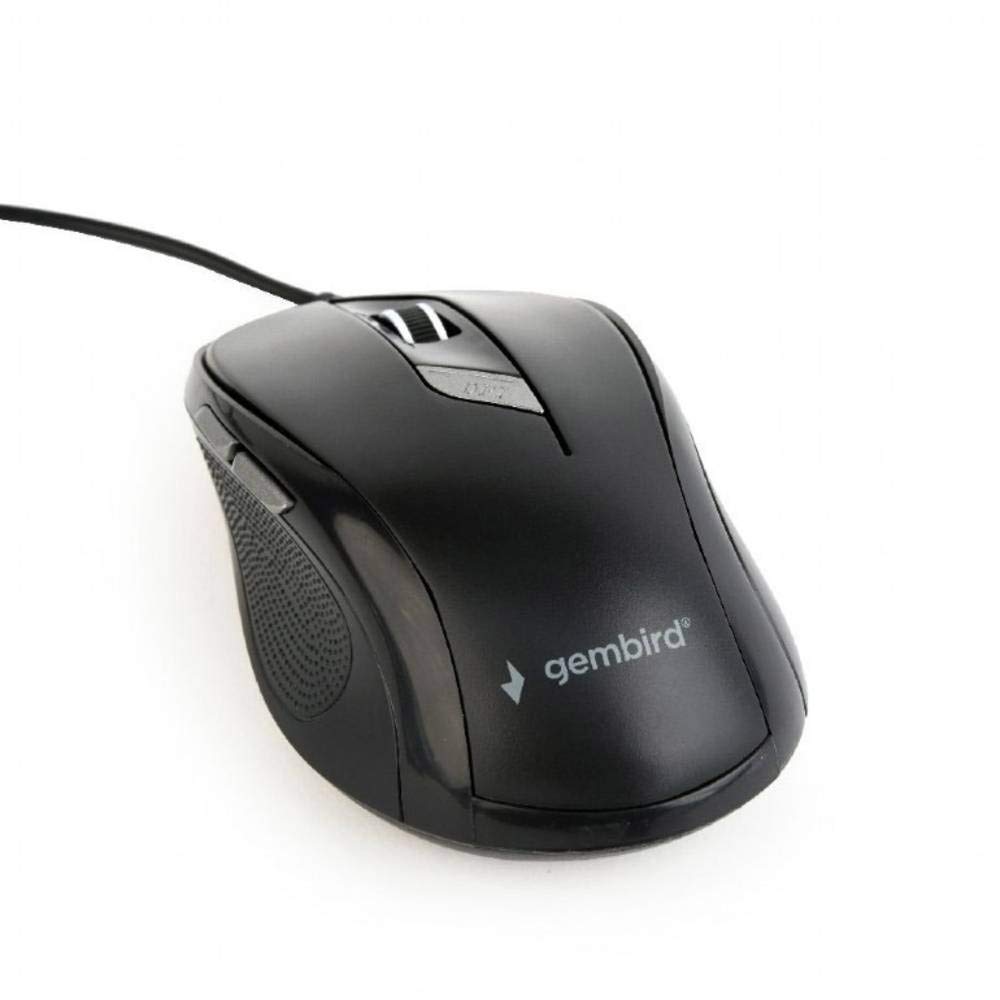
Rasm: yuqoridan pastga view of the Gembird MUS-6B-01 optical USB mouse. The mouse is black with a matte finish, featuring a scroll wheel, left and right click buttons, a DPI button, and two side buttons. A black USB cable extends from the front of the mouse.
3. Sozlash
Setting up your Gembird MUS-6B-01 mouse is a simple plug-and-play process.
O'rnatish bosqichlari:
- Kompyuteringizda mavjud USB portini toping.
- Plug the USB connector of the Gembird MUS-6B-01 mouse firmly into the USB port.
- Your operating system (Windows, Linux) will automatically detect and install the necessary drivers. This process may take a few moments.
- Drayverlar o'rnatilgandan so'ng, sichqoncha foydalanishga tayyor.
No additional software installation is typically required for basic functionality.
4. Foydalanish bo'yicha ko'rsatmalar
Familiarize yourself with the functions of each button on your Gembird MUS-6B-01 mouse.
Asosiy funktsiyalari:
- Chap tugmasini bosing: Primary action, selecting items, opening files.
- O'ng tugmasini bosing: Opens context menus, provides additional options.
- O'tkazish g'ildiragi: Hujjatlar boʻylab yuqoriga yoki pastga aylantiring va web sahifalar.
- Middle Click (Scroll Wheel Press): Often used to open links in new tabs or for specific application functions.
Kengaytirilgan funksiyalar:
- DPI sozlash tugmasi: Located behind the scroll wheel, this button allows you to cycle through different sensitivity (DPI) settings. Press it to change the cursor speed to suit your preference.
- Forward Button (Side): Typically navigates forward in web brauzerlar yoki file tadqiqotchilar.
- Backward Button (Side): Typically navigates backward in web brauzerlar yoki file tadqiqotchilar.
The functionality of the side buttons may vary depending on the application or operating system settings. Some operating systems allow customization of these buttons.
5. Xizmat ko'rsatish
Proper care will help extend the life of your Gembird MUS-6B-01 mouse.
Tozalash:
- Tozalashdan oldin sichqonchani kompyuteringizdan uzing.
- Yumshoq, bir oz d foydalaningamp, lint-free cloth to wipe the surface of the mouse.
- For stubborn dirt, a small amount of mild soap solution can be applied to the cloth (not directly to the mouse).
- Use a cotton swab or compressed air to clean around the scroll wheel and between buttons.
- Ensure the optical sensor on the underside is clean and free of dust or debris.
- Do not use harsh chemicals, abrasive cleaners, or immerse the mouse in water.
Saqlash:
When not in use for extended periods, store the mouse in a clean, dry environment away from extreme temperatures and direct sunlight.
6. Muammolarni bartaraf qilish; nosozliklarni TUZATISH
If you encounter issues with your Gembird MUS-6B-01 mouse, try the following troubleshooting steps:
| Muammo | Mumkin yechim |
|---|---|
| Sichqoncha javob bermayapti |
|
| Erratic or jumpy cursor movement |
|
| Tugmalar ishlamayapti |
|
7. Texnik shartlar
Detailed technical specifications for the Gembird MUS-6B-01 Optical USB Mouse:
| Xususiyat | Spetsifikatsiya |
|---|---|
| Brend | Gembird |
| Model nomi | MUS-6B-01 |
| Ulanish texnologiyasi | Simli (USB) |
| Harakatni aniqlash texnologiyasi | Optik |
| Tugma miqdori | 6 |
| Qo'lni yo'naltirish | Ikki tomonlama |
| Mos keladigan operatsion tizimlar | Linux, Windows 7, Windows XP (va undan keyingi versiyalari) |
| Uskuna platformasi | Shaxsiy kompyuter |
| Kabel uzunligi | 5.0 metr |
| Element og'irligi | 74 gramm |
| Material | Plastik |
| Rang | Qora |
| Batareyalar talab qilinadi | Yo'q |
8. Xavfsizlik ma'lumotlari
Iltimos, quyidagi xavfsizlik qoidalariga rioya qiling:
- Sichqonchani suvga yoki haddan tashqari namlikka duchor qilmang.
- Sichqonchani tushirish yoki kuchli zarbalarga duchor qilishdan saqlaning.
- Sichqonchani o'zingiz qismlarga ajratishga yoki ta'mirlashga urinmang. Malakali xizmat ko'rsatuvchi xodimlarga murojaat qiling.
- Qurilmani haddan tashqari harorat va to'g'ridan-to'g'ri quyosh nurlaridan uzoqroq tuting.
- Elektron chiqindilarni mahalliy qoidalarga muvofiq mas'uliyat bilan yo'q qiling.
9. Kafolat va qo'llab-quvvatlash
Gembird products are designed for reliability and performance. For specific warranty terms and conditions, please refer to the warranty card included with your product or visit the official Gembird website. For technical support or further assistance, please contact your retailer or the Gembird customer service department.