
Kirish
Thank you for choosing the Angetube Streaming 1080P HD Webcam 967. This manual provides essential information for setting up, operating, and maintaining your webcam to ensure optimal performance for streaming, video conferencing, and content creation.
Qutida nima bor
- 1080p Webkamera x 1
- Foydalanuvchi uchun qo'llanma x 1
Mahsulot xususiyatlari
- Adjustable Ring Fill Light: The webcam features an integrated ring light with three adjustable brightness levels to meet various lighting requirements for video chatting or streaming. This helps reduce visual noise and enhances detail in low-light environments.
- Professional Webcam for Streaming: Designed for compatibility with live streaming software such as OBS, Xsplit, and Mixer. It supports background replacement powered by Chromacam, allowing for customized backgrounds during games or presentations.
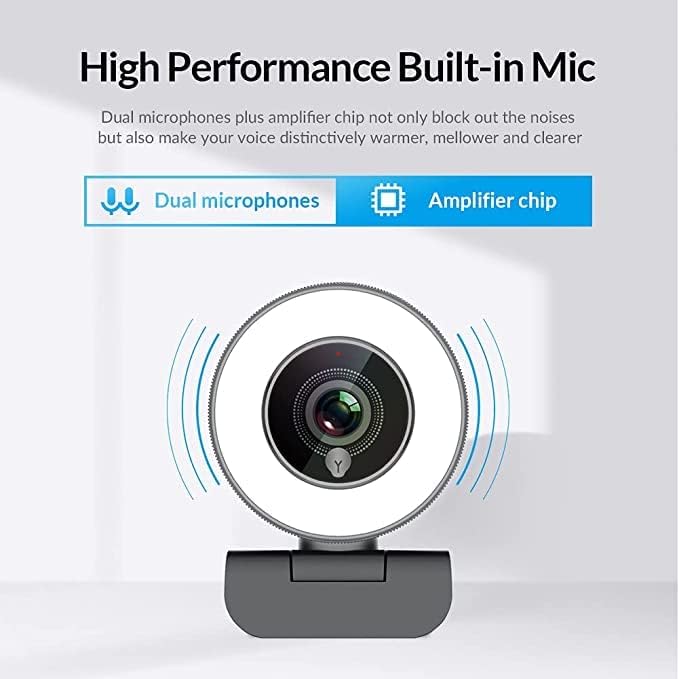
- Dual Noise-Canceling Microphones with Ampko'taruvchi chip: Equipped with superior microphones and an amplifier chip to enhance speech quality, providing clear audio. Background noise is filtered out, ensuring your voice is heard distinctly. The microphone can pick up sound from up to 3 meters away.
- Fast and Accurate Autofocus: The autofocus function eliminates the need for manual adjustments, keeping you consistently in focus during video calls or streams.
- High Quality, Low Bandwidth (H.264 Compression): Utilizes H.264 compression encoding for clearer and smoother video recording, video conferencing, and live broadcasts, optimizing bandwidth usage.
Sozlash; o'rnatish
- Paketdan chiqaring Webkamera: Ehtiyotkorlik bilan olib tashlang webcam and its accessories from the packaging.
- O'rnatish Webkamera: The webcam features a versatile clip that can be securely attached to the top of your monitor or laptop screen. Adjust the clip to ensure a stable fit. Alternatively, the base includes a standard tripod thread for mounting on a tripod (not included).
- Kompyuterga ulanish: USB kabelini rozetkadan ulang webkompyuteringizdagi mavjud USB portiga kamerani ulang. webcam is plug-and-play, meaning it should be automatically recognized by most operating systems (Windows 7/8/10 or above, Mac OS 10.6 or above, Android V5.0 or above, Chrome OS 29.0.1547.70 or above, Ubuntu 2.6.24 or above) without requiring additional drivers.
- Dasturiy ta'minotni aniqlash: Open your preferred video conferencing or streaming application (e.g., Zoom, Skype, OBS, YouTube Live, Google Meet). Select the Angetube 967 Webcam as your video and audio input device in the application's settings.
Foydalanish bo'yicha ko'rsatmalar
Adjusting the Ring Light
The Angetube 967 Webcam includes an integrated ring light to provide optimal illumination. To adjust the brightness:
- Locate the touch-sensitive button on the front of the webcam, just below the lens.
- Tap the button to cycle through three brightness levels: Low Light, Medium Light, and High Light.
- Tap a fourth time to turn the ring light off.

Avtofokus funksiyasi
The webcam features automatic autofocus. This means the camera will continuously adjust its focus to keep your face clear and sharp without manual intervention. This is particularly useful for dynamic presentations or active streaming sessions.

Mikrofondan foydalanish
The integrated dual noise-canceling microphones are designed to capture clear audio while minimizing background distractions. Ensure the webcam is positioned appropriately to optimize sound pickup, ideally within 3 meters for best results.
Moslik
The Angetube 967 Webcam is widely compatible with various operating systems and applications, including:
- Operatsion tizimlar: Windows 7/8/10 or above, Mac OS 10.6 or above, Android V5.0 or above, Chrome OS 29.0.1547.70 or above, Ubuntu 2.6.24 or above.
- Ilovalar: OBS, Xsplit, Mixer, Zoom, Skype, Google Meet, YouTube Live, Facebook Live, and other video conferencing/streaming platforms.

Xizmat
- Ob'ektivni tozalash: Use a soft, dry, lint-free cloth to gently wipe the webcam lens. Avoid using harsh chemicals or abrasive materials that could scratch the lens.
- Saqlash: Ishlatilmaganda, uni saqlang webcam in a clean, dry place away from extreme temperatures and direct sunlight.
- Kabelni parvarish qilish: Zararni oldini olish uchun USB kabelini haddan tashqari burish yoki burishdan saqlaning.
Muammolarni bartaraf qilish; nosozliklarni TUZATISH
- WebKamera aniqlanmadi:
- USB kabeli ikkalasiga ham mahkam ulanganligiga ishonch hosil qiling webkamera va kompyuteringiz.
- ni ulashga harakat qiling webkamerani boshqa USB portiga kiriting.
- Kompyuteringizni qayta ishga tushiring.
- Operatsion tizimingizning qurilma menejerini tekshiring webcam is listed and recognized.
- No Video/Black Screen:
- ni ta'minlash webcam is selected as the primary video input device in your application's settings.
- Check if any privacy settings on your operating system are blocking webcam access for the application.
- Ilovani yoping va qayta oching.
- Ovoz yo'q/Ovoz sifati yomon:
- Verify that the Angetube 967 Webcam's microphone is selected as the audio input device in your application's settings.
- Check your computer's sound settings to ensure the microphone is enabled and not muted.
- ni ta'minlash webcam is positioned within optimal range (up to 3 meters) for sound pickup.
- Ring Light Not Working:
- Gently tap the touch-sensitive button below the lens to cycle through brightness levels.
- ni ta'minlash webcam is properly connected via USB, as the light draws power from the connection.
Texnik xususiyatlari
| Mahsulot o'lchamlari | 5.3 x 6.6 x 7.6 dyuym |
| Element og'irligi | 5.3 untsiya |
| Model raqami | 967 |
| Fotosensor texnologiyasi | CMOS |
| Video suratga olish ruxsati | 1080p |
| Maksimal fokus uzunligi | 3 |
| Maksimal diafragma | 2.1 f |
| Video suratga olish formati | MP4 |
| Qo'llab-quvvatlanadigan audio formati | AAC, MP3 |
| Ulanish texnologiyasi | USB |
| Birinchi mavjud sana | 22 yil 2019 may |
Kafolat va qo'llab-quvvatlash
- Mijozlarni qo‘llab-quvvatlash: Angetube offers lifetime technical customer support for this product.
- Javob vaqti: Expect a quick response to inquiries, typically within 24 hours.
- Qaytish/almashtirish: Returns for an exchange or refund are accepted within 30 days of purchase.
- Ishlab chiqaruvchi: xzc
- Sotuvchi: Angetube Store