
1. Kirish
Thank you for choosing the Lowell JM Plus PL3300 Digital Watch. This watch is designed to provide accurate timekeeping along with advanced fitness tracking features, including optical heart rate monitoring, a pedometer, and calorie calculation. This manual will guide you through the setup, operation, and maintenance of your new watch.
2. Xavfsizlik ma'lumotlari
- Do not attempt to open or modify the watch. This may damage the device and void the warranty.
- Keep the watch away from extreme temperatures, direct sunlight for prolonged periods, and strong magnetic fields.
- Clean the watch with a soft, dry cloth. Avoid using chemical cleaners.
- The watch is water resistant to 3 ATM (30 meters). This means it is suitable for daily use, splashes, and brief immersion in water. It is not suitable for swimming, diving, or showering with hot water.
- If irritation occurs from wearing the watch, discontinue use and consult a physician.
3. Paket tarkibi
Paketingizda quyidagi narsalar borligini tekshiring:
- Lowell JM Plus PL3300 Digital Watch
- Foydalanuvchi uchun qo'llanma (ushbu hujjat)
4. Watch Overview
Familiarize yourself with the watch's display and button functions.
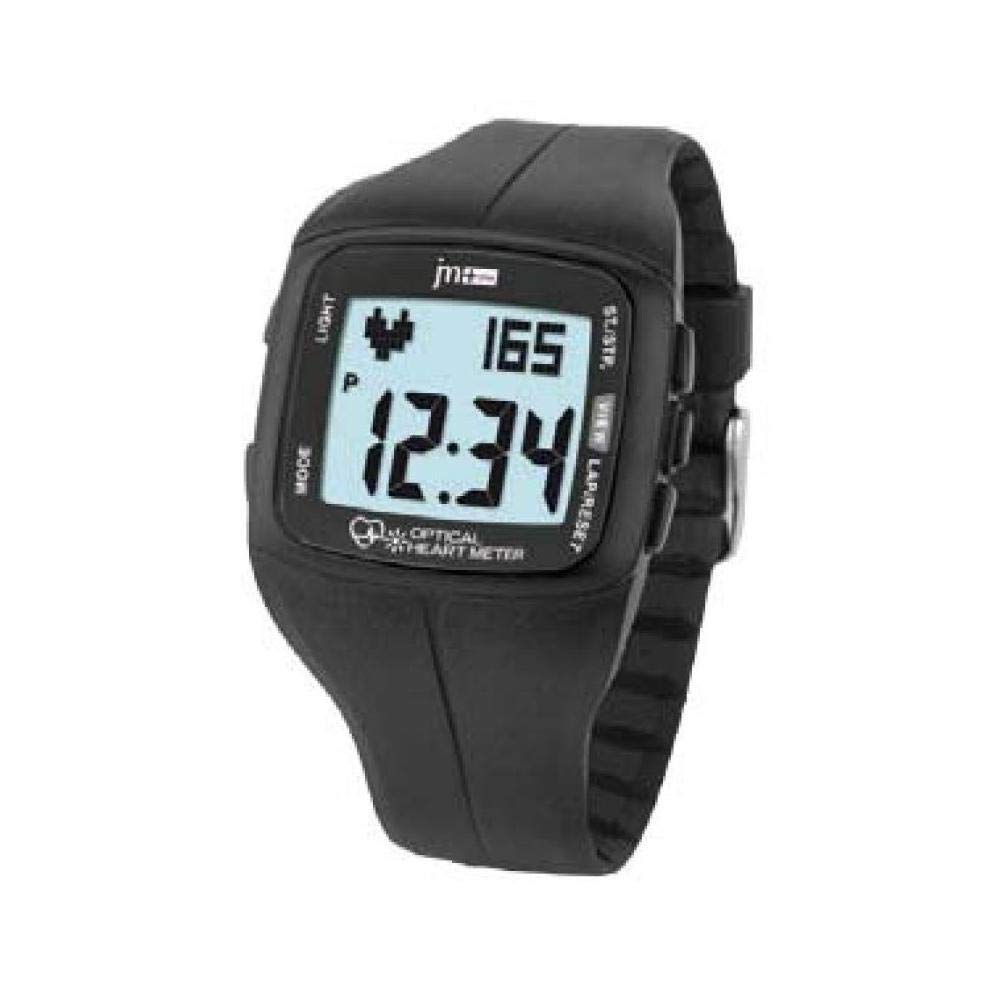
Figure 4.1: Lowell JM Plus PL3300 Digital Watch Display and Buttons
This image displays the Lowell JM Plus PL3300 digital watch. The watch features a black plastic case and strap. The digital display shows the time as 12:34, a heart rate reading of 165 beats per minute, and a 'P' indicator, likely for Pedometer or Pulse. Buttons are labeled 'LIGHT' on the top left, 'MODE' on the bottom left, 'ST./STP.' on the top right, and 'VIEW LAP/RESET' on the bottom right. The phrase 'OPTICAL HEART METER' is visible at the bottom of the display.
Tugma funktsiyalari:
- NOR: Activates the EL backlight for the display.
- YO'NALISH: Cycles through different operating modes (Time, Heart Rate, Pedometer, Training, Stopwatch, Countdown, Alarm).
- ST./STP. (Start/Stop): Starts or stops functions like stopwatch, countdown, or training mode.
- VIEW LAP/RESET: Views lap times in stopwatch mode or resets values. Also used for setting adjustments.
5. Sozlash
5.1 Dastlabki yoqish
The watch typically comes pre-charged or with a battery installed. If the display is blank, press any button to activate it.
5.2 Vaqt va sanani sozlash
- From the Time display mode, press and hold the REJIM vaqt raqamlari miltillay boshlaguncha tugmasini bosing.
- ni bosing VIEW LAP/RESET button to adjust the flashing value (e.g., hours, minutes, year, month, day).
- ni bosing ST./STP. Keyingi sozlama elementiga o'tish uchun tugmani bosing.
- Repeat steps 2 and 3 until all desired settings (time, date, 12/24-hour format) are configured.
- ni bosing REJIM sozlash rejimidan chiqish uchun yana tugmasini bosing.
5.3 Foydalanuvchi Profile Setup (for accurate fitness tracking)
For accurate heart rate, calorie, and distance calculations, it is recommended to set up your personal profile. This typically includes age, gender, height, and weight. Refer to the watch's on-screen prompts or specific menu options accessed via the REJIM button to enter these details.
6. Ishlash rejimlari
6.1 Vaqt rejimi
This is the default display mode, showing the current time and date. Press NOR displeyni yoritish uchun.
6.2 Yurak urish tezligini kuzatish
The watch features an optical heart rate sensor.
- Soat bilagingizga mahkam taqilganligiga va sensor teringizga yaxshi tegib turishiga ishonch hosil qiling.
- ni bosing REJIM button until you reach the Heart Rate mode (indicated by a heart icon or "HR").
- The watch will begin to measure your heart rate. Your current heart rate in beats per minute (BPM) will be displayed.
6.3 Pedometer (Step Counter)
The integrated pedometer tracks your daily steps.
- ni bosing REJIM button to navigate to the Pedometer mode (often indicated by a 'P' or a step icon).
- Your current step count for the day will be displayed.
- The watch automatically resets the step count at midnight.
6.4 Training Mode (Calories, Distance, Pace)
This mode allows you to track specific workout sessions.
- ni bosing REJIM button until you reach the Training mode.
- bosing ST./STP. to start a new training session. The watch will begin recording duration, heart rate, speed, pace, distance, and estimated calories burned.
- Seans paytida tugmasini bosing VIEW LAP/RESET uchun view lap data if applicable.
- bosing ST./STP. again to pause or end the training session.
- To reset the training data, press and hold VIEW LAP/RESET after stopping the session.
6.5 sekundomer
- ni bosing REJIM Sekundomer rejimiga kirish uchun tugmani bosing.
- bosing ST./STP. sekundomerni ishga tushirish.
- bosing ST./STP. again to pause. Press again to resume.
- bosing VIEW LAP/RESET to record a lap time while the stopwatch is running.
- When paused, press and hold VIEW LAP/RESET sekundomerni nolga qaytarish uchun.
6.6 Ortga hisoblash taymeri
- ni bosing REJIM button to enter Countdown Timer mode.
- To set the countdown time, press and hold VIEW LAP/RESET until the digits flash. Use VIEW LAP/RESET to adjust values and ST./STP. soatlar, daqiqalar va soniyalar orasida harakat qilish.
- bosing REJIM sozlamani tasdiqlash uchun.
- bosing ST./STP. ortga hisoblashni boshlash uchun.
- An alarm will sound when the countdown reaches zero.
6.7 signal
- ni bosing REJIM button to enter Alarm mode.
- To set the alarm time, press and hold VIEW LAP/RESET until the digits flash. Use VIEW LAP/RESET to adjust values and ST./STP. to move between hours and minutes.
- bosing REJIM sozlamani tasdiqlash uchun.
- To activate or deactivate the alarm, press ST./STP. while in Alarm mode. An alarm icon will appear on the display when activated.
7. Xizmat ko'rsatish
7.1 Tozalash
Wipe the watch case and strap regularly with a soft, slightly damp cloth. For the optical sensor on the back, ensure it is clean and free of debris for accurate readings. Avoid using harsh chemicals or abrasive materials.
7.2 Batareyani almashtirish
The watch uses a standard watch battery. When the display dims or functions become erratic, it may be time to replace the battery. It is recommended to have the battery replaced by a qualified watch technician to ensure the water resistance seal is maintained.
8. Muammolarni bartaraf qilish; nosozliklarni TUZATISH
- Watch not turning on / Display blank: Press any button. If still blank, the battery may be depleted. Refer to Section 7.2 for battery replacement.
- Yurak urish tezligining noto'g'ri ko'rsatkichlari: Ensure the watch is worn snugly on your wrist, not too loose or too tight. Clean the optical sensor on the back of the watch. Avoid excessive movement during measurement.
- Inaccurate Pedometer Readings: Ensure your user profile (height, weight) is correctly set up. Arm movements can sometimes affect step counting; try to keep your arm relatively still during walking for best accuracy.
- Water Resistance Concerns: Always ensure the watch's back cover is securely fastened after any maintenance. Avoid pressing buttons underwater.
- Tugmalar javob bermayapti: Try pressing firmly. If unresponsive, the watch may require a reset (consult support) or battery replacement.
9. Texnik shartlar
| Xususiyat | Tafsilot |
|---|---|
| Model raqami | PL3300 |
| Displey turi | Digital, EL Backlit |
| Harakat turi | Kvarts |
| Ish materiali | Plastic (40 x 35 mm) |
| Kristal turi | Plexi (Plastic) |
| Tasma materiali | Plastik |
| Tasma rangi | Qora |
| Suvga chidamlilik | 3 ATM (30 Meters) |
| Og'irligi | 42 gr |
| Maxsus xususiyatlar | Optical Heart Rate Monitor, Pedometer, Calorie Counter, Training Mode, Stopwatch, Countdown Timer, Alarm, Calendar |
10. Kafolat va qo'llab-quvvatlash
For warranty information and customer support, please refer to the documentation provided at the time of purchase or visit the official Lowell websayt. Kafolat da'volari uchun xaridingizni tasdiqlovchi hujjatingizni saqlang.