
1. Kirish
Sotib olganingiz uchun tashakkurasing the Singsation Professional Karaoke Machine. This portable Bluetooth karaoke system is designed to provide hours of entertainment with its advanced voice effects, dynamic sound effects, and captivating light show. This manual will guide you through the setup, operation, and maintenance of your new karaoke machine, ensuring you get the most out of its features.
2. Xavfsizlik ma'lumotlari
- Mahsulotni ishlatishdan oldin barcha ko'rsatmalarni o'qing.
- Jihozni suv yoki ortiqcha namlik ta'sirida qoldirmang.
- To'g'ri ventilyatsiyani ta'minlash; hech qanday shamollatish teshiklarini to'sib qo'ymang.
- Faqat jihoz bilan birga kelgan quvvat adapteridan foydalaning.
- Jihozni radiatorlar, issiqlik registrlari, pechkalar yoki boshqa qurilmalar (shu jumladan,) kabi issiqlik manbalaridan uzoqroq tuting. ampissiqlik hosil qiluvchi ko'targichlar).
- Ushbu mahsulotga o'zingiz xizmat ko'rsatishga urinmang. Barcha xizmatlarni malakali xizmat ko'rsatuvchi xodimlarga topshiring.
- Jihoz ustiga og'ir narsalarni qo'yishdan saqlaning.
3. Paket tarkibi
Iltimos, paketingizda barcha narsalar mavjudligiga ishonch hosil qiling:
- Singsation Professional Karaoke Machine Unit
- 2 x mikrofon
- Masofadan boshqarish
- Quvvat adapteri
- Foydalanuvchi uchun qo'llanma (ushbu hujjat)
4. Mahsulot xususiyatlari
The Singsation Professional Karaoke Machine is packed with features to enhance your singing experience:
- 60 Professional-Quality Voice Effects: Transform your voice with various effects like echo, baritone, alien, and more.
- 10 Amazing Sound Effects: Add fun sounds like applause, cheers, and air horn to your performance.
- 25 Room-Filling LED Light Effects: Create a dynamic party atmosphere with multi-color light modes including party, pulse, breathe, and chase.
- Portativ dizayn: Easy to transport for parties anywhere.
- Bluetooth ulanishi: Wirelessly stream music from your smartphone or tablet.
- Ikki mikrofonli kirishlar: Includes two microphones for duet singing.

4.1-rasm: tugadiview of the Singsation Karaoke Machine's control panel highlighting the extensive light, sound, and voice effects available.

4.2-rasm: The Singsation Karaoke Machine supports two microphones, enabling duet performances for enhanced entertainment.
5. Sozlash
Follow these steps to set up your Singsation Professional Karaoke Machine:
- Jihozni o'ramdan chiqarib oling: Paketdagi barcha komponentlarni ehtiyotkorlik bilan olib tashlang. Kelajakda saqlash yoki tashish uchun qadoqni saqlang.
- Quvvat ulanishi: Connect the supplied power adapter to the DC IN port on the back of the karaoke machine and plug it into a standard electrical outlet. The unit can also operate on its internal battery.
- Mikrofon ulanishi: Plug the included microphones into the MIC 1 and MIC 2 XLR ports on the side of the unit.
- Joylashtirish: Place the karaoke machine on a stable, flat surface. Ensure there is adequate space around the unit for ventilation.
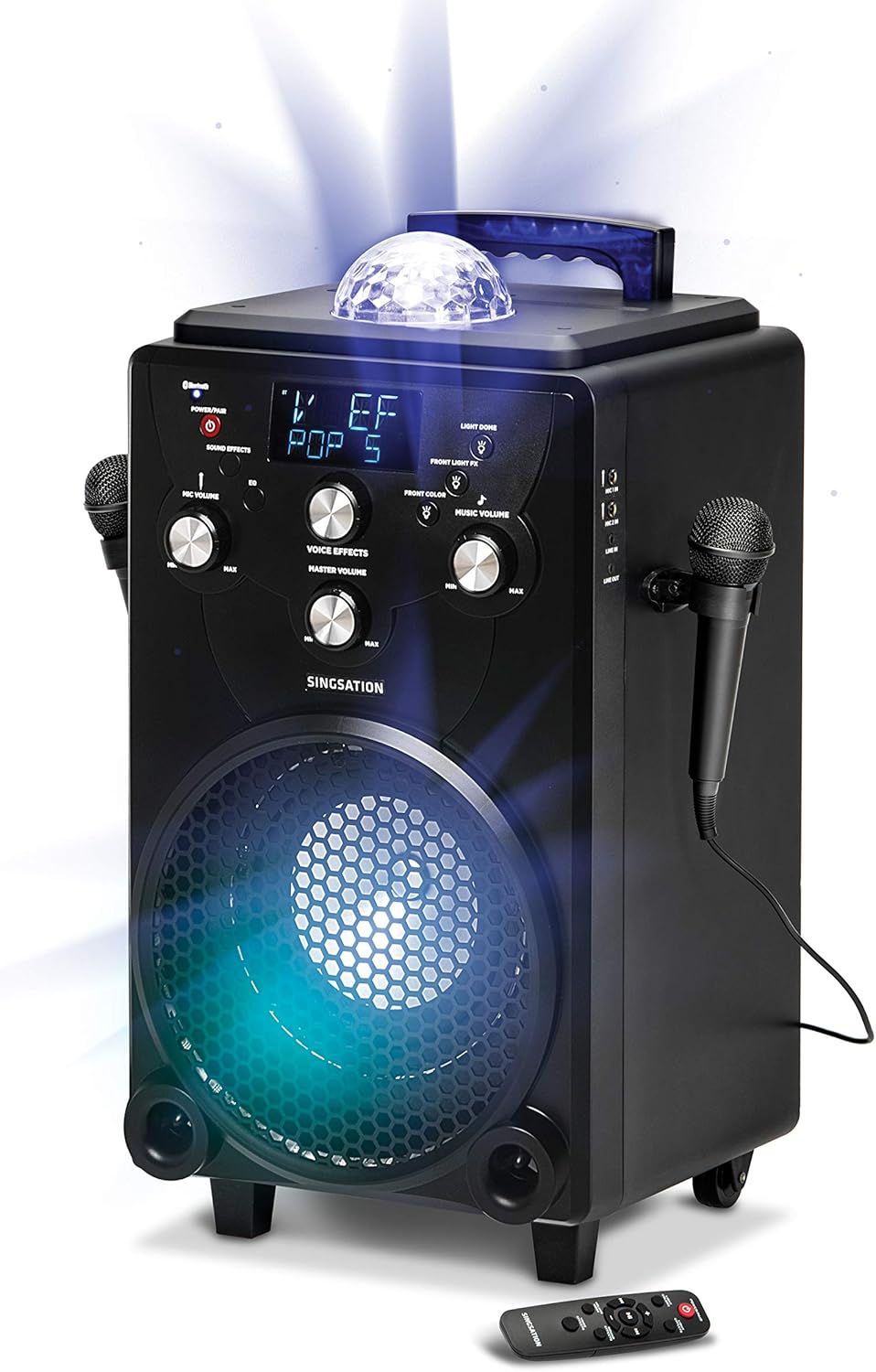
5.1-rasm: The main unit of the Singsation Professional Karaoke Machine, showing its overall design and primary components.
6. Foydalanish bo'yicha ko'rsatmalar
This section details how to operate your karaoke machine's various functions.
6.1. Quvvatni yoqish/o‘chirish
- ni bosing va ushlab turing QUVAT/PIR button on the control panel or the remote control to turn the unit ON or OFF.
6.2. Musiqani ijro etish
The Singsation Karaoke Machine supports Bluetooth audio streaming and auxiliary input.
6.2.1. Bluetooth ulanishi
- Turn on the karaoke machine. The Bluetooth indicator will flash, indicating it's in pairing mode.
- Smartfon yoki planshetingizda Bluetooth-ni yoqing va mavjud qurilmalarni qidiring.
- Select "Singsation" from the list of devices. Once paired, the Bluetooth indicator will glow solid.
- Start playing music from your device. Adjust the Music Volume knob on the karaoke machine.
6.2.2. Yordamchi kirish
- Connect an external audio device (e.g., MP3 player) to the AUX IN port using a 3.5mm audio cable (not included).
- The unit will automatically switch to AUX mode. Adjust the Music Volume knob.
6.3. Mikrofondan foydalanish
- Mikrofon ovozi: Use the MIC VOLUME knob to adjust the volume of the connected microphones.
- Ovoz effektlari: Press the VOICE EFFECTS button repeatedly to cycle through the 60 available voice effects. Use the VOICE EFFECTS knob to fine-tune the effect level.
6.4. Ovoz effektlari
- Press the SOUND EFFECTS button to activate one of the 10 built-in sound effects. Press again to cycle through them.
6.5. Yorug'lik namoyishi
- Yengil ranglar: Press the LIGHT COLORS button to switch between different color modes for the main speaker light.
- Nur effektlari: Press the LIGHT EFFECTS button to cycle through the 25 dynamic light effects for the main speaker light and the top disco ball light.
- Front Light FX: Use the FRONT LIGHT FX button to control the front-facing light effects.
6.6. Masofadan boshqarish funktsiyalari
The included remote control provides convenient access to key functions:
- Power/Pair: Turns the unit on/off and initiates Bluetooth pairing.
- Yengil ranglar: Changes the color of the main speaker light.
- Nur effektlari: Cycles through light show patterns.
- Ovoz balandligi rejimi: Switches between adjusting music volume and microphone volume.
- Ovoz effektlari: Activates and cycles through sound effects.
- Ovoz effektlari: Cycles through voice transformation effects.
- Ijroni boshqarish elementlari: O‘ynatish/To‘xtatib turish, Oldinga o‘tkazish, Orqaga o‘tkazish.

6.1-rasm: The Singsation remote control, detailing the functions of each button for convenient operation.
7. Xizmat ko'rsatish
Proper care will ensure the longevity of your karaoke machine:
- Tozalash: Jihozni yumshoq, quruq mato bilan artib oling. Abraziv tozalash vositalarini yoki erituvchilarni ishlatmang.
- Saqlash: Ishlatilmaganda, jihozni salqin, quruq joyda, to'g'ridan-to'g'ri quyosh nuri va haddan tashqari haroratdan uzoqroq tuting.
- Batareya parvarishi: If the unit is not used for an extended period, charge the battery periodically to maintain its health.
8. Muammolarni bartaraf qilish; nosozliklarni TUZATISH
If you encounter issues with your Singsation Professional Karaoke Machine, refer to the following common problems and solutions:
| Muammo | Mumkin sabab | Yechim |
|---|---|---|
| Qurilma yoqilmaydi. | Battery is depleted or power adapter is not connected properly. | Connect the power adapter and ensure it's plugged into a working outlet. Allow the unit to charge for a few minutes before attempting to power on again. |
| Karnaydan ovoz yo'q. | Music volume is too low, external device volume is low, or incorrect input mode. | Increase the Music Volume knob. Check the volume on your connected Bluetooth device or auxiliary source. Ensure the correct input mode is selected (Bluetooth/AUX). |
| Mikrofon ishlamayapti. | Microphone not plugged in, Mic Volume too low, or microphone is faulty. | Ensure microphones are securely plugged into the MIC ports. Increase the MIC VOLUME knob. Test with another microphone if available. |
| Bluetooth ulanishi amalga oshmadi. | Unit is not in pairing mode, or device is too far away. | Press and hold the POWER/PAIR button to enter pairing mode (indicator will flash). Ensure your device is within 30 feet of the karaoke machine. Try unpairing and re-pairing. |
9. Texnik shartlar
| Xususiyat | Tafsilot |
|---|---|
| Brend | Qo'shiq aytish |
| Model raqami | SPKA75 |
| Element og'irligi | 20.7 funt |
| Mahsulot o'lchamlari | 12 x 13 x 25 dyuym |
| Rang | Qora |
| Mos qurilmalar | Smartfon, planshet |
| Ulagich turi | XLR (for microphones) |
| Spikerlar soni | 1 |
| Quvvat manbai | Batareyadan quvvatlanadi |
| jildtage | 12 volt |
| Maxsus xususiyat | Portativ |
| Kiritilgan komponentlar | Microphone (x2), Remote Control, Power Adapter |
10. Kafolat va qo'llab-quvvatlash
For warranty information or technical support, please refer to the contact details provided on the product packaging or visit the official Singsation websayt. Xarid kvitansiyasini har qanday kafolat da'volari uchun xaridni tasdiqlovchi hujjat sifatida saqlang.