
Kirish
The NEDIS Universal Programmable Remote Control (model TVRC1140BK) is designed to manage up to 4 different devices. This remote can be programmed via a personal computer (PC) to replace original remote controls for various electronic devices, including televisions (TV), video cassette recorders (VCR), digital versatile disc players (DVD), and digital video broadcasting terrestrial receivers (DVB-T). It is engineered to replicate most functions of your original remotes, providing a consolidated control solution.
Xavfsizlik ma'lumotlari
- Do not expose the remote control to direct sunlight, heat, or moisture.
- Pultni tushirib yubormang yoki kuchli zarbalarga duchor qilmang.
- Do not attempt to disassemble or modify the remote control. This will void the warranty.
- Batareyalarni bolalar qo'li etmaydigan joyda saqlang. Yutib yuborilsa, darhol tibbiy yordamga murojaat qiling.
- Ishlatilgan batareyalarni mahalliy qoidalarga muvofiq yo'q qiling. Batareyalarni olovga tashlamang.
- Use only the specified battery type (2x AAA Alkaline).
Paket tarkibi
Paketda quyidagi elementlar mavjudligini tekshiring:
- NEDIS Universal Programmable Remote Control (TVRC1140BK)
- USB dasturlash kabeli
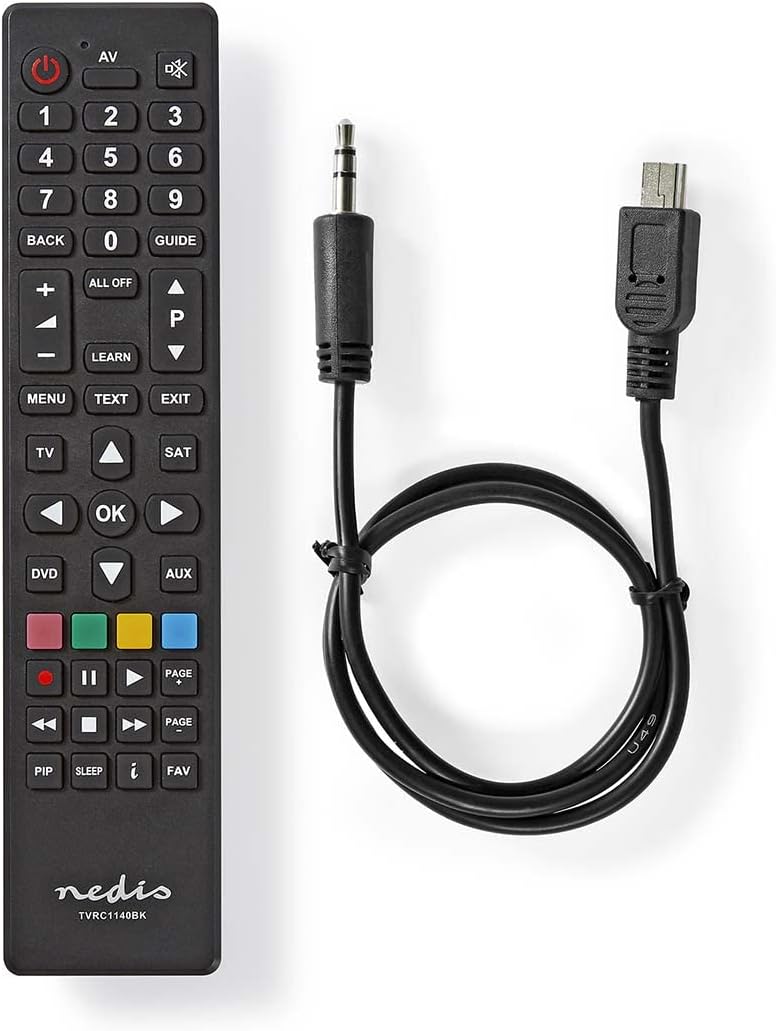
Image: The NEDIS Universal Remote Control TVRC1140BK shown alongside its USB programming cable.
Mahsulot tugadiview
The remote control features a clear button layout for intuitive operation. Familiarize yourself with the various buttons and their functions before use.

Rasm: old view of the NEDIS Universal Remote Control TVRC1140BK, displaying all control buttons.
Key Buttons and Functions:
- Quvvat tugmasi (): Qurilmalarni yoqadi yoki o'chiradi.
- Device Selection Buttons (TV, DVD, SAT, AUX): Selects the device you wish to control.
- Raqamli klaviatura (0-9): For channel selection and data input.
- Ovozni oshirish/pasaytirish (+/-): Ovoz balandligini sozlaydi.
- Channel Up/Down (P/P): Kanallarni o'zgartiradi.
- Navigatsiya tugmalari (yuqoriga, pastga, chapga, o'ngga, OK): Menyuda navigatsiya va tanlash uchun.
- Menyu/chiqish: Accesses or exits device menus.
- O'rganish tugmasi: Used for programming functions from an original remote.
- Rangli tugmalar (Qizil, Yashil, Sariq, Moviy): Often used for specific functions in menus or teletext.
Sozlash; o'rnatish
1. Batareyani o'rnatish
- Masofadan boshqarish pultining orqa qismidagi batareyalar bo'limi qopqog'ini oching.
- Insert two (2) AAA Alkaline batteries, ensuring the correct polarity (+ and -) as indicated inside the compartment.
- Batareya bo'limi qopqog'ini mahkam yoping.
2. Kompyuter dasturlash
The NEDIS TVRC1140BK remote control is programmed using dedicated software on a PC. This method allows for comprehensive device code loading and customization.
- Dasturiy ta'minotni yuklab olish: Visit the official NEDIS support website to download the latest programming software for the TVRC1140BK model.
- Dasturiy ta'minotni o'rnatish:
- If you have previously installed an older version of the software, uninstall it completely before proceeding.
- For new users, install the downloaded software directly by following the on-screen instructions.
- Masofadan boshqarish pultini ulang: Use the provided USB programming cable to connect the remote control to an available USB port on your PC.
- Programming Process: Follow the instructions within the software to select your device types (TV, DVD, VCR, DVB-T, etc.) and load the appropriate control codes onto the remote. The software typically guides you through the process of assigning functions to buttons.
Eslatma: For optimal performance and access to the latest device codes, always use the most current version of the programming software available from the manufacturer.
Masofadan boshqarish pulti bilan ishlash
Once programmed, the remote control functions similarly to your original device remotes.
- Qurilmani tanlang: Tegishli qurilma tugmasini bosing (masalan, TV, DVD, SAT, AUX) to select the device you wish to control. The indicator light on the remote may illuminate to confirm selection.
- Point and Operate: Point the remote control directly at the device's infrared receiver.
- Use Functions: Press the desired function buttons (e.g., Power, Volume, Channel, Menu, Play, Pause) to control your selected device.
Xizmat
- Tozalash: Masofadan boshqarish pultini yumshoq, quruq mato bilan arting. Abraziv tozalagichlar yoki erituvchilardan foydalanmang.
- Batareyani almashtirish: Replace batteries when the remote's performance degrades or if the indicator light does not illuminate. Always replace both batteries at the same time with new AAA Alkaline batteries.
- Saqlash: Agar masofadan boshqarish pulti uzoq vaqt davomida ishlatilmasa, sizib chiqmasligi uchun batareyalarni chiqarib oling.
Muammolarni bartaraf qilish; nosozliklarni TUZATISH
- Masofadan boshqarish pulti javob bermayapti:
- Batareyalarning to'g'ri o'rnatilganligini va etarli zaryad borligini tekshiring. Agar kerak bo'lsa almashtiring.
- Ensure there is a clear line of sight between the remote control and the device's infrared receiver.
- Verify that the correct device mode (TV, DVD, etc.) is selected on the remote.
- Device functions not working correctly after programming:
- The device code may be incorrect or incomplete. Re-program the remote using the PC software, ensuring you select the correct manufacturer and model for your device.
- Some specific functions might not be available if the original remote had unique features not supported by the universal remote's code database.
- Consult the NEDIS support website for updated software or additional programming tips.
- PC programming software issues:
- Ensure you have uninstalled any previous versions of the software before installing the latest one.
- Check your PC's operating system compatibility with the software.
- Boshqa USB portidan foydalaning yoki kompyuteringizni qayta ishga tushiring.
Texnik xususiyatlari
| Brend | NEDIS |
| Model raqami | TVRC1140BK |
| Ulanish texnologiyasi | Infraqizil |
| Maksimal qo'llab-quvvatlanadigan qurilmalar | 4 |
| Mos qurilmalar | TV, DVD/Blu-ray Player, Set-top Box, VCR |
| Nazoratchi turi | Tugmachani boshqarish |
| Maksimal diapazon | 10 metr |
| Batareyalar talab qilinadi | 2x AAA ishqoriy (shu jumladan emas) |
| Rang | Qora |
Kafolat va qo'llab-quvvatlash
For warranty information, please refer to the terms and conditions provided by your retailer at the time of purchase or contact NEDIS customer support directly. For technical assistance, software updates, and additional resources, please visit the official NEDIS websayt.