
1. Kirish
Welcome to the Argon Audio FORTE A5 powered speaker system. This manual provides essential information for setting up, operating, and maintaining your speakers to ensure optimal performance and longevity. Please read this manual thoroughly before using your speakers.
2. Xavfsizlik bo'yicha ko'rsatmalar
Yong'in yoki elektr toki urishi oldini olish uchun ushbu jihozni yomg'ir yoki namlik ta'siriga qo'ymang. Shkafni ochmang. Xizmat ko'rsatishni faqat malakali mutaxassislarga topshiring.
- Ventilyatsiya: Karnaylar atrofida yetarli shamollatishni ta'minlang. Shamollatish teshiklarini to'sib qo'ymang.
- Quvvat manbai: Connect the speakers only to the specified power supply.
- Suv va namlik: Do not expose the speakers to dripping or splashing water. Do not place objects filled with liquids, such as vases, on the speakers.
- Tozalash: Faqat quruq mato bilan tozalang. Suyuq tozalagichlar yoki aerozol tozalagichlardan foydalanmang.
- Issiqlik: Radiatorlar, issiqlik moslamalari, pechkalar yoki boshqa qurilmalar (shu jumladan,) kabi issiqlik manbalari yaqiniga o'rnatmang. ampissiqlik hosil qiluvchi ko'targichlar).
- Joylashtirish: Place the speakers on a stable, level surface to prevent them from falling.
3. Paket tarkibi
Iltimos, paketdagi barcha narsalar mavjudligini tekshiring:
- Argon Audio FORTE A5 Powered Speakers (1 pair)
- Special Speaker Cable (3 meters)
- Masofadan boshqarish
- Quvvat kabeli
- Foydalanuvchi uchun qo'llanma (ushbu hujjat)
4. Mahsulot tugadiview
4.1 Old panel
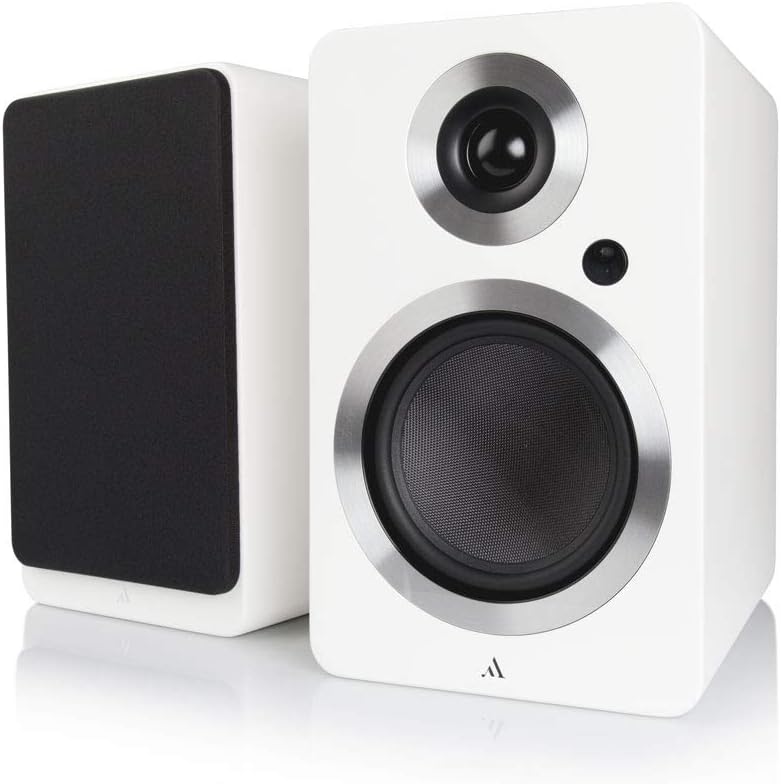
Rasm: old view of the Argon Audio FORTE A5 speakers. The image displays two white bookshelf speakers with black speaker cones and metallic rings around the drivers. The left speaker is shown from the side, while the right speaker is shown from the front, highlighting its clean design.
- Tweeter: High-frequency driver.
- Mid/Bass Driver: Handles mid-range and bass frequencies.
- LED holati: Indicates power status and selected input.
4.2 Orqa panel

Rasm: orqa view of the Argon Audio FORTE A5 speakers. The image shows the back panel of the active speaker with various connection ports including RCA, optical, USB, and speaker terminals. The passive speaker's rear panel is also visible, showing only the speaker terminals.
- RCA Inputs (L/R): For connecting analog audio sources like CD players or turntables.
- Optical Inputs (OPT1, OPT2): For connecting digital audio sources like TVs or game consoles.
- Sub Out: For connecting an external subwoofer.
- USB Charge (5V/1A): Mobil qurilmalarni zaryadlash uchun.
- Speaker Cable Output: Passiv karnayga ulanadi.
- Kirish quvvati: AC quvvat manbaiga ulanadi.
5. Sozlash
5.1 Joylashtirish
Place the speakers on a stable surface, such as a bookshelf or speaker stands. For optimal stereo imaging, position the speakers equidistant from your listening position and angle them slightly towards you (toe-in). Ensure there is sufficient space behind the speakers for proper ventilation and cable connections.
5.2 Ulanishlar
- Dinamiklarni ulash: Use the provided speaker cable to connect the active speaker (with all the inputs) to the passive speaker. Ensure correct polarity (+ to + and - to -).
- Ovoz manbalarini ulang:
- RCA: Connect your analog audio device (e.g., CD player, turntable with pre-amp) to the RCA inputs.
- Optik: Connect your digital audio device (e.g., TV, game console) to either OPT1 or OPT2.
- Bluetooth: For wireless connection, see section 6.3.
- Quvvatni ulash: Plug the power cable into the active speaker's power input, then plug the other end into a wall outlet.
6. Operatsiya
6.1 Quvvatni yoqish/o‘chirish
The speakers will automatically enter standby mode when no audio signal is detected for a period. They will wake up automatically when an audio signal is received on the selected input. To manually power off, use the remote control or the power button on the active speaker (if available).
6.2 Kirish tanlash
Use the input selection buttons on the remote control or the active speaker to cycle through the available audio inputs (RCA, Optical 1, Optical 2, Bluetooth). The Status LED will change color to indicate the currently selected input.
6.3 Bluetooth ulanishi
- Select the Bluetooth input on your speakers. The Status LED will blink, indicating pairing mode.
- On your Bluetooth device (smartphone, tablet, laptop), enable Bluetooth and search for new devices.
- Select "Argon Audio FORTE A5" from the list of available devices.
- Once connected, the Status LED on the speaker will turn solid, and you can now play audio wirelessly.
6.4 Masofadan boshqarish funksiyalari
The included remote control allows you to:
- Adjust Volume (Up/Down)
- Ovozni o‘chirish/O‘chirish
- Kirish manbasini tanlang
- Quvvatni yoqish/oʻchirish (kutish rejimi)
7. Xizmat ko'rsatish
To keep your Argon Audio FORTE A5 speakers in optimal condition:
- Tozalash: Use a soft, dry, lint-free cloth to clean the cabinet surfaces. Do not use abrasive cleaners, waxes, or solvents.
- Panjaralar: The speaker grilles can be carefully removed for cleaning, but ensure they are reattached securely to protect the drivers.
- Chang: Regularly dust the speakers to prevent accumulation, especially around the drivers and ventilation ports.
8. Muammolarni bartaraf qilish; nosozliklarni TUZATISH
If you experience issues with your speakers, please refer to the following table:
| Muammo | Mumkin sabab | Yechim |
|---|---|---|
| Ovoz yo'q | Power not connected; Incorrect input selected; Volume too low; Cables loose. | Check power connection; Select correct input; Increase volume; Reconnect all cables securely. |
| Buzilgan ovoz | Volume too high; Source audio quality poor; Cables damaged. | Reduce volume; Try a different audio source; Check and replace cables if necessary. |
| Bluetooth ulanmayapti | Speakers not in pairing mode; Device too far; Previously paired device connected. | Ensure speakers are in Bluetooth pairing mode; Move device closer; Disconnect from other Bluetooth devices. |
| Masofadan boshqarish pulti ishlamayapti | Batteries dead; Obstruction between remote and speaker. | Batareyalarni almashtiring; Har qanday to'siqlarni olib tashlang. |
If the problem persists, please contact Argon Audio customer support.
9. Texnik shartlar
| Xususiyat | Spetsifikatsiya |
|---|---|
| Model | FORTE A5 |
| Element og'irligi | 6.7 kilogramm |
| Mahsulot o'lchamlari (G x D x Y) | 16.5 x 23 x 27 sm |
| Maksimal karnay chiqish quvvati | 80 vatt |
| Ulanish texnologiyasi | Bluetooth |
| Audio chiqish rejimi | Stereo |
| O'rnatish turi | Raf tog'i |
| Karnay turi | Subwoofer (Note: This refers to the capability to connect a subwoofer, as these are bookshelf speakers) |
| Mos qurilmalar | Smartphone, Tablet, Laptop, TV, Desktop, Turntable, MP3 Player |
| Surround ovoz konfiguratsiyasi | 2.0 |
10. Kafolat va qo'llab-quvvatlash
Argon Audio products are designed and manufactured to the highest quality standards. For information regarding warranty terms and conditions, please refer to the warranty card included with your product or visit the official Argon Audio website. For technical support or service inquiries, please contact your local dealer or Argon Audio customer service.
Websayt: www.argonaudio.com