
1. Kirish
This manual provides detailed instructions for the safe and proper installation and operation of your MOUNTUP MU0009 Full Motion TV Wall Mount. Please read this manual thoroughly before installation to ensure correct setup and to prevent damage or injury. This mount is designed for most 26-60 inch LED, LCD, OLED, and 4K TVs weighing up to 77 lbs (35 kg).
The full motion design allows for optimal viewing flexibility, including swivel, tilt, and extension capabilities. It features a robust alloy steel construction for durability and security.

Image: The MOUNTUP MU0009 full motion TV wall mount with a television extended from the wall, demonstrating its range of motion.
2. Xavfsizlik ma'lumotlari
- Barcha ko'rsatmalarni o'qing: Before installation, read and understand all assembly instructions. If you have any questions, contact customer support.
- Og'irlik hajmi: Maksimal 77 funt (35 kg) og'irlikdan oshmang. Ushbu chegaradan oshib ketish jiddiy jarohatlarga yoki mulkka zarar yetkazishi mumkin.
- Ekran hajmi: This mount is designed for TVs between 26 and 60 inches.
- Devor turi: Ushbu o'rnatish yog'och ustunlarga yoki qattiq beton/g'isht devorlarga o'rnatish uchun mo'ljallangan. Faqat gipsokartonga o'rnatmang. Ensure the mounting surface can safely support the combined weight of the mount and the TV.
- Asboblar: Use appropriate tools for installation. A stud finder, drill, level, and socket wrench are typically required.
- Yordam: Due to the size and weight of TVs, it is recommended to have at least two people for installation.
- Uskuna: Faqat taqdim etilgan uskunadan foydalaning. Agar biron bir qism etishmayotgan yoki shikastlangan bo'lsa, mijozlarni qo'llab-quvvatlash xizmatiga murojaat qiling.
- O'rnatishdan keyingi tekshirish: After installation, ensure the mount is securely fastened and the TV is stable before use.
3. Texnik shartlar
| Xususiyat | Tafsilot |
|---|---|
| Model raqami | MU0009 |
| Televizor o'lchamlari mosligi | 26 - 60 dyuym |
| Og'irlik sig'imi | 77 funtgacha (35 kg) |
| VESA muvofiqligi | 100x100mm dan 400x400mm gacha |
| O'rnatish turi | Full Motion (Articulating) |
| Burilish oralig'i | 180° gacha (televizor o'lchamiga qarab) |
| Nishab diapazoni | 0° dan -10° gacha |
| Darajani sozlash | +/- 3° post-installation |
| Devordan kengaytma | 2" (orqaga tortilgan) dan 15.3" gacha (kengaytirilgan) |
| Material | Qotishma po'lat |
| Rang | Qora |
| Element og'irligi | 2 kilogramm |
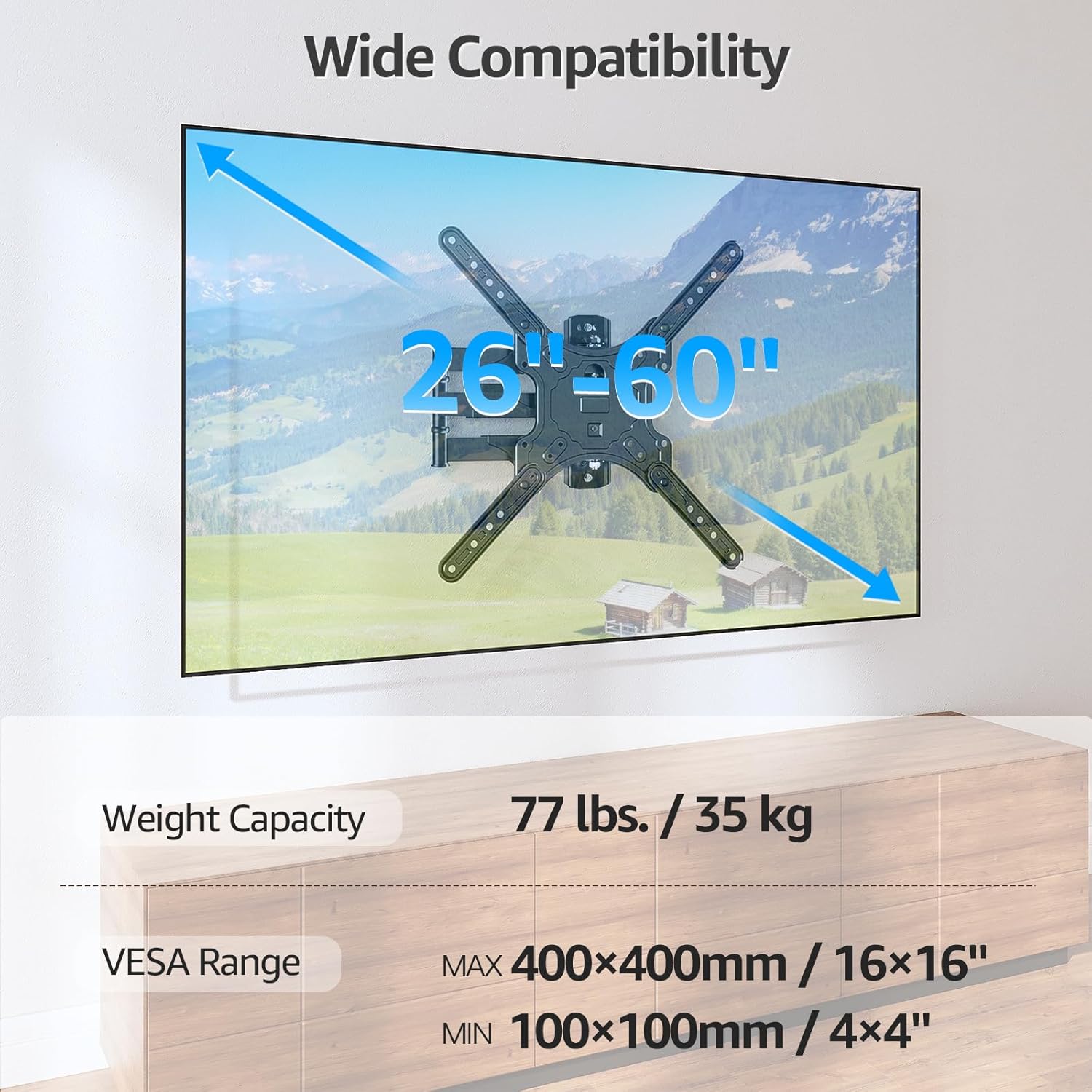
Image: Visual representation of the mount's compatibility, including supported TV sizes (26-60 inches), weight capacity (77 lbs / 35 kg), and VESA range (100x100mm to 400x400mm).
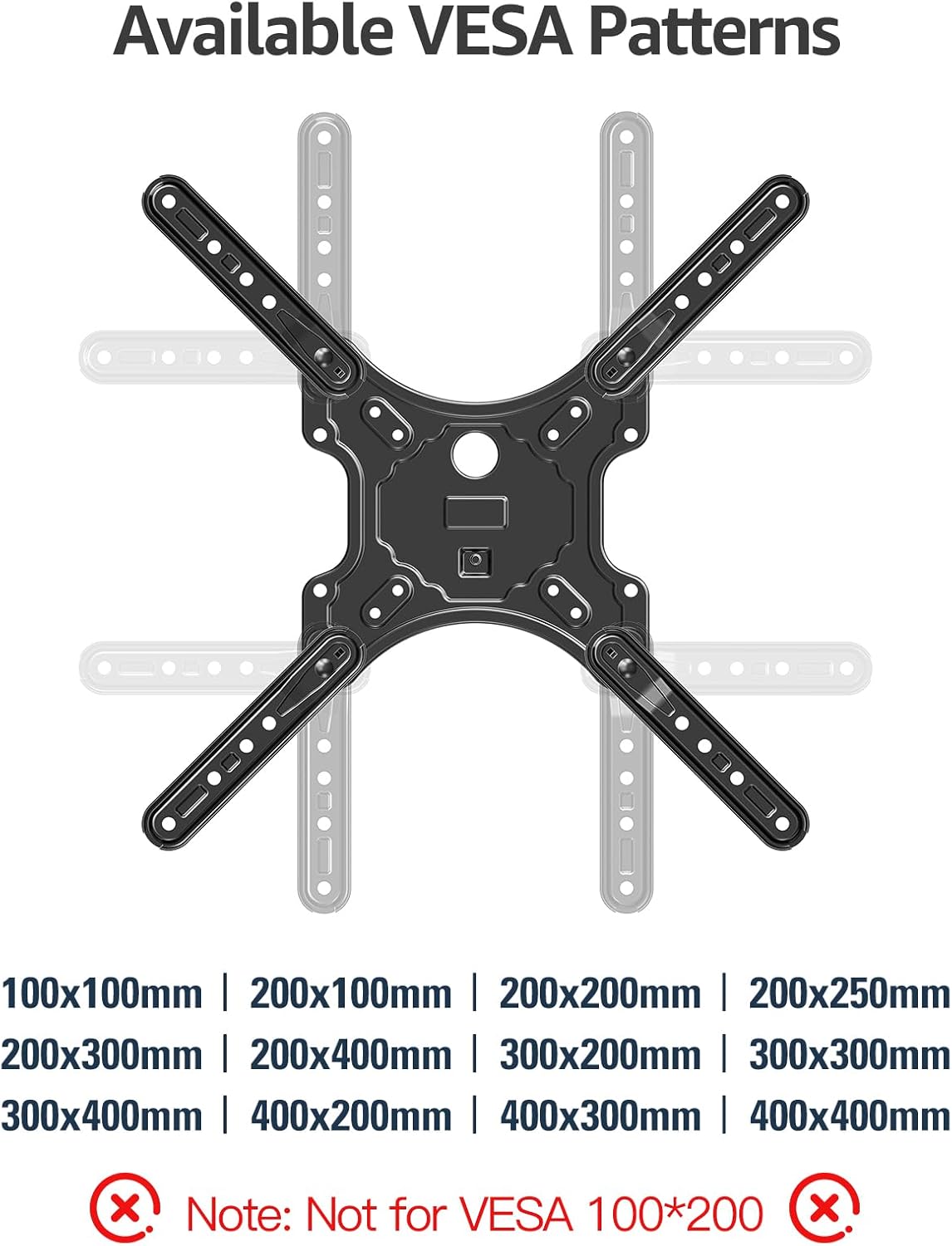
Image: A detailed diagram showing the available VESA patterns that the MOUNTUP MU0009 mount can accommodate, ranging from 100x100mm to 400x400mm.
4. O‘rnatish (Sozlash)
Before beginning, ensure you have all necessary tools and hardware. It is highly recommended to have a second person assist with the installation.
4.1. Check Wall Compatibility
The MOUNTUP MU0009 is designed for installation on a single wood stud or solid concrete/brick walls. Do not mount on drywall alone.
- Yog'ochni o'rnatish: Locate the center of a wood stud using a stud finder.
- Concrete/Brick Wall Installation: Use appropriate concrete anchors (not included, but typically provided with the mount) and a masonry drill bit.

Image: Illustration of diverse wall compatibility, showing installation on a wood stud and a concrete/brick wall, with a clear warning not to mount on drywall alone.
4.2. Bosqichma-bosqich o'rnatish
Follow these general steps for installation. Refer to the included instruction sheet for detailed diagrams and specific hardware usage.
- Step 1: Mount Brackets to TV. Attach the VESA plate and extension arms to the back of your TV using the appropriate screws, washers, and spacers from the hardware kit. Ensure the brackets are centered and securely tightened.
- Step 2: Install Wall Plate. Mark the desired height and position for the wall plate on your chosen wall type. Drill pilot holes according to the instructions for your wall type (wood stud or concrete). Secure the wall plate to the wall using the provided lag bolts. Ensure it is level and firmly attached.
- Step 3: Hang TV on Wall Plate. Carefully lift the TV (with brackets attached) and hook it onto the wall plate. Secure the TV to the wall plate using the safety screws or locking mechanisms as indicated in the detailed instructions.

Image: A visual guide to the easy 3-step installation process: 1. Mount brackets to TV, 2. Install wall plate, 3. Hang TV on the wall plate.
4.3. Burchak o'rnatish
The single stud design and 15.3-inch extension make this mount suitable for corner installations, allowing the TV to be positioned optimally within a corner space.

Image: The MOUNTUP MU0009 TV mount shown installed in a room corner, highlighting its corner mounting solution capability.
5. Operatsiya
Once installed, your MOUNTUP MU0009 TV wall mount offers various adjustments for an optimal viewtajribasi.
- Burilish: The articulating arms allow the TV to swivel up to 180° (90° left to 90° right), depending on TV size and wall clearance. Gently push or pull the TV to the desired angle.
- Nishab: The mount offers a tilt range of 0° to -10°. Use the tool-free tilt adjustment knobs on the TV brackets to set the desired vertical angle, reducing glare.
- Extension & Retraction: The mount can extend up to 15.3 inches from the wall and retract back to 2 inches, providing flexibility for viewing and saving space when not in use.
- Darajani sozlash: A post-installation leveling adjustment of +/- 3° allows for perfect TV alignment even if the wall plate was not perfectly level during installation.

Image: Illustration of the mount's swivel function, enabling a comfortable viewing experience by rotating the TV up to 90 degrees left or right.
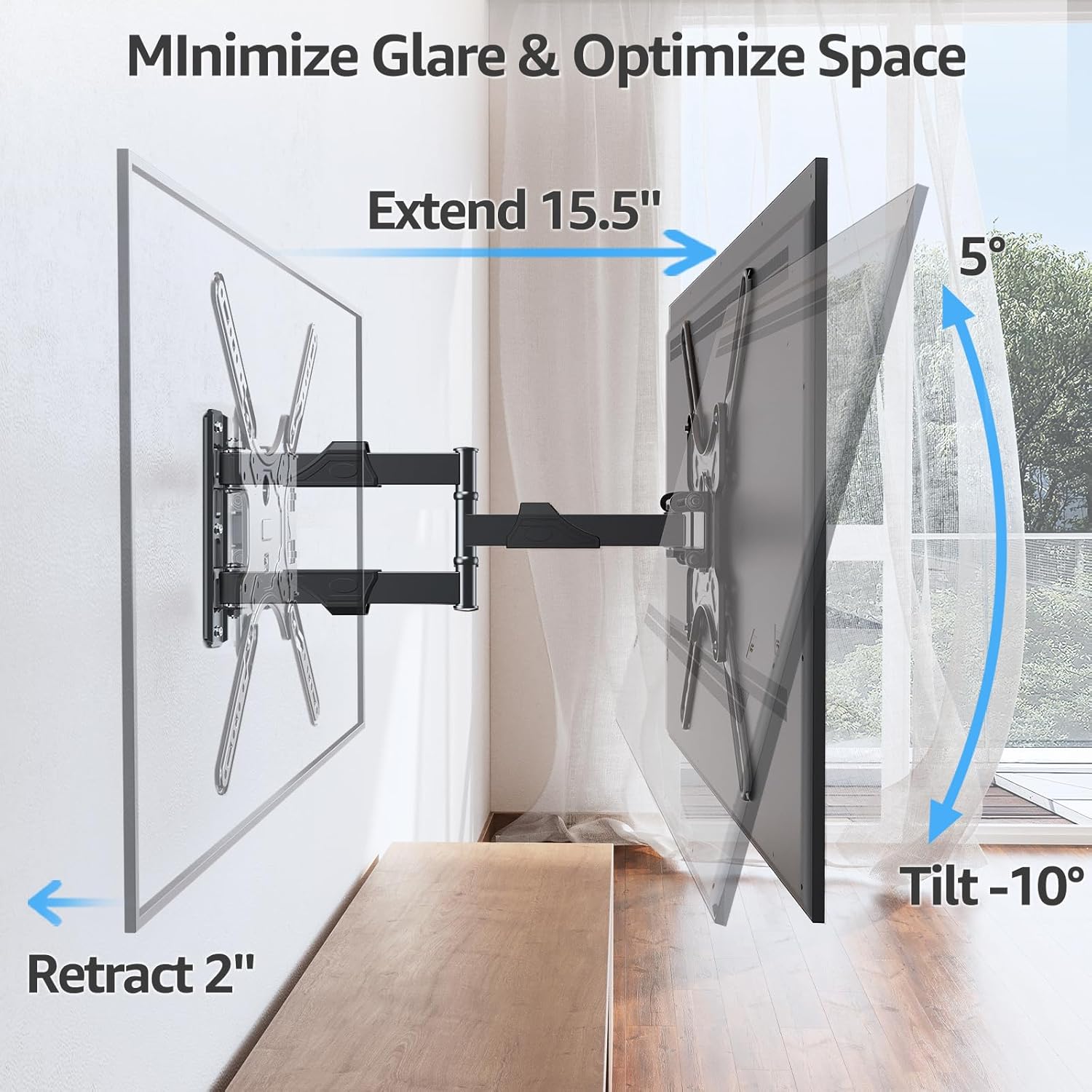
Image: Demonstrates how the mount extends up to 15.5 inches, retracts to 2 inches, and tilts up to -10 degrees to minimize glare and optimize space.
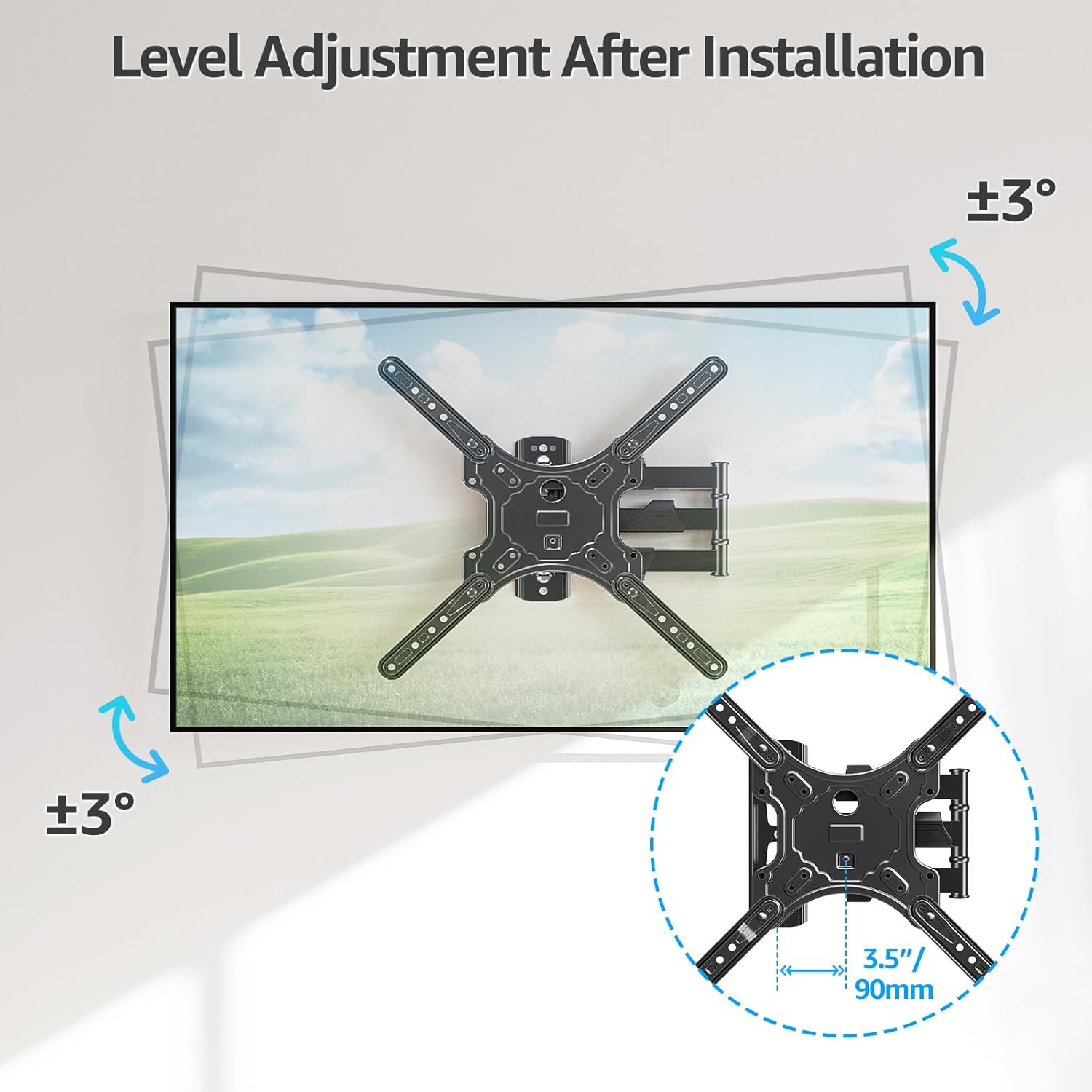
Image: Illustrates the level adjustment feature, allowing for a +/- 3 degree rotation of the TV after installation for perfect leveling.
5.1. Kabellarni boshqarish
Utilize the included cable ties to organize and secure cables along the articulating arms, providing a cleaner and more organized appearance.

Image: The MOUNTUP MU0009 mount with cables neatly managed along its arms, contributing to a clean living room aesthetic.
6. Xizmat ko'rsatish
- Muntazam tekshiruvlar: Vaqti-vaqti bilan barcha vintlardek va ulanishlarni tekshiring, ular mahkam va ishonchli bo'lib qoladi.
- Tozalash: Clean the mount with a soft, dry cloth. Avoid abrasive cleaners or solvents that could damage the finish.
- Moylash: The articulating joints are designed for smooth operation and generally do not require lubrication. If movement becomes stiff, contact customer support.
7. Muammolarni bartaraf qilish; nosozliklarni TUZATISH
- Televizor tekis emas: Use the post-installation level adjustment feature (+/- 3°) to fine-tune the TV's horizontal position.
- Tog' bo'shashgandek tuyuladi: Re-check all wall plate and TV bracket screws. Ensure they are tightened securely. If mounted on a wood stud, verify the stud was properly located and the lag bolts are fully engaged. If on concrete, ensure anchors are correctly installed.
- Difficulty moving TV: Ensure no cables are snagged. Check that all joints are free from obstruction. If the mount is new, it may require a few movements to loosen up.
- Yo'qolgan qismlar: Refer to the package contents list. If any parts are missing, contact MOUNTUP customer support immediately.
8. Official Product Video Guide
Watch the official MOUNTUP product video for a visual guide on the features and installation of the MU0009 TV Wall Mount.
Video: Official MOUNTUP video demonstrating the features and installation process of the MU0009 Swivel TV Wall Mount for 26-60 inch TVs.
9. Kafolat va qo'llab-quvvatlash
This MOUNTUP product comes with a 3 yillik kafolat. For any pre-purchase questions, installation assistance, or warranty claims, please contact our professional support team.
Bog'lanish uchun ma'lumot: Refer to the contact details provided on the product packaging or the official MOUNTUP websayt.