
1. Kirish
Thank you for choosing the SUNSHINE P-1503T Analog Power Supply. This manual provides essential information for the safe and efficient operation, setup, maintenance, and troubleshooting of your device. Please read this manual thoroughly before using the product and keep it for future reference.
The SUNSHINE P-1503T is a versatile 15-volt, 3-amp analog power supply designed primarily for mobile phone maintenance. It features touch-sensitive controls and includes two USB ports for convenient mobile testing and charging.
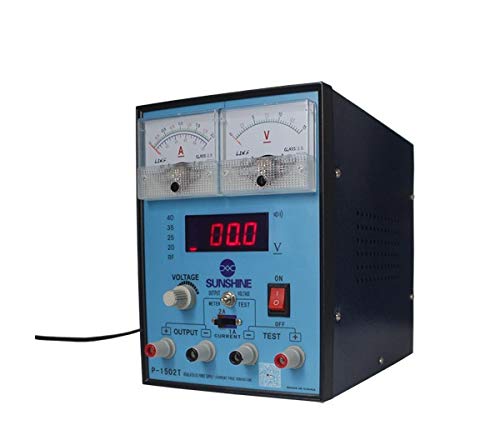
1-rasm: Old view of the SUNSHINE P-1503T Analog Power Supply. This image shows the device's display, control knobs, and output terminals, including the two USB ports.
2. Xavfsizlik ma'lumotlari
OGOHLANTIRISH: Ushbu xavfsizlik ko'rsatmalariga rioya qilmaslik elektr toki urishi, yong'in yoki jiddiy shikastlanishga olib kelishi mumkin.
- Always connect the power supply to a grounded electrical outlet.
- Qurilmani nam yoki d holda ishlatmangamp sharoitlar.
- Haddan tashqari issiqlikning oldini olish uchun to'g'ri shamollatishni ta'minlang. Shamollatish teshiklarini to'sib qo'ymang.
- c ni ochmangasing of the power supply. There are no user-serviceable parts inside. Refer all servicing to qualified personnel.
- Avoid touching output terminals when the device is powered on.
- Disconnect the power cord from the outlet before cleaning or if the device will not be used for an extended period.
- Use only the specified input voltage (15 Volts) as indicated on the device.
3. Sozlash
3.1 Paketni ochish
- Carefully remove the power supply from its packaging.
- Inspect the device for any signs of damage during transit. If damaged, do not use and contact your supplier.
- Ensure all accessories are present (e.g., power cord, test leads if included).
3.2 Quvvat manbasiga ulanish
- Place the power supply on a stable, level surface with adequate ventilation.
- Connect the provided power cord to the power input socket on the rear of the device.
- Elektr shnurining ikkinchi uchini mos tuproqli elektr rozetkaga ulang.
4. Foydalanish bo'yicha ko'rsatmalar
4.1 Quvvatni yoqish/o‘chirish
- To power on the device, press the power switch located on the front panel. The display will illuminate.
- To power off, press the power switch again.
4.2 Adjusting Output
The P-1503T is an analog power supply, typically meaning voltage and current are set via rotary knobs.
- dan foydalaning jildtage Sozlash tugmasi to set the desired output voltage. Monitor the voltage ko'rsatish.
- dan foydalaning Joriy sozlash tugmasi to set the desired current limit. Monitor the current display.
- The device emits a sound upon touch, indicating interaction with its controls.
4.3 USB portlaridan foydalanish
The power supply features two USB ports on the front panel:
- USB Port 1 (Mobile Testing): Connect a mobile device here for diagnostic purposes. This port is designed to provide stable power for testing mobile phone circuits.
- USB Port 2 (Mobile Charging): Connect a mobile device here for charging. This port delivers power suitable for recharging mobile phone batteries.
Note: Always ensure the output voltage and current settings are appropriate for the device being connected to prevent damage.
5. Xizmat ko'rsatish
5.1 Tozalash
- Ensure the power supply is turned off and disconnected from the main power outlet before cleaning.
- Qurilmaning tashqi qismini tozalash uchun yumshoq, quruq matodan foydalaning.
- Do not use liquid cleaners, aerosols, or solvents, as these may damage the casing yoki ichki komponentlar.
- Shamollatish teshiklarini chang va axlatdan toza tuting.
5.2 Saqlash
When not in use, store the power supply in a cool, dry place, away from direct sunlight and extreme temperatures.
6. Muammolarni bartaraf qilish; nosozliklarni TUZATISH
| Muammo | Mumkin sabab | Yechim |
|---|---|---|
| Qurilma yoqilmaydi. |
|
|
| Chiqish hajmi yo'qtage/joriy. |
|
|
| USB portlari ishlamayapti. |
|
|
7. Texnik shartlar
| Xususiyat | Tafsilot |
|---|---|
| Brend | QUYOSH |
| Model | P-1503T |
| Mos qurilmalar | Mobil telefon |
| Ulagich turi | ATX |
| Form faktor | ATX |
| Sovutish usuli | Havo |
| Maksimal kirish hajmitage | 15 volt |
| Minimal kirish hajmitage | 15 volt |
| Ishlab chiqaruvchi | QUYOSH |
| System Bus Connector Type | 2-ulagich |
| Quvvat manbai | Tashqi |
| ASIN | B0847QS2FX |
8. Kafolat va qo'llab-quvvatlash
This product is covered by a standard manufacturer's warranty. Please refer to the warranty card included with your purchase for specific terms and conditions. For technical support, service, or warranty claims, please contact your retailer or the manufacturer directly.
For the latest information and support, please visit the official SUNSHINE websayt (agar mavjud bo'lsa).