
Kirish
Welcome to your new Gembird GHS-U-5.1-01 USB 5.1 Surround Headset. This manual provides essential information for setup, operation, and maintenance to ensure optimal performance and an immersive audio experience.
Paket tarkibi
Paketda quyidagi elementlar bo'lishi kerak:
- Gembird GHS-U-5.1-01 USB 5.1 Surround Headset

Image: Retail packaging for the Gembird GHS-U-5.1-01 USB 5.1 Surround Headset, showing the headset inside a clear window.
Mahsulot tugadiview
The Gembird GHS-U-5.1-01 is a USB headset designed for immersive audio experiences with 5.1 surround sound. It features an adjustable microphone, built-in volume control, comfortable ear pads, and an adjustable headband for extended use.
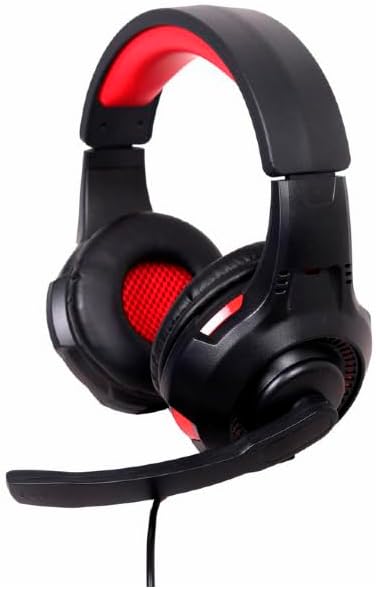
Rasm: burchakli view of the Gembird GHS-U-5.1-01 USB 5.1 Surround Headset, showcasing its black and red design with the microphone boom extended.
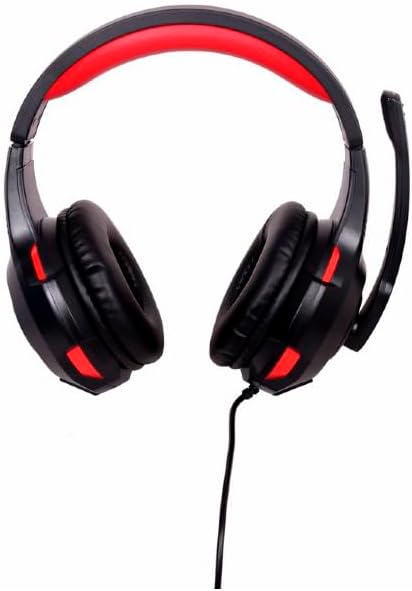
Rasm: old view of the Gembird GHS-U-5.1-01 USB 5.1 Surround Headset, highlighting the adjustable headband and earcups.

Image: Close-up of the in-line control unit for the Gembird GHS-U-5.1-01 headset, showing volume up/down and microphone mute buttons.
Sozlash; o'rnatish
Eshitish vositasini ulash
The Gembird GHS-U-5.1-01 headset connects via a standard USB port.
- Kompyuteringizda mavjud USB portini toping.
- Plug the USB connector of the headset into the USB port.
- Operatsion tizimingiz kerakli drayverlarni avtomatik ravishda aniqlab, o'rnatishi kerak. Bu jarayon bir necha daqiqa vaqt olishi mumkin.
- Once installed, the headset will be ready for use as an audio input and output device.
Audio Settings Configuration
For optimal 5.1 surround sound experience, you may need to configure your computer's audio settings.
- Windows: Go to "Sound Settings" (right-click speaker icon in taskbar) > "Sound Control Panel" > "Playback" tab. Select the Gembird headset, click "Configure," and choose "5.1 Surround."
- MacOS: Go to "System Preferences" > "Sound" > "Output" tab. Select the Gembird headset.
Foydalanish bo'yicha ko'rsatmalar
Ovozni boshqarish
The headset features an in-line remote control for easy volume adjustment.
- dan foydalaning "+" ovoz balandligini oshirish uchun tugma.
- dan foydalaning "-" ovoz balandligini pasaytirish uchun tugma.
Mikrofondan foydalanish
The adjustable microphone boom allows for precise positioning.
- Position the microphone approximately 1-2 inches from your mouth for clear voice capture.
- Use the microphone mute button on the in-line remote to toggle the microphone on or off.
Konforni sozlash
Adjust the headband to fit comfortably on your head. The ear pads are designed for extended use.
Xizmat
To ensure the longevity and performance of your headset, follow these maintenance guidelines:
- Tozalash: Use a soft, dry cloth to wipe the headset. Do not use harsh chemicals or abrasive cleaners.
- Saqlash: Store the headset in a clean, dry place away from extreme temperatures.
- Kabelni parvarish qilish: Zararni oldini olish uchun USB kabelini o'tkir egilish yoki haddan tashqari tortib olishdan saqlaning.
Muammolarni bartaraf qilish; nosozliklarni TUZATISH
No Sound or Microphone Not Working
- USB ulanishini tekshiring: Ensure the USB connector is fully inserted into the port. Try a different USB port.
- Ovoz balandligini tekshiring: Verify that the volume on the in-line control, your computer's system volume, and application-specific volumes are not muted or set too low.
- Ovoz sozlamalarini tekshiring: Confirm that the Gembird headset is selected as the default playback and recording device in your computer's sound settings.
- Kompyuterni qayta ishga tushiring: Sometimes a simple restart can resolve driver or software conflicts.
Ovoz sifati muammolari
- Haydovchi yangilanishi: Operatsion tizimingiz drayverlari yangilanganligiga ishonch hosil qiling.
- Manba sifati: Poor audio quality may stem from the audio source itself. Test with different audio files yoki ilovalar.
Texnik xususiyatlari
| Model nomi | GHS-U-5.1-01 |
| Ulanish | Simli USB |
| Form faktor | Quloq ustida |
| Rang | Qora |
| Material | Aluminum (Enclosure) |
| Og'irligi | 0.4 kilogramm |
| Qo'shimcha xususiyatlar | Adjustable microphone boom, Built-in volume control, Comfortable ear pads, Adjustable headband |
Kafolat haqida ma'lumot
This Gembird headset comes with a 24 Month Manufacturer Guarantee. Please retain your proof of purchase for warranty claims. For detailed warranty terms and conditions, refer to the documentation provided with your product or contact Gembird customer support.
Qo'llab-quvvatlash
If you encounter issues not covered in this manual or require further assistance, please visit the official Gembird website or contact their customer support for technical assistance.