
Kirish
This manual provides detailed instructions for the installation, operation, maintenance, and troubleshooting of the HP ProDesk 400 G3 MS-7957 motherboard. Please read this manual thoroughly before proceeding with any installation or operation to ensure proper functionality and safety.
Xavfsizlik ma'lumotlari
Anakartning shikastlanishi yoki o'zingizga shikast etkazmaslik uchun har doim quyidagi xavfsizlik choralariga rioya qiling:
- Har qanday komponentni o'rnatish yoki olib tashlashdan oldin elektr ta'minotini devordagi rozetkadan uzing.
- Wear an anti-static wrist strap or frequently touch a grounded metal object to discharge static electricity before handling the motherboard.
- Nozik qismlarga tegmaslik uchun anakartni chetidan tuting.
- Haddan tashqari qizib ketishining oldini olish uchun kompyuter korpusida yaxshi shamollatishni ta'minlang.
- Anakartni namlik va haddan tashqari haroratdan uzoqroq tuting.
Mahsulot tugadiview
The HP ProDesk 400 G3 MS-7957 is a MicroATX motherboard designed for Intel processors with an LGA 1151 socket. It supports DDR4 RAM and features a B250 chipset, offering a reliable foundation for desktop computing.
Asosiy xususiyatlar
- Compatible CPU Brand: Intel
- Soket turi: LGA 1151/Socket H4
- Form faktor: MicroATX
- I/U konnektorlari: Ethernet (RJ-45), USB 2.0, USB 3.0, VGA, DisplayPort, HD Audio Jack
Komponentni aniqlash
Familiarize yourself with the layout of the motherboard to facilitate proper installation and connection of components.

1-rasm: Burchakli view of the HP ProDesk 400 G3 MS-7957 motherboard. This image highlights the CPU socket (LGA 1151), four DDR4 RAM slots, PCIe slots, and various headers for front panel connections and storage devices.
O'rnatish va o'rnatish
Boshlashdan oldin
- Ensure your computer case is compatible with the MicroATX form factor.
- Gather all necessary components: CPU, RAM, CPU cooler, power supply, storage devices, and graphics card (if not using integrated graphics).
- Prepare your workspace by ensuring it is clean, well-lit, and static-free.
Anakartni o'rnatish
- Install the CPU into the LGA 1151 socket. Carefully align the CPU with the socket's notch and gently lower it into place. Close the retention arm.
- Protsessorga termal pasta surting va protsessor sovutgichini ishlab chiqaruvchining ko'rsatmalariga muvofiq o'rnating.
- Install the DDR4 RAM modules into the designated slots. Ensure they are fully seated until the clips lock into place.
- Mount the motherboard into the computer case using the appropriate standoffs and screws.
- Connect the main 24-pin ATX power connector and the 4-pin or 8-pin CPU power connector from your power supply to the motherboard.
- Install any expansion cards (e.g., graphics card) into the PCIe slots.

2-rasm: Yuqoridan pastga burchak ostida view of the HP ProDesk 400 G3 MS-7957 motherboard. This perspective provides a clear view of the processor socket, memory slots, and the layout of the various internal connectors and components.
Periferik qurilmalarni ulash
- Connect SATA storage devices (HDDs/SSDs) to the SATA ports on the motherboard.
- Connect front panel headers (power button, reset button, USB ports, audio jacks) to their respective pins on the motherboard. Refer to your case manual for specific pin assignments.
- Connect external peripherals such as monitor, keyboard, mouse, and Ethernet cable to the rear I/O panel.
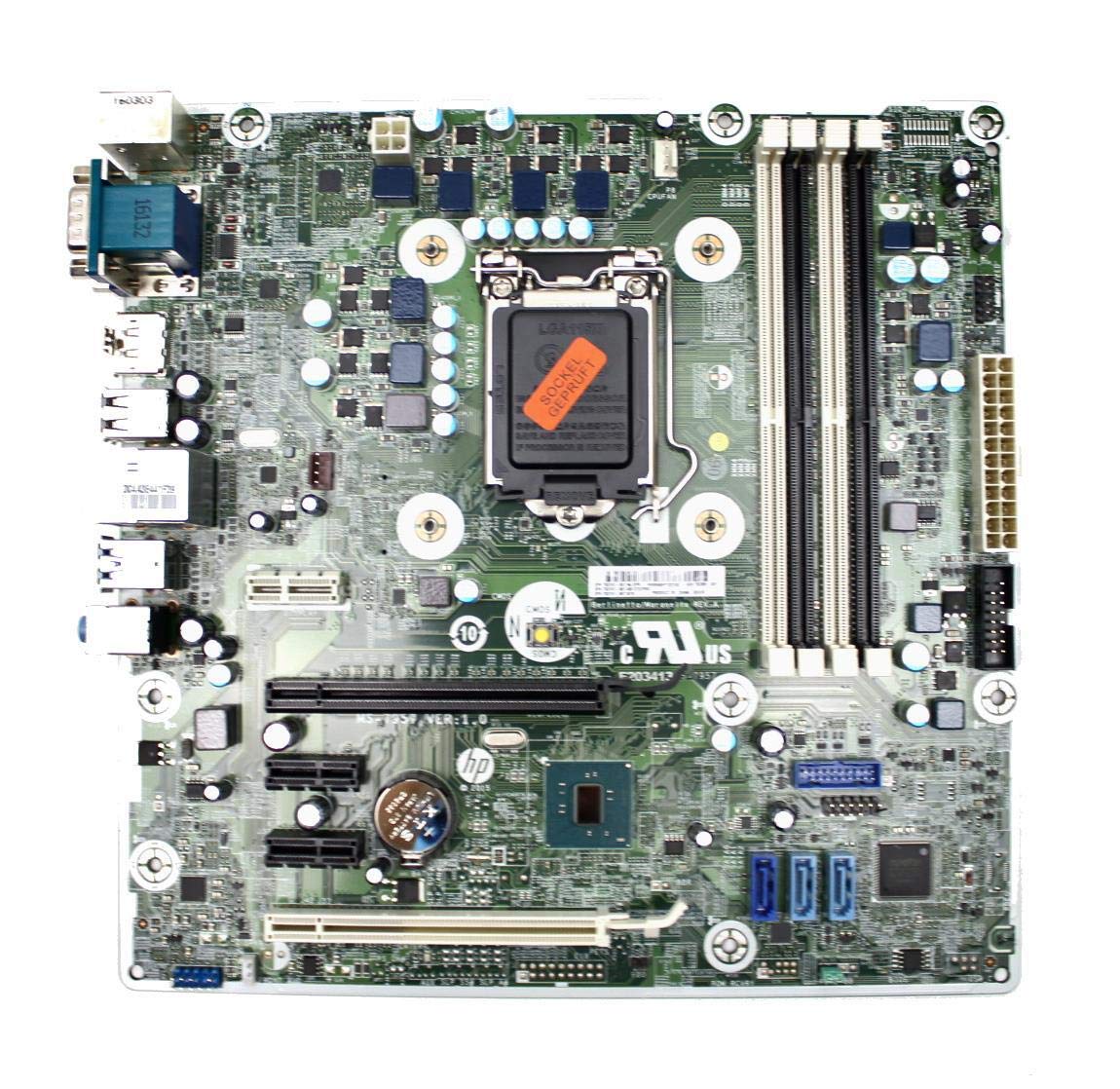
Figure 3: Rear I/O panel of the HP ProDesk 400 G3 MS-7957 motherboard. This image displays the available external connectivity options, including PS/2 ports, serial port, VGA, DisplayPort, USB 2.0, USB 3.0, Ethernet (RJ-45), and HD audio jacks.
Foydalanish bo'yicha ko'rsatmalar
Dastlabki yoqish
After all components are installed and connected, connect the power cable to the power supply and press the power button on your computer case. The system should initiate the boot process.
BIOS/UEFI konfiguratsiyasi
BIOS/UEFI o'rnatish yordam dasturiga kirish uchun belgilangan tugmani bosing (odatda Del, F2, F10, yoki F12) during the initial boot sequence. Here you can configure boot order, system time, and other hardware settings.
Haydovchi o'rnatish
After installing your operating system, it is crucial to install the latest drivers for your motherboard's chipset, integrated graphics, audio, and network adapter. These drivers can typically be found on the HP support website or the chipset manufacturer's websayt.
Xizmat
- Tozalash: Siqilgan havo yordamida anakart va komponentlardan changni muntazam tozalang. Tozalashdan oldin tizim o'chirilganligiga va elektr tarmog'idan uzilganligiga ishonch hosil qiling.
- BIOS/UEFI yangilanishlari: Periodically check for BIOS/UEFI updates from HP's official support website. Updates can improve stability, compatibility, and performance. Follow update instructions carefully to avoid system damage.
- Haydovchi yangilanishlari: Keep all system drivers updated to ensure optimal performance and compatibility with new software and hardware.
Muammolarni bartaraf qilish; nosozliklarni TUZATISH
Ushbu bo'limda siz duch kelishi mumkin bo'lgan umumiy muammolarning echimlari keltirilgan:
- Quvvat yo'q: Check all power connections, including the 24-pin ATX and CPU power cables. Ensure the power supply is switched on and the wall outlet is functional.
- Displey yo'q: Verify that your monitor is connected to the correct video output (VGA or DisplayPort) and is powered on. Reseat the graphics card (if applicable) and RAM modules.
- Tizimning beqarorligi/halokatlar: This could be due to overheating, faulty RAM, or outdated drivers. Check CPU and GPU temperatures, run memory diagnostic tools, and update drivers.
- Periferik qurilma aniqlanmadi: Ensure the peripheral is properly connected. Try a different port or update the relevant drivers.
- BIOS/UEFI bilan bog'liq muammolar: If you encounter issues after changing BIOS settings, try resetting the CMOS by removing the CMOS battery for a few minutes or using the clear CMOS jumper (refer to motherboard diagram for location).
Texnik xususiyatlari
| Xususiyat | Spetsifikatsiya |
|---|---|
| Brend | HP |
| CPU soket | LGA 1151 |
| Mos qurilmalar | Ish stoli kompyuter |
| RAM texnologiyasi | DDR4 |
| Mos keladigan protsessorlar | Intel Core i3-6xxx, Intel Core i5-6xxx, Intel Core i7-6xxx, Intel Core i3-7xxx, Intel Core i5-7xxx, Intel Core i7-7xxx, Intel Core i3-8xxx, Intel Core i5-8xxx, Intel Core i7-8xxx |
| Chipset turi | Intel B250 |
| Platforma | Windows |
| Model nomi | MS-7957 |
| CPU modeli | Core i3 (Note: Supports i3, i5, i7 as listed above) |
| Asosiy quvvat ulagichi turi | 24 pin |
| Grafik karta interfeysi | PCI Express |
| Available Memory Slots | 4 |
| Total SATA Ports | 6 |
| Jami USB portlari | 2 (Note: Refers to internal headers, rear I/O has more) |
| Jami Ethernet portlari | 1 |
| Total PCIe Ports | 3 |
| Ishlab chiqaruvchi | Computer Store Berlin (Reseller/Supplier) |
| Qism raqami | 4061435962741 |
| ASIN | B08CS13PTQ |
Kafolat va qo'llab-quvvatlash
Ushbu mahsulot bilan birga keladi 1 yillik kafolat sotib olingan kundan boshlab. Ushbu kafolat odatdagi foydalanish sharoitida materiallar va mahoratdagi nuqsonlarni qoplaydi.
For technical support, warranty claims, or further assistance, please contact your point of purchase or refer to the official HP support resources for the ProDesk 400 G3 series.