
Kirish
The FlinQ Smart WLAN Doorbell with Camera and Intercom provides enhanced home security and convenience. Featuring Full HD video, two-way audio, motion detection, and night vision, it allows you to monitor your doorstep and communicate with visitors from anywhere using your smartphone. This manual provides detailed instructions for setup, operation, and maintenance of your new smart doorbell system.
Paket tarkibi

Image: All components included in the FlinQ Smart WLAN Doorbell package, laid out on a white surface. This includes the doorbell unit, the indoor chime, two rechargeable batteries, a micro USB cable, an assembly kit, a safety wall mount, and the user manual.
Paketingizda quyida sanab o'tilgan barcha narsalar mavjudligini tekshiring:
- FlinQ Smart Video Doorbell Unit
- Indoor Chime Unit (Receiver)
- 2x qayta zaryadlanuvchi batareyalar
- Micro USB zaryadlovchi kabeli
- Safety Wall Mount
- Assembly Kit (Screws, Wall Plugs)
- Foydalanuvchi uchun qo'llanma
Mahsulot tugadiview

Image: The FlinQ Smart WLAN Doorbell, its plug-in indoor chime, and a smartphone displaying the doorbell's live video feed and control options.
The FlinQ Smart WLAN Doorbell is designed for ease of use and comprehensive security. Key components and features include:
- Full HD Camera: Captures clear 1920x1080 video.
- Keng burchak View: 155 daraja viewing angle ensures broad coverage of your doorstep.
- PIR Intelligent Motion Sensor: Harakatni aniqlaydi va ogohlantirishlarni ishga tushiradi.
- Eshik qo'ng'irog'i tugmasi: Activates the chime and sends notifications.
- Infrared HD Night Vision: Provides clear video even in low-light conditions.
- Ikki tomonlama audio: Allows real-time communication with visitors.
- IP52 suv o'tkazmaydigan reytingi: Tashqi omillarga bardosh berish uchun mo'ljallangan.
- Zaryadlanuvchi batareya: Powered by 2x 2500 mAh batteries, offering extended standby time.
- Yopiq ovoz: Plugs into a standard outlet and offers multiple melodies.
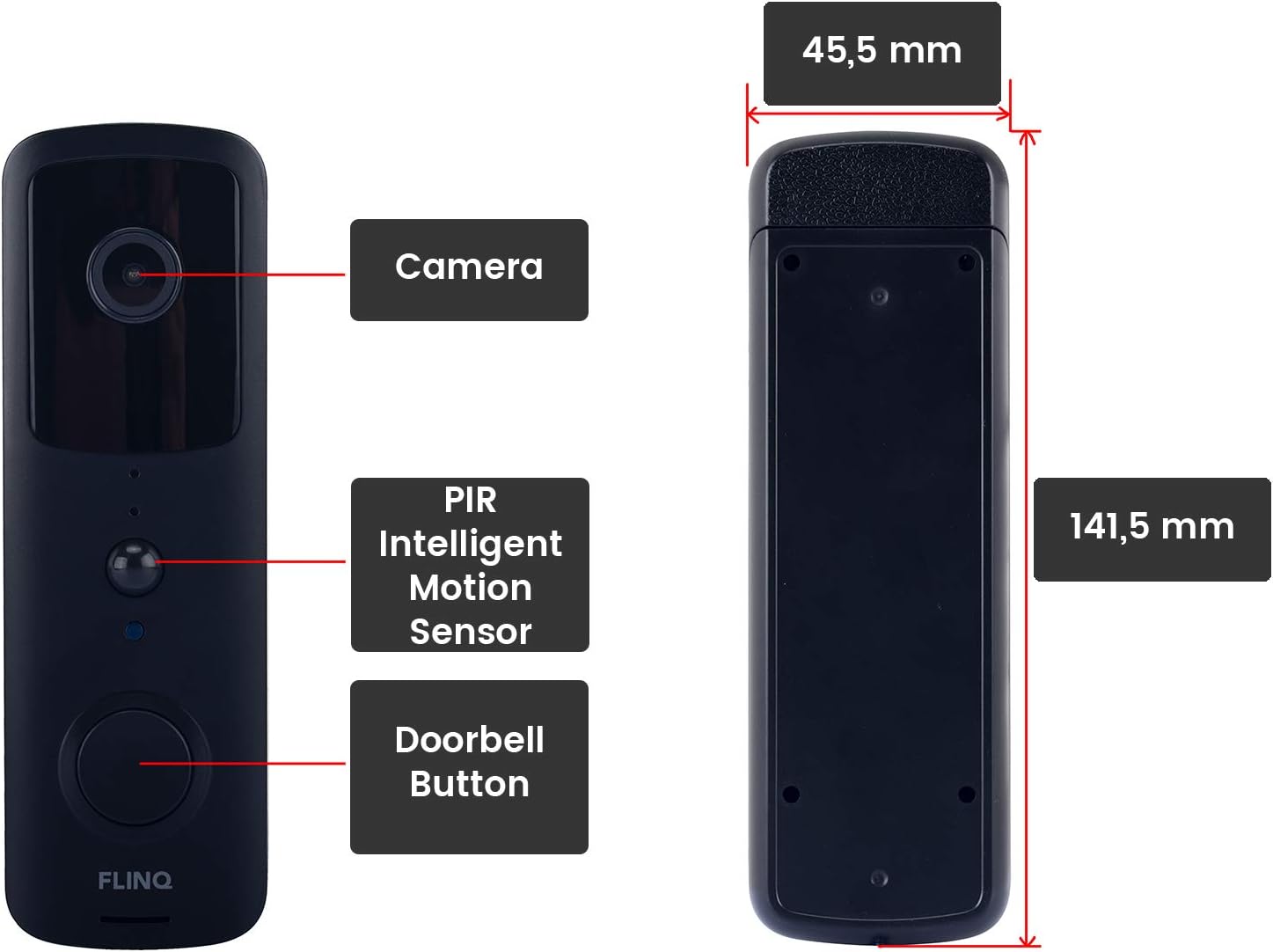
Image: A detailed diagram illustrating the front and side views of the FlinQ Smart WLAN Doorbell, highlighting its camera, PIR intelligent motion sensor, doorbell button, and overall dimensions (141.5 mm height, 45.5 mm width).

Image: A visual representation of the doorbell's 155-degree wide-angle view, showing its broad detection area and real-time HD video capabilities.
O'rnatish uchun qo'llanma
1. Charging the Doorbell
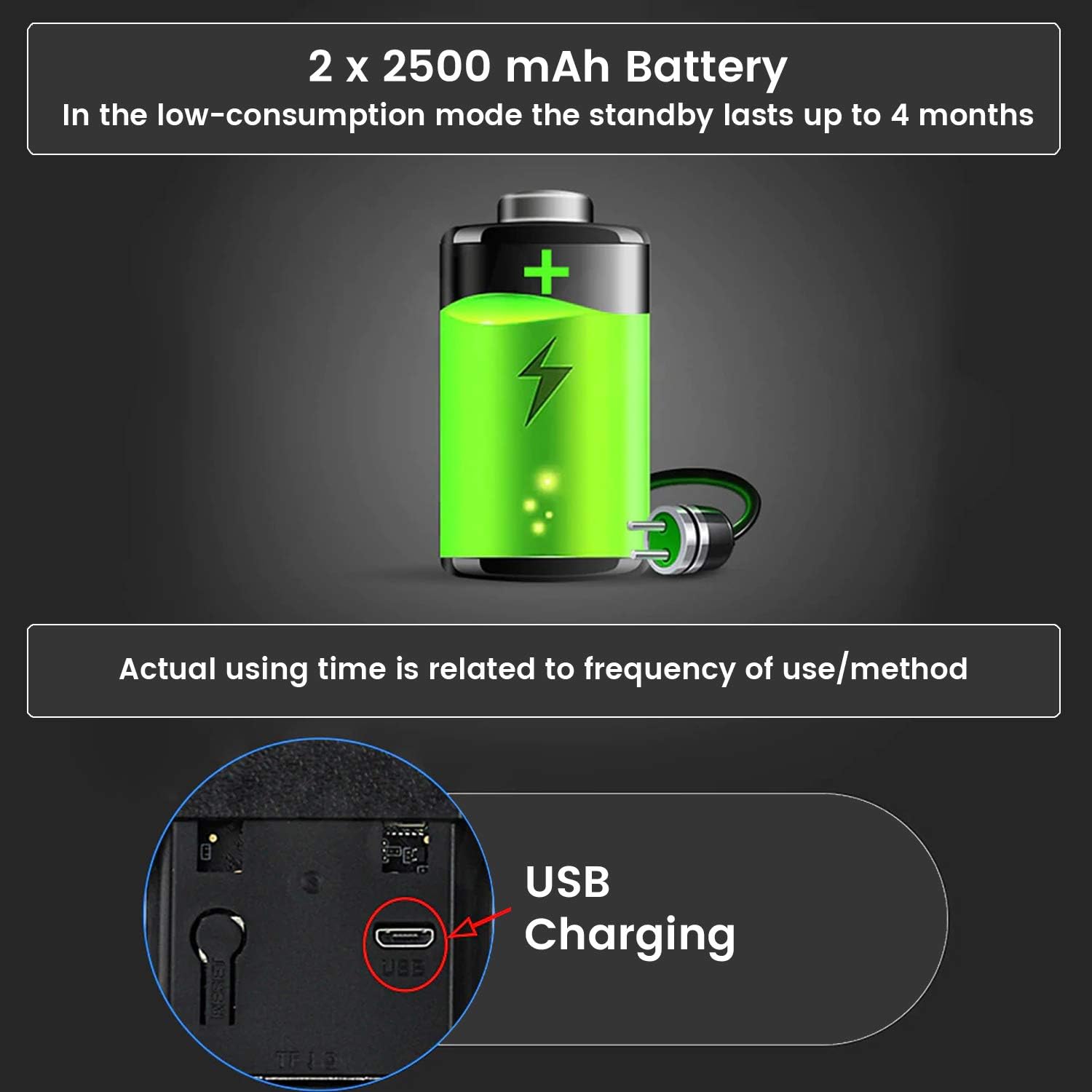
Image: An illustration of the doorbell's battery compartment and the micro USB charging port, indicating the 2x 2500 mAh battery capacity and typical standby time of up to 4 months.
Before initial use, fully charge the doorbell's batteries. Insert the two rechargeable batteries into the doorbell unit. Connect the supplied micro USB cable to the charging port on the doorbell and plug the other end into a standard USB power adapter (not included). The charging indicator light will show the charging status. A full charge can take several hours.
2. Ilovani o'rnatish
The FlinQ Smart Doorbell operates with the TUYA application. Download the "TUYA Smart" app from your smartphone's app store (Google Play Store for Android or Apple App Store for iOS).
- Ni qidirish "TUYA Smart" in your app store.
- Ilovani yuklab oling va o'rnating.
- Ilovani oching va yangi hisob qaydnomasini ro'yxatdan o'tkazing yoki agar sizda allaqachon mavjud bo'lsa, tizimga kiring.
3. Qurilmani ulash
Follow these steps to pair your doorbell with the TUYA Smart app:
- Ensure your smartphone is connected to a 2.4GHz Wi-Fi network. The doorbell does not support 5GHz Wi-Fi.
- Open the TUYA Smart app. Tap the "+" icon in the top right corner to add a device.
- Select "Video Surveillance" or "Smart Doorbell" from the device list.
- Follow the on-screen instructions to put the doorbell into pairing mode (usually by pressing and holding the doorbell button or a reset button until an indicator light flashes).
- So'ralganda, Wi-Fi tarmog'ingiz parolini kiriting.
- The app will generate a QR code. Position your doorbell camera to scan this QR code on your phone screen. Hold it about 15-20 cm away until you hear a confirmation sound from the doorbell.
- Once connected, you can name your doorbell and complete the setup.
To pair the indoor chime: Plug the chime into a power outlet. Press the pairing button on the chime (refer to the chime's specific instructions if available) and then press the doorbell button on the outdoor unit. The chime should ring, indicating successful pairing.
4. Jismoniy o'rnatish
Choose a suitable location for your doorbell, ideally near your front door, at a height that allows for optimal viewing. The doorbell is IP52 waterproof, suitable for outdoor installation.
- Mark the drilling points using the provided safety wall mount as a template.
- Agar kerak bo'lsa, teshiklarni burg'ulang va devorga o'rnatiladigan tiqinlarni joylashtiring.
- Secure the wall mount to the wall using the screws from the assembly kit.
- Attach the doorbell unit securely to the mounted bracket. Ensure it clicks into place.
Foydalanish bo'yicha ko'rsatmalar
1. Ikki tomonlama ovozli aloqa

Image: A visual representation of the real-time two-way audio feature, showing a person at the door and a smartphone user communicating directly.
When a visitor presses the doorbell button or motion is detected, you will receive a notification on your smartphone. Tap the notification to open the live view in the TUYA Smart app. From here, you can:
- Gapiring: Tap the microphone icon to speak to the visitor. Your voice will be projected through the doorbell's speaker.
- Eshiting: The doorbell's built-in microphone allows you to hear the visitor.
2. Harakatni aniqlash va ogohlantirishlar
The integrated PIR motion sensor detects movement in front of your doorbell. When motion is detected, the doorbell will:
- Send an instant push notification to your smartphone.
- Begin recording video (if configured).
You can adjust the motion detection sensitivity and set detection zones within the TUYA Smart app settings to minimize false alerts.
3. Tungi ko'rish

Image: A visual representation of the doorbell's infrared HD night vision, showing how it provides clear visibility in dark conditions using 6 night vision lights and auto-sensing technology.
The FlinQ Smart Doorbell is equipped with infrared HD night vision. This feature automatically activates in low-light conditions, ensuring clear video recordings and live views even at night.
4. Video Storage

Image: An illustration detailing the two available video storage methods for the doorbell: 7 days of cloud storage and local storage via a 32GB SD card.
Your video recordings can be stored using two methods:
- Bulutli saqlash: The TUYA app offers cloud storage options, typically including a period of free storage (e.g., 7 days). Check the app for details on subscription plans for extended cloud storage.
- Micro-SD Card Storage: Insert a micro-SD card (up to 32GB, not included) into the designated slot on the doorbell unit for local storage of recordings. This allows you to review footagto'g'ridan-to'g'ri kartadan.
5. Indoor Chime Operation
The indoor chime plugs into any standard wall outlet. When the doorbell button is pressed, the chime will ring, providing an audible alert inside your home. The chime unit comes with six different melodies. Refer to the chime's specific instructions (if separate) or the TUYA app settings to change melodies and adjust volume.
Xizmat
1. Batareyani zaryadlash
The doorbell's battery life can last up to 4 months under optimal conditions and low usage. However, frequent motion detection events, live view access, and two-way audio usage will reduce battery life. When the battery level is low, you will receive a notification via the TUYA app. Recharge the doorbell using the micro USB cable as described in the Setup section.
Note: Some users report shorter battery life depending on usage frequency and environmental factors. Regular monitoring of battery status via the app is recommended.
2. Tozalash
To maintain optimal performance, periodically clean the doorbell unit. Use a soft, damp cloth to wipe the camera lens and the body of the doorbell. Do not use harsh chemicals or abrasive cleaners, as these can damage the device or its waterproof sealing.
Muammolarni bartaraf qilish; nosozliklarni TUZATISH
| Muammo | Mumkin sabab | Yechim |
|---|---|---|
| Doorbell not connecting to Wi-Fi / App pairing fails. | Incorrect Wi-Fi band (5GHz), wrong password, weak signal, doorbell not in pairing mode. |
|
| Qisqa batareya muddati. | Frequent motion detection, high traffic area, frequent live view access, cold weather. |
|
| Motion detection is unreliable or triggers false alarms. | Incorrect sensitivity settings, environmental factors (e.g., swaying trees, passing cars). |
|
| No audio or poor audio quality during two-way communication. | Weak Wi-Fi signal, app permissions, microphone/speaker obstruction. |
|
| Indoor chime not ringing. | Chime unplugged, not paired, out of range. |
|
Texnik xususiyatlari
| Xususiyat | Tafsilot |
|---|---|
| Brend | FLINQ |
| Model (ASIN) | B08PD3YP2W |
| Video ravshanligi | Full HD 1920 x 1080 Pixels |
| Viewburchak | 155 daraja |
| Ulanish | Wireless (WLAN 2.4G), Wired (for power, if applicable, though primarily battery) |
| Quvvat manbai | Battery powered (2x 2500 mAh rechargeable batteries) |
| O'rtacha batareya quvvati | Up to 4 Months (usage dependent) |
| Suvga chidamlilik darajasi | IP52 suv o'tkazmaydigan |
| Maxsus xususiyatlar | Motion Sensor, Night Vision, Two-Way Audio, Cloud/SD Card Storage |
| Mos qurilmalar | Smartphone (via TUYA Smart App) |
| Dimensions (Doorbell) | Approx. 141.5 mm (H) x 45.5 mm (W) |
| Paket o'lchamlari | 26.3 x 8.7 x 7.7 sm; 370 g |
| Birinchi mavjud sana | 23 dekabr 2020 yil |
Kafolat va qo'llab-quvvatlash
For warranty information and technical support, please refer to the official FLINQ websaytiga tashrif buyuring yoki mahsulotni sotib olgan sotuvchiga murojaat qiling. Kafolat talablari uchun sotib olish hujjatingizni saqlang.
For app-related issues, please consult the help section within the TUYA Smart app or visit the TUYA Smart support websayt.