
1. Kirish
The Sygonix SY-4599778 is a robust, surface-mounted code lock designed for secure access control. This device features a durable metal, vandal-resistant housing and is IP66 rated for weather resistance, making it suitable for both indoor and outdoor environments. Access can be granted via RFID card or a user-defined PIN code.
2. Xavfsizlik ma'lumotlari
Umumiy xavfsizlik
- O'rnatish va ishlatishdan oldin barcha ko'rsatmalarni diqqat bilan o'qing.
- Kelajakda foydalanish uchun ushbu qo'llanmani saqlang.
- Qurilmani o'zingiz o'zgartirishga yoki ta'mirlashga urinmang. Barcha xizmat ko'rsatish ishlarini malakali mutaxassislarga topshiring.
- Ensure the device is used within its specified operating conditions.
Elektr xavfsizligi
- The device operates on 18V/DC. Ensure the power supply matches this requirement.
- Disconnect power before performing any installation or wiring work.
- Wiring should be performed by a qualified electrician to prevent electrical hazards.
- Qisqa tutashuvlarni oldini olish uchun barcha ulanishlar xavfsiz va izolyatsiyalanganligiga ishonch hosil qiling.
Atrof-muhitga oid mulohazalar
- The device has an IP66 rating, providing protection against dust ingress and powerful water jets.
- While weather-resistant, avoid submerging the device in water.
- Qurilmani belgilangan ish diapazonidan tashqarida juda yuqori haroratga duchor qilmang.
3. Mahsulot tugadiview
Xususiyatlari
- Vandal-resistant metal housing for enhanced security.
- IP66 weather resistance for outdoor installation.
- Multiple access methods: RFID card or PIN code.
- Integrated keypad for code entry.
Komponentlar
Paket odatda quyidagi tarkibiy qismlarni o'z ichiga oladi:
- Sygonix SY-4599778 Code Lock Unit (Keypad)
- O'rnatish vintlari va devor vilkalari
- Allen Key for secure mounting
- Diode (for electrical protection)
- Wiring Cable (integrated)
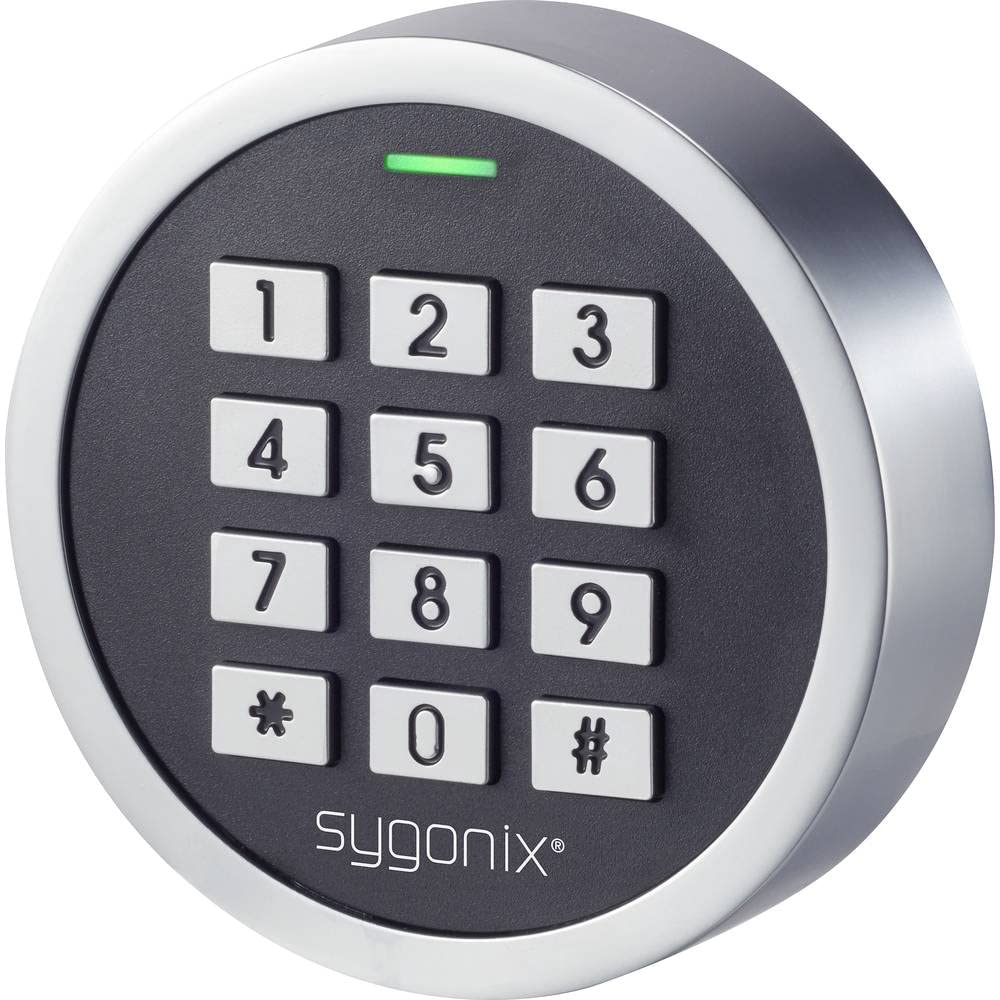
1-rasm: Old view of the Sygonix SY-4599778 Code Lock, showing the numeric keypad and brand logo.
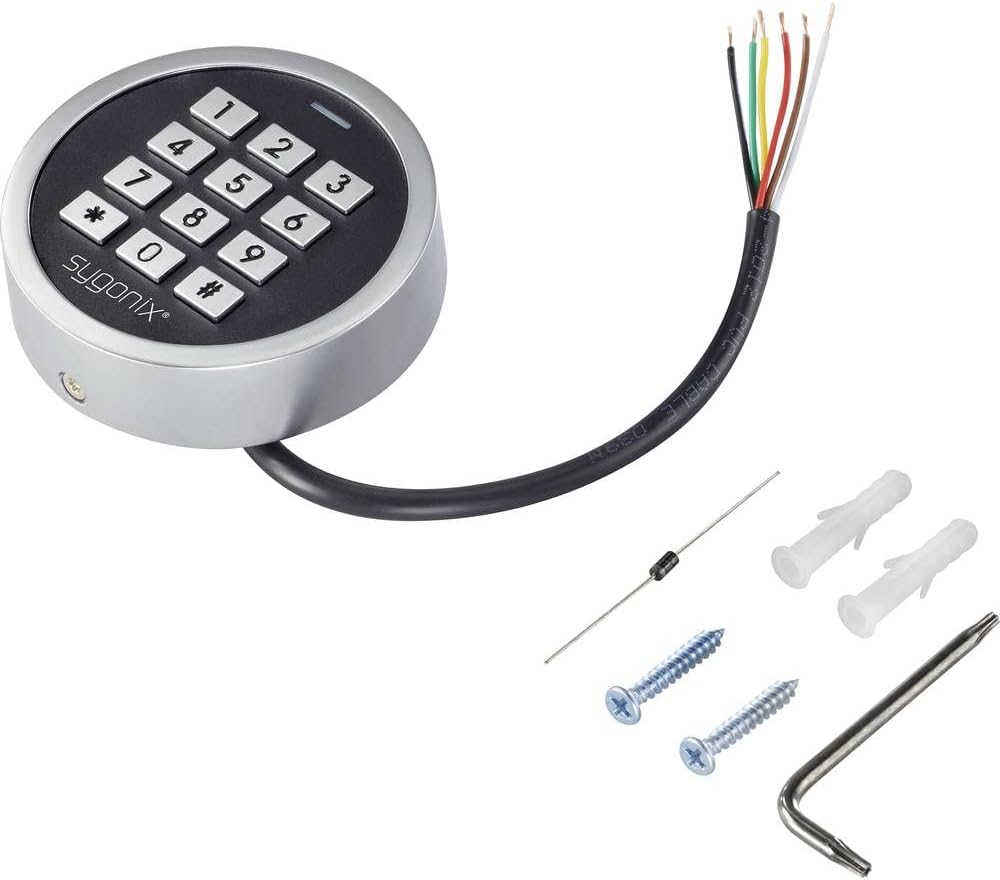
Figure 2: The Sygonix SY-4599778 Code Lock unit, displaying the integrated wiring cable, mounting screws, wall plugs, and a diode.
4. O'rnatish va o'rnatish
Jihozni o'rnatish
- Choose a suitable surface for mounting, ensuring it is flat and stable.
- Use the back plate of the unit as a template to mark the drilling points for the mounting screws.
- Belgilangan joylarda teshiklar burg'ulang va berilgan devorga o'rnatiladigan tiqinlarni joylashtiring.
- Secure the back plate to the wall using the mounting screws.
- Attach the main unit to the secured back plate, ensuring a snug fit. Use the Allen key to tighten any security screws if present.
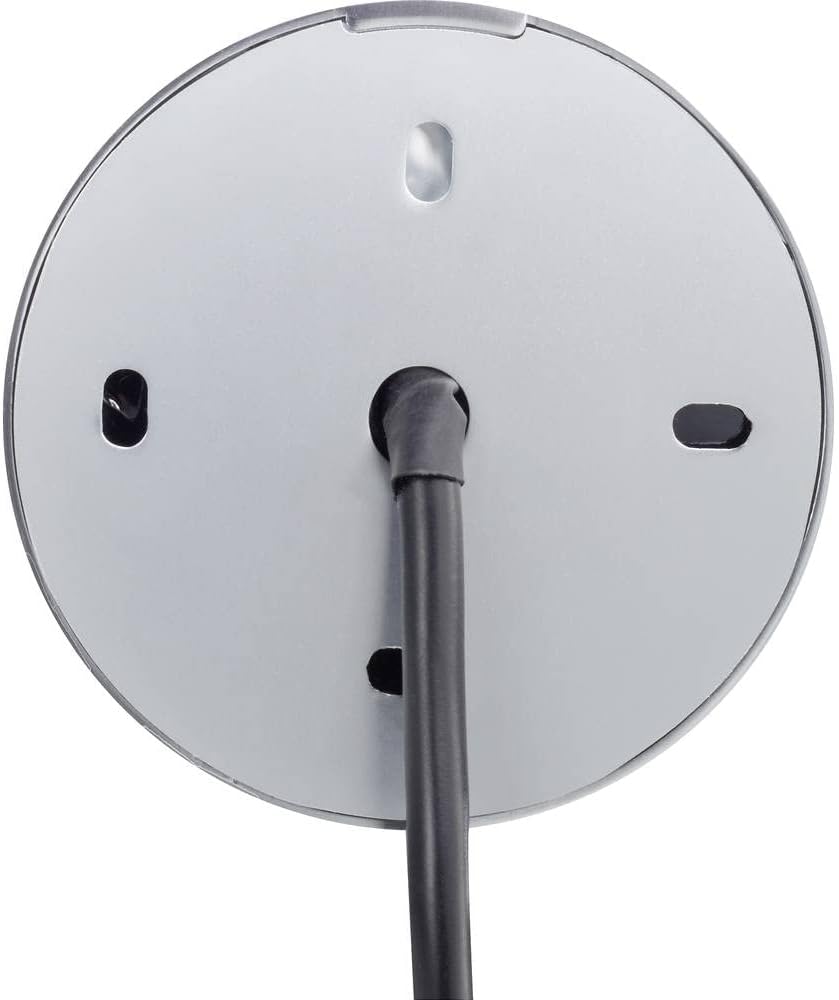
3-rasm: orqa view of the code lock, illustrating the mounting points and the integrated wiring cable.
Simli ulanishlar
The device requires an 18V/DC power supply. Connect the integrated wiring cable according to the following general guidelines. It is highly recommended that a qualified electrician performs the wiring.
- Quvvat kiritish simlarini aniqlang (odatda musbat uchun qizil, salbiy uchun qora).
- Connect the provided diode to the power line as instructed in the detailed wiring diagram (not provided in this general manual, refer to product-specific diagram). The diode helps protect the circuit from reverse polarity.
- Connect the output wires (e.g., for electric strike, alarm) to the corresponding terminals of your access control system.
- Barcha ulanishlar izolyatsiya qilinganligiga va atrof-muhit omillaridan himoyalanganligiga ishonch hosil qiling.
- After wiring, restore power to the unit. The unit should power on, indicated by an LED or audible signal.
5. Foydalanish bo'yicha ko'rsatmalar
This section outlines the basic operation and programming of the Sygonix SY-4599778 code lock. Specific programming steps may vary slightly; always refer to the detailed programming guide included with your product for precise instructions.
Initial Setup and Master Code
- Upon first power-up, the device will be in a default state.
- Enter the default master programming code (refer to your product's specific manual for this code, often a sequence like `*123456#`).
- Change the default master code immediately for security purposes. Follow the prompts or specific key sequences to set a new master code.
Adding User PIN Codes
- Enter the master programming code to enter programming mode.
- Select the option to add a new user code (e.g., press `1` or a specific key).
- Enter the desired new PIN code (typically 4-6 digits) and confirm it.
- Dasturlash rejimidan chiqish.
RFID kartalarini qo'shish
- Enter the master programming code to enter programming mode.
- Select the option to add a new RFID card (e.g., press `2` or a specific key).
- Present the RFID card to the reader area on the keypad. The unit will typically beep or flash to confirm registration.
- Dasturlash rejimidan chiqish.
Qulfga kirish
Kirish uchun:
- Using a PIN Code: Enter your valid PIN code followed by the `#` key. The lock will activate (e.g., unlock an electric strike) for a set duration.
- Using an RFID Card: Present your registered RFID card to the reader area on the keypad. The lock will activate for a set duration.

Figure 4: The code lock keypad with a green indicator light, typically indicating successful operation or entry into programming mode.
6. Xizmat ko'rsatish
Tozalash
- Clean the keypad surface with a soft, damp mato.
- Do not use abrasive cleaners, solvents, or harsh chemicals, as these can damage the finish or electronic components.
- Ensure no liquid enters the internal components of the device.
Tekshirish
- Periodically inspect the unit for any signs of physical damage or wear.
- Check the mounting screws to ensure the unit remains securely attached to the surface.
- Verify that all wiring connections are intact and free from corrosion or damage.
7. Muammolarni bartaraf qilish; nosozliklarni TUZATISH
If you encounter issues with your Sygonix SY-4599778 code lock, refer to the following common problems and solutions:
| Muammo | Mumkin sabab | Yechim |
|---|---|---|
| Qurilma yoqilmaydi. | Elektr ta'minoti yo'q yoki noto'g'ri simlar. | Check the 18V/DC power supply connection. Ensure wiring is correct and secure. |
| PIN code not recognized. | Incorrect PIN entered or PIN not programmed. | Verify the PIN code. Re-program the PIN if necessary. Ensure the '#' key is pressed after the PIN. |
| RFID card not working. | Card not programmed or not presented correctly. | Ensure the RFID card is registered. Present the card directly to the reader area. |
| Lock does not activate after valid entry. | Wiring issue to the electric strike/lock mechanism. | Check the output wiring from the code lock to the connected locking device. Ensure the locking device is functional. |
| Qurilma javob bermayapti. | Vaqtinchalik elektron nosozlik. | Disconnect power for a few seconds, then reconnect to perform a power cycle. |
Agar ushbu echimlarni sinab ko'rganingizdan keyin muammo davom etsa, iltimos, mijozlarni qo'llab-quvvatlash yoki malakali texnik bilan bog'laning.
8. Texnik shartlar
| Model raqami: | SY-4599778 |
| Brend: | Sigoniks |
| Quvvatlantirish manbai: | 18V/DC |
| Himoya reytingi: | IP66 (chang o'tkazmaydigan, kuchli suv oqimlaridan himoyalangan) |
| Kirish usullari: | PIN Code, RFID Card |
| Material: | Metal (Vandal-resistant housing) |
| Olchamlari (U x G x Y): | 20 x 73 x 73 mm |
| Og'irligi: | 199 gramm |
| Tavsiya etilgan foydalanish: | Outdoor environments, weather-exposed areas |
9. Kafolat va qo'llab-quvvatlash
Kafolat haqida ma'lumot
The availability of spare parts for this product is typically 1 year from the date of purchase. For specific warranty terms and conditions, please refer to the documentation provided at the time of purchase or contact your retailer.
Mijozlarni qo‘llab-quvvatlash
For technical assistance, troubleshooting beyond this manual, or warranty claims, please contact your point of purchase or the official Sygonix customer support channels. Contact information can usually be found on the product packaging or the manufacturer's official websayt.