
1. Kirish
The DeltaTrak 15051 Ultra Fast Fold Thermometer is engineered for rapid and accurate temperature measurements, making it suitable for demanding applications such as food operations. Its design prioritizes speed, reliability, and flexibility to meet stringent safety standards. This manual provides essential information for the proper use and maintenance of your thermometer.
2. Xavfsizlik ma'lumotlari
- Do not immerse the entire thermometer in water. The probe is waterproof, but the main unit should not be submerged.
- Termometrni bolalar qo'li etmaydigan joyda saqlang.
- Handle the stainless-steel probe with care as it has a sharp tip.
- Do not expose the thermometer to extreme temperatures outside its operating range (-58°F to 572°F / -50°C to 300°C).
- Always clean the probe before and after each use to prevent cross-contamination.
3. Paket tarkibi
- 1 x DeltaTrak 15051 Ultra Fast Fold Thermometer
- 1 x batareya (oldindan o'rnatilgan)
4. Mahsulot tugadiview
The DeltaTrak 15051 features a large LCD display, a foldable stainless-steel probe, and intuitive buttons for various functions.
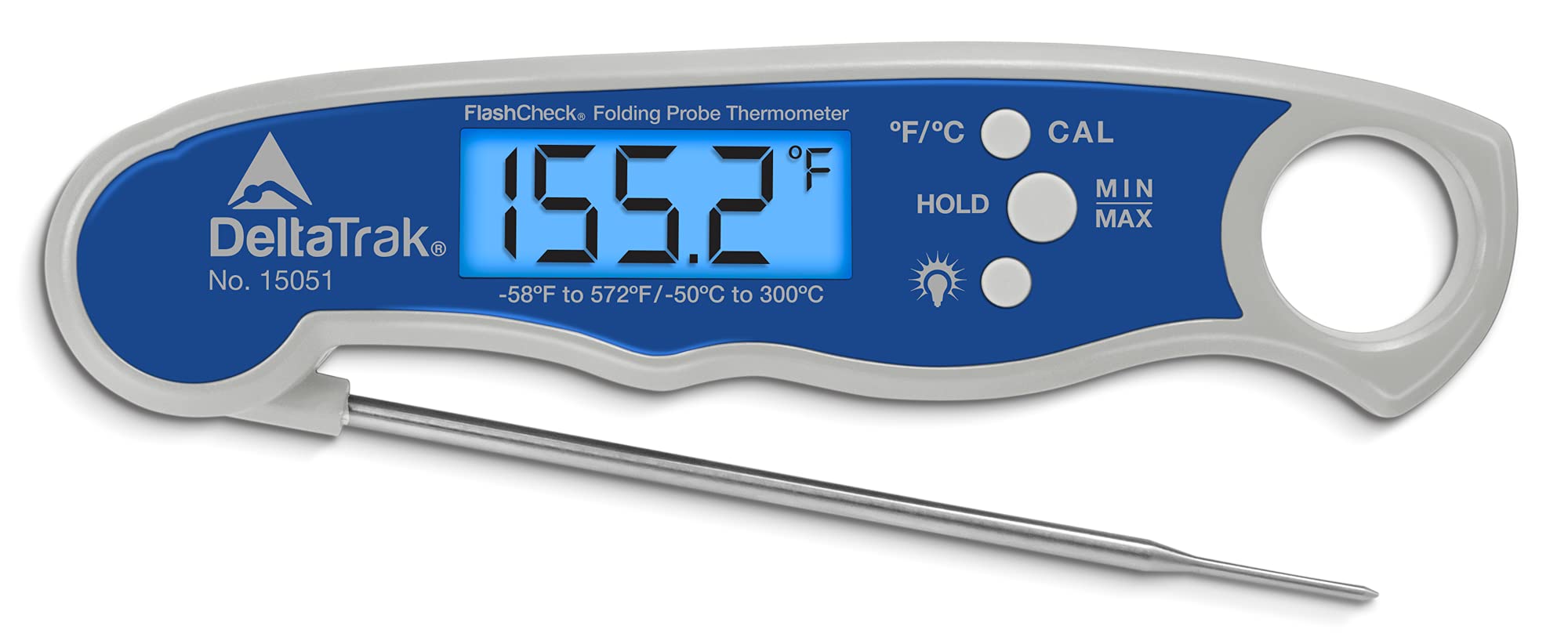
Image: DeltaTrak 15051 Ultra Fast Fold Thermometer. The thermometer is white and blue, with a digital display showing '190.6' and buttons for °F/°C, CAL, HOLD, MIN, and MAX. The stainless steel probe is extended from the main unit.
Asosiy komponentlar:
- Foldable Stainless-Steel Probe: Adjustable from 0° to 180° for flexible positioning.
- LCD displey: Large, easy-to-read display for temperature readings.
- °F/°C tugmasi: Toggles between Fahrenheit and Celsius units.
- CAL tugmasi: For calibration (refer to calibration section for details).
- HOLD tugmasi: Displeydagi joriy harorat ko'rsatkichini muzlatadi.
- MIN/MAX Button: Displays the minimum and maximum temperatures recorded during a measurement session.
5. Sozlash
The DeltaTrak 15051 thermometer comes with a pre-installed battery. No initial setup is typically required beyond removing any protective packaging.
- Termometrni ehtiyotkorlik bilan o'ramidan chiqarib oling.
- Unfold the stainless-steel probe to activate the thermometer. The display will turn on automatically.
- Ensure the display shows a reading. If not, check the battery compartment.
6. Foydalanish bo'yicha ko'rsatmalar
6.1. Taking a Temperature Reading
- Unfold the probe to turn on the thermometer.
- Insert the stainless-steel probe into the center of the food or liquid being measured. Ensure the probe tip is fully immersed and not touching the bottom or sides of the container.
- Wait for the reading on the LCD display to stabilize. The thermometer provides an almost instantaneous response, typically under 4 seconds.
- Read the temperature displayed.
- To turn off the thermometer, fold the probe back into its housing.
6.2. Switching Temperature Units (°F/°C)
ni bosing °F/°C button located on the front of the thermometer to switch between Fahrenheit and Celsius temperature scales.
6.3. Using the HOLD Function
ni bosing TUTING button to freeze the current temperature reading on the display. This is useful when you need to remove the probe from the item to read the temperature more clearly. Press TUTING again to resume live temperature measurement.
6.4. Using the MIN/MAX Function
ni bosing MIN / MAX button to cycle through the minimum and maximum temperatures recorded since the thermometer was last turned on or the MIN/MAX memory was cleared. To clear the MIN/MAX memory, hold the MIN / MAX button for a few seconds until the display resets.
6.5. Calibration (CAL)
The thermometer is factory calibrated. If recalibration is necessary, refer to specific industry standards or contact DeltaTrak support for guidance. Typically, calibration involves placing the probe in an ice bath (0°C / 32°F) and adjusting the reading using the KAL agar kerak bo'lsa tugmasini bosing.
7. Xizmat va parvarish
- Tozalash: The probe can be cleaned with warm soapy water or an antibacterial wipe. The main unit should be wiped clean with a damp mato. Do not wash the entire unit under running water or immerse it.
- Saqlash: Store the thermometer with the probe folded in a clean, dry place when not in use.
- Batareyani almashtirish: When the display becomes dim or the thermometer does not turn on, it's time to replace the battery. The thermometer uses a standard button cell battery. Open the battery compartment, replace the old battery with a new one of the same type, and close the compartment securely.
8. Muammolarni bartaraf qilish; nosozliklarni TUZATISH
| Muammo | Mumkin sabab | Yechim |
|---|---|---|
| Termometr yoqilmaydi. | Batareya tugallangan yoki noto'g'ri o'rnatilgan. | Replace the battery or ensure it is correctly inserted. |
| Noto'g'ri o'qishlar. | Probe not fully inserted; probe tip touching container; thermometer needs calibration. | Ensure proper probe placement. If issues persist, consider calibration or contact support. |
| Displey xira. | Kam batareya. | Batareyani almashtiring. |
9. Texnik shartlar
| Xususiyat | Tafsilot |
|---|---|
| Model raqami | 15051 |
| Harorat diapazoni | -58°F dan 572°F gacha / -50°C dan 300°C gacha |
| Javob vaqti | 4 soniyadan kam |
| Displey turi | LCD |
| Tekshirish materiallari | Zanglamaydigan po'lat |
| Maxsus xususiyat | Katlanuvchi prob |
| Quvvat manbai | Battery Powered (Battery included) |
| Mahsulot o'lchamlari (LxWxH) | 17 x 6 x 3 sm |
| Tashqi material | Plastik |
| Mahsulotni parvarish qilish bo'yicha ko'rsatmalar | Faqat qo'lda yuving |
10. Kafolat va qo'llab-quvvatlash
For warranty information and technical support, please refer to the official DeltaTrak websayti yoki bevosita mijozlarga xizmat ko'rsatish bilan bog'laning. Xarid kvitansiyasini xaridni tasdiqlovchi hujjat sifatida saqlang.