
1. Kirish
The Energizer Connect Smart WiFi Plug allows you to control your electronic devices remotely using a mobile application or voice commands. This smart plug connects directly to your home's 2.4GHz Wi-Fi network, eliminating the need for a separate hub. It is compatible with Amazon Alexa, Google Assistant, and Siri for convenient voice control. This manual provides detailed instructions for setting up, operating, maintaining, and troubleshooting your smart plug.
2. Xavfsizlik ma'lumotlari
Ushbu mahsulotdan foydalanishdan oldin barcha xavfsizlik ko'rsatmalarini o'qib chiqing va tushunib oling. Ushbu ko'rsatmalarga rioya qilmaslik elektr toki urishi, yong'in yoki mulkka zarar yetkazilishiga olib kelishi mumkin.
- Faqat ichki foydalanish uchun.
- Maksimal yukni 15 dan oshmang Amps (120 Volts).
- Do not immerse the plug in water or expose it to moisture.
- Qurilmani qismlarga ajratish yoki o'zgartirishga urinmang.
- Bolalar qo'li etmaydigan joyda saqlang.
- Vilkaning rozetkaga to'liq ulanganligiga ishonch hosil qiling.
- Unplug the device from the outlet before cleaning.
3. Paket tarkibi
- 1 x Energizer Connect Smart WiFi Plug
- 1 x foydalanuvchi qo'llanmasi (ushbu hujjat)
4. Mahsulot tugadiview
The Energizer Connect Smart WiFi Plug features a compact design that allows access to the second outlet. It includes a power button and an LED indicator for status.

4.1-rasm: The Energizer Connect Smart WiFi Plug shown with its retail packaging, highlighting key features like 15 Amps of power, grouping, voice control, and Wi-Fi connectivity. The plug itself is white and compact.

4.2-rasm: Oldindan yaqindan view of the Energizer Connect Smart WiFi Plug, showing the standard Type B electrical outlet configuration (two vertical slots and a round ground hole).

4.3-rasm: This image displays the compact dimensions of the Energizer Connect Smart WiFi Plug. The side view shows a depth of 1.0625 inches, and the front view indicates a diameter of 1.125 inches, illustrating its mini size.
4.1. Qismlar
- Quvvat tugmasi: Press to manually turn the connected device on or off. Press and hold for 5 seconds to initiate pairing mode (LED will blink rapidly).
- LED ko'rsatkichi:
- Qattiq ko'k: Qurilma yoqilgan.
- Oʻchiq: Qurilma o‘chirilgan.
- Rapidly Blinking Blue: Ulanish rejimi.
- Sekin-asta ko'k miltillovchi: Wi-Fi tarmog‘idan uzilgan.
5. O'rnatish bo'yicha ko'rsatmalar
Follow these steps to set up your Energizer Connect Smart WiFi Plug.
5.1. Tizim talablari
- A stable 2.4GHz Wi-Fi network (5GHz networks are not supported).
- A smartphone or tablet running iOS 10.0 or higher, or Android 6.0 or higher.
- Access to the Apple App Store or Google Play Store.
5.2. Ilovani yuklab olish va o'rnatish
- ni yuklab oling Energizer Connect App Apple App Store yoki Google Play do'konidan. Ni qidirish "Energizer Connect".
- Hisob yaratish yoki tizimga kirish uchun ilovani oching va ekrandagi ko'rsatmalarga amal qiling.

5.1-rasm: A smartphone displaying the Energizer Connect App interface, showing the smart plug in an "ON" state. The image also includes the physical smart plug and icons for downloading the app from the App Store and Google Play.
5.3. Pairing the Smart Plug
- Plug the Energizer Connect Smart WiFi Plug into a standard 120V wall outlet.
- The LED indicator on the plug should begin blinking rapidly, indicating it is in pairing mode. If not, press and hold the power button on the side of the plug for 5 seconds until it blinks rapidly.
- Energizer Connect ilovasini oching.
- Tap the "+" icon (or "Add Device") to add a new device.
- Qurilmalar ro'yxatidan "Elektr rozetkasi" yoki "Smart vilkasi" ni tanlang.
- Ilovada indikator chiroqchasi tez yonib-o'chib turganini tasdiqlang.
- Enter your 2.4GHz Wi-Fi network name and password. Ensure your phone is connected to the same 2.4GHz network.
- The app will attempt to connect to the smart plug. This may take a few moments.
- Once successfully paired, the LED indicator on the plug will turn solid blue, and the app will confirm the connection.
- You can then rename your smart plug within the app for easier identification (e.g., "Living Room Lamp," "Coffee Maker").

5.2-rasm: A visual guide showing the three easy steps for setting up the Energizer Connect Smart WiFi Plug: download the app, install the device, and set up and control via the app or voice assistants. The image also features the Energizer bunny mascot.
6. Foydalanish bo'yicha ko'rsatmalar
Control your smart plug using the Energizer Connect App or compatible voice assistants.
6.1. Qo'lda boshqarish
Press the power button on the side of the smart plug to manually turn the connected device on or off.
6.2. Ilovalarni boshqarish
- Yoqish/oʻchirish: Open the Energizer Connect App, select your smart plug, and tap the power icon to toggle its state.
- Rejalashtirish: Set custom schedules for your plug to turn on or off automatically at specific times or days. This is useful for lights, coffee makers, or other appliances.
- Taymerlar: Set countdown timers for the plug to turn off after a set duration.
- Masofaviy kirish: Control your smart plug from anywhere with an internet connection, even when you are away from home.
- Guruhlash: Group multiple Energizer Connect smart plugs together to control them simultaneously with a single command.
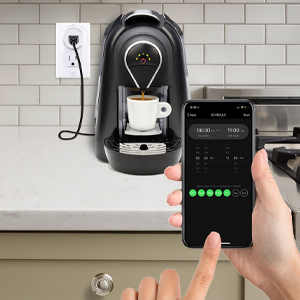
6.1-rasm: A hand holding a smartphone displaying the Energizer Connect App's scheduling interface, set to turn on a coffee maker at a specific time. The smart plug is visible in the background, connected to the coffee machine.

6.2-rasm: A person using a smartphone to remotely control a smart plug, demonstrating the ability to turn devices on or off from any location. The image shows a split view of the person and a living room with a lamp connected to a smart plug.
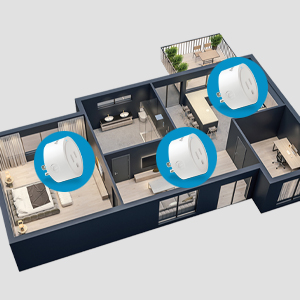
6.3-rasm: An overhead diagram of a home showing multiple Energizer Connect Smart WiFi Plugs placed in different rooms, illustrating the concept of grouping and controlling several devices simultaneously.
6.3. Ovozli boshqaruv
The Energizer Connect Smart WiFi Plug is compatible with Amazon Alexa, Google Assistant, and Siri. To enable voice control:
- Ensure your smart plug is successfully paired with the Energizer Connect App.
- Open your Amazon Alexa, Google Home, or Apple Home app.
- Follow the app's instructions to link the "Energizer Connect" skill or service. You will need to log in with your Energizer Connect account credentials.
- Ulangandan so'ng siz quyidagi kabi ovozli buyruqlardan foydalanishingiz mumkin:
- "Alexa, [Plug Name] ni yoqing."
- "Hey Google, [Plug Name] ni o'chirib qo'ying."
- "Hey Siri, turn on [Plug Name]." (Requires setting up Siri Shortcuts in the Energizer Connect App)

6.4-rasm: A living room scene demonstrating voice control capabilities. The image shows a smart plug connected to a fan, with icons for Google Assistant, Alexa, and Siri Shortcuts, indicating compatibility with these voice assistants.
7. Xizmat ko'rsatish
To ensure optimal performance and longevity of your smart plug:
- Tozalash: Tozalashdan oldin smart vilkasini elektr rozetkasidan uzing. Sirtni tozalash uchun yumshoq, quruq matodan foydalaning. Suyuq tozalagichlar yoki aerozollardan foydalanmang.
- Saqlash: When not in use, store the smart plug in a cool, dry place away from direct sunlight and moisture.
- Atrof-muhit sharoitlari: Avoid exposing the plug to extreme temperatures or humidity.
8. Muammolarni bartaraf qilish; nosozliklarni TUZATISH
If you encounter issues with your Energizer Connect Smart WiFi Plug, refer to the following solutions:
| Muammo | Mumkin sabab | Yechim |
|---|---|---|
| Plug not connecting to Wi-Fi / LED blinking slowly | Incorrect Wi-Fi password, 5GHz network selected, plug too far from router, network interference. |
|
| App cannot find the plug during pairing | Plug not in pairing mode, incorrect app used, network issues. |
|
| Ovozli boshqaruv ishlamayapti | Voice assistant not linked, incorrect device name, internet connectivity issues. |
|
| Plug unresponsive | Qudratlitage, device malfunction. |
|
9. Texnik shartlar
| Xususiyat | Tafsilot |
|---|---|
| Model raqami | B0929DFGZY |
| UPC | 805106871352 |
| Kirish hajmitage | 120 volt |
| Maksimal yuk oqimi | 15 Amps |
| Wi-Fi chastotasi | 2.4GHz (IEEE 802.11 b/g/n) |
| Moslik | Amazon Alexa, Google Assistant, Siri (via Shortcuts) |
| Sertifikatlar | FCC Certified, ETL Certified |
| Material | Plastik, kauchuk |
| Rang | Oq |
| Element og'irligi | 2.89 untsiya |
| Dimensions (Approx. Plug Body) | 1.125" (Diameter) x 1.0625" (Depth from outlet face) |
10. Kafolat va qo'llab-quvvatlash
For warranty information and technical support, please contact the manufacturer or seller directly. The manufacturer of this product is Jem Accessories, and the brand is Energizer Connect (distributed by XTREME DIGITAL LIFESTYLE ACCESSORIES).
Iltimos, kafolat da'volari uchun sotib olinganligingizni tasdiqlovchi hujjatingizni saqlab qo'ying.
For further assistance, visit the Energizer Connect websaytga kiring yoki mahsulotingizning qadoqlari bilan birga ko'rsatilgan aloqa ma'lumotlariga qarang.