
Kirish
Thank you for choosing the Hbada Ergonomic Gaming Chair. This manual provides essential information for the safe and efficient assembly, operation, and maintenance of your new chair. Please read these instructions carefully before use and retain them for future reference.

Image: The Hbada Ergonomic Gaming Chair in a modern gaming environment, showcasing its design and presence.
Xavfsizlik ma'lumotlari
- O'rnatishdan oldin barcha komponentlar mavjudligiga va buzilmaganligiga ishonch hosil qiling. Agar biron bir qism yo'qolgan yoki singan bo'lsa, foydalanmang.
- Follow the assembly instructions precisely. Incorrect assembly can lead to instability and injury.
- Stulda turmang. Undan faqat o'tirish uchun foydalaning.
- Do not exceed the maximum weight capacity (refer to specifications).
- Yig'ish paytida bolalar va uy hayvonlarini stuldan uzoqroq tuting.
- Materialning buzilishini oldini olish uchun stulni to'g'ridan-to'g'ri quyosh nuri yoki haddan tashqari haroratga ta'sir qilishdan saqlaning.
Mahsulot o'lchamlari
Understanding the dimensions of your chair is important for proper placement and comfortable use. Below are the key measurements:
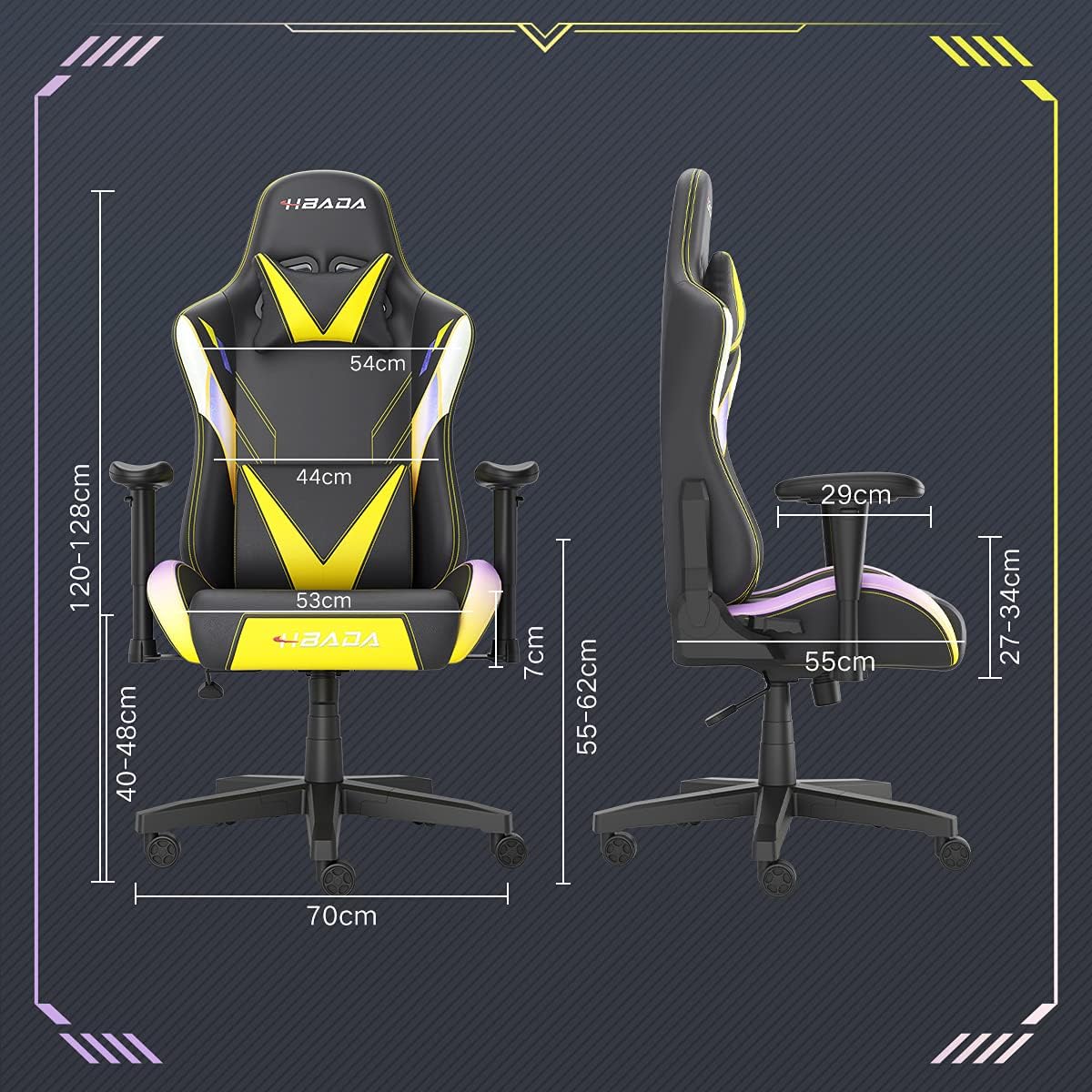
Image: A detailed diagram illustrating the various dimensions of the Hbada Gaming Chair, including height, width, and depth measurements.
- Umumiy balandligi: 120-128 cm (adjustable)
- O'rindiq balandligi: 40-48 cm (adjustable)
- O'rindiqning kengligi: 53 sm
- O'rindiq chuqurligi: 55 sm
- Orqa o'rindiq kengligi: 54 cm (shoulder area), 44 cm (lumbar area)
- Qo'ltiq balandligi (o'rindiqdan): 7 cm (adjustable)
- Asosiy diametri: 70 sm
O'rnatish va yig'ish
Please follow these steps carefully to assemble your Hbada Gaming Chair. It is recommended to have a clear, spacious area for assembly.
O'rnatish bosqichlari:
- Step 1: Assemble the Base and Wheels
Insert the five casters into the holes on the star base. Then, place the gas lift cylinder into the center hole of the base.

Image: Illustration of attaching the five casters to the chair's star-shaped base and inserting the gas lift cylinder.
- Step 2: Attach the Seat and Backrest
Connect the backrest to the seat using the provided screws and mounting plates. Ensure all screws are tightened securely.

Image: Diagram showing the process of securing the backrest to the seat cushion using screws and brackets.
- 3-qadam: Qo'l dayamalarini o'rnating
Attach the armrests to the sides of the seat using the designated screws. Make sure they are firmly attached.

Image: Visual guide for attaching the armrests to the chair's seat base.
- Step 4: Connect Seat to Base
Carefully place the assembled seat onto the gas lift cylinder, ensuring it is properly seated and stable.

Image: Depiction of lowering the assembled seat onto the gas lift cylinder, connecting the upper and lower parts of the chair.
- Step 5: Attach Headrest and Lumbar Pillow
Secure the detachable headrest and lumbar support pillow to the chair as desired for optimal comfort.

Image: Instructions for attaching the headrest and lumbar support pillows to the gaming chair.
Foydalanish bo'yicha ko'rsatmalar
Your Hbada Gaming Chair is designed with several adjustable features to provide personalized comfort and support.
Key Adjustable Functions:
- Adjustable Sitting Height: Use the lever located under the seat on the right side to raise or lower the chair. Pull the lever up to adjust the height, then release it at your desired position. The seat has an 8 cm elevation range.
- Reclining Backrest (90° to 155°): The backrest can be reclined from 90 degrees (upright) to 155 degrees (nearly flat). Use the recline lever on the side of the chair to adjust the angle. Lean back to your preferred position and lock the lever.
- Sozlanishi qo'l dayamalari: The armrests can be adjusted in height by 7 cm. Locate the button or lever on the side of each armrest to unlock, adjust, and then lock them into your desired height.
- 360° Free Swivel: The chair features a full 360-degree swivel function, allowing for easy movement and access to your surroundings without needing to move the entire chair.
- Detachable Headrest and Lumbar Support: The chair includes a removable headrest pillow and lumbar support cushion for enhanced ergonomic comfort. Adjust their positions or remove them based on your preference.

Tasvir: Bittaview of the chair's ergonomic systems, highlighting adjustable sitting height, armrests, 155° reclining, 360° swivel, cool racing casters, and durable base.

Image: The Hbada Gaming Chair demonstrated in its 155-degree reclined position, illustrating the recline controller.
Xizmat
Regular maintenance will help prolong the life and appearance of your Hbada Gaming Chair.
- PU terisini tozalash: PU charm yuzalarini yumshoq, d bilan artingamp cloth. For stubborn stains, use a mild soap solution and then wipe with a clean, damp mato. Qattiq kimyoviy moddalar yoki abraziv tozalagichlardan saqlaning, chunki ular materialga zarar etkazishi mumkin.
- Kaster parvarishi: Periodically check the casters for accumulated dust or hair. Clean them with a brush or vacuum cleaner to ensure smooth movement and prevent damage to your flooring.
- Frame and Components: Regularly inspect all screws and bolts to ensure they are tight. Re-tighten if necessary to maintain stability.
- To'g'ridan-to'g'ri quyosh nurlaridan saqlaning: Prolonged exposure to direct sunlight can cause the PU leather to fade and crack. Position your chair away from direct sunlight when possible.
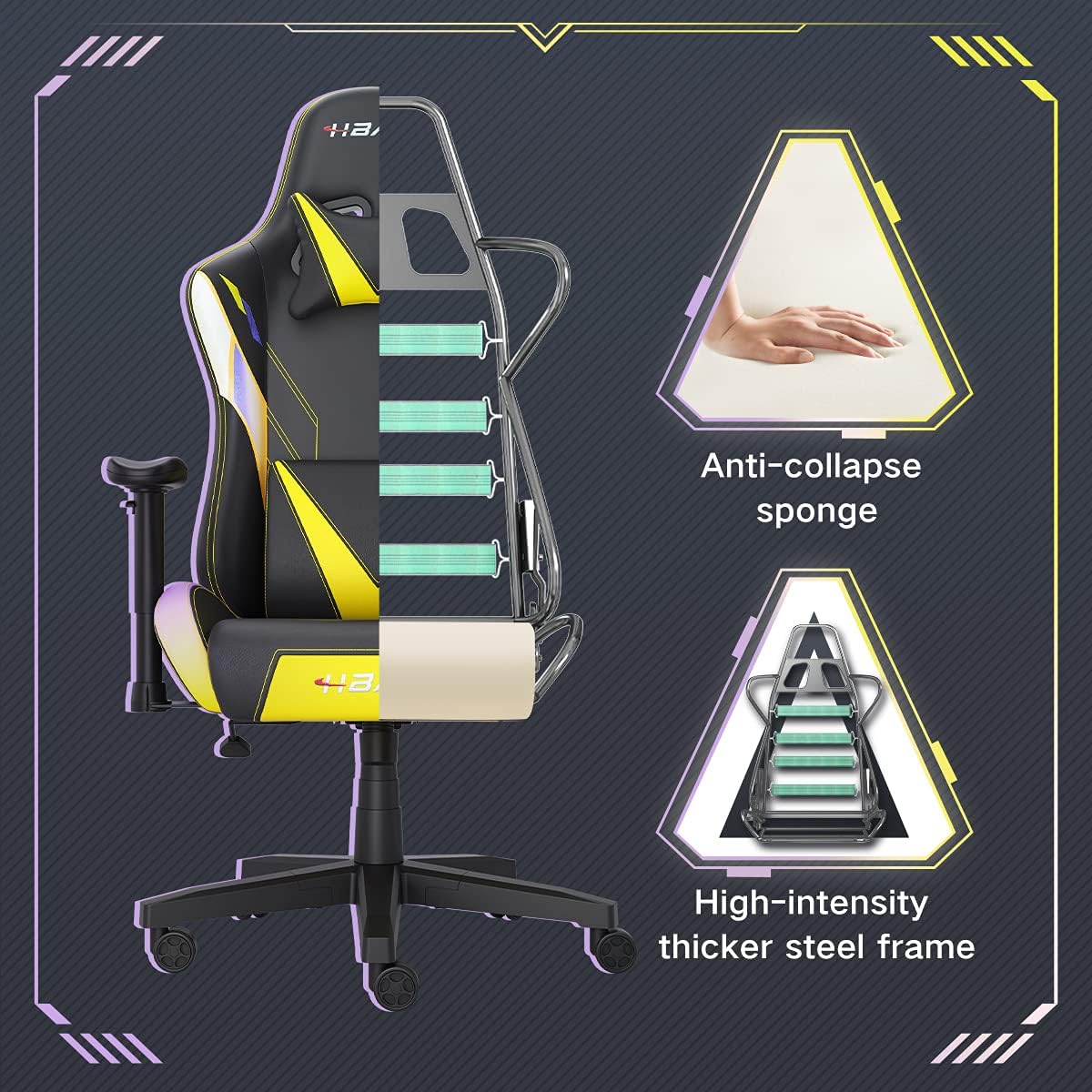
Rasm: kesma view of the chair's internal structure, highlighting the anti-collapse sponge padding and the high-intensity thicker steel frame, indicating durable construction.
Muammolarni bartaraf qilish; nosozliklarni TUZATISH
If you encounter any issues with your Hbada Gaming Chair, refer to the following common problems and solutions:
| Muammo | Mumkin sabab | Yechim |
|---|---|---|
| Kreslo balandlikni sozlamaydi | Gaz liftining noto'g'ri ishlashi yoki tutqich ulanmagan. | Balandlikni sozlash dastagi to'liq ishga tushirilganligiga ishonch hosil qiling. Agar muammo davom etsa, gaz liftini almashtirish kerak bo'lishi mumkin. Mijozlarni qo'llab-quvvatlash xizmatiga murojaat qiling. |
| Kreslo tebranadi yoki beqaror | Bo'shashgan vintlardek yoki noto'g'ri yig'ish. | Check all assembly screws and bolts, and tighten them securely. Refer to the assembly instructions. |
| G'ildiraklar silliq aylanmaydi | G'ildiraklarda ushlangan qoldiqlar (sochlar, chang). | Turn the chair over and remove any debris from the caster wheels. |
| Orqa o'rindiq suyanmaydi yoki qulflanmaydi | Qaytib harakatlanish mexanizmi tiqilib qolgan yoki dastak ishlamayapti. | Yuruvchi dastak to'liq ishga tushirilganligiga ishonch hosil qiling. Mexanizm atrofidagi har qanday to'siqlarni tekshiring. |
Texnik xususiyatlari
| Xususiyat | Tafsilot |
|---|---|
| Brend | Hbada |
| Model raqami | W203YMA/EU |
| ASIN | B095PSFLKX |
| Rang | Sariq |
| Material | PU Leather, Metal Frame |
| Mahsulot o'lchamlari | 70 x 70 x 128 sm (uzunlik x kenglik x balandlik) |
| Mahsulot og'irligi | 22 kilogramm |
| Maxsus xususiyatlar | Ergonomic, Swivel, Casters, Headrest Support, Adjustable Recline (90°-155°), Adjustable Seat Height (8cm range), Adjustable Armrests (7cm range) |
| Birliklar soni | 1.0 hisob |
Kafolat va qo'llab-quvvatlash
Your Hbada Gaming Chair comes with a bir yillik kafolat sotib olingan kundan boshlab. Ushbu kafolat ishlab chiqarish nuqsonlari va oddiy foydalanishdagi moddiy nuqsonlarni qoplaydi.
If you experience any issues during use, including problems with installation, damage, or missing parts, please do not hesitate to contact Hbada customer service. We are committed to providing reliable service and can offer free exchanges for covered issues.
For support, please visit the official Hbada websayt yoki chakana sotuvchingizga murojaat qiling.