
GOCOM G9
GOCOM G9 IP67 Waterproof Two Way Radios User Manual
Model: G9
Kirish
Thank you for choosing the GOCOM G9 IP67 Waterproof Two Way Radios. This manual provides essential information for the safe and efficient operation of your device. Please read it thoroughly before use and retain it for future reference. The G9 radios are designed for reliable communication in various environments, featuring IP67 waterproofing, NOAA weather alerts, and a built-in SOS function.
Qutida nima bor
Upon opening your GOCOM G9 package, please verify that all the following components are included:
- 2 x GOCOM G9 Walkie Talkies
- 1 x eshitish vositasi
- 4 x Naushniklar
- 1 x Charger (Original Fast Charger)
- 1 x antenna
- 1 x Lanyard
- Rechargeable Ni-MH Batteries (1200 mAh)
- USB zaryadlovchi kabeli

Image: The complete package contents of the GOCOM G9 Two Way Radios, including the radios, charging docks, batteries, and various accessories.
Mahsulot xususiyatlari
The GOCOM G9 Two Way Radios are equipped with a range of features designed for robust and reliable communication:
- 22 Channels & 121 Privacy Codes: Offers 2,662 combinations for clear and private conversations.
- NOAA ob-havo ogohlantirishi: Automatically scans 11 weather (WX) band channels and alerts you to severe weather updates (US only).
- USB orqali zaryadlash: Comes with 18 AA Ni-MH rechargeable batteries (1200 mAh) and supports convenient USB charging via PC, car charger, or power bank.
- SOS Emergency Button & Flashlight: A dedicated red SOS button activates an emergency signal and a bright LED flashlight.
- IP67 suv o'tkazmaydigan va chang o'tkazmaydigan: Provides complete protection from dust and can withstand water immersion for 30 minutes in 1-meter deep water.
- Water Activated LED & Floating Design: If dropped in water, a white LED activates automatically, and the radio floats, aiding in recovery in dark environments.
- Uzoq masofa: Capable of up to 32 miles in open environments.
- High & Crystal Clear Audio: Ensures clear communication.
- VOX qo'lsiz: Allows for voice-activated transmission.

Image: Visual representation of the GOCOM G9's main features, such as its high luminous flashlight, NOAA weather channel, clear audio, floating design, SOS emergency light, and 22 channels.

Image: The GOCOM G9 radio demonstrating its IP67 waterproof capabilities, showing it submerged in water and highlighting its ability to float and its dewatering system.
Sozlash; o'rnatish
1. Batareyani o'rnatish
- Radio o'chirilganligiga ishonch hosil qiling.
- Radioning orqa tarafidagi batareya bo'limi qopqog'ini toping.
- Open the cover and insert the provided Ni-MH rechargeable batteries, observing the correct polarity (+/-).
- Batareya bo'limi qopqog'ini mahkam yoping.
2. Batareyalarni zaryadlash
The GOCOM G9 radios can be charged using the included original fast charger or a standard USB charging cable.
- Using the Fast Charger: Place the radio into the charging cradle. Ensure the charging contacts align. The indicator light on the charger will show charging status.
- Using USB Charging: Connect the USB charging cable to the Micro-USB Charging Port on the radio. Connect the other end to a PC, car charger, or power bank.
Birinchi foydalanishdan oldin to'liq zaryad qilish uchun etarli vaqt ajrating.
Foydalanish bo'yicha ko'rsatmalar

Image: Detailed diagram of the GOCOM G9 radio, labeling all buttons and ports for easy identification and function understanding.
1. Quvvatni yoqish/o‘chirish
ni bosing va ushlab turing Quvvatni yoqish/o‘chirish button (usually located on the side or front) until the display lights up or turns off.
2. Ovoz balandligini sozlash
dan foydalaning Yuqoriga/pastga buttons (often integrated with channel selection) to adjust the listening volume.
3. Kanal tanlash
ni bosing Menyu button to enter channel selection mode. Use the Yuqoriga/pastga buttons to cycle through the 22 available channels. Press Menyu again or wait for a few seconds to confirm your selection.
4. Setting Privacy Codes (CTCSS/DCS)
To ensure privacy, you can set privacy codes. After selecting a channel, press the Menyu button again to access privacy code settings. Use Yuqoriga/pastga to select one of the 121 privacy codes. Both radios must be on the same channel and privacy code to communicate.
5. Qabul qilish va uzatish
- O'tkazish uchun: ni bosing va ushlab turing Push-to-Talk (PTT) button located on the side of the radio. Speak clearly into the microphone. Release the PTT button when you are finished speaking.
- Qabul qilish uchun: Ensure the PTT button is not pressed. The radio will automatically receive transmissions on the selected channel and privacy code.
6. NOAA Weather Alert (US Only)
The G9 radio can scan for NOAA weather alerts.
- To activate NOAA Weather Scan, press the Weather Switch button (often labeled WX or similar). The radio will automatically scan through 11 available weather (WX) band channels and lock onto the strongest signal.
- If a severe weather alert is issued, the radio will sound an alarm.
Note: NOAA radio service may not be available in all areas.

Image: The GOCOM G9 radio shown in a cold, snowy setting, illustrating its durability and the NOAA Weather Alert function for extreme conditions.
7. SOS Emergency Button & Flashlight
For emergencies, the G9 features a dedicated SOS button and a powerful LED flashlight.
- SOS signali: With the walkie talkie turned on, press and hold the red SOS button for 3 seconds. A red LED light will activate and emit an SOS signal.
- Chiroq: The built-in LED bulb provides strong illumination, functioning as a reliable flashlight. The Lamp Yoqish/o‘chirish button controls the flashlight.
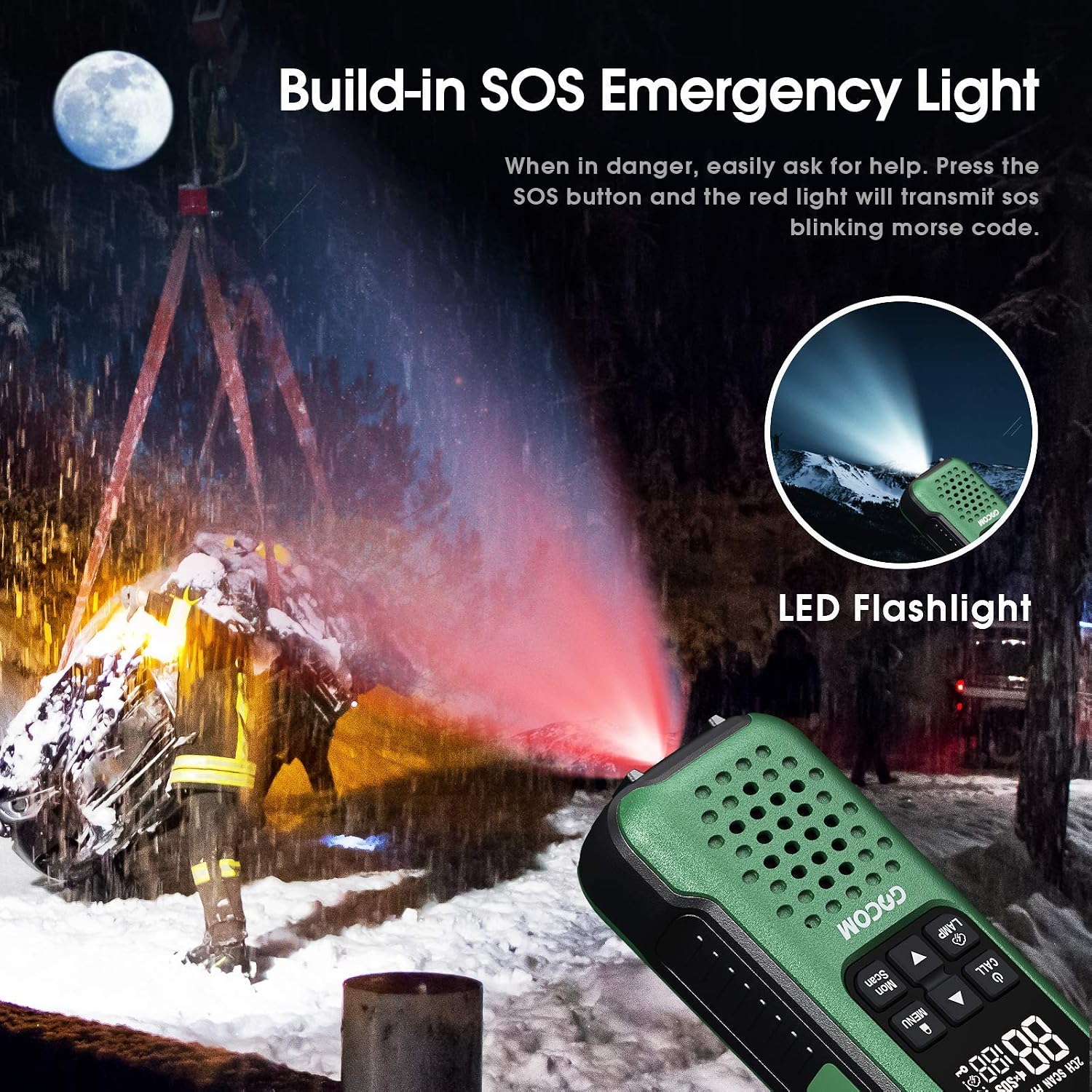
Image: The GOCOM G9 radio's SOS emergency light in action, emitting a red signal in a dark setting, alongside an illustration of its bright LED flashlight.
8. VOX Hands-free Operation
The VOX (Voice Operated Exchange) feature allows you to transmit without pressing the PTT button.
- To enable VOX, access the menu settings (refer to the full manual for detailed menu navigation).
- Adjust the VOX sensitivity level to suit your environment.
- When VOX is active, the radio will automatically transmit when it detects your voice.
9. Lock/Menu/Scan Functions
- Qulflash: ni bosing va ushlab turing Qulflash button to prevent accidental changes to settings. Repeat to unlock.
- Menyu: ni bosing Menyu button to access various settings such as channel, privacy codes, VOX, call tones, etc. Use Yuqoriga/pastga navigatsiya qilish va Menyu tasdiqlash uchun yana.
- Skanerlash: ni bosing Skanerlash button to scan through active channels. The radio will stop on an active channel. Press Skanerlash Skanerlashni davom ettirish uchun yana bosing.
Xizmat
Proper maintenance will ensure the longevity and optimal performance of your GOCOM G9 radios.
- Tozalash: Radioni yumshoq vosita bilan artib oling, damp cloth. Do not use harsh chemicals or abrasive cleaners. Despite its waterproof rating, avoid unnecessary exposure to water or submersion unless required.
- Batareya parvarishi:
- Always use the provided rechargeable Ni-MH batteries and charger.
- Zaryadlanmaydigan batareyalarni zaryad qilishga urinmang.
- If storing the radios for an extended period, remove the batteries to prevent leakage.
- Recharge batteries fully before long-term storage and periodically during storage to maintain battery health.
- Saqlash: Radiolarni salqin, quruq joyda, to'g'ridan-to'g'ri quyosh nuri va haddan tashqari haroratdan uzoqroq joyda saqlang.
- Suvga cho'mish: While IP67 rated, after immersion, ensure the radio is thoroughly dried, especially around the speaker and microphone areas, to maintain clear audio. The dewatering system helps, but manual drying is recommended.
Muammolarni bartaraf qilish; nosozliklarni TUZATISH
| Muammo | Mumkin sabab | Yechim |
|---|---|---|
| Quvvat yo'q | Batareyalar quvvati kam yoki to'g'ri o'rnatilmagan. | Charge batteries fully. Ensure batteries are inserted with correct polarity. |
| Cannot Communicate with Other Radios | Different channel or privacy code. Out of range. | Ensure all radios are on the same channel and privacy code. Move closer to the other radio. |
| Poor Audio Quality / Static | Out of range. Interference. Low battery. | Move closer. Change channel/privacy code. Recharge batteries. |
| Radio Floats but LED doesn't activate in water | Water sensor obstructed or malfunction. | Ensure water sensor area is clean. If issue persists, contact support. |
| NOAA Weather Alert not working | Not in a NOAA service area. Feature not activated. | Verify you are in a NOAA service area. Ensure NOAA scan is activated via the Weather Switch button. |
Texnik xususiyatlari
| Xususiyat | Tafsilot |
|---|---|
| Model raqami | G9 |
| Brend | GOCOM |
| Kanallar | 22 FRS kanallari |
| Maxfiylik kodlari | 121 (CTCSS/DCS) |
| Suvga chidamlilik darajasi | IP67 Waterproof & Dustproof (Submersible 1m for 30 mins) |
| Batareya turi | Ni-MH Rechargeable (1200 mAh) |
| Zaryadlanmoqda | USB Charging, Original Fast Charger |
| Maxsus xususiyatlar | NOAA Weather Alert, SOS Emergency Button, LED Flashlight, Floating Design, Water Activated LED |
| Rang | White (as per product data, though images show green) |
| Kiritilgan komponentlar | 2 Walkie Talkies, 1 Headset, 4 Earpieces, 1 Charger, 1 Antenna, 1 Lanyard |
Kafolat va qo'llab-quvvatlash
For warranty information, technical support, or customer service inquiries regarding your GOCOM G9 Two Way Radios, please visit the official GOCOM store on Amazon or contact GOCOM customer support directly.
Ask a question about this manual
Ask about setup, troubleshooting, compatibility, parts, safety, or missing instructions. Manuals+ will review the question and use this page’s manual context to help answer it.