
1. Kirish
The ION Audio Boombox Deluxe Stereo is a versatile audio system designed to provide a range of listening experiences. It combines classic audio playback options with modern connectivity, featuring an AM/FM radio, a cassette player, Bluetooth streaming, and USB/Micro SD card playback. This manual provides detailed instructions for setting up, operating, and maintaining your device.

1-rasm: Old view of the ION Audio Boombox Deluxe Stereo, showcasing its dual speakers, cassette deck, and radio tuner display.
2. Qutida nima bor
- Boombox Deluxe Unit
- Quvvat kabeli
- Tez ko'rsatma qo'llanmasi
3. Sozlash
3.1 Jihozni quvvatlantirish
The Boombox Deluxe can be powered using the included AC power cable or by batteries for portable use. Insert the AC power cable into the AC IN port on the back of the unit and plug it into a standard wall outlet. For battery operation, open the battery compartment (typically on the bottom or back) and insert the required D-cell batteries (not included), ensuring correct polarity.
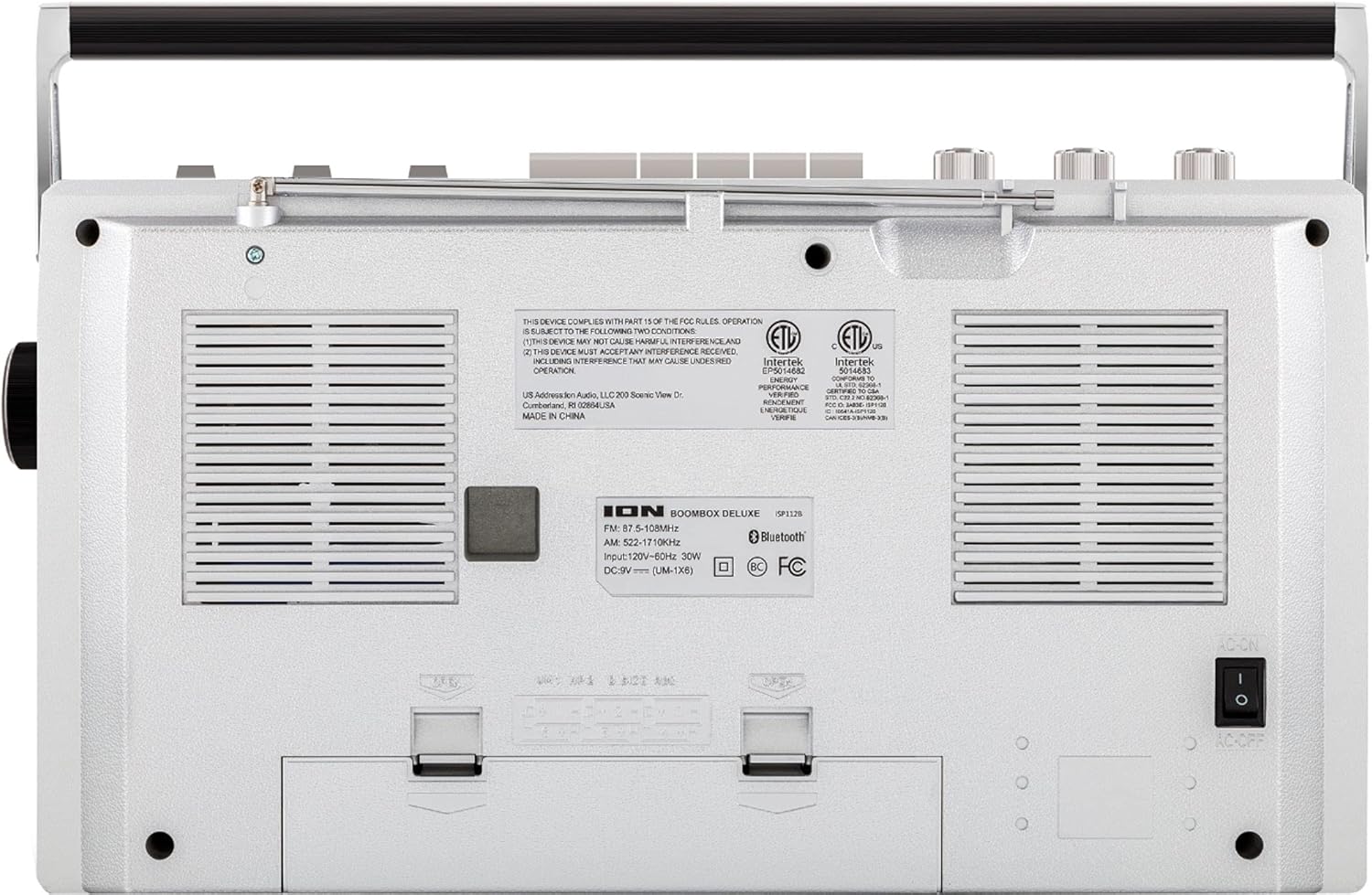
Figure 2: Rear panel of the Boombox Deluxe, highlighting the AC power input and battery compartment location.
3.2 Antennani sozlash
For optimal AM/FM radio reception, extend the telescopic antenna located on the top of the unit. Adjust its position for the clearest signal.
4. Foydalanish bo'yicha ko'rsatmalar
4.1 Umumiy boshqaruv elementlari
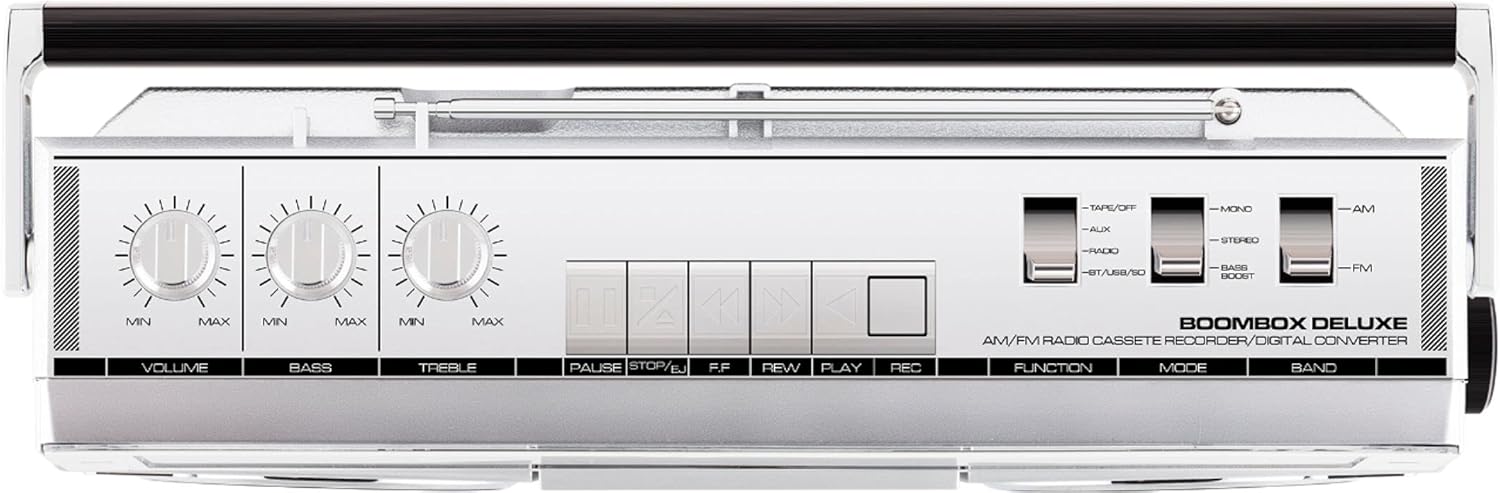
Figure 3: Top panel controls, including Volume, Bass, Treble knobs, and cassette playback buttons.
- Ovoz balandligi tugmasi: Umumiy ovoz chiqarish darajasini sozlaydi.
- Bass tugmasi: Past chastotali audio chiqishni sozlaydi.
- Treble tugmasi: Yuqori chastotali audio chiqishni sozlaydi.
- Funktsiyani almashtirish: Selects between Tape/Off, Aux, Radio, and BT/USB/SD modes.
- Tartibni almashtirish: Selects between Mono, Stereo, and Bass Boost audio modes.
- Tarmoqli almashtirish: Selects between AM and FM radio bands.
4.2 Radio bilan ishlash
- ni o'rnating Funktsiyani almashtirish to 'Radio'.
- ni o'rnating Tarmoqli almashtirish to 'AM' or 'FM'.
- dan foydalaning Tugmachani sozlash to select your desired radio station. The frequency will be displayed on the tuner scale.
4.3 Cassette Player Operation
- ni o'rnating Funktsiyani almashtirish to 'Tape/Off'.
- ni bosing To'xtatish / chiqarish kasseta bo'linmasini ochish uchun tugma.
- Insert a cassette tape with the open edge facing upwards. Close the compartment.
- ni bosing O'ynang ijroni boshlash uchun tugma.
- Foydalanish Orqaga qaytarish (REW) va Tez oldinga o'tkazish (FF) buttons to navigate the tape.
- bosing Pauza to temporarily stop playback. Press again to resume.
- bosing To'xtatish / chiqarish to stop playback and eject the tape.
- To record, ensure the Funktsiyani almashtirish is set to 'Tape/Off' and press the Yozuv (REC) tugmasi bilan bir vaqtda bosing O'ynang tugmasi.
4.4 Bluetooth ulanishi

Figure 4: Side panel with USB and Micro SD card slots, and playback controls for digital media.
- ni o'rnating Funktsiyani almashtirish to 'BT/USB/SD'. The unit will enter Bluetooth pairing mode, indicated by a flashing LED.
- On your Bluetooth-enabled device (e.g., smartphone, tablet), search for 'ION Boombox Deluxe' in the Bluetooth settings.
- Select 'ION Boombox Deluxe' to pair. Once connected, a confirmation tone will sound, and the LED will stop flashing.
- You can now stream audio from your device to the Boombox Deluxe. Use your device's controls or the boombox's playback buttons (Play/Pause, Next/Previous Track) for media control.
4.5 USB/Micro SD orqali ijro etish
- ni o'rnating Funktsiyani almashtirish to 'BT/USB/SD'.
- Insert a USB flash drive or Micro SD card (with compatible audio files) into the respective slot on the side of the unit.
- The unit will automatically detect and begin playing audio files.
- Use the playback control buttons (Play/Pause, Next/Previous Track, Delete) on the side panel to manage your music.
4.6 Yordamchi kiritish

Figure 5: Side panel with headphone output and auxiliary input jacks.
- ni o'rnating Funktsiyani almashtirish to 'Aux'.
- Tashqi audio qurilmani (masalan, MP3 pleer, CD pleer) ga ulang AUX IN jack using a 3.5mm audio cable (not included).
- Audio from the connected device will play through the boombox speakers. Control playback from your external device.
5. Xususiyatlari
- Integrated Stereo System with Dual Speakers
- Bluetooth simsiz oqim
- AM/FM Radio Tuner
- Cassette Player/Recorder
- USB va Micro SD kartani o'ynatish
- Auxiliary Input for External Devices
- Adjustable Bass and Treble Controls
- Tashish tutqichi bilan portativ dizayn
6. Texnik shartlar
| Spetsifikatsiya | Tafsilot |
|---|---|
| Brend | ION audio |
| Model | Boombox Deluxe |
| Ulanish texnologiyasi | Bluetooth, USB |
| Karnay turi | Stereo |
| Quvvat manbai | Battery Powered (D-cell), AC Power |
| Rang | Qora, kumush |
| Element og'irligi | 8.93 funt |
| Paket o'lchamlari | 18.1 x 11.1 x 7.6 dyuym |
7. Muammolarni bartaraf qilish; nosozliklarni TUZATISH
- Quvvat yo'q:
Ensure the AC power cable is securely connected to both the unit and a working power outlet. If using batteries, check that they are inserted correctly and are not depleted. - Radioni yomon qabul qilish:
Fully extend the telescopic antenna and adjust its position. Try relocating the unit to an area with better signal reception, away from potential interference sources like other electronic devices. - Cassette Tape Not Playing/Recording:
Ensure the tape is inserted correctly and the cassette compartment is fully closed. Check that the tape is not tangled or damaged. For recording, ensure both Play and Record buttons are pressed simultaneously. - Bluetooth ulanmayapti:
Make sure the Boombox Deluxe is in 'BT/USB/SD' mode and in pairing mode (flashing LED). Ensure Bluetooth is enabled on your external device and it is within range (typically 30 feet). Try unpairing and re-pairing the device. - No Sound from USB/Micro SD:
Verify that the USB drive or Micro SD card is inserted correctly and contains compatible audio files (e.g., MP3). Ensure the volume is turned up on the boombox.
8. Xizmat ko'rsatish
- Tozalash: Jihozning tashqi qismini tozalash uchun yumshoq, quruq matodan foydalaning. Suyuq tozalagichlar yoki erituvchilardan foydalanmang.
- Kasseta to'plamini parvarish qilish: Vaqti-vaqti bilan lenta boshlarini tozalang va roliklarni paxta tayoqchasi bilan yengil qisib qo'yingampened with isopropyl alcohol to ensure optimal playback and recording quality.
- Batareyani saqlash: Agar jihoz uzoq vaqt ishlatilmasa, sizib chiqishi va shikastlanishining oldini olish uchun batareyalarni chiqarib oling.
9. Kafolat va qo'llab-quvvatlash
This product is offered as an Amazon Renewed item. Amazon Renewed products are professionally inspected and tested to work and look like new. If you are not satisfied with your purchase, renewed products are eligible for replacement or refund under the Amazon Renewed Guarantee. For specific details regarding the Amazon Renewed Guarantee, please refer to the Amazon Renewed program terms and conditions on the Amazon websayt.
For further assistance or technical support, please contact ION Audio customer service or refer to their official webqo'llab-quvvatlash manbalari uchun sayt.